

Monitor Amazon DynamoDB Tables with CloudWatch Contributor Insights
Amazon DynamoDB is a fully managed NoSQL database service provided by AWS that allows you to create databases capable of massive workloads while maintaining consistent low latency. Monitoring and optimizing the performance of DynamoDB tables is critical for applications relying on this fast and flexible database.
One effective way to gain deep visibility into DynamoDB tables is by using CloudWatch Contributor Insights. CloudWatch Contributor Insights analyzes the read and write operations to each table, allowing you to identify trends, outliers, and optimization opportunities.
In this tutorial, we will walk through how to enable CloudWatch Contributor Insights for your DynamoDB tables. We will cover the prerequisites, steps for activation, and how to view the generated metrics and reports. We will also look at some example AWS CLI commands for programmatic management of Contributor Insights rules and metrics.
By the end, you will have the knowledge to leverage CloudWatch Contributor Insights to monitor DynamoDB performance, isolate bottlenecks, and optimize your NoSQL workloads. The powerful insights provided by Contributor Insights enables proactive management of your mission-critical DynamoDB tables.
Prerequisites
- An AWS account
- DynamoDB tables created in your account
- IAM permissions to access CloudWatch and DynamoDB
Enabling Contributor Insights
- Open the CloudWatch console in your AWS account.
- In the left navigation pane, click on “Contributor Insights”.
- Click on “DynamoDB Resources”.
- Check the box next to the DynamoDB tables you want to enable insights for.
- Click on “Activate”.
Contributor Insights will now begin aggregating metrics for the selected tables. It may take up to 24 hours for metrics to become available.
Viewing Metrics and Reports
Once activated, you can view metrics and generate reports for your DynamoDB tables:
- In the Contributor Insights section, click on “DynamoDB Resources”.
- Choose the table you want to analyze.
- The “Contributors” tab shows metrics like total requests, throttle events, consumed capacity, latency by contributor.
- The “Reports” tab lets you generate pre-defined reports showing trends over time.
- You can also create custom dashboards and alarms based on Contributor Insights metrics.
AWS CLI Commands for Contributor Insights
Here are some example AWS CLI commands for enabling and viewing CloudWatch Contributor Insights for DynamoDB tables:
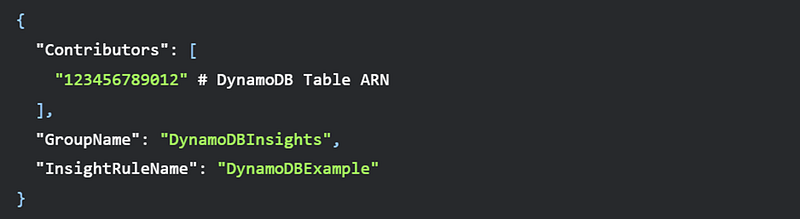
Enable Contributor Insights

Contents of enable-insights.json
List all insights rules

Get metrics for a rule

View details on a contributor

The main steps are:
- Enable Contributor Insights on DynamoDB table using put-contributor-insights
- List existing insight rules with list-insights-rules
- Get metrics and reports for a rule using get-insight-rule-report
- View details per contributor using get-contributor-insights
The AWS CLI provides a programmatic way to manage Contributor Insights for monitoring DynamoDB.
Conclusion
CloudWatch Contributor Insights grants you valuable visibility into the operations of your DynamoDB tables. By breaking down metrics by contributor, you can readily identify usage trends, performance issues, and optimization opportunities.
After enabling Contributor Insights for your DynamoDB tables, you can generate reports and dashboards that reveal insights into read/write patterns, throttling, latency, and more. Drilling into specifics by contributor simplifies isolating and addressing bottlenecks.
The AWS CLI provides an additional way to programmatically manage Contributor Insights rules and consume the generated metrics. The commands enable automation for enabling insights, gathering reports, and analyzing particular contributors.
With the ability to correlate insights to individual application components and users, you can take targeted actions to optimize DynamoDB performance. This helps you get the most out of DynamoDB’s throughput capacity and consistently deliver speedy responses.
In summary, CloudWatch Contributor Insights is an indispensable tool for monitoring and optimizing Amazon DynamoDB workloads. The metrics and visibility provided allows you to build reliable, high-performance applications using DynamoDB as a managed NoSQL database option.


