
Modern Neovim — AI Coding Plugins
Free or open-source AI coding plugins.

There are many AI coding plugins available for Neovim that can assist with code completion, linting, and other AI-powered features. In this article, we will explore free or open-source AI plugins.
This article is part of the Modern Neovim series.
The Neovim configuration files are available in this repository.
Getting Started
There are many new AI-driven coding plugins or tools that integrate with Neovim to enhance our coding experience. However, many of them come with a cost, though it is trivial. We will explore free AI coding plugins, and open-source language models that can assist us in coding.
We talked about AI plugins extensively in the following articles. Do check them out!
Codeium
We talked about Codeium in the previous article. It is a free AI coding toolkit that is free for individual use.
Codeium provides extensions for all major editors and IDEs, including Vim and Neovim. It is a good alternative to Github Copilot and other AI-powered code completion products.
In the screenshot below, Codeium automatically shows the suggestion and we can cycle through the suggestions using the pre-defined or custom keymappings.

sg.nvim
Sourcegraph provides code search and an AI assistant with the context of the code graph.
sg.nvim is a plugin focused on bringing many of the features of Sourcegraph into Neovim.
To install it using lazy.nvim,
{
  "sourcegraph/sg.nvim",
  event = "VeryLazy",
  opts = {},
  dependencies = { "nvim-lua/plenary.nvim" },
},
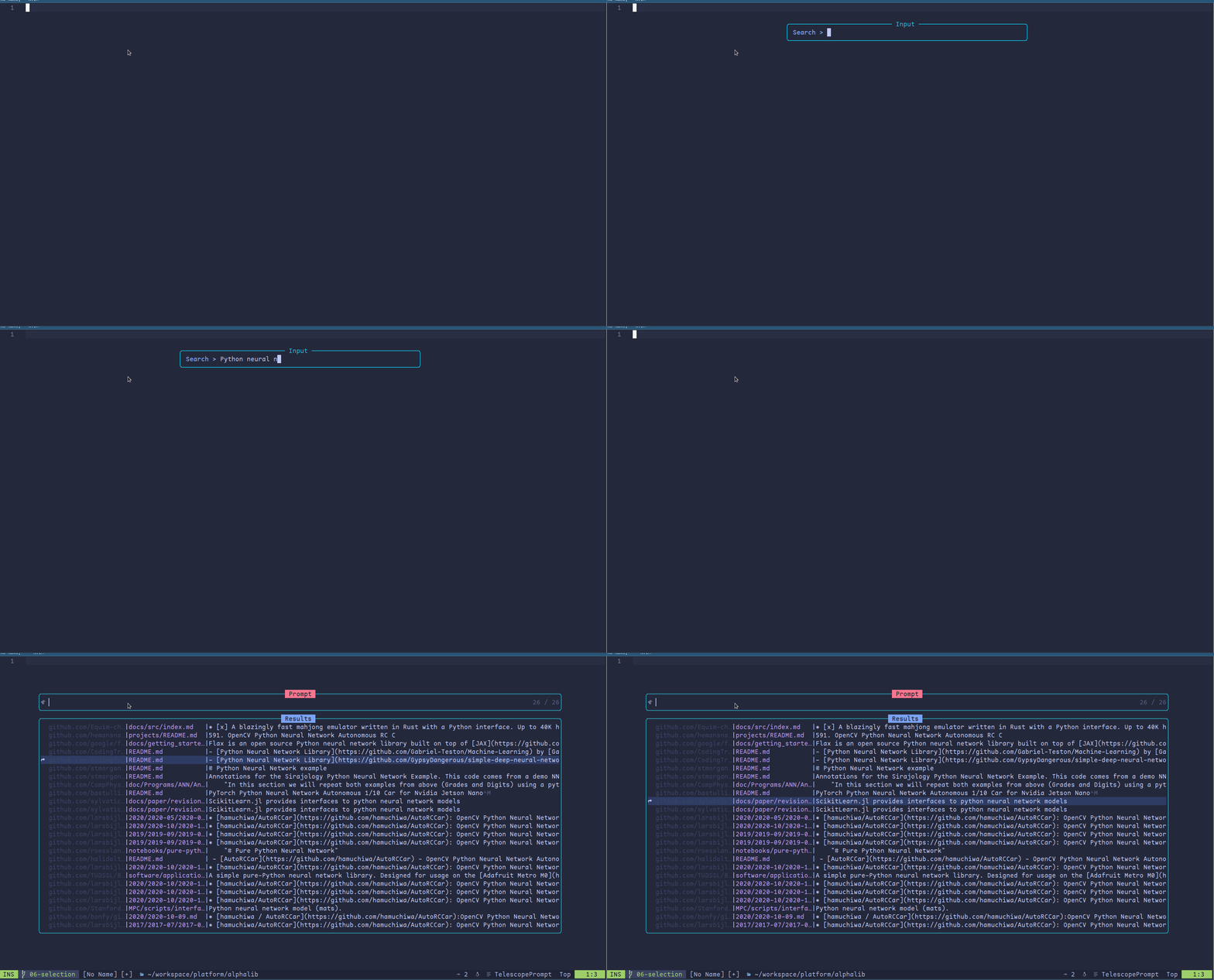
Once installed, we need to configure the access token using the :SourcegraphLogin command. With the access configured,
- We can search for code from any repositories
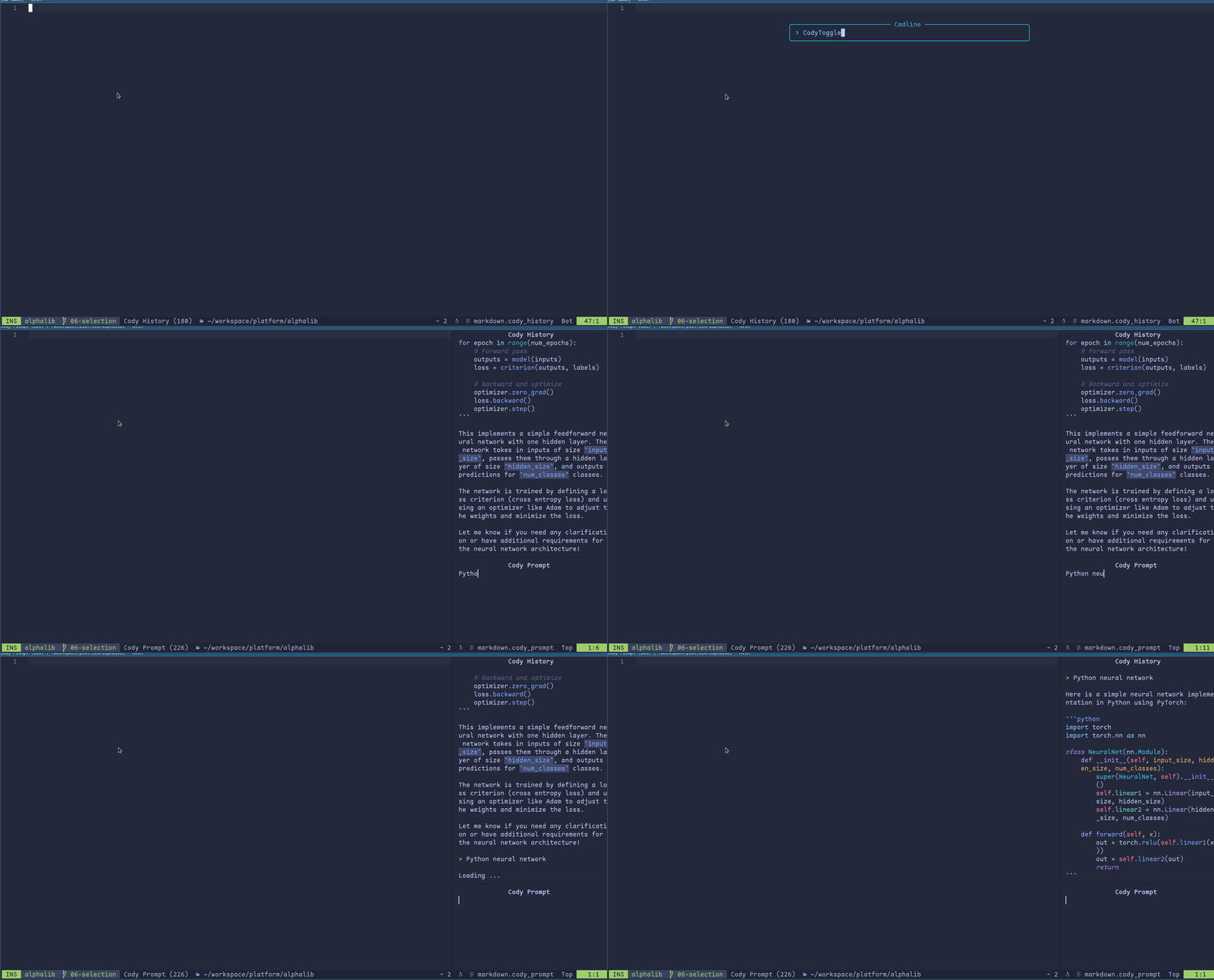
- We can use Cody which is a free, helpful AI assistant, that explains, generates, and transpiles code
For example, we can search for Python code related to neural networks.
We can use the Cody code assistant.
Hugging Face Code Completion
Note: The plugin is renamed to llm.nvim.
hfcc.nvim is another Neovim plugin that allows us to use the language models from the Hugging Face Hub.
Using this plugin, we can select and configure the model to use from Hugging Face.
For example, we use lazy.vim to configure the plugin to use the bigcode/starcoder model.
{
    "huggingface/hfcc.nvim",
    event = "InsertEnter",
    enabled = true,
    opts = {
      model = "bigcode/starcoder",
    },
}
Tabnine
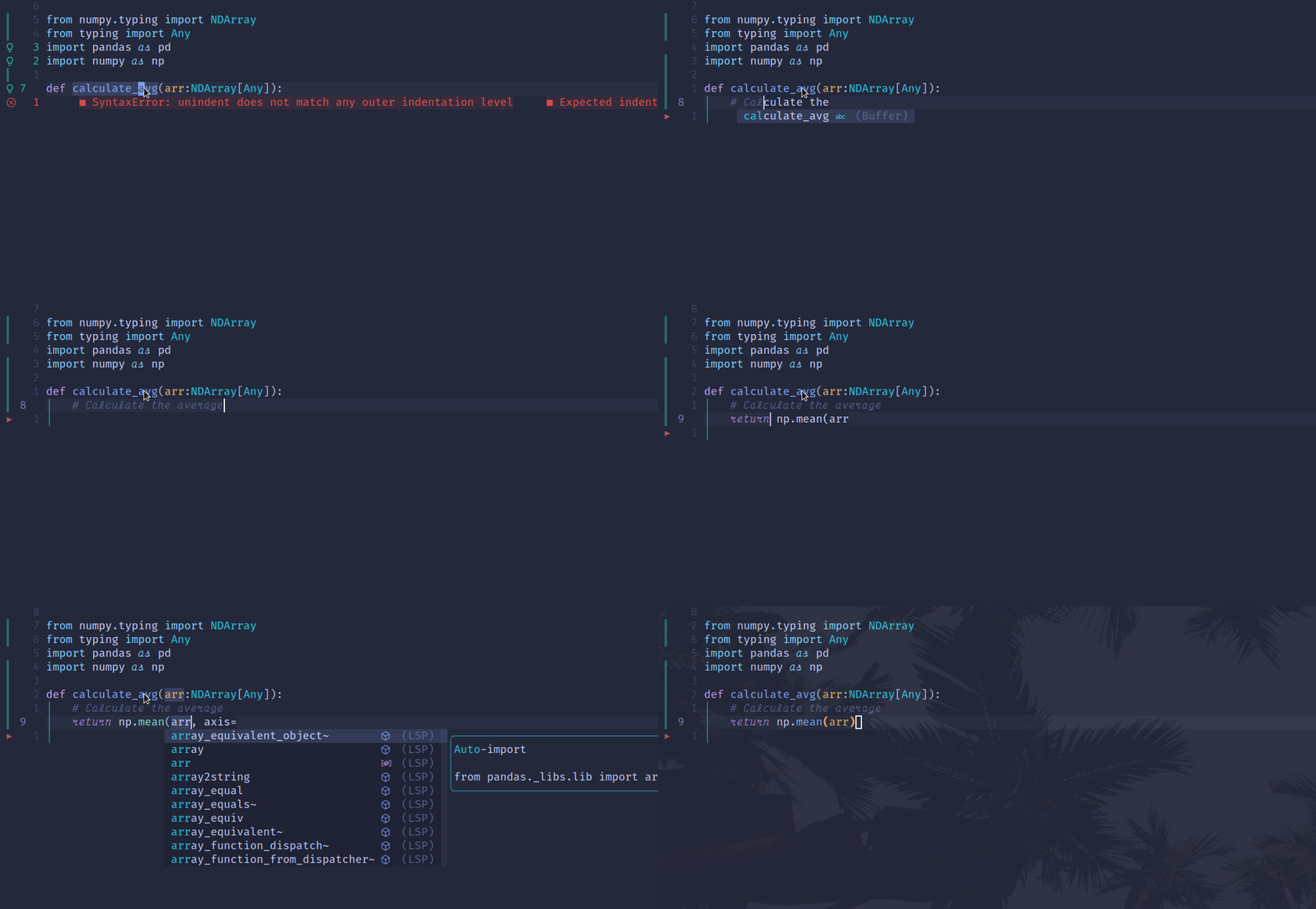
Tabnine has a starter plan that provides basic code completion.
For example, we configure the plugin using lazy.nvim, as shown below.
{
    "codota/tabnine-nvim",
    enabled = true,
    build = "./dl_binaries.sh",
    event = "VeryLazy",
    config = function()
      require("tabnine").setup {
        disable_auto_comment = true,
        accept_keymap = "<A-l>",
        dismiss_keymap = "<A-c>",
        debounce_ms = 800,
        suggestion_color = { gui = "#808080", cterm = 244 },
        exclude_filetypes = { "TelescopePrompt" },
      }
    end,
}
Now we can have short code completion.
GPT4All
GPT4All is a free-to-use, locally running, privacy-aware chatbot, without requiring any GPU or internet.
Since the model runs locally, there are additional steps to set it up.
For example, we need to download the model which is > 20 GB.
mkdir -p "$HOME/.codeexplain/"
curl -o "$HOME/.codeexplain/model.bin" https://gpt4all.io/models/ggml-vicuna-7b-1.1-q4_2.bin
The Neovim plugin codeexplain.nvim uses this model to explain the code.
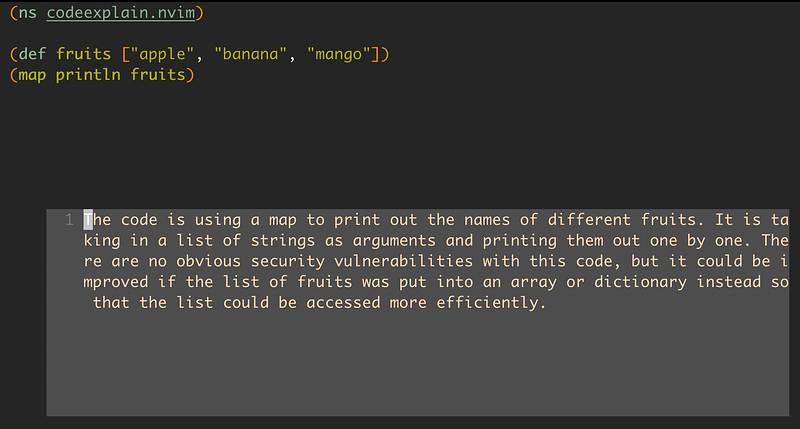
It is not efficient to run the model locally and is time-consuming to produce the result.
CodeGeeX
CodeGeeX is an AI-based coding assistant, which can suggest code in the current or following lines. It is powered by a large-scale multilingual code generation model with 13 billion parameters, pre-trained on a large code corpus of more than 20 programming languages.
Currently, the extension is available for VS Code and JetBrains IDEs. However, there are APIs that are available for us to use.
Using the API key and secret from the localconfig.js file from the VS Code extension, we can easily use the APIs.
For example, we can use curl to call the API.
curl https://tianqi.aminer.cn/api/v2/multilingual_code_generate_block \
  -H "Content-Type: application/json" \
  -d '{
  "model": "glm",
  "language": "en",
  "prompt": "Python binary sort a list of integer",
  "iprompt": "",
  "max_tokens": 500,
  "temperature": 0.9,
  "top_p": 0,
  "top_k": 40,
  "echo": 0,
  "stop": ["\n\n"],
  "presence_penalty": 2,
  "frequency_penalty": 2,
  "apikey": "XXX",
  "apisecret": "XXX"
 }' | jq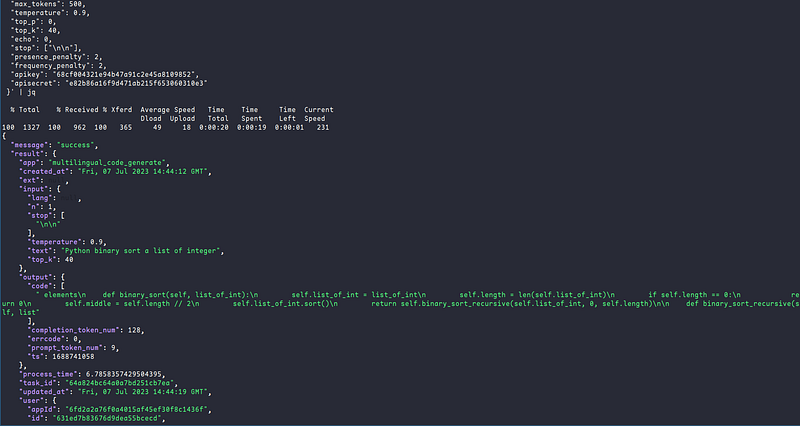
In the example below, we use plenary.nvim to call the API.
Note: Replace the apikey and apisecret with the correct values.
local request = {}
request["model"] = "glm"
request["language"] = "en-US"
request["prompt"] = "Python binary sort a list of integer"
request["iprompt"] = ""
request["max_tokens"] = 500
request["temperature"] = 0.9
request["top_p"] = 0
request["top_k"] = 40
request["echo"] = 0
local stop = {}
table.insert(stop, "\n\n")
request["stop"] = stop
request["presence_penalty"] = 2
request["frequency_penalty"] = 2
request["apikey"] = "XXX"
request["apisecret"] = "XXX"

local Job = require "plenary.job"
local body = vim.fn.json_encode(request)
vim.print(body)
local job = Job:new {
  command = "curl",
  args = {
    "https://tianqi.aminer.cn/api/v2/multilingual_code_generate_block",
    "-H",
    "Content-Type: application/json",
    "-d",
    body,
  },
}
local is_completed = pcall(job.sync, job, 10000)
if is_completed then
  local result = job:result()
  local ok, parsed = pcall(vim.json.decode, table.concat(result, ""))
  if not ok then
    vim.notify "Failed to parse result"
  end
  vim.print(parsed)
end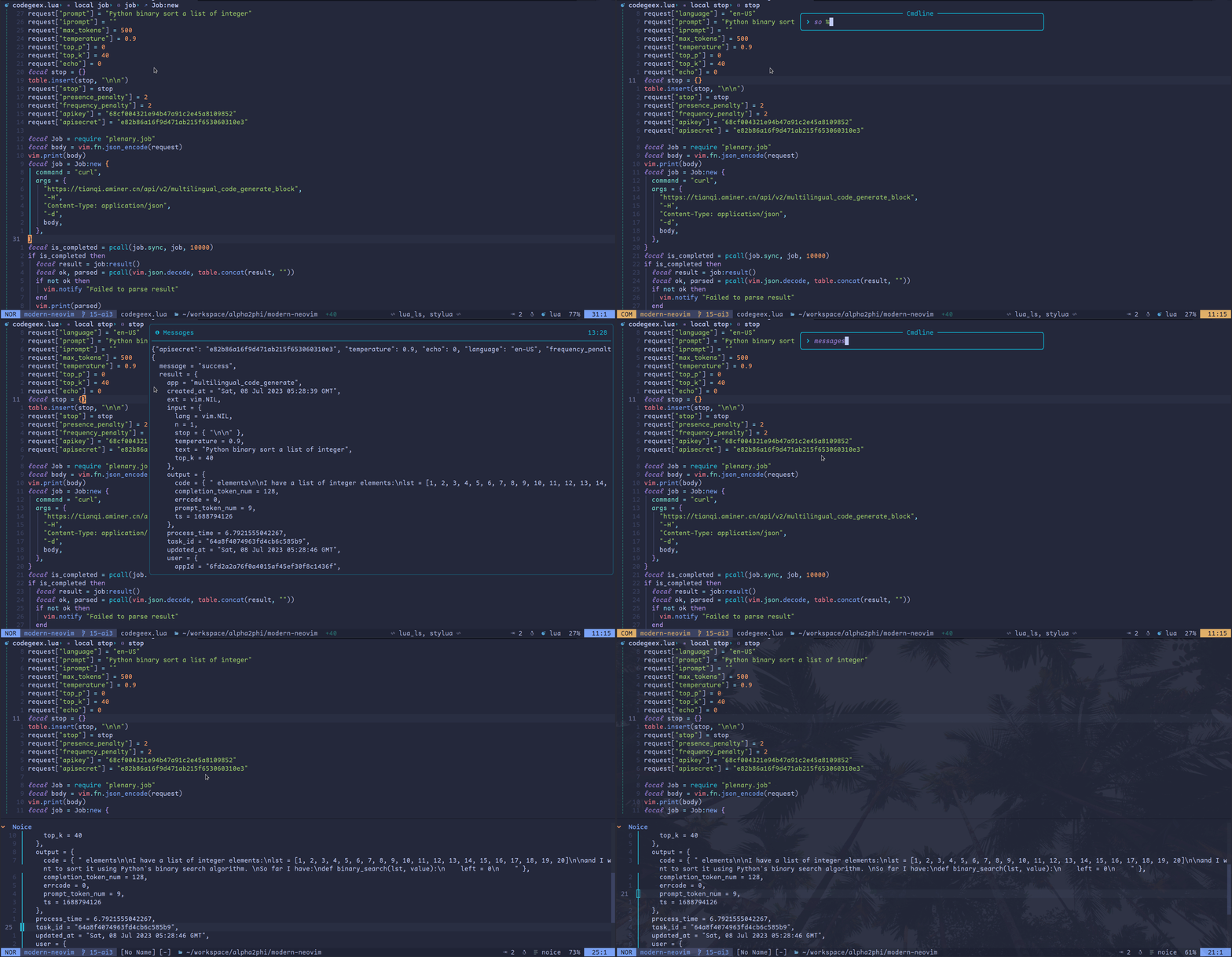
We talked about developing a Lua module to call the OpenAI APIs in the article below. Do check it out!
CodeGeex seems to be a very good alternative to Copilot. We will see how to develop a Neovim plugin in a future article.
Summary
Copilot is still the best option for AI-assisted coding as of this writing. However, other competitors are catching up and soon, we should have more options available.
Check out the article Learn Neovim The Practical Way for all the Vim/Neovim articles!
If you are yet to be a Medium member and want to become one, click here. You will gain unlimited access to all Medium articles and support my work directly.


