
Model Parameters in OpenAI API
Let’s break down the ChatCompletion.create() Function and find the sweet-spot for the parameter values together.
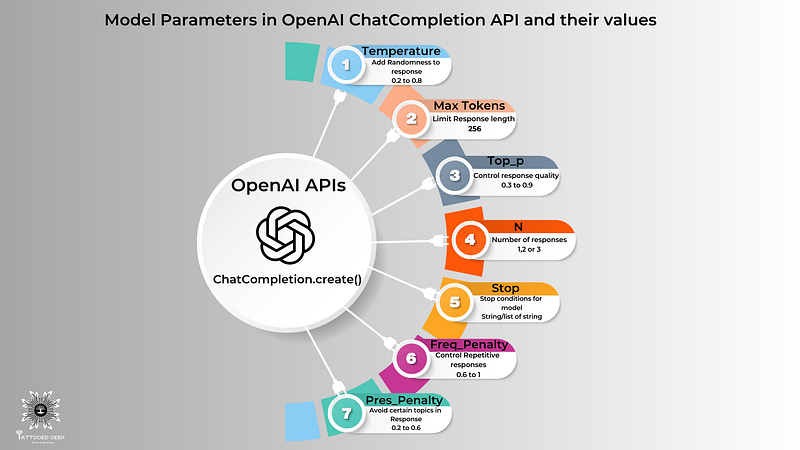
Introduction
In this blog post, we will delve into the inner workings of the openai.ChatCompletion.create() function in the OpenAI API.
Whether you’re a geek, student, engineer, or technologist, this guide will provide you with the knowledge to harness the capabilities of the ChatGPT API. You will also find a link to another post towards the end using which you can build your very own ChatGPT personal assistant on terminal/shell
This function plays a crucial role in generating most coherent responses from the ChatGPT model.
This blog will also give you the MAGIC numbers or the MAGIC range for setting those parameters to get the best out of you ChatGPT application.
Bonus Tip: One great tool I recently started using for writing and tasks such as plagiarism checker, grammar checker, Co-writer, paraphraser, summariser, and translator is QuillBot .
I wanted to try something similar and cheaper than Grammarly.
I took up its yearly premium for around $2/month (45% off) during the Year-end sale using coupon code — (HOLIDAY45), valid till December end. The price was literally dirt cheap compared to other writing tools I have used in the past.
Personally, it’s UI and UX is very simple and easy to use. So I just wanted to share this awesome, productive tool with you all. Do check it out and use it in your day-to-day writing tasks.

By understanding the various parameters it accepts and fine-tuning them, you can control the behavior and quality of the model's responses.
Table of Contents:
- Understanding the
openai.ChatCompletion.create()Function - Temperature: Controlling andomness and diversity of the Responses
- Max Tokens: Limiting the Response Length
- Top P (Nucleus Sampling): Controlling Response Quality
- n: Generating Multiple Responses
- Stop: Customizing Stop Conditions
- Frequency Penalty: Controlling Repetitive Responses
- Presence Penalty: Controlling Avoidance of Certain Topics
- Implementing Parameters in Python Code
- Conclusion
1. Understanding the openai.ChatCompletion.create() Function
This function allows us to generate responses from the ChatGPT model by providing a series of messages as input.
In the openai.ChatCompletion.create() the function, the strings "system", "user", and "assistant" are used to define the role of each message within the conversation. These roles help provide context and structure to the model's understanding of the conversation flow.
The function call looks like this:
response = openai.ChatCompletion.create(
  model="gpt-3.5-turbo",
  messages=[
        {"role": "system", "content": "You are a helpful assistant."},
        {"role": "user", "content": "Who won the world series in 2020?"},
        {"role": "assistant", "content": "The Los Angeles Dodgers won the World Series in 2020."},
        {"role": "user", "content": "Where was it played?"}
    ]
ptyth)
Here, we pass the model parameter specifying the model (e.g., "get-3.5-turbo"). The messages parameter is an array of message objects, each having a "role" ("system", "user", or "assistant") and "content" (the actual text of the message).
“system”: The “system” role typically provides high-level instructions or context-setting messages. It helps guide the behavior of the assistant throughout the conversation. For example, a system message could be“You are a helpful assistant.”“user”: The “user” role represents the messages or queries from the user or end-user interacting with the model. These messages contain the user’s input or questions. For instance, a user message could be“Tell me a fun fact.”“assistant”: The “assistant” role represents the responses generated by the ChatGPT model. It includes the model’s generated replies or information provided to the user based on their queries. For example, an assistant message could be, “Sure, here is an interesting fact:”
By assigning specific roles to each message, you establish a conversational context and guide the model’s understanding of the user’s input and the assistant’s responses. This allows for a more interactive and coherent conversation between the user and the AI model.
2. Temperature: Adding Randomness to the Responses
The temperature parameter influences the randomness of the generated responses. A higher value, such as 0.8, makes the answers more diverse, while a lower value, like 0.2, makes them more focused and deterministic.
A value between 0.2 and 0.8 can be effective. Lower values (e.g., 0.2) produce more focused and deterministic responses, while higher values (e.g., 0.8) allow for more randomness.
Code Sample:
response = openai.ChatCompletion.create(
  model="gpt-3.5-turbo",
  messages=[
      {"role": "user", "content": "Tell me a joke."},
      {"role": "assistant", "content": "Why don't scientists trust atoms?"},
      {"role": "user", "content": "I don't know, why?"},
      {"role": "assistant", "content": "Because they make up everything!"}
  ],
  temperature=0.8
)
Output:
{
  ...
  "choices": [
    {
      "message": {
        "content": "Why did the chicken cross the road? To get to the other side!",
        "role": "assistant"
      }
    }
  ],
  ...
}
3. Max Tokens: Limiting the Response Length
The max_tokens parameter allows you to limit the length of the generated response. Setting an appropriate value allows you to control the response length and ensure it fits the desired context.
Tokens: In NLP, a token refers to a unit of text the model reads. Tokens can be as short as one character or as long as one word, depending on the language and the specific model used. Tokens are common sequences of characters found in the text.
Rule of thumb: 1 token is approximately 4 characters or 0.75 words for English text.
GPT models excel at understanding token relationships and generating the next token in a sequence.
The model processes text by reading and generating tokens, and the number of tokens in an API call affects the cost and response time. Hence we need to set the max_tokens parameter and put a limit on the response length.
It’s essential to remember that tokens are not equivalent to words, as they can also represent punctuation marks, spaces, or special characters.
Use the below Tokenizer tool to understand better how user text is broken down into tokens by the GPT model.
Code Sample:
response = openai.ChatCompletion.create(
  model="gpt-3.5-turbo",
  messages=[
      {"role": "user", "content": "Translate the following English text to French: 'Hello, how are you?'"},
      {"role": "assistant", "content": "Sure, here is the translation: 'Bonjour, comment ça va ?'"}
  ],
  max_tokens=20
)
Output:
{
  ...
  "choices": [
    {
      "message": {
        "content": "Bonjour, comment ça",
        "role": "assistant"
      }
    }
  ],
  ...
}
4. Top P (Nucleus Sampling): Controlling Response Quality
The top_p parameter, also known as nucleus sampling or "penalty" in the API, controls the diversity and quality of the responses. It limits the cumulative probability of the most likely tokens. Higher values like 0.9 allow more tokens, leading to diverse responses, while lower values like 0.2 provide more focused and constrained answers.
A value between 0.3 and 0.9 is recommended. Higher values (e.g., 0.9) make the model consider a broader range of possibilities, while lower values (e.g., 0.3) make it more selective.
Code Sample:
response = openai.ChatCompletion.create(
  model="gpt-3.5-turbo",
  messages=[
      {"role": "user", "content": "Who was the first man on the moon?"},
      {"role": "assistant", "content": "The first man on the moon was Neil Armstrong."},
      {"role": "user", "content": "Tell me more about him."}
  ],
  top_p=0.5
)
Output:
{
  ...
  "choices": [
    {
      "message": {
        "content": "Neil Armstrong was an astronaut who became famous for being the first person to walk on the moon. He was a part of the Apollo 11 mission in 1969.",
        "role": "assistant"
      }
    }
  ],
  ...
}
5. n: Generating Multiple Responses
The n parameter allows you to generate multiple alternative completions for a given conversation. By increasing the value of n, you can explore different response variations.
Experiment with different values (e.g., 1, 2, or 3) to specify the number of alternative completions to generate. Increasing this value can offer more diverse response options.
Code Sample:
response = openai.ChatCompletion.create(
  model="gpt-3.5-turbo",
  messages=[
        {"role": "system", "content": "You are a helpful assistant."},
        {"role": "user", "content": "Who is the best soccer player of all time?"}
    ],
  n=3
)
Output:
{
  'choices': [
    {
      'message': {
        'role': 'assistant',
        'content': 'There are many great soccer players, but some of the most frequently mentioned ones include Pelé, Diego Maradona, and Lionel Messi.'},
      'finish_reason': 'stop',
      'index': 0
    },
    {
      'message': {
        'role': 'assistant',
        'content': 'When it comes to soccer, opinions may vary, but some popular choices for the best player of all time include Pelé, Diego Maradona, and Cristiano Ronaldo.'},
      'finish_reason': 'stop',
      'index': 1
    },
    {
      'message': {
        'role': 'assistant',
        'content': 'The best soccer player of all time is subjective and can vary depending on personal preferences. However, some widely recognized legends in the sport include Pelé, Diego Maradona, and Lionel Messi.'},
      'finish_reason': 'stop',
      'index': 2
    }
  ]
}
6. Stop: Customizing stop Conditions
The stop parameter allows you to specify a custom condition for the completion. You can provide a string or a list of strings that, when encountered in the generated response, will cause the model to stop generating further tokens. Here's an example
Providing a list of stop words can help prevent the model from generating responses containing those specific words. Include relevant stop words based on your application.
Code Sample:
response = openai.ChatCompletion.create(
  model="gpt-3.5-turbo",
  messages=[
        {"role": "system", "content": "You are a helpful assistant."},
        {"role": "user", "content": "Translate the following English text to French: 'Hello, how are you?'"}
    ],
  stop="Translate:"
)
Output:
{
  'id': 'chatcmpl-6p9XYPYSTTRi0xEviKjjilqrWU5Ve',
  'object': 'chat.completion',
  'created': 1677649420,
  'model': 'gpt-3.5-turbo',
  'usage': {'prompt_tokens': 56, 'completion_tokens': 62, 'total_tokens': 118},
  'choices': [
    {
      'message': {
        'role': 'assistant',
        'content': 'Salut, comment ça va ?'},
      'finish_reason': 'stop',
      'index': 0
    }
  ]
}
7. Frequency Penalty: Controlling Repetitive Responses
The frequency_penalty parameter allows you to control the model's tendency to generate repetitive responses. Higher values, like 1.0, encourage the model to explore more diverse and novel responses, while lower values, such as 0.2, make the model more likely to repeat information.
Increasing this value (e.g., 0.6) encourages the model to avoid repeating the same words/phrases and can lead to more varied responses.
Code Sample:
response = openai.ChatCompletion.create(
  model="gpt-3.5-turbo",
  messages=[
      {"role": "user", "content": "What are some tourist attractions in Paris?"},
      {"role": "assistant", "content": "Some popular attractions in Paris are the Eiffel Tower, Louvre Museum, and Notre-Dame Cathedral."},
      {"role": "user", "content": "Tell me more about the Louvre Museum."}
  ],
  frequency_penalty=0.6
)
Output:
{
  ...
  "choices": [
    {
      "message": {
        "content": "The Louvre Museum is one of the world's largest and most visited museums. It is located in the heart of Paris and houses a vast collection of art and historical artifacts.",
        "role": "assistant"
      }
    }
  ],
  ...
}
8. Presence Penalty: Controlling Avoidance of Certain Topics
The presence_penalty parameter allows you to influence the model's avoidance of specific topics in its responses. Higher values, such as 1.0, make the model more likely to avoid mentioning particular topics provided in the user messages, while lower values, like 0.2, make the model less concerned about preventing those topics.
Increasing this value (e.g., 0.6) encourages the model to include more relevant details from the provided context and can enhance the specificity of responses.
Code Sample:
response = openai.ChatCompletion.create(
  model="gpt-3.5-turbo",
  messages=[
      {"role": "user", "content": "Tell me about your favorite book."},
      {"role": "assistant", "content": "I enjoy reading science fiction novels."},
      {"role": "user", "content": "What are your thoughts on 'Dune' by Frank Herbert?"}
  ],
  presence_penalty=0.8
)
Output:
{
  ...
  "choices": [
    {
      "message": {
        "content": "I'm sorry, but I am not familiar with 'Dune' by Frank Herbert.",
        "role": "assistant"
      }
    }
  ],
  ...
}
10. Implementing Parameters in Python Code
In this section, we provide a Python code snippet that combines the aforementioned parameters, allowing you to experiment and observe their effects on the generated responses.
Code Sample:
response = openai.ChatCompletion.create(
  model="gpt-3.5-turbo",
  messages=[
      {"role": "user", "content": "Tell me a fun fact."},
      {"role": "assistant", "content": "Sure, here is an interesting fact:"}
  ],
  temperature=0.6,
  max_tokens=30,
  top_p=0.8,
  frequency_penalty=0.6,
  presence_penalty=0.8
)
The expected output would be the response generated by the chatbot, which would be a completion of the conversation based on the provided context and the behavior of the model with the given parameters.
Note: The code examples provided above assume the OpenAI Python library is installed and the appropriate API credentials are set up.
To know how to set up the Python environment and export the OpenAI API credentials you can refer my recent blog here.
However, without actually running the code with a valid OpenAI API key, you cannot build a ChatGPT application.
You should use and refer my recent blogpost on building and deploying your Personal ChatGPT Bot in Python with ChatGPT API on MacOS to create a simple personalterminal/shellchatGPT assistant bot to get started with exploring the capabilities of ChatGPT and innovate.
Once you have made and deployed the terminal/shell chatbot using the above post, on you machine, refer this blog to fine-tune and experiment with the chatGPT bot and the model’s parameters to see some varying, interesting and fun responses.
8. Conclusion
In this blog post, we have explored the essential parameters of the openai.ChatCompletion.create() function in the OpenAI API.
Please Subscribe and Follow for Free access to my newsletter and keep yourself updated on the latest AI and ChatGPT trends and technologies to make your lives easier and more productive, save money, and be effective at whatever you do.
Your support motivates me to keep researching, designing cheatsheets, and writing about such topics.
By understanding and fine-tuning these parameters, you can shape the behavior and quality of the ChatGPT model's responses.
We covered the temperature, max_tokens, and top_p parameters, providing code samples and their respective outputs. Armed with this knowledge, we can now unlock the full potential of the OpenAI API and create more engaging and interactive chatbots.
Remember to experiment and iterate with different parameter values to achieve the desired results. Happy AI!
Connect with me on my social profiles like LinkedIn & Github. And let’s collaborate.


