avatarNote Aloud

Free AI web copilot to create summaries, insights and extended knowledge, download it at here

2323

Abstract

xT3f7L6HBg.png"><figcaption></figcaption></figure><p id="2327">This is what the same content looks like using the mindmap view.</p><figure id="ce22"><img src="https://cdn-images-1.readmedium.com/v2/resize:fit:800/1*npYYN9VyfHE9mVE70bhJyQ.png"><figcaption></figcaption></figure><p id="4750">Obsidian is great for reorganising content, redefining a table of contents, and linking one idea to another.</p><p id="373d">Effie adds another layer on top of that. The ability to see the same content as a mindmap.</p><p id="6df6">Simple bullets and indents form the basis of your mindmap which you can then style with a choice of five different views.</p><h2 id="5512">Organisation</h2><p id="ae91">Effie offers a clean folder structure, which I appreciate. This makes organising projects very easy.</p><figure id="6a37"><img src="https://cdn-images-1.readmedium.com/v2/resize:fit:800/1*oWqSxyf5dqmXP_6Wi0PjKw.png"><figcaption></figcaption></figure><p id="101b">Within folders, you can add subfolders.</p><p id="70c6">Notes are called Sheets and these sit inside your folders, or default to the Inbox.</p><h2 id="3f65">What could you use Effie for?</h2><p id="0dec"><b>A daily journal or log</b>: if you’re a fan of interstitial journaling, Effie lends itself to this type of content, creating a card view of each entry.</p><figure id="0d4d"><img src="https://cdn-images-1.readmedium.com/v2/resize:fit:800/1*9YvhulX2K241bXmzglsw0g.png"><figcaption></figcaption></figure><p id="b840">These can be exported as an image which can be shared on social media.</p><figure id="8cc3"><img src="https://cdn-images-1.readmedium.com/v2/resize:fit:800/1*Qo_I1PGf3wgGJuio5o5bIA.jpeg"><figcaption></figcaption></figure><p id="866e">Content can also be exported in other file formats including PDF, DOCX and Markdown. The latter is of particular interest to me, as this enables me to import content into Obsidian.</p><p id="3f6b"><b>Lists</b>: I’ve created a list of goals which I find more useful in mindmap layout.</p><p id="4dce"><b>Outliner: </b>Effie makes a great Outliner tool.</p><p id="312c">You could create a project or to do list.</p><figure id="b2ce"><img src="https://cdn-images-1.readmedium.com/v2/resize:fit:800/1*50ZL9Sjnv1Qyg1d3GIFqqw.png"><figcaption></figcaption></figure><p id="644e">And then view it as a mindmap.</p><figure

Options

id="6520"><img src="https://cdn-images-1.readmedium.com/v2/resize:fit:800/1*NqoTQR5u-CLeI9RbqoyCEA.png"><figcaption></figcaption></figure><h2 id="c4a6">Publishing</h2><p id="7400">Currently, you can publish content to MindHub.Pro or configure your account to connect with your WordPress website. I’d love to see the range of options expanded to include Medium, or even to link to Dropbox or other file sharing sites, which would enable publication in other ways.</p><h2 id="7831">Mobile app</h2><p id="f58d">Like the desktop app, the mobile version is easy to use making it perfect for writing on the go. If posts written in Effie could be shared directly to Medium, this would fill a gap left by Medium removing this function from their app.</p><h2 id="e4cc">What else would I like?</h2><p id="15e2">I always prefer to customise my apps and tools, and a choice of different themes makes me happy.</p><p id="c00e">Being able to import .md or .txt files would fit nicely into my writing workflow, especially as Obsidian is my main repository.</p><h2 id="9354">Pricing</h2><p id="05df">Effie costs £25.99 per year or £4.49 monthly. You can try Effie before you buy.</p><p id="77b2">I’ve been using an evaluation version to write this review.</p><h2 id="6f5f">Conclusion</h2><p id="4eaf">Effie is a very nice to use, distraction-free writing tool. Particularly great for those times when you need to focus, or for anyone who wants to build a repository of content but finds the idea of a creating a Second Brain overwhelming.</p><h2 id="acbe">Sign up for more of my writing, what I’m reading, my love of coffee and cafés, plus other places I go.</h2><div id="71fc" class="link-block"> <a href="https://booksbeansboots.medium.com/membership"> <div> <div> <h2>Join Medium with my referral link — Nicola</h2> <div><h3>Read my stories (and those of thousands of other writers) on Medium What you get as a Medium member: full access to all…</h3></div> <div><p>booksbeansboots.medium.com</p></div> </div> <div> <div style="background-image: url(https://miro.readmedium.com/v2/resize:fit:320/0*N_QfhAJzOHlekU0t)"></div> </div> </div> </a> </div></article></body>

Mindmap your writing with Effie, a distraction free editor

Photo by Daniel Thomas on Unsplash

Medium Post — Effie

I’ve been a Mindmap fan for decades, going back to the days when Tony Buzan was creating a buzz around this technique. His was the name on everyone’s lips. I remember using early versions of Mindmap software around 1997 to create one page project plans, website layouts and idea maps. As a visual learner, these tools helped me achieve a greater clarity of thought than vast swathes of PowerPoint slides.

Since discovering PKM (personal knowledge management) and the whole concept of a Second Brain last year, I finally found the missing link to my writing.

I no longer have to face the blank page — my Second Brain builds a repository of material that I can tap into.

A good note taking app helps you develop this repository and also provides a distraction free editor, the perfect clean slate on which to write.

If it has some additional bells and whistles, even better.

This is where Effie comes in!

Who is Effie?

I like to think of her as a muse whose goal is to inspire me to write more.

Effie is also an app. Described as a writing tool, the interface is reminiscent of Bear. Clean and crisp, with a choice of fonts (I’ve chosen Avenir), and driven by Markup, Effie is a synch to use.

But, the big selling point for me is the mindmapping function.

Information overload

The more I write, the more I realise that I need better visibility of my ideas. This is especially true when I’m writing my book.

Here is an outline of the first few sections.
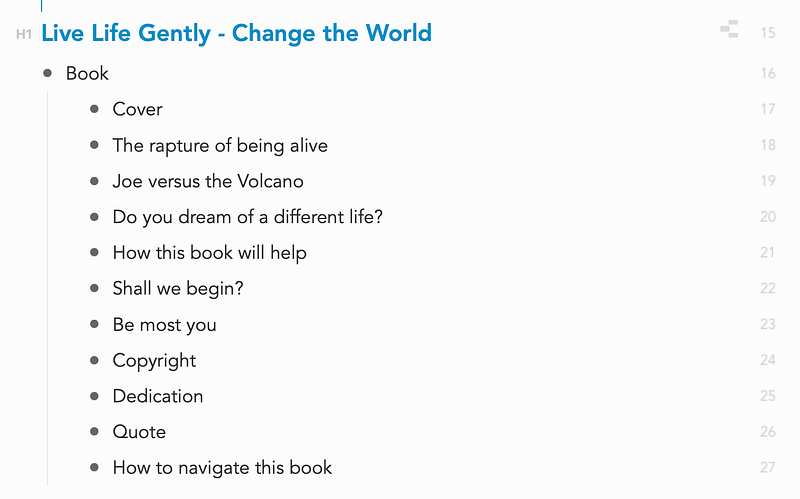
This is what the same content looks like using the mindmap view.
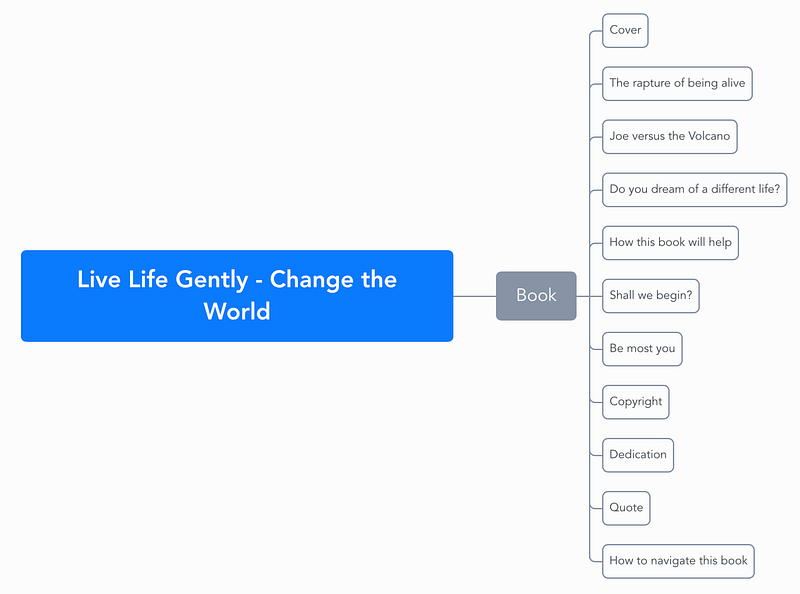
Obsidian is great for reorganising content, redefining a table of contents, and linking one idea to another.

Effie adds another layer on top of that. The ability to see the same content as a mindmap.

Simple bullets and indents form the basis of your mindmap which you can then style with a choice of five different views.

Organisation

Effie offers a clean folder structure, which I appreciate. This makes organising projects very easy.
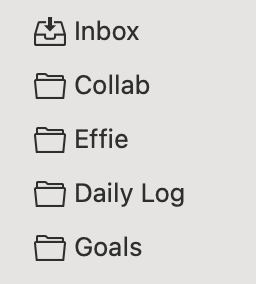
Within folders, you can add subfolders.

Notes are called Sheets and these sit inside your folders, or default to the Inbox.

What could you use Effie for?

A daily journal or log: if you’re a fan of interstitial journaling, Effie lends itself to this type of content, creating a card view of each entry.
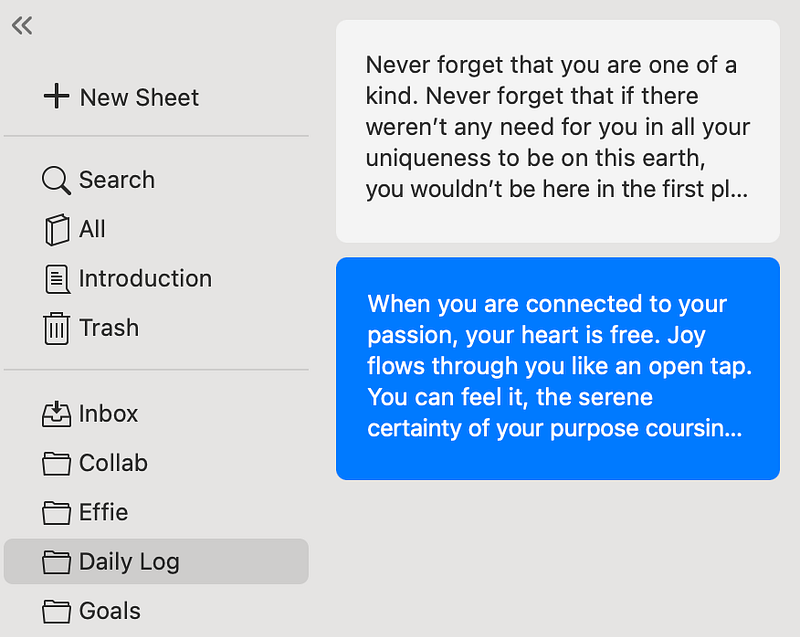
These can be exported as an image which can be shared on social media.

Content can also be exported in other file formats including PDF, DOCX and Markdown. The latter is of particular interest to me, as this enables me to import content into Obsidian.

Lists: I’ve created a list of goals which I find more useful in mindmap layout.

Outliner: Effie makes a great Outliner tool.

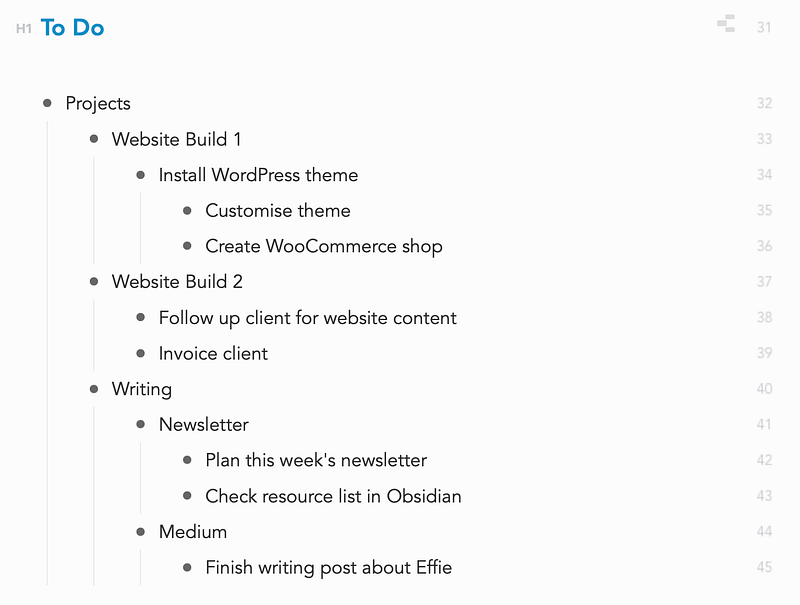
You could create a project or to do list.
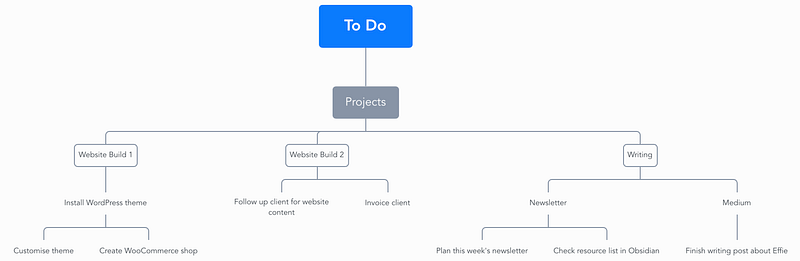
And then view it as a mindmap.
Publishing

Currently, you can publish content to MindHub.Pro or configure your account to connect with your WordPress website. I’d love to see the range of options expanded to include Medium, or even to link to Dropbox or other file sharing sites, which would enable publication in other ways.

Mobile app

Like the desktop app, the mobile version is easy to use making it perfect for writing on the go. If posts written in Effie could be shared directly to Medium, this would fill a gap left by Medium removing this function from their app.

What else would I like?

I always prefer to customise my apps and tools, and a choice of different themes makes me happy.

Being able to import .md or .txt files would fit nicely into my writing workflow, especially as Obsidian is my main repository.

Pricing

Effie costs £25.99 per year or £4.49 monthly. You can try Effie before you buy.

I’ve been using an evaluation version to write this review.

Conclusion

Effie is a very nice to use, distraction-free writing tool. Particularly great for those times when you need to focus, or for anyone who wants to build a repository of content but finds the idea of a creating a Second Brain overwhelming.

Sign up for more of my writing, what I’m reading, my love of coffee and cafés, plus other places I go.

Technology
Writing
Productivity
Creativity
Apps
Recommended from ReadMedium