
Migrating from TSLint to ESLint
Source: TSLint to ESLint
Last year TSLint was deprecated in favor of ESLint (TSLint in 2019). TSLint was a valuable project for the TypeScript community and the efforts there were greatly appreciated. The migration from TSLint to ESLint is welcome in being able to leverage more of what the larger JavaScript community has been developing. All of the functionality that was available to us through TSLint is being migrated to ESLint plugins. In this article we will go through migrating a project from TSLint to ESLint. We’ll even throw in Prettier support for a little sprinkles on our sundae.
Our TSLint Project
The first thing to look at is what our project looks like with TSLint. For our purposes something very simple will do.
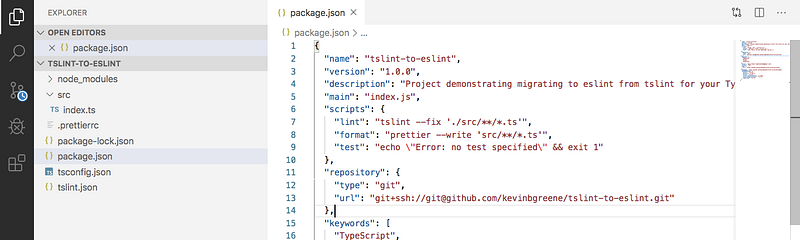
Highlights here are I have all of my TS source in the src directory. I have a tsconfig.json, a tslint.json and a .prettierrc. If we dig further and look into the package.json we’ll see these dev dependencies:
"prettier": "^1.19.1",
"tslint": "^6.0.0",
"tslint-config-prettier": "^1.18.0",
"tslint-plugin-prettier": "^2.1.0",
"typescript": "^3.7.5"
Next, let’s look at the scripts I have defined to run these tools.
"lint": "tslint --fix './src/**/*.ts'",
"format": "prettier --write 'src/**/*.ts'",
"prebuild": "npm run lint && npm run format",
"build": "tsc",
The short of it is that anytime I use npm run build it will first run lint and then format before running tsc.
Next let’s look at how I have tslint and prettier configured. Starting with the tslint.json.
{
  "extends": [
    "tslint:recommended",
    "tslint-config-prettier",
    "tslint-plugin-prettier"
  ],
  "rules": {
    "prettier": true,
    "array-type": [
      true,
      "generic"
    ]
  }
}
So, we use tslint:recommended which will give us a lot of standard rules out of the box. We also configure for prettier there are rules that will conflict with what prettier does. The options tslint-config-prettier and tslint-plugin-prettier will turn those rules off and make tslint and prettier play better together. Then I also add a custom rule to prefer array generic form. That is I want Array<string> and not string[] which is the default.
Now let’s look into the .prettierrc.
{
  "trailingComma": "all",
  "tabWidth": 2,
  "semi": false,
  "singleQuote": true,
}
Okay, a quick breakdown here is I always want trailing commas. I want tab width of 2 spaces. I don’t want semicolons and I prefer single quotes to double quotes for strings.
Now if I write a raw source file that looks like this:
// index.ts
const arr: string[] = ["one", "two", "three"];
if (arr.length == 0) {
throw new Error('Empty array');
}We can see, based on the config I have provided, there is a lot to be changed here.
Let’s try to build.
$ npm run buildWhen we do this tslint runs first and will fail with the following error:
> tslint --fix './src/**/*.ts'src/index.ts:3:16
ERROR: 3:16 triple-equals == should be ===One of the rules in tslint:recommended is to always prefer strict equals. TSLint does’t automatically fix this for us, so it throws an error.
Time to update.
// index.ts
const arr: string[] = ["one", "two", "three"];
if (arr.length === 0) {
throw new Error('Empty array');
}Now let’s try to build again.
$ npm run buildNow everything should go smoothly. All of the other problems with our little source file can be auto-corrected by either tslint or prettier.
> tslint-to-eslint@1.0.0 prebuild /Users/kevingreene/Documents/tslint-to-eslint
> npm run lint && npm run format
> tslint-to-eslint@1.0.0 lint /Users/kevingreene/Documents/tslint-to-eslint
> tslint --fix './src/**/*.ts'> tslint-to-eslint@1.0.0 format /Users/kevingreene/Documents/tslint-to-eslint
> prettier --write 'src/**/*.ts'src/index.ts 328ms> tslint-to-eslint@1.0.0 build /Users/kevingreene/Documents/tslint-to-eslint
> tscThis all will leave us with a source file looking like this:
// index.ts
const arr: Array<string> = ['one', 'two', 'three']
if (arr.length === 0) {
throw new Error('Empty array')
}Now, let’s start over and get to this same result using ESLint.
Migrating Our Project to ESLint
It seems right to start by just installing eslint in our project. We’re going to need a few other things to go with that.
$ npm i -D eslint \
eslint-config-prettier \
eslint-plugin-prettier \
@typescript-eslint/eslint-plugin \
@typescript-eslint/parser
If we remove all of our tslint dependencies that will leave us with a package.json that looks like this:
"devDependencies": {
  "@typescript-eslint/eslint-plugin": "^2.20.0",
  "@typescript-eslint/parser": "^2.20.0",
  "eslint": "^6.8.0",
  "eslint-config-prettier": "^6.10.0",
  "eslint-plugin-prettier": "^3.1.2",
  "prettier": "^1.19.1",
  "typescript": "^3.7.5"
}
All of the functionality that was provided to us by TSLint before will now be provided by @typescript-eslit/eslint-plugin and @typescript-eslint/parser. The parser is necessary because eslint can’t parse TypeScript files out-of-the-box. Luckily ESLint is so extensible that it allows swapping out the parser.
After we have all of our new dependencies let’s add a configuration file for ESLint. I do this in the form of .eslintrc.js.
module.exports = {
  parser: '@typescript-eslint/parser',
  extends: [
    'plugin:@typescript-eslint/recommended',
    'prettier/@typescript-eslint',
    'plugin:prettier/recommended',
  ],
  parserOptions: {
    ecmaVersion: 2018,
    sourceType: 'module',
  },
  rules: {
    '@typescript-eslint/array-type': [
      'error',
      { default: 'generic' }
    ],
  },
}
A lot of this is analogous to the tslint.json we were using before. We’ll go through this step by step.
The first thing is we need to tell ESLint to use the TypeScript parser.
parser: '@typescript-eslint/parser',After that we add essentially the same modules to extend as we did before.
extends: [
  'plugin:@typescript-eslint/recommended',
  'prettier/@typescript-eslint',
  'plugin:prettier/recommended',
],
These bring along the recommended rules for TypeScript (plungin:@typescript-eslint/recommended), disable rules that conflict with Prettier ( prettier/@typescript-eslint ) and enables the ESLint plugin for Prettier that displays Prettier errors as ESLint errors ( plungin:prettier/recommended ).
The next section allows us to configure the parser.
parserOptions: {
  ecmaVersion: 2018,
  sourceType: 'module',
},
There are a number of options you can set here. These are the ones I find most common, setting the JavaScript version and setting source type to “module” as opposed to “script”. You can find more info in the Github repo ( @typescript-eslint/parser ).
After the parser is configured we can define any custom rules (in addition to the included recommended ones). As before we’ll just include one.
rules: {
  '@typescript-eslint/array-type': [
    'error',
    { default: 'generic' }
  ],
},
Let’s compare this to the rule we used before.
"rules": {
  "array-type": [
    true,
    "generic"
  ]
}
You can see these definitions are very similar. In fact, they have the same name. The new one is just prefixed with @typescript-eslint. You should find this to be convention as you move rules over. Look for something of the same name, just prefixed. You can see a list of the included rules here eslint-plugin.
I’m using an array here as my options to the rule ( ['error', { default: 'generic' }] ). The first value says I want this to be an error and not a warning and is general to all rules. The second is specific to this rule, saying I want a generic array. This option is an object so that you can provide different options for mutable and readonly arrays. I could have done this:
rules: {
  '@typescript-eslint/array-type': [
    'error',
    {
      default: 'array',
      readonly: 'generic'
    }
  ],
},
Other options for this rule are “array”, “array-simple” or the one I chose “generic”.
You don’t have to use the array form here. I could have done this:
rules: {
  '@typescript-eslint/array-type': 'error',
},
This means I want this rule to be an error, but I’m fine using the default option. The default here being “array”.
If I wanted to turn this rule off I would do this:
rules: {
  '@typescript-eslint/array-type': 0,
},
Now that our rules are migrated, let’s go back over to package.json and update our lint command.
"lint": "eslint --fix './src/**/*.ts'",
"format": "prettier --write 'src/**/*.ts'",
"prebuild": "npm run lint && npm run format",
"build": "tsc",
This is the same. I just trade out tslint for eslint.
Let’s revert our source file back to its original form:
// index.ts
const arr: string[] = ["one", "two", "three"];
if (arr.length == 0) {
throw new Error('Empty array');
}And try building again.
$ npm run buildOne difference we’ll notice immediately is there is no error for strict equals, @typescript-eslint is nice enough to fix that for us now.
> tslint-to-eslint@1.0.0 prebuild /Users/kevingreene/Documents/tslint-to-eslint
> npm run lint && npm run format
> tslint-to-eslint@1.0.0 lint /Users/kevingreene/Documents/tslint-to-eslint
> eslint --fix './src/**/*.ts'> tslint-to-eslint@1.0.0 format /Users/kevingreene/Documents/tslint-to-eslint
> prettier --write 'src/**/*.ts'src/index.ts 407ms> tslint-to-eslint@1.0.0 build /Users/kevingreene/Documents/tslint-to-eslint
> tscEverything runs for me as expected. Now if we look at our file:
// index.ts
const arr: Array<string> = ['one', 'two', 'three']
if (arr.length === 0) {
throw new Error('Empty array')
}Everything looks good. We’ve migrated from the legacy tool to the great new thing with no regressions.