
Migrating from Microsoft Defender for Endpoint (Servers) to Defender for Cloud Server Plan

Ever since Microsoft released the Microsoft defender for cloud server protection, there have been customers who would wonder what Server protection solution they should apply to their server fleet in the Microsoft Security “stack”.
For years, Defender for Endpoint for Servers served as the primary, and recommended way to go for server protection. But as focus changed to DevOps practices, better Cloud security, and multi-cloud strategies became options, the need for a Cloud-native, and multi-cloud solution that goes beyond server protection was evident.
As we know, in the security field, the needs go way beyond enforcement going through the need to assess, measure and mitigate risk configuration and other issues in your environment. This is why having cloud security posture management and cloud workload protection capabilities provided on the same platform is very attractive to Infra and Security managers.
With all that said, there are many customers who have been using Microsoft defender for Endpoint for Servers as their primary server security solution. MDE for servers’ licensing is based on a yearly subscription and it differs from the Microsoft defender for Cloud offering, which is consumption based (in which customers can pay for the service as they consume or as they use the services).
And although they have theoretically the same engine running behind the curtains there are differences in management and configuration that need to be understood when we think about migrating. This is what this article is about.
As always, for accurate and the latest information always referred to the official documentation, which you can access here. With that said, let's discuss what I know from the topic.
Considerations
As stated before, these are similar solution, but Defender for Cloud expands the capabilities to assess and protect infrastructure resources, including multi-cloud.
Technical
Defender for cloud server plan includes defender for endpoint for servers — which I covered before. MDC server plans, offer more capabilities and a different management plane.
So technically, from a protection perspective, there is no difference. Just from a deployment and management perspective, there can be slight variations to the analyst’s experience.
Offering
It’s important to discuss changes with your Microsoft representative. MDE for servers is a subscription model, whilst MDC Server Plans are consumption. Ensure there’s no overlap of licensing for undesired costs.
Pre-requisites
Essentially, the migration process varies depending on machine type.
But there are common prerequisites:
- If not using Azure, ensure to plan using WAF: Azure Well-Architected Framework.
- Enable MDC on subscriptions.
- Enable MDC “Server plan” on subscriptions. The official document makes a note: “In case you’re using Defender for Servers Plan 2, make sure to also enable it on the Log Analytics workspace your machines are connected to; it enables you to use optional features like File Integrity Monitoring, Adaptive Application Controls and more.”
- Enable “MDE Integration” and Vulnerability Management on MDC.

5. Ensure Azure Arc network connectivity requirements are met. There are support limitations from Azure Arc that need to be reviewed — details here.
Scenarios
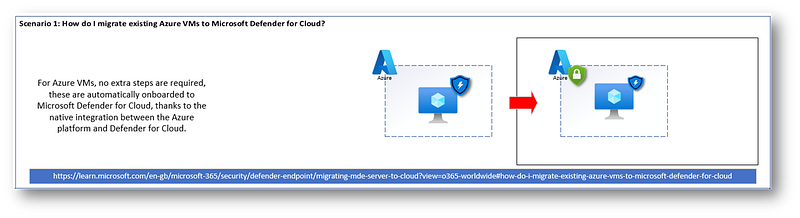
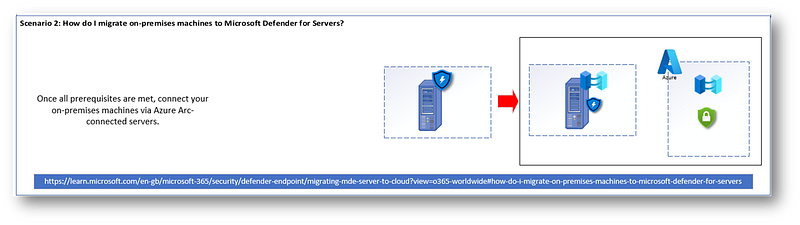
So, I thought about representing migration scenarios using diagrams.
These are my own representations of the descriptions from the official documentation. I only look at Microsoft technologies for each scenario.
All the text and scenarios are from the official documentation:
Looking at my Diagram:

Scenario 1: How do I migrate existing Azure VMs to Microsoft Defender for Cloud?
Scenario 2: How do I migrate on-premises machines to Microsoft Defender for Servers?
Scenario 3: How do I migrate VMs from AWS or GCP environments?
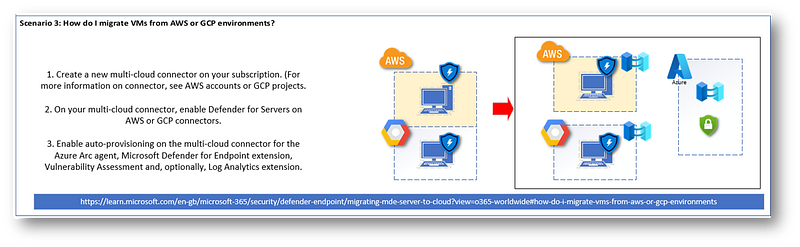
After each step is finalized, here’s what happens:
- MDC deploys MDE.Windows and MDE.Linux extensions to servers.
- This Extension acts as management and orchestration tool for installation of and provisioning reporting of MDE to Azure. MDC adds MDE service tags to servers.
- If you have the legacy Log Analytics-based MDE solution, MDC deployment will include the MDE “unified solution” and later stop and disable the legacy solution from the relevant servers.
Learn more about my Cloud and Security Projects: https://linktr.ee/acamillo
Consider subscribing to Medium (here) to access more content that will empower you!
Thank you for reading and leave your thoughts/comments!
References
Scattered throughout the document


