
Spring Boot performance battle: blocking vs non-blocking vs reactive
I would like to talk about interesting stuff that I faced on my project. For our client, we wrote some lightweight microservices in AWS that just proxies requests to some underlying services via HTTP and returns it back to the client.
The main flow:
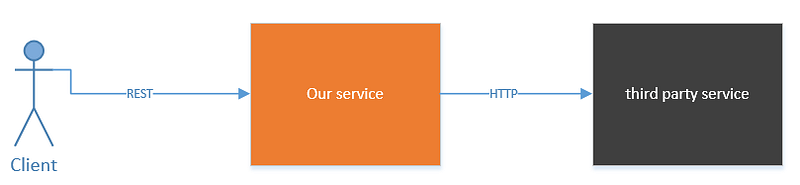
At first glance, what could be simpler than writing a REST proxy service?
Important condition: we didn’t control underlying service.
So, of course, we started with Spring Boot and wrote simple RestControllers. We made the POC and the results were good. Third party service had SLA with the service response time and we used this value for performance tests. The response time of the third party service was quite good ~ about 10–100ms. We also decided to use CPU as a scaling policy for our microservice which was running in Docker as AWS ECS service. We configured autoscaling in AWS and went live.
You guessed it, not everything went smoothly. We often had AWS ECS task restarting due to health check timeout. Also, we were wondering that scaling didn’t work so good and we always had a minimal number of running task. In addition, we saw that CPU and memory are low but our service was too slow and sometimes even had timeout error.
You are right, the problem was in the third party service. Third party service response time became 500–1000ms. BUT, it never had a timeout issue and was able to handle more clients then we had.
So the problem was in our service. We didn’t scale up our application when it was needed. We made the performance test for 500–1000ms and were shocked.
CPU was low, memory was good, but we were able to handle only 200 requests/sec.
This was Servlet thread per connection issue. The default thread pool is 200 that was why we have 200 requests/sec for 1000ms response time.
But we needed an elastic service: we should handle as many requests as underlying service can. And response time should be almost the same as underlying service.
We investigated it and found several options:
- Increase the thread pool size
- DeferredResult or CompletableFuture with Servlet
- Spring reactive with WebFlux
Option 1: Increase the thread pool size
Yes, this is a good workaround, BUT only workaround!!! Because we cannot set this value to several thousand, because it’s is Docker with very limited memory. And each thread requires stack memory.
Another problem is if some third party service had a big response time, for example, 5second than we still have the same problem. Throughput equals = thread pool size/response time. If we have 1000 threads and 5s delay than throughput is 200 requests/sec. CPU again is low and service has enough resource for processing.
Option 2: DeferredResult or CompletableFurure with Servlet (Non-Blocking)
As you may know, Servlet 3.1 supports asynchronous processing. To have it working we need just return some promise and Servlet will handle it in an asynchronous fashion.
We compared DeferredResult with CompletableFurure and result was the same. Thus we agreed to test CompletableFurure.
Option 3: Spring reactive with WebFlux
This is the most popular topic now. From Spring documentation:
“ non-blocking web stack to handle concurrency with a small number of threads and scale with fewer hardware resources”
Let’s test this stuff
Test environment:
Spring Boot:2.1.2.RELEASE(latest)
Java: 11 OpenJDK
Node: t2.micro (Amazon Linux)
Code: https://github.com/Aleksandr-Filichkin/spring-mvc-vs-webflux
Http Clients: Java 11 Http Client, Apache Http Client, Spring WebClient
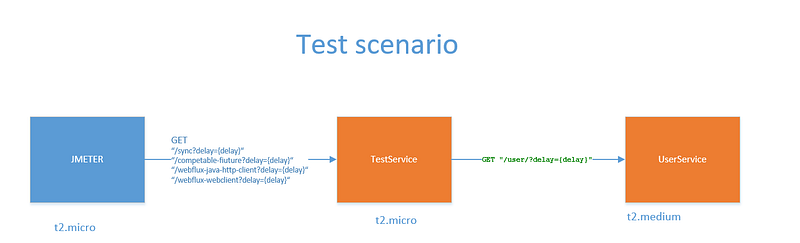
Test-Service( our proxy service) exposes several GET endpoints for testing. All endpoints have a delay(in ms) parameter that is used for third-party service delay.
@GetMapping(value = "/sync")
public String getUserSync(@RequestParam long delay) {
    return sendRequestWithJavaHttpClient(delay).thenApply(x -> "sync: " + x).join();
}@GetMapping(value = "/completable-future-java-client")
public CompletableFuture<String> getUserUsingWithCFAndJavaClient(@RequestParam long delay) {
return sendRequestWithJavaHttpClient(delay).thenApply(x -> "completable-future-java-client: " + x);
}@GetMapping(value = "/completable-future-apache-client")
public CompletableFuture<String> getUserUsingWithCFAndApacheCLient(@RequestParam long delay) {
return sendRequestWithApacheHttpClient(delay).thenApply(x -> "completable-future-apache-client: " + x);
}@GetMapping(value = "/webflux-java-http-client")
public Mono<String> getUserUsingWebfluxJavaHttpClient(@RequestParam long delay) {
CompletableFuture<String> stringCompletableFuture = sendRequestWithJavaHttpClient(delay).thenApply(x -> "webflux-java-http-client: " + x);
return Mono.fromFuture(stringCompletableFuture);
}@GetMapping(value = "/webflux-webclient")
public Mono<String> getUserUsingWebfluxWebclient(@RequestParam long delay) {
return webClient.get().uri("/user/?delay={delay}", delay).retrieve().bodyToMono(String.class).map(x -> "webflux-webclient: " + x);
}@GetMapping(value = "/webflux-apache-client")
public Mono<String> apache(@RequestParam long delay) {
return Mono.fromCompletionStage(sendRequestWithApacheHttpClient(delay).thenApply(x -> "webflux-apache-client: " + x));
}User-Service( third-party service) exposes a single endpoint GET “/user?delay={delay}”. Delay(ms) parameter is used for delay emulation. If we send /user?delay=10 then the response time will be 10 ms+network delay (minimal inside AWS);
This user-service is our third-party service (user-service) which is really fast and can handle more than 4000requests/sec
Load numbers
For performance test, we will use Jmeter. We will test our service for 100, 200, 400, 800 concurrent requests for 10,100,500 ms delay. Total 12 tests for each implementation.
Important note:
We measure performance only for a hot server: before each test, our service handled 1 million requests (for JIT compiler and JVM optimization)
Build artifact
Test code you can see on my GitHub https://github.com/Aleksandr-Filichkin/spring-mvc-vs-webflux
It’s a single Maven project.
For WebFlux(Netty) use “web-flux” maven profile:
mvn clean install -P web-fluxFor Servlet(Tomcat) use “servlet” maven profile:
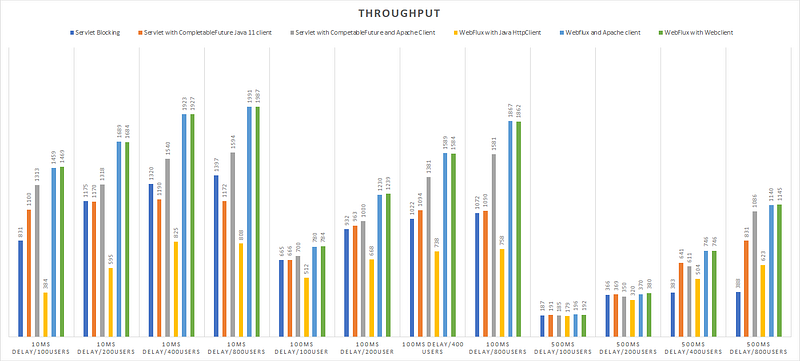
mvn clean install -P servletThroughput results(msg/sec)
CPU Utilization
Profiling
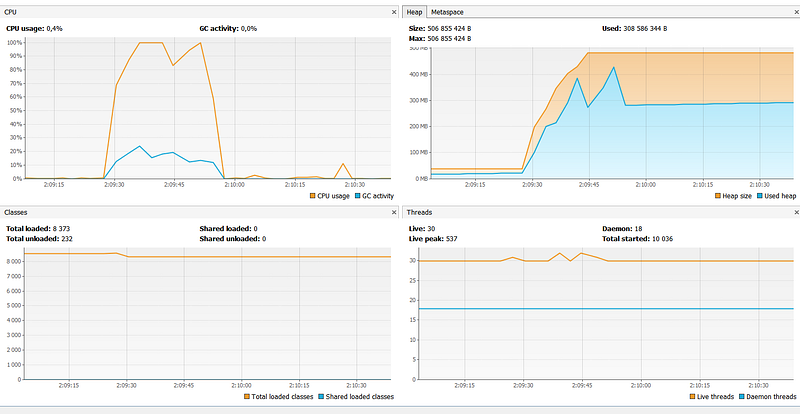
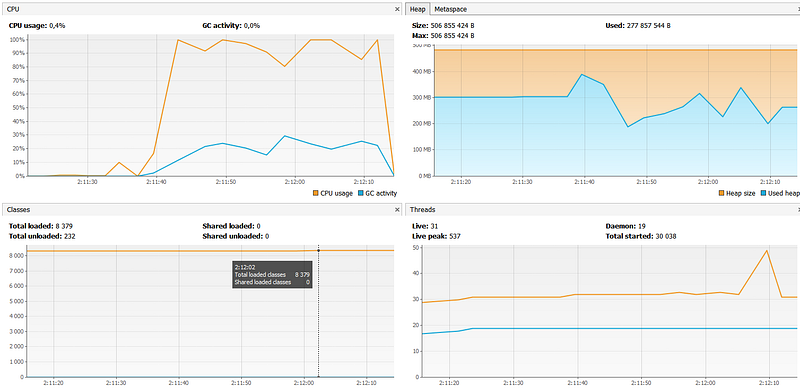
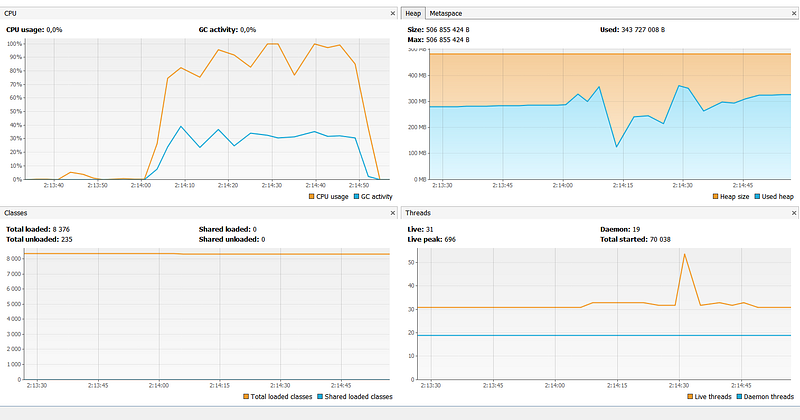
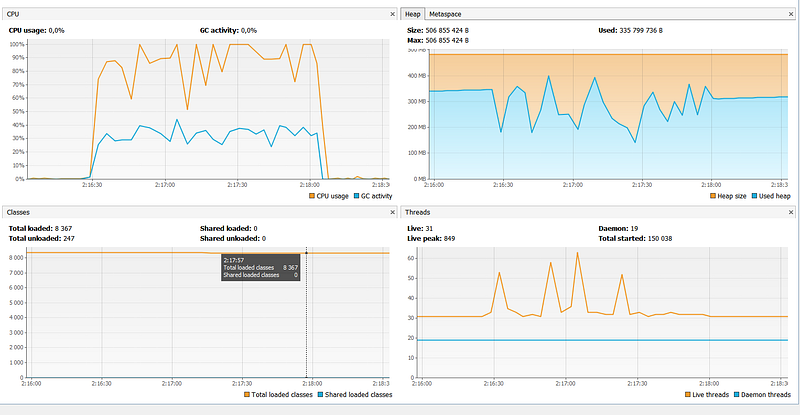
Test 10 ms delay for underlying service (100,200,400,800 concurrent users )
Test 10 ms delay for underlying service (100,200,400,800 concurrent users )
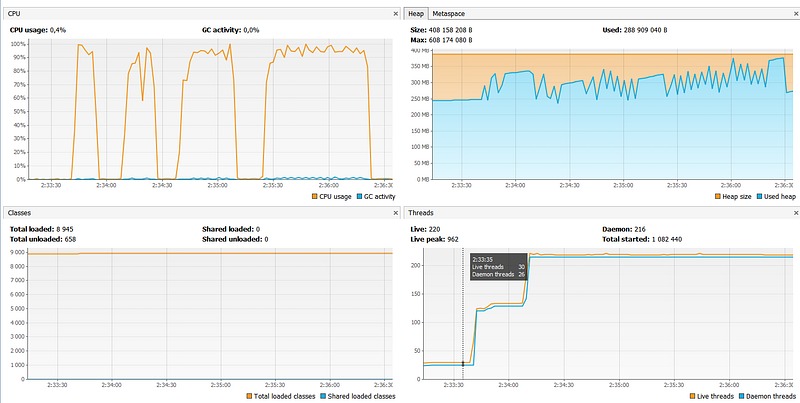
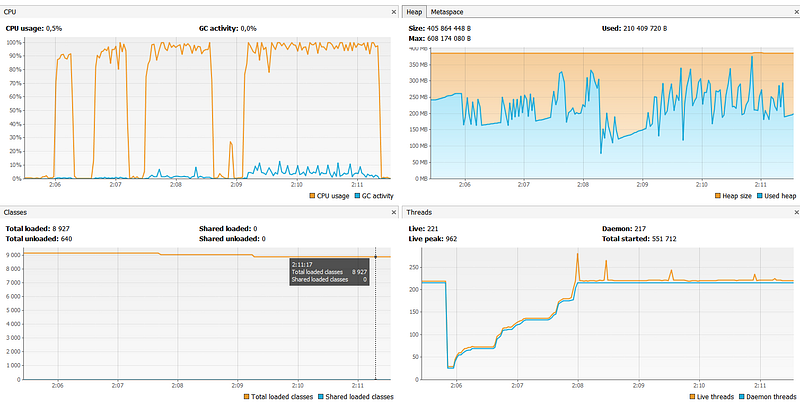
4 spikes in CPU is are 4 load tests(100, 200, 400, 800 users)
1)Blocking with Servlet
2)CompletableFuture with Java Http Client and Tomcat
3)CompletableFuture with Apache Http Client and Tomcat
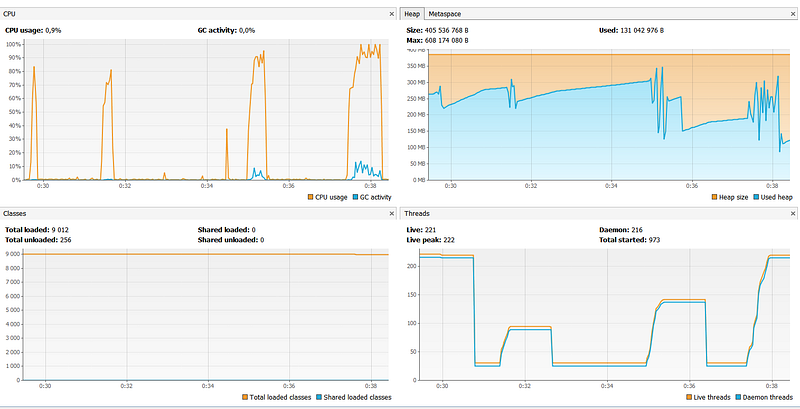
4,5)WebFlux with WebClient and Apache Client(WebClient and Apache Client have the same memory utilization and thread stuff)
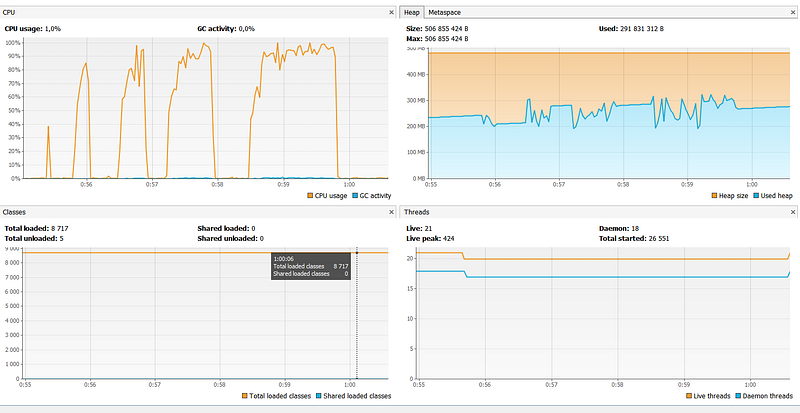
6)WebFlux and Java Http Client
100 clients:
200 clients:
400 clients:
800 clients
Test 500 ms delay for underlying service ( 100,200,400,800 concurrent users)
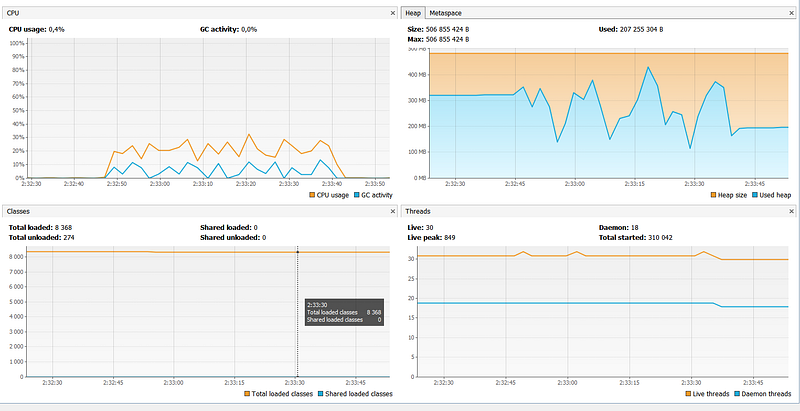
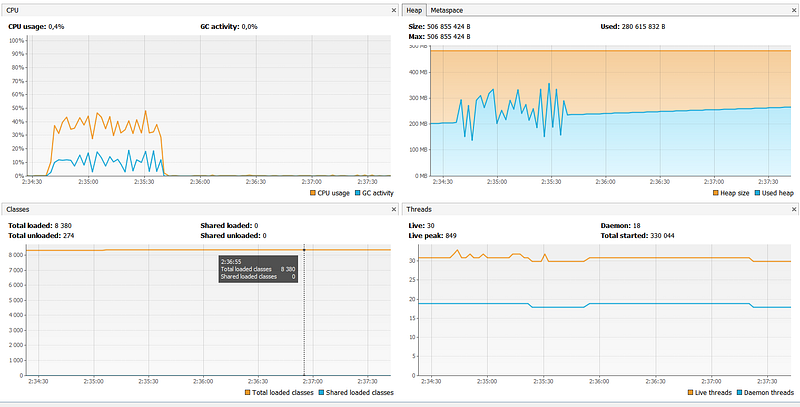
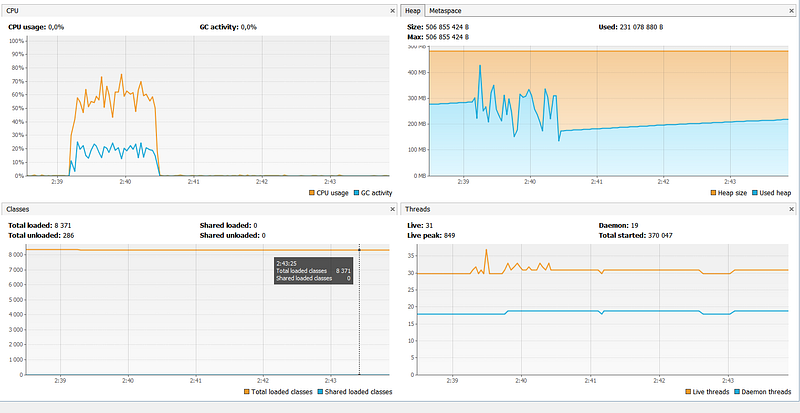
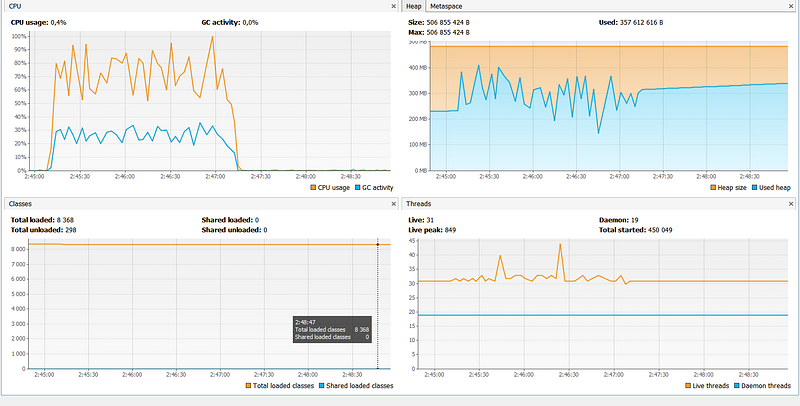
1)Blocking with Servlet
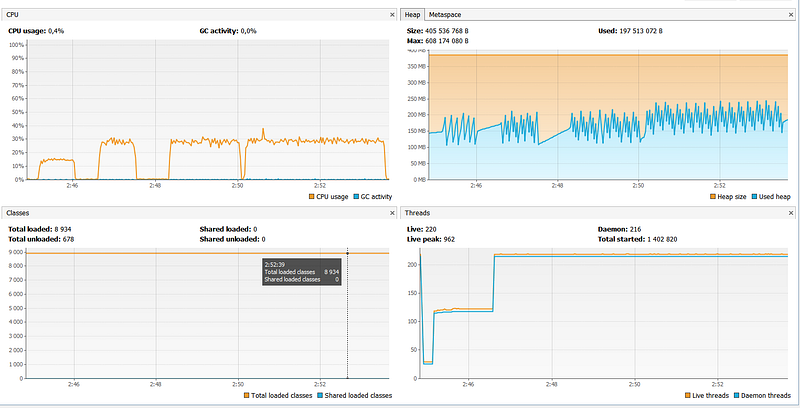
2)CompletableFuture with Java Http Client and Tomcat
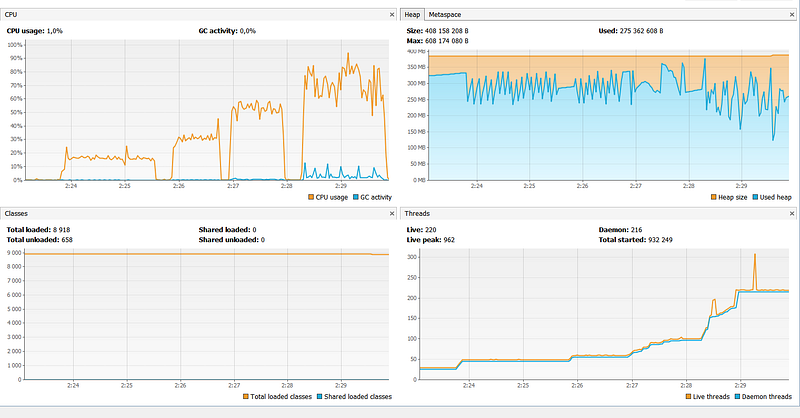
3)CompletableFuture with Apache Http Client and Tomcat
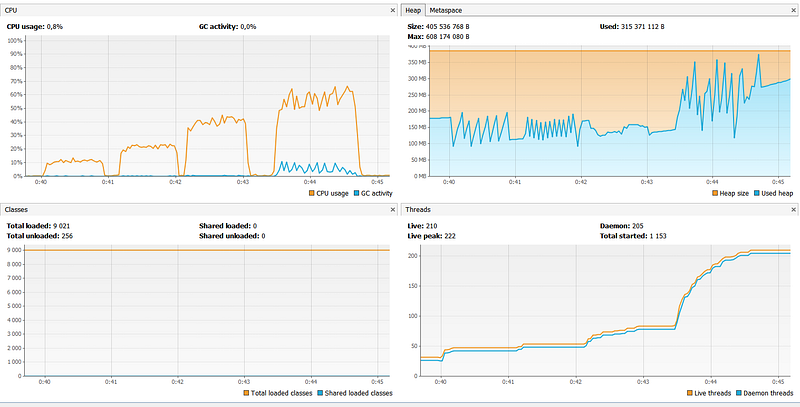
4,5)WebFlux with WebClient and Apache Client(WebClient and Apache Client have the same memory utilization and thread stuff)
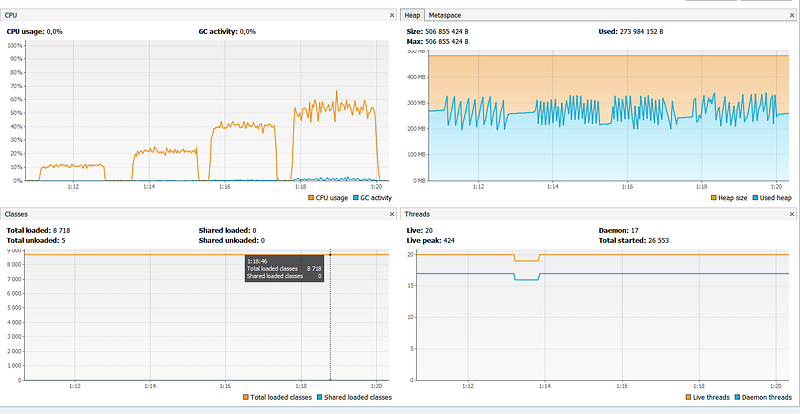
6)WebFlux and Java Http Client
WebFlux with Java 11 Http Client display unexpected huge GC usage https://github.com/spring-projects/spring-framework/issues/22333
100 clients:
200 clients:
400 clients
800 clients
Scaling policy problem:
The biggest problem for REST/microservice is scaling policy.
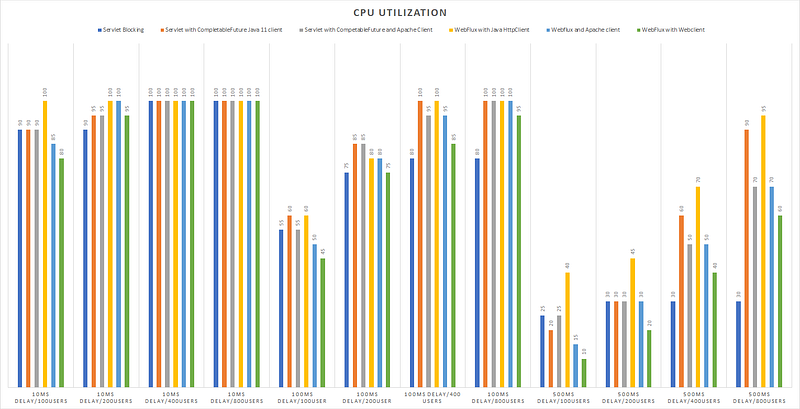
As you can see for the case (500ms delay) blocking Servlet doesn’t have high CPU even for 800 concurrent users. It’s due to Servlet thread pool. By default, Tomcat has 200 threads in a pool and that is why we don’t have throughput difference for 200 and 400 concurrent users.
So with blocking Servlet we cannot scale based on CPU or Memory if we don’t control underlying service or underlying service response time is not stable.
For nonblocking and async flow we don’t have such problem and should use CPU as scaling policy.
Conclusion (on a single core, 1GB RAM server instance):
Blocking with Servlet performs well only for the case when underlying service is fast(10ms)
Nonblocking with Servlet is a pretty good solution and for the case when underlying service is slow(500ms). It loses Webflux only in case of a big number of requests.
Spring Webflux with WebClient and Apache clients wins in all cases. The most significant difference(4 times faster than blocking Servlet) when underlying service is slow(500ms). It 15–20% faster then Non-blocking Servlet with CompetableFuture. Also, it doesn’t create a lot of threads comparing with Servlet(20 vs 220).
Unfortunately, we cannot use WebFlux everywhere, because we need asynchronous drivers/clients for it. Otherwise, we have to create custom thread pools/wrappers.
P.S.
Java 11 Http Client slower than Apache Http client (~30% performance degradation) for a single core, 1GB RAM server instance
Spring WebClient has the same performance as Apache Http Client for on a single core, 1GB RAM server instance
Combination runtime models of WebFlux and Java 11 Http Client doesn’t work well when you only have one core and little RAM (https://github.com/spring-projects/spring-framework/issues/22333)
Next Performance battle
If you like it, please read my new post:
Fix Java cold start in AWS lambda with GraalVM [performance comparison]


