avatarAmit Chauhan

Free AI web copilot to create summaries, insights and extended knowledge, download it at here

4598

Abstract

e of python programs</h3></div> <div><p>pub.towardsai.net</p></div> </div> <div> <div style="background-image: url(https://miro.readmedium.com/v2/resize:fit:320/0*fWvwbrPvZHH2nkiq)"></div> </div> </div> </a> </div><div id="f481" class="link-block"> <a href="https://pub.towardsai.net/are-you-switching-careers-to-data-science-and-machine-learning-5fab0b75470e"> <div> <div> <h2>Are you Switching Careers to Data Science and Machine Learning?</h2> <div><h3>Analytics role and roadmap to becoming a data scientist</h3></div> <div><p>pub.towardsai.net</p></div> </div> <div> <div style="background-image: url(https://miro.readmedium.com/v2/resize:fit:320/0*M0OslnCAV1CfUfHD)"></div> </div> </div> </a> </div><blockquote id="8000"><p><b><i>Garbage Collection</i></b></p></blockquote><p id="a44c">Garbage collection is nothing but releasing the memory when the object is no longer in use. The system removes the unused object from the memory slot and reuses it for new objects. It can be denoted as a computer’s automated recycling system.</p><p id="3dc4">Now, what if you don’t want the object to get automatically erased by Python’s memory manager? There is a way to save this object in the memory even though it’s empty. This concept is established by creating reference cycles.</p><h2 id="54fb">Reference cycle:</h2><p id="d3d8">A reference cycle is nothing but more than one object referencing each other. A reference cycle is created only when the object’s reference count is unable to reach a minimum value of ‘1’. One of the easiest ways to generate a reference cycle is by creating an object referring to itself. The program below will show you how it works.</p><h2 id="a534">Program:</h2><div id="a284"><pre><span class="hljs-number">1</span>→ def <span class="hljs-built_in">ref_cycle</span>(): <span class="hljs-number">2</span>→ A = [ ] <span class="hljs-number">3</span>→ A.<span class="hljs-built_in">append</span>(A) <span class="hljs-number">4</span><span class="hljs-built_in">ref_cycle</span>()</pre></div><h2 id="5e6a">Explanation:</h2><p id="59f4">In this program, we are creating a function containing an empty list. The third line containing the append function is where the reference cycle gets generated. This means that the function ‘A’, contains a reference to itself, making the default reference count of the object as 1. Due to this function, the object ‘A’ will not be free once the function returns. Hence causing the memory, ‘A’ to be stored until the Python Garbage Collector is invoked.</p><blockquote id="a7b1"><p><b><i>Making an object eligible for Garbage collection</i></b></p></blockquote><p id="3a27">There is a way to collect the discarded objects using the Python program. The below program shows a way to make an object eligible for garbage collection.</p><h2 id="9117">Program:</h2><div id="1a56"><pre><span class="hljs-attribute">A</span> =<span class="hljs-meta"> [ ]</span> <span class="hljs-attribute">A</span>.append(<span class="hljs-number">1</span>) <span class="hljs-attribute">A</span>.append(<span class="hljs-number">2</span>)</pre></div><div id="37d5"><pre><span class="hljs-selector-tag">del</span> <span class="hljs-selector-tag">A</span></pre></div><h2 id="c105">Explanation:</h2><p id="37f5">From the above program, an empty list ‘A’ is created and, the reference count is 2 due to the two append functions. The list ‘A’ gets deleted later; making it unable to use it again. Hence, the object becomes garbage. But the list can never be freed from the memory because of the reference cycles generated; making the object eligible for garbage collection.</p><blockquote id="74cc"><p><b><i>Automatic Garbage Collection</i></b></p></blockquote><p id="310f">Since reference cycles take a lot of computational processes to discover, it is much better when the garbage collector gets scheduled. Python schedules this collection based on the object’s allocation and deallocation thresholds. In other words, the garbage collector can be automated only if:</p><div id="510a"><pre><span class="hljs-keyword">No</span>. of allocations — <span class="hljs-keyword">No</span>. of deallocations > threshold <span class="hljs-keyword">no</span></pre></div><p id="aaf4">Also, to find the threshold for new objects, all you have to do is, import the gc module and request

Options

the thresholds.</p><h2 id="403f">Program:</h2><div id="e809"><pre>import gc <span class="hljs-function"><span class="hljs-title">print</span><span class="hljs-params">(“Python GC thresholds:”, gc.get_threshold()</span></span>)</pre></div><div id="c1ef"><pre><span class="hljs-comment">#Sample Output:</span> <span class="hljs-attribute">Python</span> GC thresholds: (<span class="hljs-number">800</span>, <span class="hljs-number">20</span>, <span class="hljs-number">20</span>)</pre></div><h2 id="495d">Explanation:</h2><p id="4fd9">From the output obtained from the above program, the default threshold is 800. This means that the number of allocations minus the number of deallocations is greater than 800 thereby, successfully running the garbage collector.</p><blockquote id="ebdf"><p><b><i>Manual Garbage Collection</i></b></p></blockquote><p id="7678">Calling the garbage collector during the program’s execution manually; is an excellent idea to understand how the memory is handled and consumed by reference cycles.</p><h2 id="56a8">Program:</h2><div id="6982"><pre>import <span class="hljs-keyword">gc</span> <span class="hljs-keyword">c</span> <span class="hljs-operator">=</span> <span class="hljs-keyword">gc</span>.collect()</pre></div><div id="4dd4"><pre>print(“Garbage collector: <span class="hljs-keyword">c</span> — “<span class="hljs-punctuation">,</span><span class="hljs-variable">%d</span> objects” % <span class="hljs-keyword">c</span>)</pre></div><div id="154e"><pre><span class="hljs-comment">#Output:</span> <span class="hljs-attribute">Garbage</span> collector: c — <span class="hljs-number">0</span> objects</pre></div><h2 id="dead">Explanation:</h2><p id="727d">In the above program, we have imported the gc module to collect the number of objects in the garbage collector and print it as the output.</p><blockquote id="0230"><p><b><i>Conclusion</i></b></p></blockquote><p id="5da1">To conclude, in Python, we never deal with memory addresses directly. This topic is just for programmers to understand the basic backend of Python of how it handles memory and storage. I strongly recommend referring to more articles and applying these concepts using python programs you can experiment with on this topic.</p><p id="2599">I hope you like the article. Reach me on my <a href="https://www.linkedin.com/in/data-scientist-95040a1ab/">LinkedIn</a> and <a href="https://twitter.com/amitprius">twitter</a>.</p><h1 id="c692">Recommended Articles</h1><p id="99e9">1. <a href="https://pub.towardsai.net/8-active-learning-insights-of-python-collection-module-6c9e0cc16f6b?source=friends_link&amp;sk=4a5c9f9ad552005636ae720a658281b1">8 Active Learning Insights of Python Collection Module</a> 2. <a href="https://pub.towardsai.net/numpy-linear-algebra-on-images-ed3180978cdb?source=friends_link&amp;sk=d9afa4a1206971f9b1f64862f6291ac0">NumPy: Linear Algebra on Images</a> 3. <a href="https://pub.towardsai.net/exception-handling-concepts-in-python-4d5116decac3?source=friends_link&amp;sk=a0ed49d9fdeaa67925eac34ecb55ea30">Exception Handling Concepts in Python</a> 4. <a href="https://pub.towardsai.net/pandas-dealing-with-categorical-data-7547305582ff?source=friends_link&amp;sk=11c6809f6623dd4f6dd74d43727297cf">Pandas: Dealing with Categorical Data</a> 5. <a href="https://pub.towardsai.net/hyper-parameters-randomseachcv-and-gridsearchcv-in-machine-learning-b7d091cf56f4?source=friends_link&amp;sk=cab337083fb09601114a6e466ec59689">Hyper-parameters: RandomSeachCV and GridSearchCV in Machine Learning</a> 6. <a href="https://readmedium.com/fully-explained-linear-regression-with-python-fe2b313f32f3?source=friends_link&amp;sk=53c91a2a51347ec2d93f8222c0e06402">Fully Explained Linear Regression with Python</a> 7. <a href="https://readmedium.com/fully-explained-logistic-regression-with-python-f4a16413ddcd?source=friends_link&amp;sk=528181f15a44e48ea38fdd9579241a78">Fully Explained Logistic Regression with Python</a> 8. <a href="https://pub.towardsai.net/data-distribution-using-numpy-with-python-3b64aae6f9d6?source=friends_link&amp;sk=809e75802cbd25ddceb5f0f6496c9803">Data Distribution using Numpy with Python</a> 9. <a href="https://pub.towardsai.net/decision-trees-vs-random-forests-in-machine-learning-be56c093b0f?source=friends_link&amp;sk=91377248a43b62fe7aeb89a69e590860">Decision Trees vs. Random Forests in Machine Learning</a> 10. <a href="https://pub.towardsai.net/standardization-in-data-preprocessing-with-python-96ae89d2f658?source=friends_link&amp;sk=f348435582e8fbb47407e9b359787e41">Standardization in Data Preprocessing with Python</a></p></article></body>

Memory and Garbage Collection in Python

Memory allocation and deallocation
Photo by Shahadat Rahman on Unsplash

Introduction

Have you wondered what happens when you create an object in Python? Where does it get stored? Or what happens if more than two kinds of data get stored in the same variable? How does the memory handle these kinds of processes? This article will help you understand the backend processes of python memory.

In python programming, the concept of memory allocation and deallocation is an automatic method. Unlike C# and C++, Python users do not have to pre-allocate or deallocate memory using dynamic memory allocation.

Python follows two kinds of strategies:

  1. Garbage Collection
  2. Reference counting

Reference counting

Reference counting is nothing but deallocating objects when there’s no reference to them in a program. Let us have a better understanding using an example:

  • Let us consider the value ‘10’ stored in ‘My_nem’.

First Example:

My_nem = 10

Here, python is creating an object of integer type having value as ‘10’, with some memory address(eg: 1000). And here, ‘My_nem’ is a pointer to the stated object.
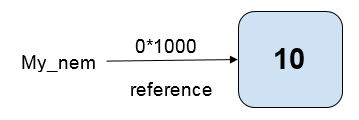
This means that ‘My_nem’ is the reference to the memory address of that object. Hence the current reference count is 1.

Reference count = 1

Second Example:

My_nem = 10
Nem = My_nem

Here, we are not assigning ‘Nem’ to the value 10. Instead, we are taking the reference of ‘My_nem’ and assigning that to ‘Nem’.
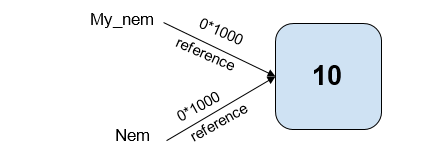
In simple words, ‘Nem’ does not get stored as a separate object. It is pointing to the same object in the memory. Hence, sharing the memory address. And in terms of reference count, it now adds up to 2.

Reference count = 2
  • Let us now consider another scenario, where ‘My_nem’ either falls out of scope or gets assigned to a different object in the memory, and the second line of code is still present:
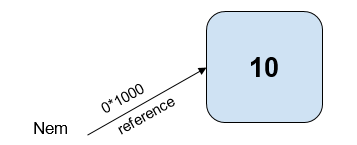
What happens now is that the reference goes away and, the reference count goes back to being 1.

Reference count = 1
  • In the final scenario, consider the second line of code also goes out of scope.
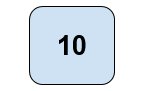
Now there is nothing left, and the reference count drops to 0. And at this point, the Python memory manager recognizes that there is no object left. And hence it sees the memory as garbage and throws away the object.

Reference count = 0

This is where the concept of garbage collection arises.

Garbage Collection

Garbage collection is nothing but releasing the memory when the object is no longer in use. The system removes the unused object from the memory slot and reuses it for new objects. It can be denoted as a computer’s automated recycling system.

Now, what if you don’t want the object to get automatically erased by Python’s memory manager? There is a way to save this object in the memory even though it’s empty. This concept is established by creating reference cycles.

Reference cycle:

A reference cycle is nothing but more than one object referencing each other. A reference cycle is created only when the object’s reference count is unable to reach a minimum value of ‘1’. One of the easiest ways to generate a reference cycle is by creating an object referring to itself. The program below will show you how it works.

Program:

1→ def ref_cycle():
2→     A = [ ]
3→     A.append(A)
4ref_cycle()

Explanation:

In this program, we are creating a function containing an empty list. The third line containing the append function is where the reference cycle gets generated. This means that the function ‘A’, contains a reference to itself, making the default reference count of the object as 1. Due to this function, the object ‘A’ will not be free once the function returns. Hence causing the memory, ‘A’ to be stored until the Python Garbage Collector is invoked.

Making an object eligible for Garbage collection

There is a way to collect the discarded objects using the Python program. The below program shows a way to make an object eligible for garbage collection.

Program:

A = [ ]
A.append(1)
A.append(2)
del A

Explanation:

From the above program, an empty list ‘A’ is created and, the reference count is 2 due to the two append functions. The list ‘A’ gets deleted later; making it unable to use it again. Hence, the object becomes garbage. But the list can never be freed from the memory because of the reference cycles generated; making the object eligible for garbage collection.

Automatic Garbage Collection

Since reference cycles take a lot of computational processes to discover, it is much better when the garbage collector gets scheduled. Python schedules this collection based on the object’s allocation and deallocation thresholds. In other words, the garbage collector can be automated only if:

No. of allocations — No. of deallocations > threshold no

Also, to find the threshold for new objects, all you have to do is, import the gc module and request the thresholds.

Program:

import gc
print(“Python GC thresholds:”, gc.get_threshold())
#Sample Output:
Python GC thresholds: (800, 20, 20)

Explanation:

From the output obtained from the above program, the default threshold is 800. This means that the number of allocations minus the number of deallocations is greater than 800 thereby, successfully running the garbage collector.

Manual Garbage Collection

Calling the garbage collector during the program’s execution manually; is an excellent idea to understand how the memory is handled and consumed by reference cycles.

Program:

import gc
c = gc.collect()
print(“Garbage collector: c — “,%d objects” % c)
#Output:
Garbage collector: c — 0 objects

Explanation:

In the above program, we have imported the gc module to collect the number of objects in the garbage collector and print it as the output.

Conclusion

To conclude, in Python, we never deal with memory addresses directly. This topic is just for programmers to understand the basic backend of Python of how it handles memory and storage. I strongly recommend referring to more articles and applying these concepts using python programs you can experiment with on this topic.

I hope you like the article. Reach me on my LinkedIn and twitter.

Recommended Articles

1. 8 Active Learning Insights of Python Collection Module 2. NumPy: Linear Algebra on Images 3. Exception Handling Concepts in Python 4. Pandas: Dealing with Categorical Data 5. Hyper-parameters: RandomSeachCV and GridSearchCV in Machine Learning 6. Fully Explained Linear Regression with Python 7. Fully Explained Logistic Regression with Python 8. Data Distribution using Numpy with Python 9. Decision Trees vs. Random Forests in Machine Learning 10. Standardization in Data Preprocessing with Python

Python
Programming
Education
Artificial Intelligence
Data Science
Recommended from ReadMedium