Free AI web copilot to create summaries, insights and extended knowledge, download it at here
898
Abstract
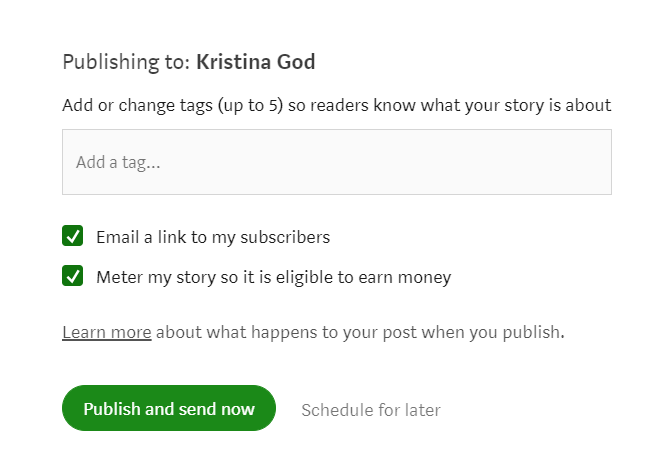
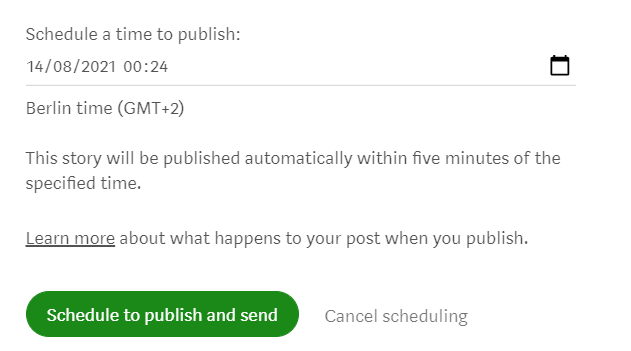
<img src="https://cdn-images-1.readmedium.com/v2/resize:fit:800/1*7KZ4AadiIKHP2CaNfj4wcw.png"><figcaption>Click the ‘Publish’ button; screenshot by <a href="https://kristinagod.medium.com/">Kristina God</a></figcaption></figure><p id="ee65">2. Click <b>‘Schedule for later’.</b></p><figure id="1400"><img src="https://cdn-images-1.readmedium.com/v2/resize:fit:800/1*Uj3W8nDNokCz98eEEGIQnw.png"><figcaption>Click ‘Schedule for later’; screenshot by <a href="https://kristinagod.medium.com/">Kristina God</a></figcaption></figure><p id="1163">3. Schedule a specific time and date to publish your post and click on the green button <b>‘Schedule to publish and send’</b>.</p><figure id="6308"><img src="https://cdn-images-1.readmedium.com/v2/resize:fit:800/1*yRf1OsObiavVQBxokxiqbw.png"><figcaption>Schedule a time to publish; screenshot by <a href="https://kristinagod.medium.com/">Kristina God</a></fi
Options
gcaption></figure><p id="aef1">By looking in your personal story drafts/your publication’s stories section you can verify that your post is scheduled.</p><p id="3028">Finally, your story will be published automatically within five minutes of the specified time.</p><div id="afd4" class="link-block">
<a href="https://readmedium.com/theres-one-essential-thing-about-medium-i-didn-t-know-d95d55ebd3f">
<div>
<div>
<h2>There’s One Essential Thing About Medium I Didn’t Know</h2>
<div><h3>…for an insanely long time.</h3></div>
<div><p>medium.com</p></div>
</div>
<div>
<div style="background-image: url(https://miro.readmedium.com/v2/resize:fit:320/1*CKTlWhiD3uMf2_a3QO2vcw.jpeg)"></div>
</div>
</div>
</a>
</div></article></body>