avatarBurk

Free AI web copilot to create summaries, insights and extended knowledge, download it at here

2931

Abstract

8b58">Write OS does not only include comprehensive Notion templates for writing, organizing, and archiving your work, it also features</p><ul><li>a database to back up your email subscribers manually or automatically</li><li>a 7000-word e-book about writing and succeeding on Medium in 2022, with tips and tricks to get the best out of this platform.</li><li>a list of writing resources like apps, add-ons, extensions, and software to better the Medium experience</li><li>a list of reference articles about Medium and writing in general</li></ul><h1 id="6297">Why Notion</h1><p id="be6a">You might not be using Notion. I get it.</p><p id="d63e">I’ll strongly advise you to <a href="https://readmedium.com/how-i-manage-my-medium-content-with-notion-and-why-you-should-too-free-template-included-1600e4d1ee7e">take a look into this powerful free tool</a>, though.</p><p id="edfe">For some it seems too complex, they might not know what to do with it. I get it. I had the same issue when I started using Notion a few years ago.</p><p id="9671">It’s easier than you think. The key is a good use case. For me, this use case was building a great writing system.</p><p id="58a0">I quickly learned the basics. And now, I’m fairly deep into the advanced stuff you can do on Notion. I still have a lot to learn and discover, though. It’s fun.</p><p id="26e9">Notion is great for writing. The editor is simple and straightforward. You can use Markdown to write which is fantastic. Then, you have all the metadata to add to your posts like tags, times and dates, URLs, complex formulas, and more.</p><p id="1db8">Give it a shot! Organize your content in Notion.</p><h1 id="51cd">The bottom line</h1><p id="fe97">I’m excited to share my <b>Write OS</b> with you very soon.</p><p id="c23d"><b>If you want to be the first to try it, be sure to <a href="https://burk.gumroad.com/follow">follow me directly on Gumroad</a> where I’ll be releasing the product download. Or <a href="https://letters.byburk.net">subscribe to my newsletter to be notified</a> once it’s ready.</b></p><p id="b3d7">In the meantime, I already have a couple of Notion templates for Medium writers and content creators available on Gumroad.</p><p id="0f76">Check them out here:</p><div id="5d86" class="link-block"> <a href="https://burk.gumroad.com"> <div> <div> <h2>Burk</h2> <div><h3>Writer, designer, content creator. Find freebies & more below!</h3></div> <div><p>burk.gumroad.com</p></div> </div> <div> <div style="background-image: url(https://miro.readmedium.com/v2/resize:fit:320/0*7d9QcpeO013R8tWF)"></div> </div> </div> </a> </div><div id="ead2"><pre>P.S.: First, you should <span class="hljs-keyword">get</span> my posts <span class="hljs-keyword">in</span> your inbox. <span class="hljs

Options

-keyword">Do</span> that here! Secondly, <span class="hljs-keyword">if</span> you <span class="hljs-keyword">like</span> <span class="hljs-keyword">to</span> experience Medium yourself, consider supporting me <span class="hljs-keyword">and</span> thousands <span class="hljs-keyword">of</span> other writers <span class="hljs-keyword">by</span> signing up <span class="hljs-keyword">for</span> a membership. It <span class="hljs-keyword">only</span> <span class="hljs-keyword">costs</span> <span class="hljs-meta">5</span> per month, <span class="hljs-keyword">and</span> you have the chance <span class="hljs-keyword">to</span> make <span class="hljs-type">money</span> <span class="hljs-keyword">with</span> your writing <span class="hljs-keyword">as</span> well. <span class="hljs-keyword">When</span> I started, I made <span class="hljs-meta">3000</span> <span class="hljs-keyword">in</span> <span class="hljs-number">6</span> months. <span class="hljs-keyword">By</span> signing up <span class="hljs-keyword">with</span> this link, you’ll support me directly <span class="hljs-keyword">with</span> a portion <span class="hljs-keyword">of</span> your fee, it won’t <span class="hljs-keyword">cost</span> you more. <span class="hljs-keyword">If</span> you <span class="hljs-keyword">do</span> so, thank you a million times! Lastly, I <span class="hljs-keyword">create</span> freebies <span class="hljs-keyword">all</span> the <span class="hljs-type">time</span>. Subscribe <span class="hljs-keyword">for</span> more.</pre></div><div id="0e1f" class="link-block"> <a href="https://burkrosemann.medium.com/list/fe978b971cf9"> <div> <div> <h2>The Power Of Notion For Medium Writers</h2> <div><h3>Notion is an all-in-one productivity platform which is the perfect tool to write, manage, archive, and organize your…</h3></div> <div><p>burkrosemann.medium.com</p></div> </div> <div> <div style="background-image: url(https://miro.readmedium.com/v2/resize:fit:320/0*2049e1d805bbe96b2555f361d900f89443cd5e71.jpeg)"></div> </div> </div> </a> </div><div id="3a90" class="link-block"> <a href="https://burkrosemann.medium.com/list/62c7d034c25e"> <div> <div> <h2>Genius Tips For Medium Beginners (and Everybody Else)</h2> <div><h3>Medium is the best place to write online. To make it even better, here are some genius tips for Medium writers, from…</h3></div> <div><p>burkrosemann.medium.com</p></div> </div> <div> <div style="background-image: url(https://miro.readmedium.com/v2/resize:fit:320/0*19a4c6c32a14c826f30e63e66b263b5fc17f9f02.jpeg)"></div> </div> </div> </a> </div></article></body>

Write OS

The system to write

Programmer code vector created by freepik — www.freepik.com

Are you feeling lost on Medium?

When I began in February 2021, I did.

1.5 years later, I’m enjoying my entrepreneurial journey with Medium as my main income source.

From 0 to 4 figures a month with writing. And additional money from other connected income streams like affiliate marketing, digital product sales, video content, and ads.

Now, I have a robust and comprehensive writing system in place to keep track of my stories, gain deeper insights into my stats and analytics, archive my work, back up my email subscribers, and manage my tasks or to-dos.

Here’s my Write OS.

What’s Write OS

I run my writing system in Notion. Notion is an all-in-one productivity tool that’s free to use and infinitely capable.

It combines the powers of a to-do app, calendar, project management tool, writing app, database system, spreadsheet and word processor, and so much more.

And it’s free.

Inside of Notion, I write my Medium stories. It’s a brilliant writing tool.

I also create content for Substack, Vocal, NewsBreak, WordPress, my blog, and social media. Lastly, I keep track of my YouTube videos and digital product designs for Gumroad.
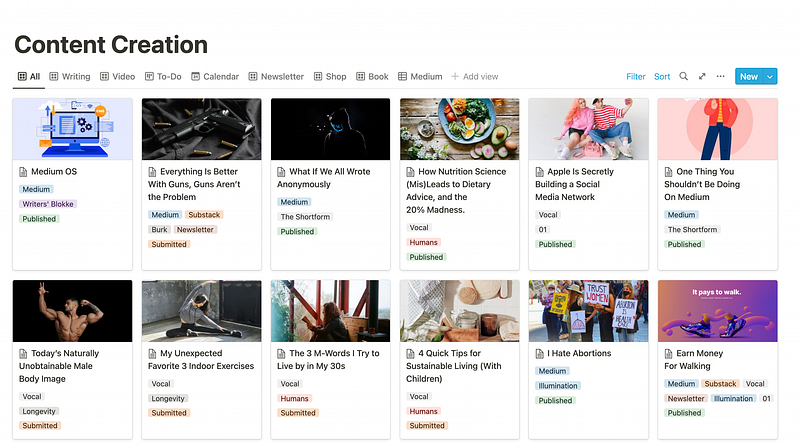
Screenshot by author

All in one app. Synced across my devices, accessible from phone, tablet, and desktop. For free.

Simply brilliant.

Why am I telling you this

Write OS has been such a game changer for my full-time content creator business that I’ve decided to turn it into a digital product.

That means I’m going to release the full Write OS as a digital download on Gumroad very soon.

For all of you, Medium writers, who are looking for a robust and detailed management system for writing, this is perfect. Not just for Medium writers, though, anyone can benefit from this system. It’s made to be platform-independent.

But there’s more.

Write OS features

Write OS does not only include comprehensive Notion templates for writing, organizing, and archiving your work, it also features

  • a database to back up your email subscribers manually or automatically
  • a 7000-word e-book about writing and succeeding on Medium in 2022, with tips and tricks to get the best out of this platform.
  • a list of writing resources like apps, add-ons, extensions, and software to better the Medium experience
  • a list of reference articles about Medium and writing in general

Why Notion

You might not be using Notion. I get it.

I’ll strongly advise you to take a look into this powerful free tool, though.

For some it seems too complex, they might not know what to do with it. I get it. I had the same issue when I started using Notion a few years ago.

It’s easier than you think. The key is a good use case. For me, this use case was building a great writing system.

I quickly learned the basics. And now, I’m fairly deep into the advanced stuff you can do on Notion. I still have a lot to learn and discover, though. It’s fun.

Notion is great for writing. The editor is simple and straightforward. You can use Markdown to write which is fantastic. Then, you have all the metadata to add to your posts like tags, times and dates, URLs, complex formulas, and more.

Give it a shot! Organize your content in Notion.

The bottom line

I’m excited to share my Write OS with you very soon.

If you want to be the first to try it, be sure to follow me directly on Gumroad where I’ll be releasing the product download. Or subscribe to my newsletter to be notified once it’s ready.

In the meantime, I already have a couple of Notion templates for Medium writers and content creators available on Gumroad.

Check them out here:

P.S.: First, you should get my posts in your inbox. Do that here! Secondly, if you like to experience Medium yourself, consider supporting me and thousands of other writers by signing up for a membership. It only costs $5 per month, and you have the chance to make money with your writing as well. When I started, I made $3000 in 6 months. By signing up with this link, you’ll support me directly with a portion of your fee, it won’t cost you more. If you do so, thank you a million times! Lastly, I create freebies all the time. Subscribe for more.
Medium
Writing
Creativity
Productivity
Technology
Recommended from ReadMedium