
Medium Formatting
Medium Drop Caps and Custom Drop Caps
Customizing your Medium article formatting with drop caps and custom drop caps

A ‘drop cap’ or ‘initial’ is a specifically-styled first letter of a block of text that is usually larger and sometimes more ornate than the surrounding letter-forms. Decorative caps increased usability by marking important passages and guiding readers through the text.
Unlike their historic counterparts, drop caps on the Web don’t add value in terms of usability or readability — and they are usually hard for Web developers to control, often rendering differently across browsers.
One of the nice features of the Medium editor is its simple, but effective, creation of a drop caps tool:
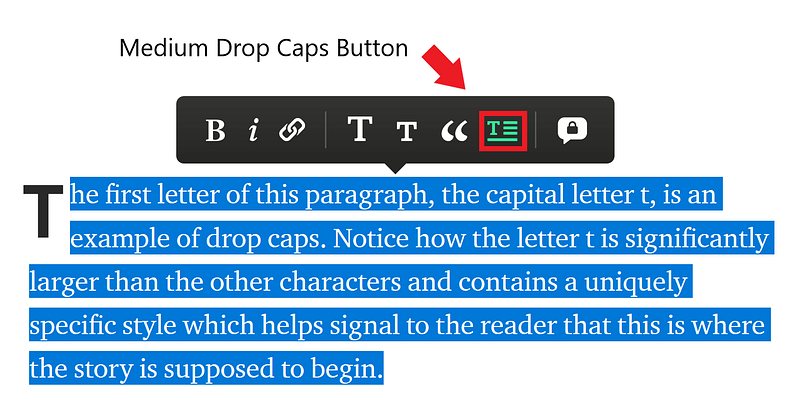
When the drop caps tool is used, the first letter of any selected paragraph is enlarged and takes on a specific style format:
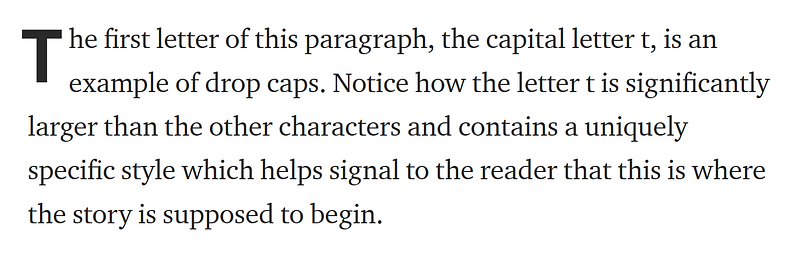
How to Create Drop Caps in Medium
Select the first letter of a paragraph, and an option to turn it into a drop cap will appear in your formatting menu. Click on the drop caps button and the first letter of the paragraph will be converted, as seen below:

Custom Image Drop Caps
You can also upload a custom image drop cap instead of the Medium default characters.
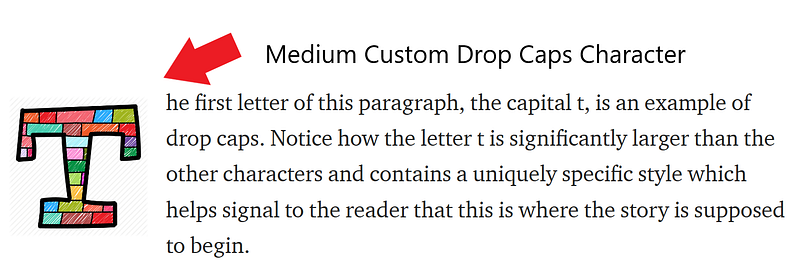
How to Create a Custom Drop Caps Character
- Follow the steps above to create a standard drop caps character.
- Save the custom image you want to use for your custom drop caps character to your desktop.
- Click on the standard drop caps character (you should see a green rectangle appear around the large letter).
- From your desktop, drag the custom image file you’d like to use in place of your drop cap, directly onto the green box.
- The custom image will replace the default drop caps character.

Need Custom Drop Caps Letters?

Thanks for reading this article! Leave a comment below if you have any questions. Be sure to sign up for the Blogging Guide newsletter, to get the latest tips, tricks, and news about writing on Medium and to join our Facebook group, Medium Writing, to share your latest Medium posts and connect with other writers.
If you liked this article, here are some other articles you may enjoy:

Casey Botticello is a partner at Black Edge Consulting. Black Edge Consulting is a strategic communications firm, specializing in online reputation management, digital marketing, and crisis management. Prior to founding Black Edge Consulting, he worked for BGR Group, a bipartisan lobbying and strategic communications firm.
Casey is the founder of the Cryptocurrency Alliance, a Super PAC dedicated to cryptocurrency and blockchain advocacy. He is a graduate of The University of Pennsylvania, where he received his B.A. in Urban Studies.
You can connect with him on LinkedIn, Twitter, Facebook, or by visiting his website, Blogging Guide.


