Analyze Your Distributed Stories
The new release of the Chrome Extension makes it easier
Initially I had planned this release to be a quick update. But then I learned some new tricks. I won’t bother you with the technical details, but let’s say I fell way down the rabbit hole and wanted to put my newfound expertise to use. I got a range of exciting features.

I proudly present version Popcorn of the Chrome extension Medium Distribution Info. That’s version 3.0 for those of you who enjoy knowing that you’re dealing with a major version.
Again, the codename hardly makes any sense. Three features of this release are behind the pop(up) button, so this was the most fitting name I could come up with. Think you can do better? Let me know in the comments.
Anyway, read on to see all this new version has to offer. Or scroll down to see the (still) pictures. [TK think of a better joke; no one is going to get that I am implying moving pictures here and even if they did, they wouldn’t understand the far-fetched association with popcorn].
Before we’re off, let me make sure that you know where to find the popup button is:
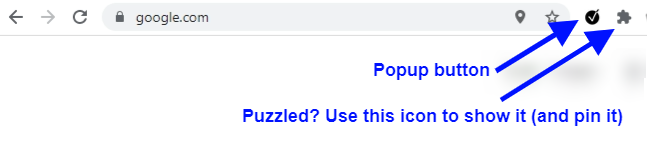
The button should be somewhere to the right of Chrome’s Omnibox (the address bar). If it isn’t, you can use the puzzle piece to access it and even pin it to have it available at all times.
Got it? Great. It’s showtime!
New features
Analysis
Ok, maybe analysis is a big word. But the intention of this is to enable you to analyze your data without compiling the data yourself.
This was one major journey for me. I learned a lot of new technical wizardry. And as learning goes, there was a lot of frustration, but in the end I felt elated that I managed to get everything to work. Want to know more? Read this revealing story by yours truly.
The analyze button also resides under the popup button. Surprise! You didn’t see it coming, did you? Go ahead, just calm down, take a deep breath and push it.
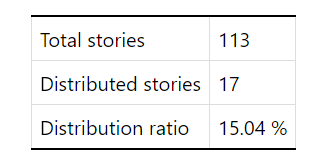
There is some waiting time involved for the extension to grab all the data. This is a great time to get those corns popping. For me it takes about two seconds. I hope you are patient enough for this.
The second feature under the popup menu is a list of the top 5 recently Distributed stories as soon as you open it. How is that for service? Now you don’t have to dive deeper every time. You don't even need to be on Medium for this work (you do need to be logged in, obviously).
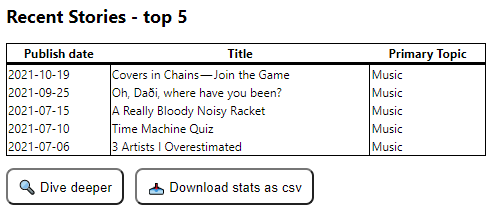
The analyze-page is very basic at the moment. I have some ideas I want to implement, but I would much rather get your input on this. What do you want to analyze? Which data or information are you yearning for? Or maybe you can live without the extraordinary power of statistical analysis? Let me know in the comments. Seriously. Those suggestions will most likely be the next update to the extension.
Download
Now it’s possible to download your stats. It’s basically the same list that Medium Enhanced Stats gives you, but it also provides the Primary Topic for you. The button will spawn a comma-separated file (csv) which you can use in the spreadsheet of your choice.
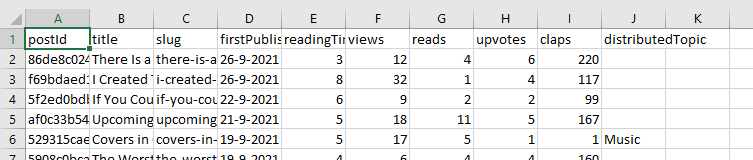
By now you should know where to find the download button. First, however, you need to have your popcorn ready, because you can tinker with the downloaded data longer than you would need to finish viewing an average 3D blockbuster (oh, why didn’t Avatar have a bathroom break!).
As I said earlier: if you create beautiful graphs, wonderful insights, or funny statistics, let me know. I’d love to add some calculations or graphs to an upcoming version in the analyze section.
In-depth explanation
Remember the hover-texts I introduced? These things are wonderful to display some additional information without cluttering your screen. In this release I found out that these floaters are just not adequate for my needs, for two reasons.
First, there is only so much text I can cram in a little box to be able to read everything comfortably. Secondly, if I want to update the texts, it takes a day or two for Google to release the new version.
At the detailed stats of a story, I have introduced question-marks in Medium’s style. Clicking on those will take you to a page that holds more information. I will update that story on a regular basis.

The explanation story is intended to be a reference document. Bring some popcorn if you want to digest all information at once. It’s a lot and I couldn’t bring myself to let my cringeworthy humour seep in. I am, however, proud of the infographic I put in there. Maybe I’ll create a couple more of those.
I hope this is a sustainable solution for my needs. Let me know in the comments what your needs are.
Suggested Topics
On the statistics page of a story, you can see all kinds of distribution details. I revamped the looks a bit and I added some information regarding the topics that Medium automatically applies to your stories.
We have no way of knowing for sure how these topics are selected and we don’t know how they are used. We need some serious theorycrafting to find out. My working hypothesis is always in the explanation story.
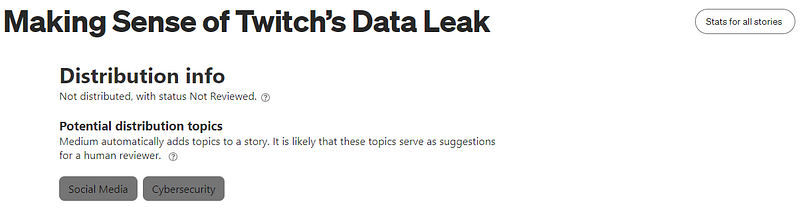
I think it is interesting to see what the Medium-bots think a story is about. Whether it is useful, is for you to decide. Let me know in the comments!
Small updates
Sorting hat-trick
Jeanne-Erin reported she found it hard to tell the × and the ? in the overview apart when scrolling. How can I refuse a small request to change that up a little? In fact, I have thrown in a little extra.
Now the question mark appears Medium-grey. Hopefully, this makes scrolling easier on the eyes. Also, when you sort the table now by Distribution, the ? and the × no longer mingle. First, you get the distributed stories, then the unknowns (?), and finally the undistributed ones (×). Thanks for the suggestion, Jeanne-Erin. Let me know what you think about it. That goes for all of you.
Oh, you need 3 things for a hat-trick? I also popped a very minor bug.
Performance
One of the things I learned has to do with the fundamentals. The extension first loads all the data from the background, and then it displays it on the page. Sometimes, however, the extension wants to put stuff on the table before loading is complete. To prevent this, I had some code that prevented that. I finally figured out how to prevent that from happening. This, and some other things in how I handle the data have been implemented in some pieces of the code. In later updates I want to add that everywhere.
Did this technobabble sound too corny? Sorry. I had to vent some complaints about the cleaning up I need to do now. Yup, there’s more cleaning up to do. If you haven’t already clicked on the link, read this story to know what I mean by the unholy horrors of cleaning up code.
Otherwise, you should not notice too much about this just yet. Ending credits at a movie are boring too, so I thought this would be a fitting end to the list of new stuff.
What did not make it?
I really tried to put a show on the road by studying hard and experimenting with my new knowledge. I planned to be able to show all topics at the overview, in the popup, at the analyze page, and in the downloads. Sadly, I had to conclude that this was not possible without putting some strain on Medium’s server. I’m pretty sure that the extension will bump into a few Captcha’s and fail completely to prove it’s human.
So, I am a bit crestfallen by the failure to fully implement the features I wanted to.
Maybe I’ll add some manual ‘Get more data’-buttons here and there, but for now I don’t see an option to implement everything I want. Ah, well. It’s not over before the fat lady sings.
The statistics are very basic at this point. I had spent too much time on getting my failed experiment to run. And at some point you just have to call it a day. I’d rather have early feedback than a release with bells and whistles no one wants to use. It would be awesome if you guys put something on your wishlist in the comments.
Due to this some other basic things you’d expect aren’t there. Like the ability to sort the table at the analyze-page, or have fancy graphs with cute animations in the popup. I don’t see the sense in gold-plating for this first release.
I am toying with the idea to show that a story is not distributed when you read it. I’m always unsure whether the extension works (I usually have a development version running). In the end, I moved that to an upcoming release, unless you all tell me not to implement it.
How about the sequel?
Ideally, I will get loads of inspiration for what would be interesting to see on the analysis page. Instead of bundling all the new info in one big release, I’d like to push out every update as a minor version. I think the analysis page will become a valuable asset to the extension and not just a gimmick.
There’s also a lot of refactoring (improve code) to do. If I postpone that too much, it will become harder and harder to create new updates. Did I mention this story? It dives a bit deeper than I’m doing here. Oh, and it also involves woodworking. What’s not to like?
Finally, there are the things I have mentioned in earlier updates. The most notable would be to make the extension work on publications on a custom domain (ones not on medium.com).
As always, I am open to suggestions. Don’t be afraid to request something. The worst that can happen is that I say no.
I am beyond flattered that a couple of you donated me a coffee! Thanks a lot for your support. If you want to do so as well, use the link above. If you can’t spare the change. Don’t worry, but maybe… I would like it if you read one of my stories that are not about the extension. You might enjoy those too.
Downloading and installing
The link above takes you to the Chrome Webstore. Installing is easy. Updates are done automatically.
All releases notes and information can be found here.
Wow, some dedication! You made it to the end. Did you finish your popcorn?
Thank you for your support. I hope to hear from you in the comments. Until then: stay awesome and get distributed!


