avatarStevie Adler

Free AI web copilot to create summaries, insights and extended knowledge, download it at here

1013

Abstract

in preview it could say <b>Microfiction</b>, and when reading the story, the <b>Subtitle</b> could be blanked out.</p><h2 id="7004">Description</h2><p id="d897">The default Description that appears in an internet search is the first 160 characters (approx) of the body of the story. I’ve always found this a bit confusing. Why does it not describe what the whole story is about, then you are better placed to decide to read it or not. This is where you can customise the <b>Description</b>.</p><h1 id="017b">Step-by-Step Instructions</h1><p id="5a72">Edit story:</p><figure id="81ce"><img src="https://cdn-images-1.readmedium.com/v2/resize:fit:800/1*RJ0zisyrWv8E04ddVRpo0A.jpeg"><figcaption>Screen shot — Stevie Adler</figcaption></figure><p id="7099">Press the three dots <b></b> (top-right) to get drop-down menu:</p><figure id="eaac"><img src="https://cdn-images-1.readmedium.com/v2/resize:fit:800/1*fZIsKdzUTU_YpTj-Q1e11g.jpeg"><figcaption>Screen shot — Stevie Adler</figcaption></figure><p id="1564">Select

Options

option <b>Customize title / subtitle</b></p><p id="a782">and note what the Automatic values of fields <b>Title</b>, <b>Subtitle</b> and <b>Description</b>:</p><figure id="9eec"><img src="https://cdn-images-1.readmedium.com/v2/resize:fit:800/1*M2aOtEs1Kvmaan5QokI8vA.jpeg"><figcaption>Screen shot — Stevie Adler</figcaption></figure><p id="fa5e">click the <b>Custom</b> button:</p><figure id="b1cb"><img src="https://cdn-images-1.readmedium.com/v2/resize:fit:800/1*VFlkSSjjz5jXcQo2IbGs3A.jpeg"><figcaption>Screen shot — Stevie Adler</figcaption></figure><p id="114f">change required fields:</p><figure id="bae1"><img src="https://cdn-images-1.readmedium.com/v2/resize:fit:800/1*9n4QSwZ4O3EhhPl9Y_ByZw.jpeg"><figcaption>Screen shot — Stevie Adler</figcaption></figure><p id="d9cd">Press <b>Save </b>(and remember it only takes effect after <b>Publish</b>)</p><p id="a378">In practice, not sure if the customised description propagates to search engines…</p><p id="cd51">(note: unlisted document)</p></article></body>

Medium: Customize Subtitle / Description

Customise fields that appear in a Preview (Title, Subtitle and Description)

When stories are listed Medium, in a profile list say, there is a preview of the story showing Title and Subtitle. It is possible to customise this preview text of Title and Subtitle.

When Medium stories are listed in an internet search it is possible to customise the Description as well as Title and Subtitle.

Title

I’m not sure why you would want to customise a story Title that appears in a preview to be different to the actual Title, but it is possible. Perhaps you might want to shorten it to make it more “punchy” and eye-catching, or to fit into a smaller space.

Subtitle

One reason why the Preview Subtitle might be different to the Story Subtitle is to highlight some reason why you would want to read it. So, in preview it could say Microfiction, and when reading the story, the Subtitle could be blanked out.

Description

The default Description that appears in an internet search is the first 160 characters (approx) of the body of the story. I’ve always found this a bit confusing. Why does it not describe what the whole story is about, then you are better placed to decide to read it or not. This is where you can customise the Description.

Step-by-Step Instructions

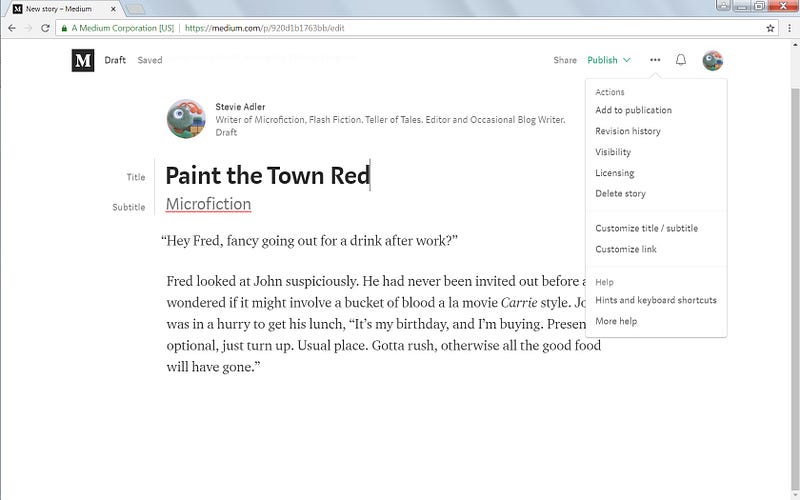
Edit story:
Screen shot — Stevie Adler

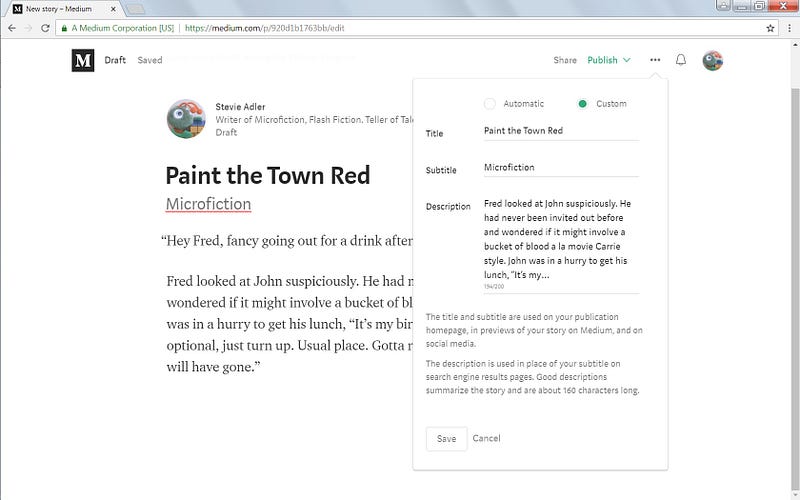
Press the three dots (top-right) to get drop-down menu:

Screen shot — Stevie Adler

Select option Customize title / subtitle

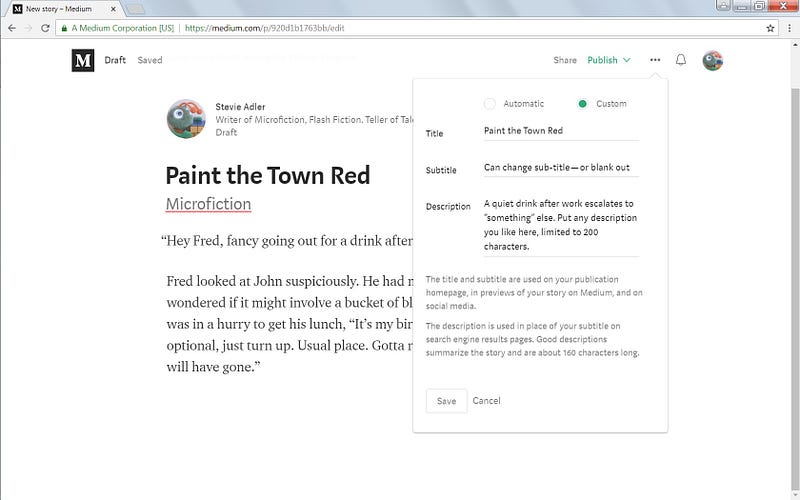
and note what the Automatic values of fields Title, Subtitle and Description:
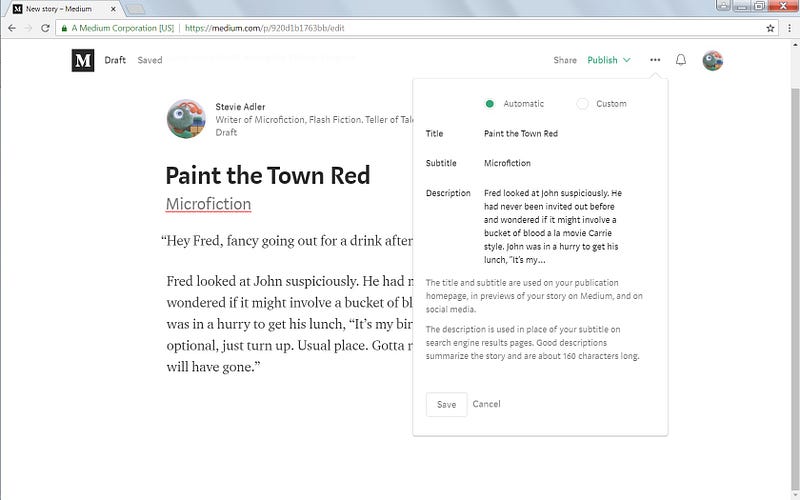
Screen shot — Stevie Adler

click the Custom button:

Screen shot — Stevie Adler

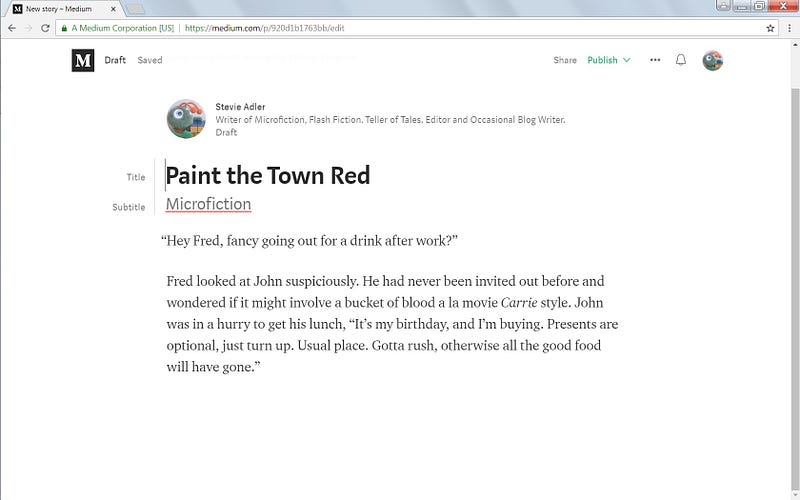
change required fields:

Screen shot — Stevie Adler

Press Save (and remember it only takes effect after Publish)

In practice, not sure if the customised description propagates to search engines…

(note: unlisted document)

Medium
Customization
Medium How To
Recommended from ReadMedium