000">
</div>
</div>
</figure></iframe></div></div></figure><p id="5481">Take a look at this <a href="https://codesandbox.io/s/material-table-autofocus-tihjt?file=/src/App.js">codesandbox</a> above for the complete code. You may be best off opening the table itself in a new tab to see it effectively. I’ll dive into some of the most important points below.</p><h1 id="26e2">Requirements and how to add autoFocus to material-table</h1><p id="dfa1">Material-Table requires @material-ui/core. It also uses @material-ui/icons, but if that is not available then material-table replaces the icons with text. In my codesandbox I controlled this by directly giving the table the icons I wanted to use.</p><p id="6614">If you are adding rows, that implies you want to make use of the ‘editable’ config. Take a look at the <a href="https://material-table.com/#/docs/features/editable">docs here</a> for the starter code. That is what I used in the above codesandbox. Please note the following:</p><ul><li>onRowAdd must return a promise — otherwise the table breaks</li><li>onRowUpdate and onRowDelete are required with onRowAdd — otherwise the table styling is off</li></ul><p id="b232">The most important unique piece of code I wrote can be seen in the first element in the ‘columns’ config array. Notice that I overrode ‘editComponent’ and added
Options
a lambda function that returns an MUI <input> element.</p><div id="3702"><pre><span class="hljs-attr">editComponent</span>: <span class="hljs-function">(<span class="hljs-params">editProps</span>) =></span> (
<span class="language-xml"><span class="hljs-tag"><<span class="hljs-name">Input</span>
<span class="hljs-attr">autoFocus</span>=<span class="hljs-string">{true}</span>
<span class="hljs-attr">onChange</span>=<span class="hljs-string">{(e)</span> =></span> editProps.onChange(e.target.value)}
/></span>
)</pre></div><p id="b3be">The ‘onChange’ is necessary to return the <input> value to the onRowAdd callback properly; it won’t work without ‘onChange’.</p><p id="a67b">Comment below with any good demos you’ve made using material-table.</p><p id="69a8">Preparing for a JavaScript interview? Simply want to expand your knowledge of JavaScript? Check out my book, <a href="https://geni.us/JS-Interview-Amazon-Lk"><b>300 JavaScript Interview Mastery Questions</b></a><b> </b>(affiliate link).The questions explore a wide variety of JavaScript syntax, functions, APIs, and theory. You WILL learn something new in this book and be better prepared for your next interview.</p><figure id="5c3c"><img src="https://cdn-images-1.readmedium.com/v2/resize:fit:800/0*cJOQIaRfdGd9EWCv.png"><figcaption></figcaption></figure></article></body>
Material-Table AutoFocus on Row Add
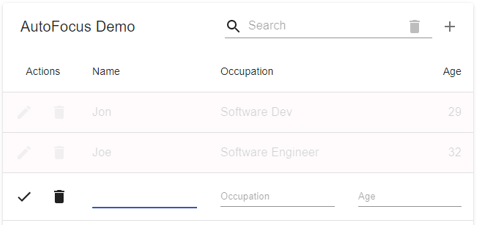
Material-Table is a react data table based on Material-UI. It is quick to implement and will feel familiar to any developer experienced with React and MUI. It is also relatively easy to customize, such as adding autoFocus to the first input when adding a new row to a table.
I recently was using an editable material-table and noticed that I had to make an annoying extra click after adding a row before I could start typing in data. I’ll show in this article how I overrode the first column component to add autoFocus.
Take a look at this codesandbox above for the complete code. You may be best off opening the table itself in a new tab to see it effectively. I’ll dive into some of the most important points below.
Requirements and how to add autoFocus to material-table
Material-Table requires @material-ui/core. It also uses @material-ui/icons, but if that is not available then material-table replaces the icons with text. In my codesandbox I controlled this by directly giving the table the icons I wanted to use.
If you are adding rows, that implies you want to make use of the ‘editable’ config. Take a look at the docs here for the starter code. That is what I used in the above codesandbox. Please note the following:
onRowAdd must return a promise — otherwise the table breaks
onRowUpdate and onRowDelete are required with onRowAdd — otherwise the table styling is off
The most important unique piece of code I wrote can be seen in the first element in the ‘columns’ config array. Notice that I overrode ‘editComponent’ and added a lambda function that returns an MUI element.
The ‘onChange’ is necessary to return the value to the onRowAdd callback properly; it won’t work without ‘onChange’.
Comment below with any good demos you’ve made using material-table.
Preparing for a JavaScript interview? Simply want to expand your knowledge of JavaScript? Check out my book, 300 JavaScript Interview Mastery Questions(affiliate link).The questions explore a wide variety of JavaScript syntax, functions, APIs, and theory. You WILL learn something new in this book and be better prepared for your next interview.