
Mastering Time Management with Todoist: Your Ultimate Guide
Time management is a crucial skill that can greatly enhance productivity and reduce stress. With the myriad of tasks and responsibilities we face in our personal and professional lives, effectively managing our time becomes essential. One popular tool that aids in this endeavor is Todoist — a powerful task management application that helps individuals and teams stay organized and focused. In this comprehensive guide, we will delve into the various features and techniques offered by Todoist to master time management and boost productivity.
Start organizing your life with Todoist! Sign up now.
II. Getting Started with Todoist
A. Setting up an account
To begin your time management journey with Todoist, you first need to create an account. Simply visit the Todoist website or download the mobile app, and sign up using your email or preferred social media account.
B. Navigating the Todoist interface
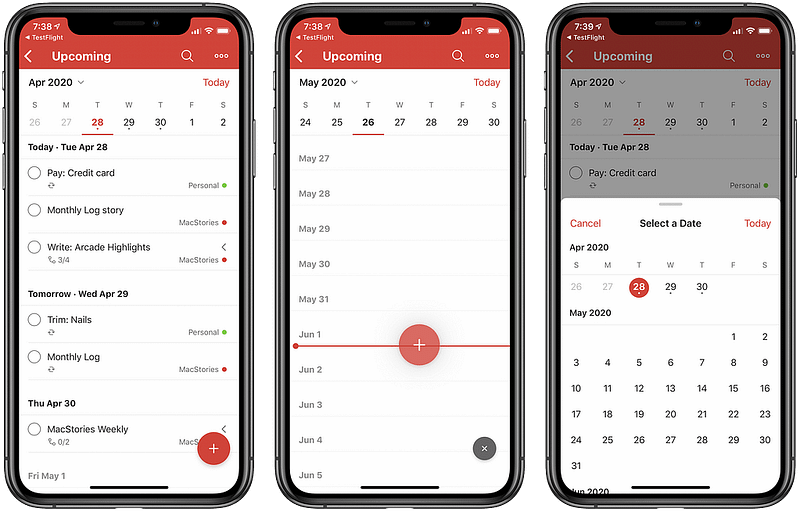
Once you have created an account, familiarize yourself with the Todoist interface. The user-friendly design allows for easy navigation and quick access to essential features. The main components include the project list, task list, and task view.
C. Creating projects and tasks
One of the fundamental aspects of Todoist is organizing your tasks into projects. Projects serve as containers for related tasks, helping you maintain clarity and structure. Create projects based on categories such as work, personal, or specific projects you are working on.
D. Adding due dates and reminders
Assigning due dates and setting reminders ensures that you stay on top of your tasks. Todoist allows you to add due dates to individual tasks, set recurring due dates for repetitive tasks, and even create location-based reminders.
Activate your Todoist account and unlock the power of productivity.
III. Organizing Your Tasks
A. Creating task labels and filters
Task labels and filters enable you to categorize and filter your tasks based on different criteria. You can create labels such as “urgent,” “important,” or customize them to suit your specific needs. Filters help you view tasks based on labels, due dates, and other attributes.
B. Prioritizing tasks with labels and colors
By assigning labels and colors to your tasks, you can visually prioritize and differentiate between various tasks. This feature allows you to focus on the most critical tasks and helps you allocate your time efficiently.
C. Using sections and subtasks
To further organize your tasks within projects, Todoist provides sections and subtasks. Sections allow you to group related tasks together, creating a logical flow within a project. Subtasks enable you to break down complex tasks into smaller, manageable steps.
D. Collaborating with others on tasks
Todoist supports collaboration, making it ideal for team projects or shared responsibilities. You can invite team members, assign tasks, and communicate within the task comments section. This promotes seamless collaboration and enhances productivity.
Discover the incredible features of Todoist and supercharge your productivity.
IV. Maximizing Productivity with Todoist Features
A. Utilizing recurring tasks
Recurring tasks are a powerful feature that automates repetitive tasks, saving you time and effort. Whether it’s daily, weekly, or monthly tasks, Todoist allows you to set up recurring patterns and reminders.
B. Using task comments and attachments
Sometimes tasks require additional information or attachments. Todoist offers a built-in commenting system where you can leave notes, ask questions, or provide updates. You can also attach files, such as documents or images, directly to a task.
C. Setting task dependencies and priorities
For tasks that are dependent on others or have specific dependencies, Todoist enables you to establish task dependencies. By setting priorities and task sequences, you ensure that tasks are completed in the most efficient order.
D. Integrating Todoist with other tools and platforms
To streamline your workflow and enhance productivity, Todoist integrates with various tools and platforms. You can connect Todoist with your calendar, email, note-taking apps, and project management software, allowing for seamless data synchronization and task management.
Choose the perfect plan for your productivity needs. View our pricing options.
V. Advanced Tips and Techniques
A. Customizing Todoist settings
Todoist provides extensive customization options to tailor the application to your preferences. You can configure various settings, such as the task view layout, notification preferences, and keyboard shortcuts, to optimize your workflow.
B. Implementing the Eisenhower Matrix
The Eisenhower Matrix is a popular time management technique that Todoist fully supports. By categorizing tasks into four quadrants — urgent and important, important but not urgent, urgent but not important, and neither urgent nor important — you can prioritize tasks effectively and allocate your time accordingly.
C. Applying the Pomodoro Technique
The Pomodoro Technique is a time management method that breaks work into intervals, typically 25 minutes of focused work followed by a short break. Todoist can be integrated with Pomodoro timers, helping you maintain productivity and manage your time more efficiently.
D. Harnessing keyboard shortcuts for efficiency
Todoist offers a range of keyboard shortcuts that allow you to navigate and interact with the application swiftly. Learning and utilizing these shortcuts can significantly improve your speed and efficiency when managing tasks.
Elevate your team’s productivity with Todoist Business. Get started today.
VI. Staying Motivated and Consistent
A. Setting realistic goals and expectations
When managing your time, it’s crucial to set realistic goals and expectations. Break down larger tasks into smaller, actionable steps, and ensure your deadlines are attainable. This approach fosters motivation and prevents overwhelm.
B. Tracking progress and celebrating achievements
Todoist offers progress tracking features, allowing you to see your accomplishments and milestones. Celebrating small victories can boost motivation and reinforce positive habits.
C. Overcoming procrastination and staying focused
Procrastination can hinder effective time management. Combat this by leveraging Todoist’s features, such as reminders, deadlines, and breaking tasks into smaller, manageable subtasks. Additionally, utilize strategies like time blocking or the “two-minute rule” to maintain focus and avoid procrastination.
D. Building a sustainable time management routine
Establishing a consistent time management routine is key to long-term success. Experiment with different approaches, find what works best for you, and stick to it. Regularly review and optimize your task lists, priorities, and strategies to ensure continuous improvement.
VII. Todoist for Work and Personal Life
A. Managing projects and teams
Todoist’s versatility extends beyond personal use. It is also a valuable tool for managing projects and teams. Collaborative project management, task assignments, and shared visibility make Todoist an excellent choice for both individual and team-oriented workflows.
B. Balancing work and personal tasks
Todoist allows you to manage both work-related and personal tasks in one place. You can create separate projects or use labels to distinguish between work and personal responsibilities, facilitating a balanced and organized approach to managing your life.
C. Syncing Todoist across devices
With Todoist’s multi-platform availability, you can access your tasks and projects seamlessly across various devices. Whether it’s your computer, smartphone, or tablet, your tasks and progress are always synchronized, ensuring you stay organized wherever you are.
D. Leveraging Todoist for personal growth
Beyond managing tasks, Todoist can be a powerful tool for personal growth and self-improvement. By incorporating habits, goals, and milestones into your task lists, you can actively work on developing new skills, pursuing hobbies, or achieving personal aspirations.
VIII. Troubleshooting and Support
A. Common issues and solutions
While using Todoist, you may encounter some common issues or have questions about specific features. Todoist’s help resources and community forums provide solutions and troubleshooting guidance for most problems you might encounter.
B. Accessing Todoist help resources
Todoist offers a comprehensive knowledge base, tutorials, and FAQs to assist users in utilizing the application’s features effectively. These resources can provide in-depth information and answers to frequently asked questions.
C. Contacting Todoist support
In case you need personalized assistance or encounter technical difficulties, Todoist provides support channels for reaching out to their customer support team. Whether it’s via email, live chat, or support tickets, help is readily available.
Take Todoist with you everywhere. Download our app now!
IX. Conclusion
Mastering time management is an ongoing journey, and Todoist serves as an invaluable companion along the way. By implementing the techniques and utilizing the features provided by Todoist, you can effectively prioritize tasks, stay organized, and ultimately enhance your productivity. Take control of your time and unlock your full potential with Todoist — a reliable and versatile task management tool.
Frequently Asked Questions (FAQs)
Q1: Is Todoist available for free?
Yes, Todoist offers a free version that provides essential features for individual task management. There is also a premium version available with additional features and advanced functionalities.
Q2: Can I use Todoist offline?
Yes, Todoist allows you to access and manage your tasks offline. Any changes or updates you make will be synchronized across devices once you reconnect to the internet.
Q3: Can I share tasks and projects with others using Todoist?
Absolutely! Todoist supports collaboration, allowing you to share tasks, projects, and responsibilities with colleagues, friends, or family members. You can invite others to collaborate, assign tasks, and communicate within the application.
Q4: Can I integrate Todoist with other apps and tools I use?
Yes, Todoist offers integrations with a wide range of popular applications and platforms. You can connect Todoist with tools such as Google Calendar, Outlook, Slack, Trello, and more, enhancing your workflow and enabling seamless data synchronization.
Q5: Can I access Todoist on multiple devices?
Certainly! Todoist is designed to be accessible across various devices. You can use Todoist on your computer, smartphone, tablet, or smartwatch, ensuring you have access to your tasks and projects wherever you go.


