
Mastering Next JS 13: A Thorough Tutorial on Transforming the useRouter
Hi There!
Welcome to an exciting journey! In the article titled “Exploring useRouter in Next JS 13 and Making the Shift from next/router to next/navigation” we examined high level the modifications to useRouter in Next JS 13 and explored its updated functionalities.
In the era of Next JS 12, useRouter provided details like pathName, locale, query, asPath, basePath, and more. However, fast forward to Next JS 13, and useRouter has undergone a transformation, tailor-made for seamless programmatic navigation.
Let’s Uncover the Exciting Changes Together!
Get ready for an exciting ride as useRouter in Next JS has undergone some major upgrades! Loads of methods have either been swapped out or replaced with fresh hooks and approaches. No time to waste — let’s dive right into the revamped world of userRouter and discover the awesome alternatives waiting for us! Ready to explore? Let’s do this!
1. Import { useRouter } from ‘next/navigation’
The useRouter hook should be imported from next/navigation and not next/router when using the App Router
Take a look at the API Reference for ‘userRouter.’
router.push(href: string, { scroll: boolean }): Perform a client-side navigation to the provided route. Adds a new entry into the browser’s history stack.router.replace(href: string, { scroll: boolean }): Perform a client-side navigation to the provided route without adding a new entry into the browser’s history stack.router.refresh(): Refresh the current route. Making a new request to the server, re-fetching data requests, and re-rendering Server Components. The client will merge the updated React Server Component payload without losing unaffected client-side React (e.g.useState) or browser state (e.g. scroll position).router.prefetch(href: string): Prefetch the provided route for faster client-side transitions.router.back(): Navigate back to the previous route in the browser’s history stack.router.forward(): Navigate forwards to the next page in the browser’s history stack.
2. pathname Replaced by usePathname
The pathname string has been removed and is replaced by usePathname()
usePathname is a Client Component hook that lets you read the current URL's pathname.
'use client'

import { usePathname } from 'next/navigation'

export default function ExampleClientComponent() {
  const pathname = usePathname()
  return <p>Current pathname: {pathname}</p>
}
usePathname returns a string of the current URL's pathname. For example:
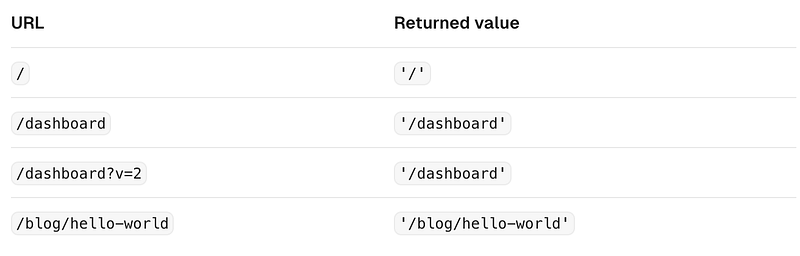
usePathname returns a string of the current URL's pathnameIn addition to that, numerous methods have been removed and substituted with new hooks. Consequently, we will now examine each of these methods individually along with their respective alternatives.
3. query Replaced by useSearchParams
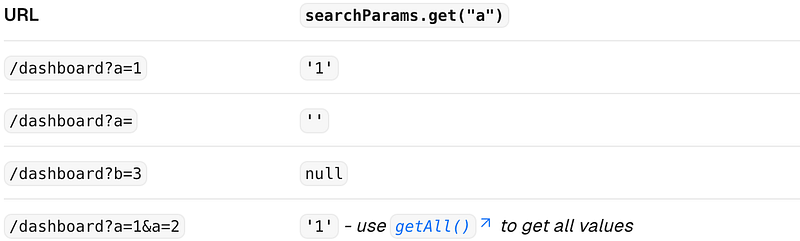
The query object has been removed and is replaced by useSearchParams()
useSearchParams returns a read-only version of the URLSearchParams interface.
'use client'

import { useSearchParams } from 'next/navigation'

export default function SearchBar() {
  const searchParams = useSearchParams()

  const search = searchParams.get('search')

  // URL -> `/dashboard?search=my-project`
  // `search` -> 'my-project'
  return <>Search: {search}</>
}
Learn more about other read-only methods of URLSearchParams, including the getAll(), keys(), values(), entries(), forEach(), and toString()
4. isFallback
isFallback has been removed because fallback has been replaced.
In the pages directory, the fallback property returned from getStaticPaths is used to define the behaviour of a page that isn't pre-rendered at build time.
// Example with `pages` directory

export async function getStaticPaths() {
  return {
    paths: [],
    fallback: 'blocking'
  };
}

export async function getStaticProps({ params }) {
  ...
}

export default function Post({ post }) {
  return ...
}
In the app directory the config.dynamicParams property controls how params outside of generateStaticParams are handled:
true: (default) Dynamic segments not included ingenerateStaticParamsare generated on demand.false: Dynamic segments not included ingenerateStaticParamswill return a 404.
This replaces the fallback: true | false | 'blocking' option of getStaticPaths in the pages directory. The fallback: 'blocking' option is not included in dynamicParams because the difference between 'blocking' and true is negligible with streaming.
// Example with `app` directory

export const dynamicParams = true;

export async function generateStaticParams() {
  return [...]
}

async function getPost(params) {
  ...
}

export default async function Post({ params }) {
  const post = await getPost(params);

  return ...
}
5. locale, locales, defaultLocales, domainLocales has been removed
The locale, locales, defaultLocales, domainLocales values have been removed because built-in i18n Next JS features are no longer necessary in the app directory. Learn more about i18n.
Explore the article named “Seamless Integration of Localisation and URL Optimisation in Next JS 13: Hiding the Default Locale” for guidance on setting up localisation in Next JS 13.
6. basePath has been Removed
basePath has been removed. The alternative will not be part of useRouter. It has not yet been implemented.
7. asPath has been Removed
asPath has been removed because the concept of as has been removed from the new router.
8. isReady has been Removed
isReady has been removed because it is no longer necessary. During static rendering, any component that uses the useSearchParams() hook will skip the pre-rendering step and instead be rendered on the client at runtime.
Conclusion
I trust the information provided above will be helpful for you, enabling you to better organise your code whether you are migrating from Next JS 12 to Next JS 13 or building a new app using Next JS 13.
Thank you so much for taking the time to read my article all the way through!
If you found it helpful or interesting, why not give it a round of applause by clicking those clap buttons?

And hey, don’t miss out on more insightful content — hit that follow button to stay updated!
Get email alerts for my latest Medium posts! Click here.
Happy learning! 👏
Stackademic
Thank you for reading until the end. Before you go:
- Please consider clapping and following the writer! 👏
- Follow us on Twitter(X), LinkedIn, and YouTube.
- Visit Stackademic.com to find out more about how we are democratizing free programming education around the world.