
Mastering Data Science Workflows with Helper Classes
Python Helper Classes for EDA, Feature Engineering and Machine Learning

In computer programming, classes are a useful way to organize data (attributes) and functions (methods). For example, you can define a class that defines attributes and methods related to a machine learning model. An instance of this type of class may have attributes such as training data file name, model type, and more. Methods associated with these attributes can be fit, predict and validate.
In addition to machine learning, classes have a wide range of applications across data science in general. You can use classes to organize a variety of EDA tasks, feature engineering operations, and machine learning model training. This is ideal because, if written well, classes make it easy to understand, modify and debug existing attributes and methods. This is particularly true if class methods are defined to complete a single well-defined task. It is generally good practice to define functions that do one thing and classes make understanding and maintaining these methods more straight-forward.
While using classes can make maintaining code more straightforward, it can also become harder to understand as you add complexity. If you like to organize attributes and methods for basic EDA, feature engineering and model training, a single class probably suffices. But as you add more attributes and methods for each type of task, initiation of these objects can become quite obscure, especially for collaborators reading your code. With this in mind, it is ideal to have helper classes for each type of task (EDA, feature engineering, machine learning) instead of a single class as complexity increases. When developing complex ML workflows, there should be separate EDA, feature engineering, and machine learning classes instead of a single class.
Here we will consider each of these types of tasks and see how to write a single class that enables us to perform them. For EDA, our class will allow us to read in data, generate histograms and scatter plots. For feature engineering, our class will have a methods taking the log transform. Finally for machine learning, our class will have fit, predict and validate methods.
From there we will see how as we add additional attributes and methods, class instantiation and method calls become harder to read. We will add additional methods and attributes for each task type and illustrate how readability get compromised as we add complexity. From there we will see how we can separate parts of our classes into helper classes that are easier to understand and manage.
For this work, I will be writing code in Deepnote, which is a collaborative data science notebook that makes running reproducible experiments very easy. We will be working with the Medical Cost dataset. We will use patient attributes such as age, body mass index, and number of children to predict medical costs. The data is publicly free to use, modify and share under the Database Contents License (DbCL: Public Domain).
Bookkeeping Model Type with OOP
To start, let’s navigate to Deepnote and create a new project (you can sign-up for free if you don’t already have an account).
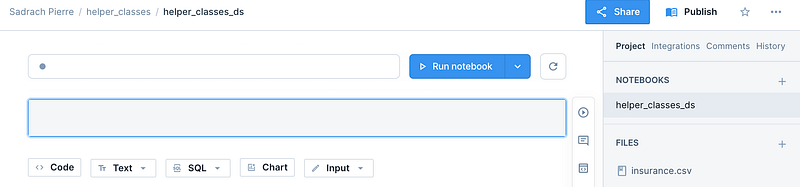
Let’s create a project called ‘helper_classes’ and a notebook within this project called ‘helper_classes_ds’. Also, lets drag and drop the insurance.csv file on the left hand panel on the page where it says ‘FILES’:
We will proceed by defining a class that contains, at a high level, some of the basic steps within a machine learning workflow. Let’s start by importing all of the packages we will be working with:
Let’s define a class called ‘MLworkflow’ which contains an init method that initializes dictionaries which we will use to store model predictions and the performance. We will also define a class attribute that stores our medical cost data:
class MLworkflow(object):
    def __init__(self):
        self._performance = {}
        self._predictions = {}
        self.data = pd.read_csv("insurance.csv")
Next we’ll define a method called ‘eda’ that performs some simple visualizations. If you pass a value of ‘True’ for the variable histogram, it will generate a histogram for the numerical feature specified. If you pass a value of ‘True’ for the variable scatter_plot, it will generate a scatter plot of the numerical feature against the target:
class MLworkflow(object):
    ...
    def eda(self, feature, target, histogram, scatter_plot):
        self.corr = self.data[feature].corr(self.data[target])
        if histogram:
            self.data[feature].hist()
            plt.show()
        if scatter_plot:
            plt.scatter(self.data[feature], self.data[target])
            plt.show()
Next, we’ll define another method called ‘data_prep’ that defines our inputs and output. We will also define a parameter called transform which we can use to take the log-transform of numerical columns:
class MLworkflow(object):
    ...
   def data_prep(self, features, target, transform):
        for feature in features:
            if transform:
                self.data[feature] = np.log(self.data[feature])
        self.X = self.data[features]
        self.y = self.data[target]
We will also define a fit method. It will split the data for training and testing, where the test_size can be specified by the ‘split’ parameter. We will also provide the option to fit to a linear regression or random forest model. This can obviously be extended to any number of model types:
class MLworkflow(object):
    ...
    def fit(self, model_name, split):
        X_train, X_test, y_train, y_test = train_test_split(self.X, self.y, random_state=42, test_size=split)
        self.X_test = X_test
        self.y_test = y_test
        if model_name == 'lr':
            self.model = LinearRegression()
            self.model.fit(X_train, y_train)
        elif model_name == 'rf':
            self.model = RandomForestRegressor(random_state=42)
            self.model.fit(X_train, y_train)
We will then define a predict method that generates predictions on our test set. We will store the results in our predictions dictionary, where the dictionary keys will be the model type:
class MLworkflow(object):
    ...
    def predict(self, model_name):
        self._predictions[model_name] = self.model.predict(self.X_test)
And finally calculate performance for each model type. We will use mean absolute error as our performance metric and store the values in our performance dictionary using a method called validate:
class MLworkflow(object):
    ...
    def validate(self, model_name):
        self._performance[model_name] = mean_absolute_error(self._predictions[model_name], self.y_test)
The full class is as follows:
We can define an instance of this class and generate some visualizations:
We can then define an instance and build linear regression and random forests models. We start by defining an instance of our class and calling the data prep method with the inputs and output we wish to use:
model = MLworkflow()
features = ['bmi', 'age']
model.data_prep(features, 'charges', True)
We can then build a linear regression model by calling the fit method with a model_name parameter value ‘lr’ for linear regression and a test_size of 20%. We then call the predict and validate methods on our model instance:
model.fit('lr', 0.2)
model.predict('lr')
model.validate('lr')
We can do the same for our random forest model:
model.fit('rf', 0.2)
model.predict('rf')
model.validate('rf')
As a result our model object will have an attribute called _performance. We can access it through our model object and print the dictionary:
We see that we have a dictionary with keys ‘lr’ and ‘rf’ with mean absolute error values of 9232 and 9161 respectively.
Bookkeeping Model Type and Categorically Segmented Training Data with a Single Class
While the code used to define this class is simple enough, it can be come difficult to read and interpret with increasing complexity. For example, what if in addition to being able to monitor model_types, we’d like to be able to build models on distinct categories within the data. For example, what if we wish to train a linear regression model on only female patients or a random forest model trained on only male patients. Let’s walk through how to write this modified class. Similar to before we define an init method where we initialize necessary dictionaries. We will add a new dictionary called models:
class MLworkflowExtended(object):
    def __init__(self):
        self._performance = {}
        self._predictions = {}
        self._models = {}
        self.data = pd.read_csv("insurance.csv")
The eda and data prep methods remain mostly unchanged:
class MLworkflowExtended(object):
    ...
    def eda(self, feature, target, histogram, scatter_plot):
        self.corr = self.data[feature].corr(self.data[target])
        if histogram:
            self.data[feature].hist()
            plt.show()
        if scatter_plot:
            plt.scatter(self.data[feature], self.data[target])
            plt.show()


    def data_prep(self, features, target, transform):
        self.target = target
        for feature in features:
            if transform:
                self.data[feature] = np.log(self.data[feature])
The fit method contains quite a few changes. It now takes variable model_category and category_values as well as default values for our random forest algorithm. It also checks if the category values are in the initialized dictionaries. If they aren’t, they are initialized with an empty dictionary. The result is a dictionary of dictionaries where the outer most keys are the categorical values. The values that they categorical keys map to are dictionaries containing the algorithm type and their performance. The structure is as follows:
_performance = {'category1':{'algorithm1':100, 'algorithm2':200}, 'category2':{'algorithm1':300, 'algorithm2':500}We will also filter the data on the specified category. The code corresponding to this logic is as follows:
    def fit(self, model_name, model_category, category_value, split, n_estimators=10, max_depth=10):
        self.split = split
        self.model_category = model_category
        self.category_value = category_value
        if category_value not in self._predictions:
            self._predictions[category_value]= {}
        if category_value not in self._performance:
            self._performance[category_value] = {}
        if category_value not in self._models:
            self._models[category_value] = {}

        self.data_cat = self.data[self.data[model_category] == category_value]
The remaining logic is similar to what we had before. The full function is as follows:
    def fit(self, model_name, model_category, category_value, split, n_estimators=10, max_depth=10):
        self.split = split
        self.model_category = model_category
        self.category_value = category_value
        if category_value not in self._predictions:
            self._predictions[category_value]= {}
        if category_value not in self._performance:
            self._performance[category_value] = {}
        if category_value not in self._models:
            self._models[category_value] = {}

        self.data_cat = self.data[self.data[model_category] == category_value]

        self.X = self.data_cat[features]
        self.y = self.data_cat[self.target]

        X_train, X_test, y_train, y_test = train_test_split(self.X, self.y, random_state=42, test_size=split)
        self.X_test = X_test
        self.y_test = y_test

        if model_name == 'lr':
            self.model = LinearRegression()
            self.model.fit(X_train, y_train)
        elif model_name == 'rf':
            self.model = RandomForestRegressor(n_estimators=n_estimators, max_depth = max_depth, random_state=42)
            self.model.fit(X_train, y_train)
        self._models[category_value] = self.model
Notice that this function is significantly more complex.
The predict and validate methods are similar. The difference is we now store predictions and performance by category as well:
    def predict(self, model_name):
        self._predictions[self.category_value][model_name] = self._models[self.category_value].predict(self.X_test)

    def validate(self, model_name):
        self._performance[self.category_value][model_name] = mean_absolute_error(self._predictions[self.category_value][model_name], self.y_test)
The full class is as follows:
We can then run experiments that vary by model type and category. For example, let build some linear regression and random forest models on separate female and male data sets:
We can do the same for the region category. Let’s run experiments for southwest and northwest:
While this works just fine the code for running certain experiments become difficult to read. For example, when fitting our random forest, it can be unclear to someone reading our code for the first time what all of the values passed to the fit method mean:
model.fit('rf','region', 'northwest', 0.2, 100, 100)This can get even more complicated as we increase the functionality of our class.
Bookkeeping Model Type and Categorically Segmented Training Data with Helper Classes
To avoid this increasing complexity, it is often helpful to resort to helper classes that are defined based on each part of the ML workflow.
We can start by defining an EDA helper class:
We can then use the eda class to access our data in a feature engineering class:
Next we will define our data prep class. In the init method of our data prep class we will initialize our dictionaries to store models, predictions and performance. We will also use the feature engineering class to apply log transforms to bmi and age. Finally, we will store the modified data and the target variable in data prep attributes:
class DataPrep(object):
    def __init__(self):
        self._performance = {}
        self._predictions = {}
        self._models = {}
        feature_engineering = FeatureEngineering()
        feature_engineering.engineer(['bmi', 'age'], 'charges', True, False)
        self.data = feature_engineering.data
        self.target = feature_engineering.target

    def dataprep(self, model_name, model_category, category_value, split):
        self.split = split
        self.model_category = model_category
        self.category_value = category_value
        if category_value not in self._predictions:
            self._predictions[category_value]= {}
        if category_value not in self._performance:
            self._performance[category_value] = {}
        if category_value not in self._models:
            self._models[category_value] = {}
Next we will define a data prep method within our data prep class. We will start by defining attributes for train/test split, model category, and category values. We will then check if the category values are present in our prediction, performance and model dictionaries. If they are not we will store an empty dictionary for the new category:
class DataPrep(object):
    ...
    def dataprep(self, model_name, model_category, category_value, split):
        self.split = split
        self.model_category = model_category
        self.category_value = category_value
        if category_value not in self._predictions:
            self._predictions[category_value]= {}
        if category_value not in self._performance:
            self._performance[category_value] = {}
        if category_value not in self._models:
            self._models[category_value] = {}
We will then filter on our category, define inputs and output, split data for training and testing and store results in data prep attributes:
class DataPrep(object):
    ...
    def dataprep(self, model_name, model_category, category_value, split):
    ...
      self.data_cat = self.data[self.data[model_category] == category_value]

      self.X = self.data_cat[features]
      self.y = self.data_cat[self.target]

      X_train, X_test, y_train, y_test = train_test_split(self.X, self.y, random_state=42, test_size=split)
      self.X_test = X_test
      self.y_test = y_test
      self.X_train = X_train
      self.y_train = y_train
The full data prep class is as follows:
Finally, we define a model training class, that allows us to access our prepared data, train our models, generate predictions and calculate performance:
We can now run a series of experiments with our hierarchy of classes. For example, we can build a random forest model trained on only data corresponding to female patients:
We can also build a linear regression model trained on only data corresponding to female patients. The performance for this model will be added to the existing performance dictionary:
We can do the same for male patients. These are the results for linear regression:
and for random forest:
We see that we have a dictionary of several experiments and their corresponding model types, category levels and model performance values.
The code used in this post is available on GitHub.
CONCLUSIONS
In this post we discussed how to use object oriented programming to streamline parts of the data science workflow. First we defined a single ML workflow class that enabled simple eda, data prep, model training and validation. We then saw how as we added functionality to our class, method calls on class instances became difficult to read. To avoid issues with reading and interpreting code, we designed a class hierarchy made up of a series of helper classes. Each helper class corresponded to a step within the ML workflow. This makes it easy to understand methods as they relate to high level tasks, which helps with readability and maintainability. I encourage you to try this with some of your own ML projects.


