
Mastering Component Lifecycles: Angular vs. React
The Lifecycle Journey: Angular and React Perspectives
Introduction
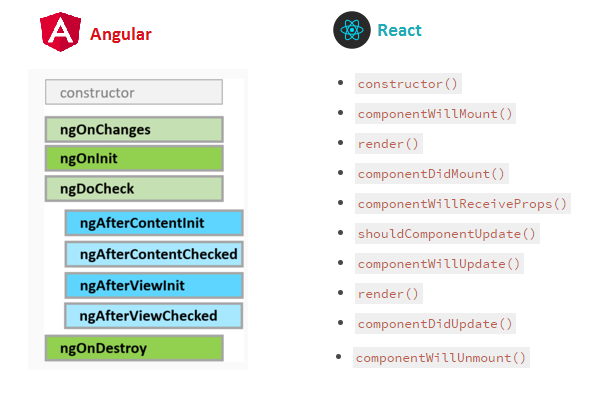
When building web applications with Angular or React, understanding lifecycle hooks is crucial for managing component behavior throughout their lifecycle. While Angular and React have different approaches to managing component lifecycles, both frameworks provide mechanisms to execute code at specific points during a component’s creation, update, and destruction phases.
In this article, we’ll delve into the lifecycle hooks provided by Angular and React, compare their counterparts, and provide comprehensive examples covering various scenarios.
Angular Lifecycle Hooks
Angular offers a set of lifecycle hooks that allow developers to tap into different stages of a component’s lifecycle. These hooks enable developers to perform actions such as initializing data, responding to changes, and cleaning up resources.
ngOnInit
The ngOnInit hook is called after Angular has initialized all data-bound properties of a directive. It is commonly used for initializing component properties and fetching data from external sources.
import { Component, OnInit } from '@angular/core';

@Component({
  selector: 'app-example',
  template: '<p>{{ message }}</p>'
})
export class ExampleComponent implements OnInit {
  message: string;
  ngOnInit() {
    this.message = 'Initialized with Angular!';
  }
}
ngOnChanges
The ngOnChanges hook is called whenever Angular detects changes to input properties of a component. It receives a SimpleChanges object containing the previous and current values of the input properties.
import { Component, Input, OnChanges, SimpleChanges } from '@angular/core';

@Component({
  selector: 'app-example',
  template: '<p>{{ message }}</p>'
})
export class ExampleComponent implements OnChanges {
  @Input() data: string;
  ngOnChanges(changes: SimpleChanges) {
    if (changes.data) {
      this.message = 'Data changed: ' + changes.data.currentValue;
    }
  }
}
ngOnDestroy
The ngOnDestroy hook is called just before Angular destroys the directive or component. It is used for cleanup tasks such as unsubscribing from observables or releasing resources.
import { Component, OnDestroy } from '@angular/core';

@Component({
  selector: 'app-example',
  template: '<p>{{ message }}</p>'
})
export class ExampleComponent implements OnDestroy {
  message: string;
  ngOnDestroy() {
    this.message = 'Component destroyed!';
  }
}
React Lifecycle Methods
React provides a different set of lifecycle methods compared to Angular. These methods are invoked at different stages of a component’s lifecycle, allowing developers to perform actions such as setting up state, handling updates, and cleaning up resources.
componentDidMount
The componentDidMount method is called after a component has been rendered to the DOM. It is commonly used for initializing state and fetching data from APIs.
import React, { Component } from 'react';

class ExampleComponent extends Component {
  constructor(props) {
    super(props);
    this.state = { message: '' };
  }
  componentDidMount() {
    this.setState({ message: 'Initialized with React!' });
  }
  render() {
    return <p>{this.state.message}</p>;
  }
}
componentDidUpdate
The componentDidUpdate method is called after a component's updates have been flushed to the DOM. It is used for responding to prop or state changes and performing side effects based on those changes.
import React, { Component } from 'react';

class ExampleComponent extends Component {
  constructor(props) {
    super(props);
    this.state = { message: '' };
  }
  componentDidUpdate(prevProps, prevState) {
    if (this.props.data !== prevProps.data) {
      this.setState({ message: 'Data changed: ' + this.props.data });
    }
  }
  render() {
    return <p>{this.state.message}</p>;
  }
}
componentWillUnmount
The componentWillUnmount method is called just before a component is unmounted and destroyed. It is used for cleanup tasks such as unsubscribing from event listeners or clearing timers.
import React, { Component } from 'react';

class ExampleComponent extends Component {
  constructor(props) {
    super(props);
    this.state = { message: '' };
  }
  componentWillUnmount() {
    this.setState({ message: 'Component destroyed!' });
  }
  render() {
    return <p>{this.state.message}</p>;
  }
}
Comparison and Conclusion
While Angular and React have different terminologies for lifecycle hooks, their functionality largely overlaps. Both frameworks provide hooks for initialization, change detection, and cleanup, allowing developers to manage component lifecycles effectively.
Understanding these lifecycle hooks is essential for building robust and efficient applications with Angular and React. By leveraging these hooks, developers can control the behavior of their components at every stage of their lifecycle, ensuring optimal performance and user experience.
FAQ
Q: Can Angular components use React lifecycle methods?
No, Angular components cannot directly use React lifecycle methods. Angular has its own set of lifecycle hooks that serve similar purposes but are implemented differently.
Q: Are there any lifecycle hooks in Angular similar to componentDidMount and componentDidUpdate in React?
Yes, in Angular, the ngOnInit hook is similar to componentDidMount, and ngOnChanges serves a similar purpose to componentDidUpdate. However, the implementation and usage may differ slightly.
Q: How can I handle cleanup tasks in Angular components?
In Angular, cleanup tasks can be performed in the ngOnDestroy hook, which is called just before a component is destroyed. This is where you can unsubscribe from observables, release resources, or perform any necessary cleanup actions.
Q: Which framework provides better control over component lifecycles?
Both Angular and React provide comprehensive lifecycle management capabilities. The choice between them depends on factors such as project requirements, team expertise, and personal preference.