
Mastering AI Summarization: Your Ultimate Productivity Hack
Unlock Your Second Brain with Streamlit and Hugging Face’s Free LLM Summarization: build a Python Webapp running on your PC.

We are learners, and we never stop doing it. If you are reading these lines means that you are like many of us: we want more, we want to understand how things works, how they are wired.
We have to process a lot of information and read a lot of books on the learning process: don’t you feel too overwhelmed, sometimes? I feel it too!
I read an amazing article by The PyCoach about building a second brain: he discusses the use of AI tools to store and process information efficiently, with the aim of building a “second brain”. The author shares three AI tools that help organize online content and increase productivity. I will put the link at the end if you are curious (and it is worth it, believe me..)
Well I have to process a lot of engineering documentation and I read also as much as I can to understand this new world called AI. I need a strategy if I want to manage my work, my passions, hobbies and family.
I started to Summarize the material (articles, Youtube videos, books, blogposts and so on…) and then organize them into categories in my Obsidian notes. The summarization helps me to have a quick idea of the topic and decide afterwards if I want to go deeper into it or not.
In this article I will show you how to use free LLM from Hugging Face and Python to build a Summarization app: you only need your computer, a GPU is not even required. We will follow few steps:
1. Download the LaMini model
2. Prepare the Python environment and install dependencies
3. Test the summarization Pipeline
4. Prepare and test the Graphic interface with Streamlit
5. Put together logic and graphic interface
1. Download the LaMini model
We will use LaMini-LM from Hugging Face: this is a small model based on the Flan-T5 family. With its own 248M parameters it matches the same performances of the Aplaca-7B and LLaMa-7B on downstream NLP tasks (text generation, QnA and summarization).
This setup was tested on both Windows 10 64bit and Mac (Intel chip) running Python 3.10. Check the following link for tips related to other Python versions. Pay attention to the torch installation because pytorch is compiled for specific python versions (link below for more info)
- Create a new folder for the project (I used
LaMiniLocal…) - create a subfolder called
model.
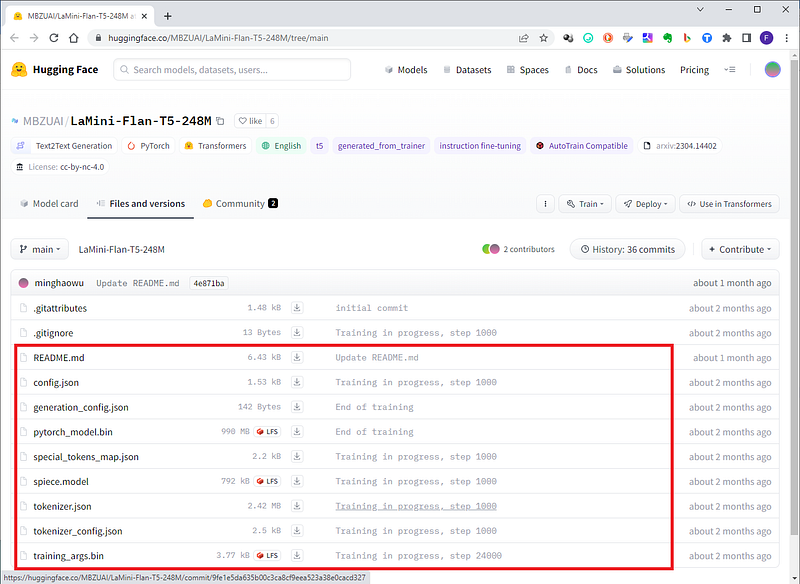
Go to the Hugging Face repo for LaMini-Flan-T5–248M and download all the files in the directory into the model folder you just created.
2. Prepare the Python Environment and install dependencies
We have a lot of libraries to install: be aware that the core interaction with the Hugging Face model are the torch and the transformers libraries: for detailed information refer to the mentioned above link.
- From the
LaMiniLocaldirectory, create a virtual environment and activate it:
python -m venv venv
source venv/bin/activate #for ubuntu/Mac
venv\Scripts\activate #for windows- With the venv still active install the following:
pip install mkl mkl-include # required for CPU usage on Mac users
pip install torch==1.11.0 torchvision==0.12.0 torchaudio==0.11.0 # The core
#install Hugging Face Transformer libraries we need them to inteact with LLM
pip install git+https://github.com/huggingface/transformers

#These will be used in the future to interact with our documents
pip install langchain==0.0.173
pip install faiss-cpu==1.7.4
pip install unstructured==0.6.8
pip install pytesseract==0.3.10
pip install pypdf==3.9.0
pip install pdf2image==1.16.3
pip install sentence_transformers==2.2.2

#required to run on CPU only, a little fasater
pip install accelerate==0.19.0

# For the GUI and webapp
pip install streamlit- Create a new python file in the main directory (
LaMiniLocal) calledmain.py: we will verify that all libraries are correctly installed.
from transformers import AutoTokenizer, AutoModelForSeq2SeqLM
from transformers import pipeline
import torch
import streamlit
Go to the terminal, with the venv activated and run python main.py. If you don’t see any errors means that everything is set!
3. Test the Summarization Pipeline
There are many ways to perform a Summarization: here I will use the pipeline method. Pipelines, from the transformers library, are the tools dedicated to specific tasks (Named Entity Recognition, Masked Language Modeling, Sentiment Analysis, Feature Extraction and Question Answering).
Update the main.py file with all the imports required and the initialization of the pipeline.
########### GUI IMPORTS ################
import streamlit as st
#### IMPORTS FOR AI PIPELINES ###############
from transformers import AutoTokenizer, AutoModelForSeq2SeqLM
from transformers import pipeline
from transformers import AutoModel, T5Tokenizer, T5Model
from transformers import T5ForConditionalGeneration
from langchain.llms import HuggingFacePipeline
import torch
Our model is stored in a checkpoint (the location, for us the directory model): it as encoder-decoder model so we initialize it as follows:
# SET THE MODEL PATH
checkpoint = "./model/"  #it is actually LaMini-Flan-T5-248M
# INITIALIZE TOKENIZER AND MODEL
tokenizer = T5Tokenizer.from_pretrained(checkpoint)
base_model = T5ForConditionalGeneration.from_pretrained(
                                            checkpoint,
                                            device_map='auto',
                                            torch_dtype=torch.float32)
The pipeline specify the task we want our LLM to perform: we set the model the tokenizer and we add some specific arguments (max_length and min_length of the summarization).
# INITIALIZE THE PIPELINE
pipe_sum = pipeline('summarization',
                    model = base_model,
                    tokenizer = tokenizer,
                    max_length = 350,
                    min_length = 25)
To test it we will assign along text to a string variable and we will execute the pipeline on it
text = " Automatic text summarization with machine learning is the task of condensing a piece of text to a shorter version, reducing the size of the initial text while at the same time preserving key informational elements and the meaning of content. It is a challenging task that requires extensive research in the NLP area. There are two different approaches for automatic text summaryization: extraction and abstraction. The extraction method involves identifying important sections of the text and stitching together portions of the content to produce a condensed version. The scoring function assigns a value to each sentence denoting the probability with which it will get picked up in the summary. The process involves constructing an intermediate representation of the input text and scoring the sentences based on the representation. A typical flow of extractive summarization systems involves constructing intermediate representations of the input text, scoring sentences based on the representation, and using Latent semantic analysis (LSA) to identify semantically important sentences. Recent studies have also applied deep learning in extractive text summaryization, such as Sukriti's approach for factual reports using a deep learning model, Yong Zhang's document summarizing framework using convolutional neural networks, and Y. Kim's regression process for sentence ranking. The neural architecture used in the paper is compounded by one single convolution layer built on top of pre-trained word vectors followed by a max-pooling layer. Experiments have shown the proposed model achieved competitive or even better performance compared with baselines. Abstractive summarization methods aim to produce summary by interpreting the text using advanced natural language techniques to generate a new shorter text that conveys the most critical information from the original text. They take advantage of recent developments in deep learning and use an attention-based encoder-decoder method for generating abstractive summaries. Recent studies have argued that attention to sequence models can suffer from repetition and semantic irrelevance, causing grammatical errors and insufficient reflection of the main idea of the source text. Junyang Lin et al proposes a gated unit on top of the encoder outputs at each time step to tackle this problem. The code to reproduce the experiments from the NAMAS paper can be found here. The Pointer Network is a neural attention-based sequence-to-sequence architecture that learns the conditional probability of an output sequence with elements that are discrete tokens corresponding to positions in an input sequence. Other methods for abstractive summarization include Pointer-Generator, which allows copying words from the input sequence via pointing of specific positions, and a generator that generates words from a fixed vocabulary of 50k words. To overcome repetition problems, the paper adapts the coverage model of Tu et al. to overcome the lack of coverage of source words in neural machine translation models. To train the extractor on available document-summary pairs, the model uses a policy-based reinforcement learning (RL) with sentence-level metric rewards to connect both extractor and abstractor networks and to learn sentence saliency. The abstractor network is an emphasis-based encoder-decoder which compresses and paraphrases an extracted document sentence to a concise summary sentence. An RNN encoder computes context-aware representation and then an RNN decoder selects sentence at time step t. The extractor agent is a convolutional sentence encoder that computes representations for each sentence based on input embedded word vectors. An RNN encoder computes context-aware representation and then an RNN decoder selects sentence at time step t. The method incorporates abstractive approach advantages of concisely rewriting sentences and generating novel words from the full vocabulary, while adopting intermediate extractive behavior to improve the overall model's quality, speed, and stability. Recent studies have proposed a combination of adversarial processes and reinforcement learning to abstractive summarization. The extractive approach is easier because copying large chunks of text from the source document ensures good levels of grammaticality and accuracy, while the abstractive model generates new phrases, rephrasing or using words that were not in the original text. Recent developments in the deep learning area have allowed for more sophisticated abilities to be generated."
# RUN THE PIPELINE ON THE TEXT AND PRINT RESULT
result = pipe_sum(text)
print(result)
From the terminal, with the venv still active run python main.py. You will see a result like this.
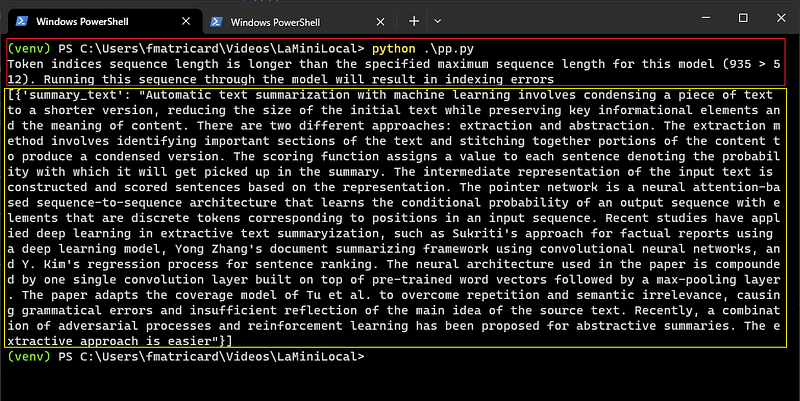
There are some errors due to some tuning still required… It is all about selecting them according to the original text length. We will do this later on. Note that the result of the pipeline is a list with a dictionary: so to call only the text string we should use [0] for the first (and in this case only…) item in the list, and [‘summary_text’] that is the key of the value(string) we want to have.
print(result[0]['summary_text'])4. Prepare and test the Graphic interface with Streamlit
Now that the logic part is done (except for the text splitter, in case the text we want to summarize is long) let’s dive in the Streamlit app.
Streamlit is a library to build data web apps without having to know any front-end technologies like HTML, and CSS. If you want to know more check the clear documentation here.
Create a python file called LaMini-TextSummarizer.py : we will first create the backbone of the GUI and then bond the elements with the logic.
import streamlit as st
############# Displaying images on the front end #################
st.set_page_config(page_title="Mockup for single page webapp",
                   page_icon='💻',
                   layout="centered",  #or wide
                   initial_sidebar_state="expanded",
                   menu_items={
                        'Get Help': 'https://docs.streamlit.io/library/api-reference',
                        'Report a bug': "https://www.extremelycoolapp.com/bug",
                        'About': "# This is a header. This is an *extremely* cool app!"}
                        )
# Load image placeholder from the web
st.image('https://placehold.co/750x150', width=750)
# Set a Descriptive Title
st.title("Your Beautiful App Name")
st.divider()
your_future_text = "Lorem ipsum dolor sit amet, consectetur adipiscing elit. Cras rhoncus massa sit amet est congue dapibus. Duis dictum ac nulla sit amet sollicitudin. In non metus ac neque vehicula egestas. Vestibulum quis justo id enim vestibulum venenatis. Cras gravida ex vitae dignissim suscipit. Pellentesque habitant morbi tristique senectus et netus et malesuada fames ac turpis egestas. Duis efficitur, lorem ut fringilla commodo, lacus orci lobortis turpis, sit amet consequat ante diam ut libero."
st.text_area('Summarized text', your_future_text,
height = 150, key = 'result')- After importing streamlit, the first statement must be the set_page_config (it will throw you an error if you place it elsewhere in the program): the arguments are the settings for the general layout of the webapp page.
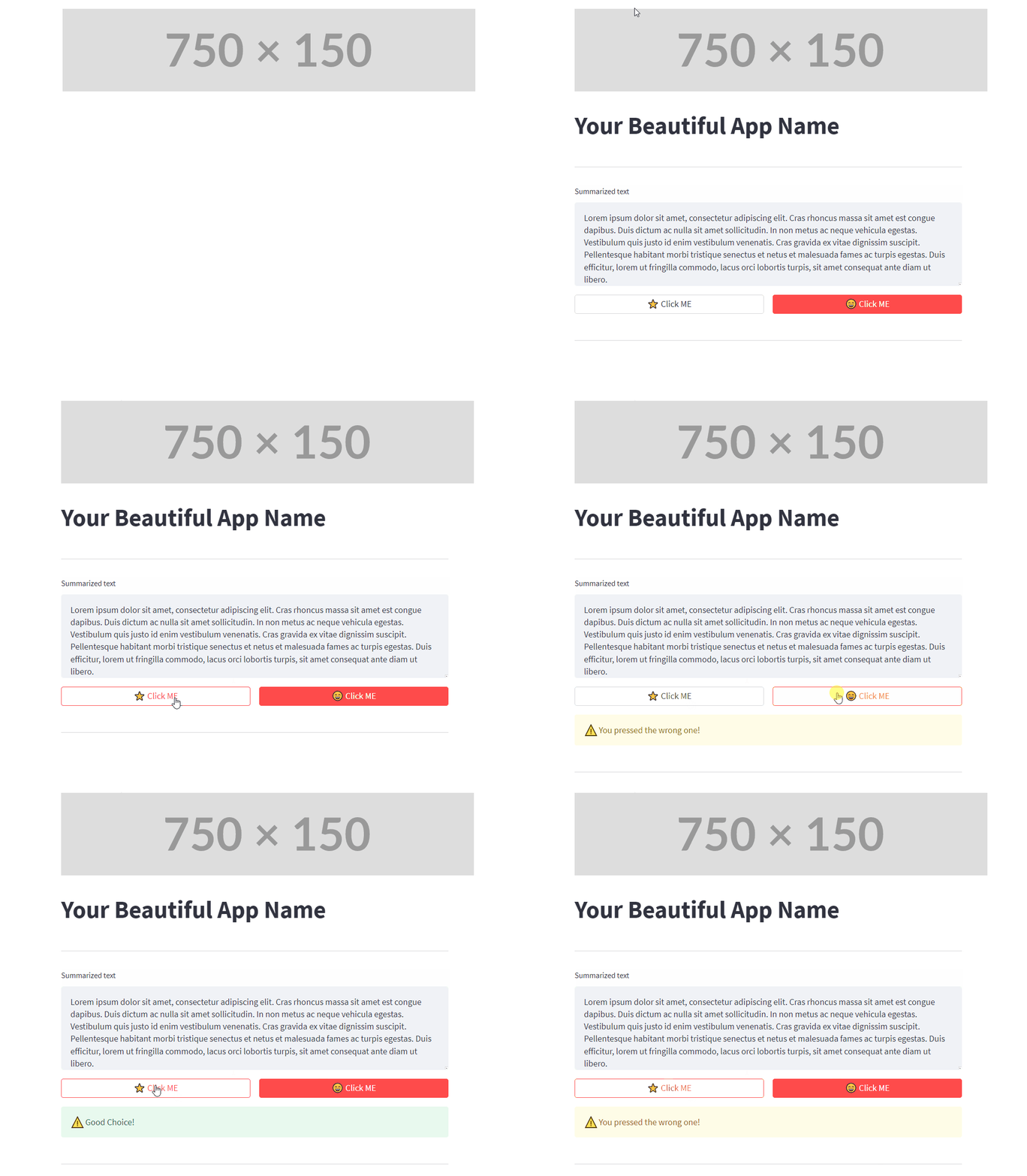
- We then load the header image: for test only I am using here an image placeholder from the web that create a picture of the size you want directly changing the last part of the url (
https://placehold.co/750x150means 750 width, 150 height). If you replace the url with a filepath it will load a local image. - st.text_area is another Stramlit widget: it creates a text area with a title and a content. In our case the content will be filled by the text in the string
your_future_text. The last argument iskey = ‘result’: we will use it to callsession_states(the way we can call and update variables when the app is running)
# Set 2 colums to make the Buttons wider
col1, col2 = st.columns(2)
btn1 = col1.button(" :star: Click ME ", use_container_width=True, type="secondary")
btn2 = col2.button(" :smile: Click ME ", use_container_width=True, type="primary")

if btn1:
    st.warning('You pressed the wrong one!', icon="⚠️")
if btn2:
    st.success('Good Choice!', icon="⚠️")
st.divider()- For this example only here we define 2 columns and we place one Button in each one. Notice that when inside a container (the columns) you call the widgets without the
st.. We useuse_container_width=Trueto extend the width of the Button to the one of the column. - Save everything, go to the terminal and to run the streamlit app type:
streamlit run LaMini-TextSummarizer.py
Your default browser will open at the default address http://localhost:8501

5. Put together logic and graphic interface
After the introduction on Streamlit let’s put the logic part (AI pipeline) and Graphic User Interface part (Streamlit). Don’t worry about the code: you can find it in my GitHub Repository.
Rename the previous file LaMini-TextSummarizer_mockup.py and create a new one LaMini-TextSummarizer.py
########### GUI IMPORTS ################
import streamlit as st
import ssl
############# Displaying images on the front end #################
st.set_page_config(page_title="Summarize and Talk ot your Text",
                   page_icon='📖',
                   layout="centered",  #or wide
                   initial_sidebar_state="expanded",
                   menu_items={
                        'Get Help': 'https://docs.streamlit.io/library/api-reference',
                        'Report a bug': "https://www.extremelycoolapp.com/bug",
                        'About': "# This is a header. This is an *extremely* cool app!"
                                },)

#### IMPORTS FOR AI PIPELINES ###############
from transformers import AutoTokenizer, AutoModelForSeq2SeqLM
from transformers import pipeline
from transformers import AutoModel, T5Tokenizer, T5Model
from transformers import T5ForConditionalGeneration
from langchain.llms import HuggingFacePipeline
import torch
import datetime
# SET THE MODEL PATH
checkpoint = "./model/"  #it is actually LaMini-Flan-T5-248M
# INITIALIZE TOKENIZER AND MODEL
# this part has been moved inside the AI_SummaryPL function
So far nothing new. The following code blocks I will put together the functions and the interactive Streamlit wigdets, with explanations of the building blocks.
######################################################################
#     SUMMARIZATION FROM TEXT STRING WITH HUGGINGFACE PIPELINE       #
######################################################################
def AI_SummaryPL(checkpoint, text, chunks, overlap):

    """
    checkpoint is in the format of relative path
    example:  checkpoint = "/content/model/"  #it is actually LaMini-Flan-T5-248M   #tested fine
    text it is either a long string or a input long string or a loaded document into string
    chunks: integer, lenght of the chunks splitting
    ovelap: integer, overlap for cor attention and focus retreival
    RETURNS full_summary (str), delta(str) and reduction(str)

    post_summary14 = AI_SummaryPL(LaMini,doc2,3700,500)
    USAGE EXAMPLE:
    post_summary, post_time, post_percentage = AI_SummaryPL(LaMini,originalText,3700,500)
    """
    from langchain.text_splitter import RecursiveCharacterTextSplitter
    text_splitter = RecursiveCharacterTextSplitter(
        # Set a really small chunk size, just to show.
        chunk_size = chunks,
        chunk_overlap  = overlap,
        length_function = len,
    )
    texts = text_splitter.split_text(text)
    #checkpoint = "/content/model/"  #it is actually LaMini-Flan-T5-248M   #tested fine
    checkpoint = checkpoint
    tokenizer = T5Tokenizer.from_pretrained(checkpoint)
    base_model = T5ForConditionalGeneration.from_pretrained(checkpoint,
                                                        device_map='auto',
                                                        torch_dtype=torch.float32)
    ### INITIALIZING PIPELINE
    pipe_sum = pipeline('summarization',
                        model = base_model,
                        tokenizer = tokenizer,
                        max_length = 350,
                        min_length = 25
                        )
    ## START TIMER
    start = datetime.datetime.now() #not used now but useful
    ## START CHUNKING
    full_summary = ''
    for cnk in range(len(texts)):
      result = pipe_sum(texts[cnk])
      full_summary = full_summary + ' '+ result[0]['summary_text']
    stop = datetime.datetime.now() #not used now but useful
    ## TIMER STOPPED AND RETURN DURATION
    delta = stop-start
    ### Calculating Summarization PERCENTAGE
    reduction = '{:.1%}'.format(len(full_summary)/len(text))
    print(f"Completed in {delta}")
    print(f"Reduction percentage: ", reduction)

    return full_summary, delta, reduction
This is the main function, so let’s have a look at it together. We need a function because the Summarization will start when clicking on the correct Button (and for this method we need a function to call)
from langchain.text_splitter import RecursiveCharacterTextSplitter
    text_splitter = RecursiveCharacterTextSplitter(
        # Set a really small chunk size, just to show.
        chunk_size = chunks,
        chunk_overlap  = overlap,
        length_function = len,
    )
    texts = text_splitter.split_text(text)
The LangChain library is a very powerful toolbox: you can use external document and sourced to interact with the Language Model. LangChain TextSplitters have more than one method. The RecursiveCharacterSplitter is the recommended one for splitting long generic text in small pieces (called chunks) and not exceed the token limitations.
It is parameterized by a list of characters. It tries to split on them in order until the chunks are small enough. The default list is [“\n\n”, “\n”, “ “, “”]. This has the effect of trying to keep all paragraphs (and then sentences, and then words) together as long as possible, as those would generically seem to be the strongest semantically related pieces of text.
## START CHUNKING
full_summary = ''
for cnk in range(len(texts)):
   result = pipe_sum(texts[cnk])
   full_summary = full_summary + ' '+ result[0]['summary_text']
Chunks are stored in a list: we iterate over the items in the list and feed every chunk to the summarization pipeline. We join then all the strings together to get our final_summary.
### HEADER section
st.image('Headline-text.jpg', width=750)
title = st.text_area('Insert here your Copy/Paste text', "", height = 350, key = 'copypaste')
btt = st.button("1. Start Summarization")
txt = st.empty()
timedelta = st.empty()
text_lenght = st.empty()
redux_bar = st.empty()
st.divider()
down_title = st.empty()
down_btn = st.button('2. Download Summarization')
text_summary = ''
You can see some st.empty(). This is a placeholder: we are “booking” a spot in the layout of the page that will be filled later.
def start_sum(text):
    if st.session_state.copypaste == "":
        st.warning('You need to paste some text...', icon="⚠️")
    else:
        with st.spinner('Initializing pipelines...'):
            st.success(' AI process started', icon="🤖")
            print("Starting AI pipelines")
            text_summary, duration, reduction = AI_SummaryPL(LaMini,text,3700,500)
        txt.text_area('Summarized text', text_summary, height = 350, key='final')
        timedelta.write(f'Completed in {duration}')
        text_lenght.markdown(f"Initial length = {len(text.split(' '))} words / summarization = **{len(text_summary.split(' '))} words**")
        redux_bar.progress(len(text_summary)/len(text), f'Reduction: **{reduction}**')
        down_title.markdown(f"## Download your text Summarization")
This function will be called when pressing btt = st.button(“1. Start Summarization”) that starts the summarization of the text pasted in the text_area.
Finally we assign the functions to the push button: one to start the summarization, the other to save to the hard drive the summarized text.
if btt:
    start_sum(st.session_state.copypaste)

if down_btn:
    def savefile(generated_summary, filename):
        st.write("Download in progress...")
        with open(filename, 'w') as t:
            t.write(generated_summary)
        t.close()
        st.success(f'AI Summarization saved in {filename}', icon="✅")
    savefile(st.session_state.final, 'text_summarization.txt')
    txt.text_area('Summarized text', st.session_state.final, height = 350)
Note here that the only argument for start_sum is a session_state.
Session State is a way to share variables between reruns, for each user session. In addition to the ability to store and persist state, Streamlit also exposes the ability to manipulate state using Callbacks. Session state also persists across apps inside a multipage app.
With the venv active, run from the terminal:
streamlit run LaMini-TextSummarizer.py
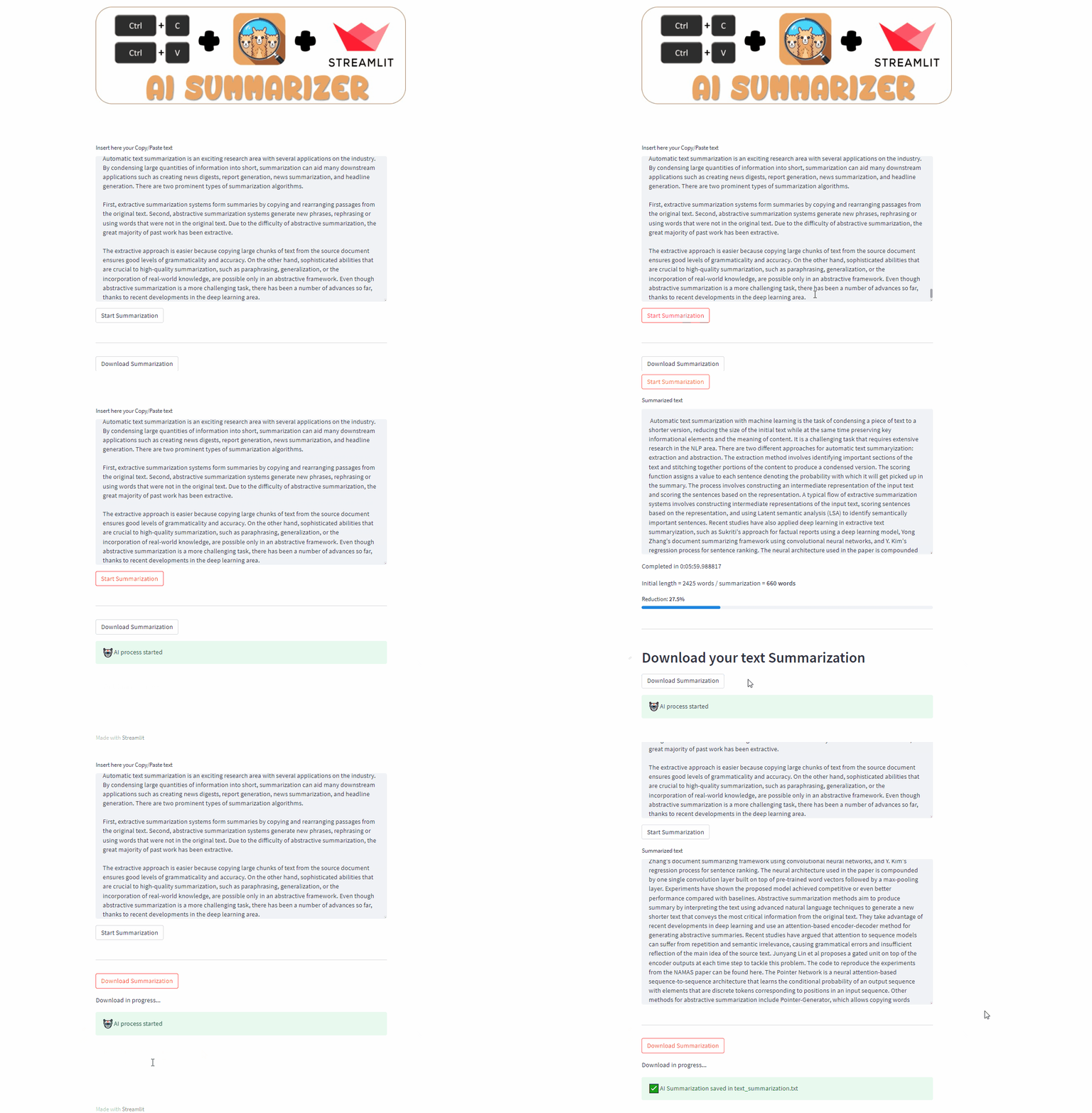
Paste the text of an article you want to summarize and press the button. For the test I used Automatic Text Summarization with Machine Learning — An overview ,by Luís Gonçalves.
Conclusion
Pipelines are amazing. We can run all we want on our computer even with little hardware (LaMini-LM runs also with CPU only). Experiment with different settings to refine the quality of the Summarization.
If this story provided value and you wish to show a little support, you could:
- Clap 50 times for this story (this really, really helps me out)
- Sign up for a Medium membership using my link — ($5/month to read unlimited Medium stories)
- Follow me on Medium
- Read my latest articles https://medium.com/@fabio.matricardi
The The PyCoach article link is here below:


