
Mastering Abstraction in Java
Unveiling the Power of Abstract Classes and Interfaces
Table of Contents: We will cover the following
· Introduction to Abstraction in Java · Abstract Classes: The Foundation of Abstraction · Interfaces: Defining Contracts and Achieving Multiple Inheritance · The Role of Abstract Classes vs. Interfaces · Abstraction in Practice: Designing Effective Java Classes · Best Practices for Abstraction in Java · Examples and Code Walkthroughs · Tips and Tricks for Effective Abstraction · Common Mistakes and Pitfalls to Avoid · Conclusion: Embracing Abstraction for Better Java Programming · Additional Resources and Further Reading

Introduction to Abstraction in Java
1. What is Abstraction?
Abstraction is a fundamental concept in programming, including Java. It refers to the process of simplifying complex reality by modeling classes based on the essential properties and behaviors an object should have, while ignoring the non-essential details. In simpler terms, abstraction allows you to focus on what an object does rather than how it does it.
In Java, abstraction is implemented using abstract classes and interfaces. These constructs provide a way to define a blueprint or contract for a class without providing a complete implementation. Abstract classes and interfaces define methods that must be implemented by their subclasses, ensuring that certain behaviors are consistent across different implementations.
2. Why Abstraction is Important in Programming
Abstraction plays a crucial role in programming for several reasons:
- Simplification: Abstraction simplifies complex systems by breaking them down into manageable components. It allows developers to work on one piece of a larger system without needing to understand every intricate detail of the entire system.
- Encapsulation: Abstraction enforces encapsulation, one of the core principles of object-oriented programming. Encapsulation restricts access to an object’s internal state and exposes only the necessary functionality through well-defined interfaces. This reduces complexity and enhances security.
- Reusability: Abstraction promotes code reusability. By defining abstract classes and interfaces, you can create reusable components that can be inherited or implemented by multiple classes. This reduces redundancy and leads to more maintainable code.
- Flexibility: Abstraction enhances code flexibility. If you design your software with abstraction in mind, it becomes easier to adapt and extend your codebase to accommodate new features or changes in requirements.
- Modularity: Abstraction encourages modularity, where code is organized into self-contained, reusable modules. This simplifies testing, debugging, and maintenance.
- Team Collaboration: In collaborative development environments, abstraction enables multiple developers to work on different parts of a project simultaneously. Each developer can focus on implementing specific abstracted components without interfering with others’ work.
3. How Java Implements Abstraction
Java provides two main mechanisms for implementing abstraction:
- Abstract Classes: An abstract class is a class that cannot be instantiated and is typically used as a base class for other classes. Abstract classes can have both abstract (unimplemented) and concrete (implemented) methods. Subclasses that inherit from an abstract class must provide implementations for all the abstract methods defined in the abstract class. You declare an abstract class using the
abstractkeyword. Here's a simple example:
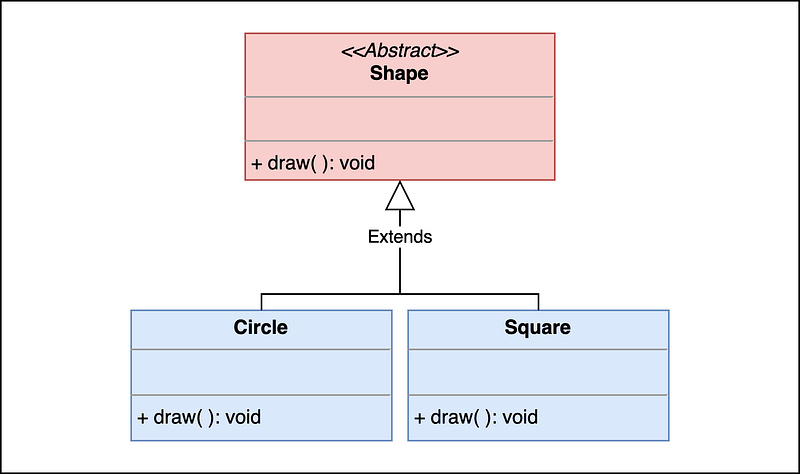
abstract class Shape {
    abstract void draw(); // Abstract method
}

class Circle extends Shape {
    void draw() {
        // Implementation for drawing a circle
    }
}

class Square extends Shape {
    void draw() {
        // Implementation for drawing a square
    }
}- Interfaces: An interface in Java defines a contract for classes to implement. It contains only abstract methods and constant values (
staticandfinalfields). Any class that implements an interface must provide concrete implementations for all the methods declared in the interface. You declare an interface using theinterfacekeyword. Here's an example:
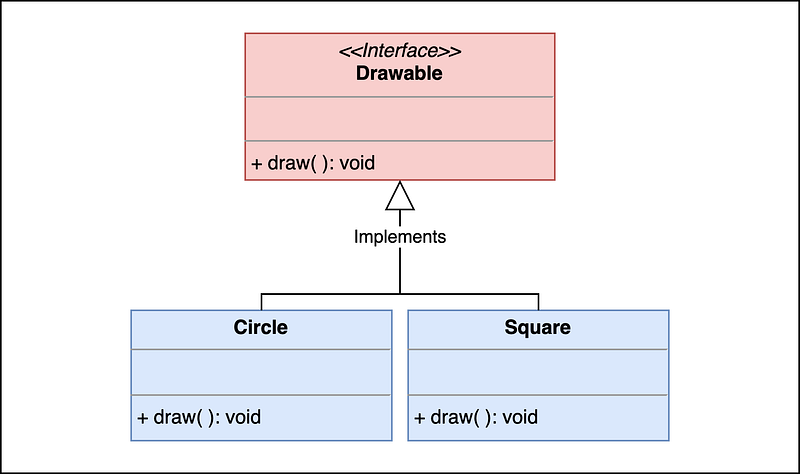
interface Drawable {
    void draw(); // Abstract method
}

class Circle implements Drawable {
    public void draw() {
        // Implementation for drawing a circle
    }
}

class Square implements Drawable {
    public void draw() {
        // Implementation for drawing a square
    }
}
In both cases, abstract classes and interfaces serve as blueprints for other classes to follow. They enforce a level of abstraction by specifying the methods that must be implemented, allowing developers to focus on defining the behavior of specific objects rather than the underlying implementation details.
Abstraction is a powerful concept in Java and programming in general. It simplifies complex systems, promotes reusability, and enhances code flexibility. Java achieves abstraction through abstract classes and interfaces, enabling developers to create well-structured and maintainable software.
Abstract Classes: The Foundation of Abstraction
1. Understanding Abstract Classes
An abstract class in Java is a class that cannot be instantiated directly and is often used as a blueprint for other classes. It serves as a foundation for abstraction by allowing you to define methods that must be implemented by its concrete subclasses. Abstract classes are declared using the abstract keyword.
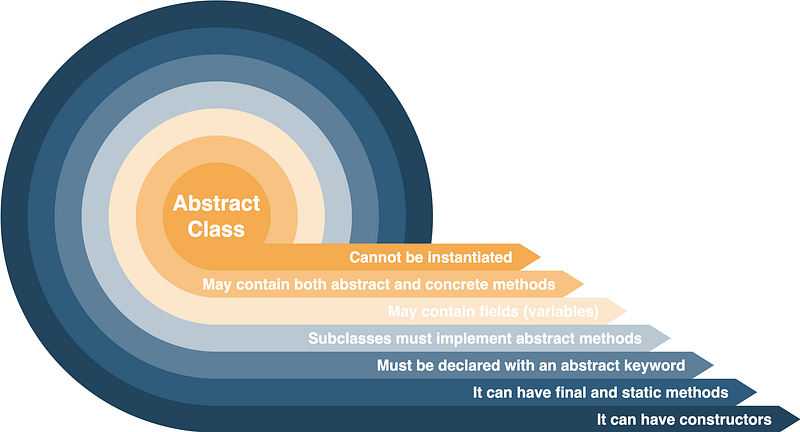
Key points about abstract classes:
- Cannot be Instantiated: You cannot create an instance of an abstract class. It exists solely for the purpose of being subclassed.
- May Contain Both Abstract and Concrete Methods: Abstract classes can have both abstract (unimplemented) methods and concrete (implemented) methods. Concrete methods provide default behavior that can be inherited by subclasses.
- May Contain Fields: Abstract classes can have fields, constructors, and other members just like regular classes. Subclasses inherit these members.
- Subclasses Must Implement Abstract Methods: Any class that extends an abstract class must provide concrete implementations for all the abstract methods declared in the abstract class. This enforces the contract defined by the abstract class.
2. Declaring and Defining Abstract Methods
Abstract methods are methods declared in an abstract class but without an implementation. They are meant to be overridden and implemented by concrete subclasses. To declare an abstract method, you use the abstract keyword in the method signature and omit the method body. Abstract methods are typically used to define a set of behaviors that subclasses must adhere to.
Here’s an example of an abstract class with an abstract method:
abstract class Shape {
    // Abstract method
    abstract void draw();

    // Concrete method
    void resize(int percentage) {
        // Default implementation
    }
}
In this example, the draw() method is an abstractmethod, while the resize(int percentage) method is a concrete method with a default implementation. Subclasses of Shape must provide their own implementations for the draw() method.
3. Creating Subclasses of Abstract Classes
To create a subclass of an abstract class, you use the extends keyword. Subclasses inherit the fields and methods (both abstract and concrete) of the abstract class. However, they must provide concrete implementations for all the abstract methods declared in the abstract class. Failure to do so results in a compilation error.
Here’s an example of a concrete subclass of the Shape abstract class:
class Circle extends Shape {
    // Concrete implementation of the abstract draw() method
    void draw() {
        // Implementation for drawing a circle
    }
}
In this example, the Circle class extends the Shape abstract class and provides a concrete implementation for the draw() method, fulfilling the contract set by the Shape class.
4. Real-World Use Cases for Abstract Classes
Abstract classes are commonly used in Java and have real-world applications in software development:
- Graphics and UI Frameworks: Abstract classes can be used to define generic shapes or UI components in graphics libraries. Concrete subclasses can then provide specific implementations for drawing these shapes or components.
- Template Method Pattern: Abstract classes are central to implementing the template method pattern, where the abstract class defines the overall structure of an algorithm but leaves certain steps to be implemented by concrete subclasses.
- Plugin Systems: Abstract classes can serve as a base for defining plugin interfaces. Concrete plugins must implement the methods defined in the abstract class to integrate with the system.
- Frameworks and APIs: Many Java frameworks and APIs use abstract classes to provide extensibility points for developers. Subclasses can customize and extend the functionality of these frameworks by implementing abstract methods.
- Modeling Real-World Concepts: Abstract classes are useful for modeling real-world concepts where there is a common base with variations. For example, in a game development framework, an abstract class like
GameCharactercan define common methods likemove()andattack(), which are implemented differently by subclasses representing specific characters.
Abstract classes are a crucial concept in Java that allows you to create a blueprint for classes while enforcing a contract through abstract methods. They are widely used in various software development scenarios to promote code structure, reusability, and extensibility.
Interfaces: Defining Contracts and Achieving Multiple Inheritance
1. What Are Interfaces?
In Java, an interface is a fundamental concept that allows you to define a contract or a set of abstract methods that must be implemented by any class that claims to implement the interface. Interfaces provide a way to achieve abstraction and define a common set of behaviors that multiple classes can adhere to without requiring them to be part of the same class hierarchy.
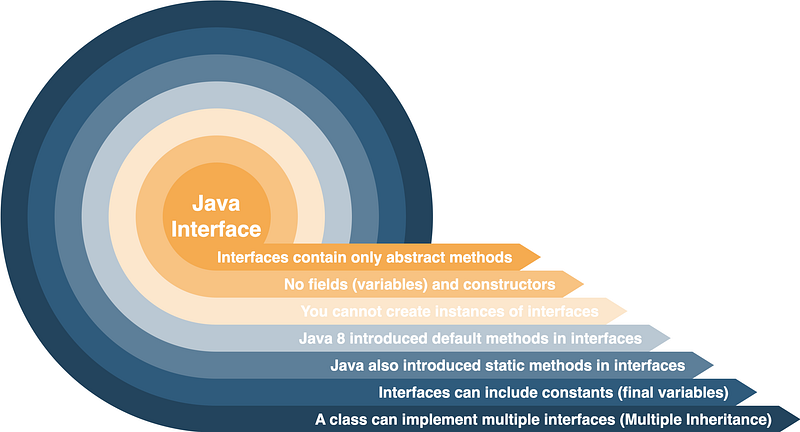
Key points about interfaces:
- Purely Abstract: Interfaces contain only abstract methods (methods without a body) and constant values (static final fields). They do not contain concrete (implemented) methods.
- No Fields (Variables): Interfaces cannot have instance variables (fields), only constants.
- Multiple Implementation: A class can implement multiple interfaces, allowing it to inherit and provide implementations for all the methods defined in those interfaces.
- No Object Creation: You cannot create instances of interfaces. They serve as contracts or blueprints for classes.
- Default Methods (Java 8 and later): Java 8 introduced default methods in interfaces, which provide a default implementation for a method. Classes implementing the interface can use the default implementation or override it.
2. Declaring and Implementing Interfaces
To declare an interface in Java, you use the interface keyword. Here's an example of a simple interface:
interface Printable {
    void print(); // Abstract method
    int PAPER_WIDTH = 8; // Constant (static final) field
    int PAPER_HEIGHT = 11; // Constant (static final) field
}
In this example, the Printable interface defines one abstract method, print(), and two constant fields, PAPER_WIDTH and PAPER_HEIGHT.
To implement an interface in a class, you use the implements keyword. A class implementing an interface must provide concrete implementations for all the abstract methods declared in the interface. Here's an example of a class implementing the Printable interface:
class Printer implements Printable {
    public void print() {
        System.out.println("Printing a document on " + PAPER_WIDTH + "x" + PAPER_HEIGHT + " paper.");
    }
}
In this example, the Printer class implements the Printable interface and provides a concrete implementation for the print() method.
3. Extending Interfaces and Multiple Inheritance
Interfaces can extend other interfaces, allowing you to create more specialized interfaces while inheriting the abstract methods and constants of the parent interfaces. A class implementing an interface must provide implementations for all methods from all interfaces in its hierarchy.
Here’s an example of extending an interface:
interface ColorPrintable extends Printable {
    void printColor(String color); // Additional abstract method
}
In this example, the ColorPrintable interface extends the Printable interface, adding an abstract method printColor(String color).
A class can implement multiple interfaces by separating them with commas. This enables a form of multiple inheritance in Java, where a class inherits behavior from multiple sources. For example:
class ColorPrinter implements Printable, ColorPrintable {
    public void print() {
        System.out.println("Printing a document.");
    }

    public void printColor(String color) {
        System.out.println("Printing a color document in " + color + ".");
    }
}
In this example, the ColorPrinter class implements both the Printable and ColorPrintable interfaces, providing concrete implementations for all the methods defined in both interfaces.
4. When to Use Interfaces
Interfaces are commonly used in Java for various purposes:
- Defining Contracts: Interfaces define contracts that classes must adhere to, ensuring that they provide specific methods or behaviors. This helps establish a common API for different classes.
- Achieving Multiple Inheritance: Interfaces allow you to achieve multiple inheritance, where a class can inherit behavior from multiple sources, overcoming the limitations of single class inheritance in Java.
- Implementing Polymorphism: Interfaces enable polymorphism by allowing different classes to implement the same interface. This allows objects of different classes to be treated as instances of a common interface, enhancing code flexibility.
- Creating Frameworks and APIs: Interfaces are fundamental for creating libraries, frameworks, and APIs that other developers can use to build applications. They provide clear guidelines for how classes should interact with the framework.
- Enforcing Design Patterns: Interfaces are often used to enforce design patterns such as the Strategy Pattern, Observer Pattern, and Command Pattern, where different classes must conform to a common interface.
Interfaces in Java define contracts that classes must follow, enabling multiple inheritance, polymorphism, and the creation of flexible and extensible code. They are crucial for building robust software, creating reusable components, and enforcing design patterns.
The Role of Abstract Classes vs. Interfaces
1. Choosing Between Abstract Classes and Interfaces
When designing Java classes and APIs, you often face the decision of whether to use abstract classes, interfaces, or a combination of both. Your choice depends on the specific requirements of your application and the design goals you want to achieve.
Abstract Classes:
- When to Use: Abstract classes are a good choice when you have a base class that should provide a common implementation for its subclasses. You may also use abstract classes when you want to define instance variables (fields) that should be inherited by subclasses.
- Usage Scenarios: Abstract classes are used to create class hierarchies where the base class provides some default behavior and concrete subclasses extend or customize that behavior.
- Example: Consider a
Shapeabstract class with common methods likearea()andperimeter(). Subclasses likeCircleandRectanglecan provide specific implementations for these methods.
Interfaces:
- When to Use: Interfaces are suitable when you want to define a contract that multiple classes must adhere to, regardless of their class hierarchy. Interfaces are also the choice when you want to achieve multiple inheritance in Java.
- Usage Scenarios: Interfaces are used to define a set of methods (abstract or default) that classes should implement. This allows classes from different inheritance hierarchies to share a common set of behaviors.
- Example: The
Serializableinterface in Java ensures that any class implementing it can be serialized, regardless of the class's hierarchy.
2. Advantages and Disadvantages
Abstract Classes Advantages:
- Provides a common base with shared behavior for subclasses.
- Allows the definition of fields (instance variables) that can be inherited.
- Supports the use of constructors.
- Can have abstract and concrete methods.
Abstract Classes Disadvantages:
- Supports single inheritance only (a class can extend only one abstract class).
- Less flexible than interfaces for achieving polymorphism.
Interfaces Advantages:
- Support multiple inheritance (a class can implement multiple interfaces).
- Define contracts for unrelated classes to share common behaviors.
- Promote code reusability and flexibility.
- Enforce a clear separation of concerns through interface segregation.
Interfaces Disadvantages:
- Cannot contain fields (instance variables).
- Cannot have constructors (prior to Java 8, but default methods can be used to simulate constructors).
- Requires implementing classes to provide implementations for all methods in the interface.
3. Real-World Examples of Their Usage
Abstract Classes:
- Java Collections Framework: The
AbstractList,AbstractSet, andAbstractMapclasses in the Java Collections Framework provide common implementations for list, set, and map data structures, respectively. Concrete classes likeArrayList,HashSet, andHashMapextend these abstract classes to implement specific data structures. - Game Development: In game development, an abstract class like
GameObjectcan provide common methods likeupdate()andrender(), which are inherited by various game objects like characters, enemies, and items.
Interfaces:
- Java API: The Java API makes extensive use of interfaces. For example, the
Runnableinterface defines therun()method, allowing any class to be executed as a separate thread by implementing this interface. Similarly, theComparableinterface is used for objects that need to define a natural ordering. - Java Collections Framework: Many interfaces, such as
List,Set, andMap, define common methods for data structures. Classes likeArrayList,HashSet, andHashMapimplement these interfaces to provide specific data structure implementations. - Observer Pattern: The Observer Pattern, commonly used in event-driven systems, is implemented through interfaces. The subject class implements an
Observableinterface, and observers implement anObserverinterface. This allows multiple observers to react to changes in the subject without needing to inherit from a common base class.
Abstract classes and interfaces have distinct roles in Java’s object-oriented programming. Abstract classes are used for building class hierarchies with shared behaviors and fields, while interfaces define contracts for unrelated classes to share common behaviors and achieve multiple inheritance. The choice between them depends on the design goals and requirements of your application.
Abstraction in Practice: Designing Effective Java Classes
1. Building a Class Hierarchy with Abstraction
When designing Java classes and class hierarchies, abstraction plays a crucial role in creating well-structured and maintainable code. Here’s how abstraction helps build effective class hierarchies:
- Identifying Common Behaviors: Abstraction helps you identify common behaviors and attributes that should be present in a base class. These commonalities form the basis for creating an abstract class or interface.
- Abstract Class Definition: An abstract class is created to represent the common behaviors, and it contains abstract (unimplemented) methods that should be defined by its concrete subclasses. This abstract class serves as a blueprint for the derived classes.
- Concrete Subclasses: Concrete subclasses extend the abstract class and provide specific implementations for the abstract methods. Each subclass can add its own unique behaviors while inheriting the common behaviors defined in the abstract class.
2. Encapsulation and Abstraction
Encapsulation and abstraction are two fundamental principles in object-oriented programming. They complement each other and are essential for designing effective Java classes:
- Encapsulation: Encapsulation is the practice of bundling data (attributes) and methods (behaviors) that operate on that data into a single unit, known as a class. Access to the internal state of an object is controlled through access modifiers (e.g., private, protected) and getter and setter methods.
- Abstraction: Abstraction focuses on defining the essential characteristics and behaviors of an object while hiding unnecessary details. It allows you to create abstract classes and interfaces that declare the structure of classes without specifying their implementations.
- Combining Encapsulation and Abstraction: Encapsulation ensures that the internal state of an object is protected and accessed through controlled interfaces. Abstraction allows you to define those interfaces in a way that hides the implementation details, promoting modularity and reducing complexity.
3. Polymorphism and Abstraction
Polymorphism is another key concept in object-oriented programming, and it works hand-in-hand with abstraction:
- Polymorphism: Polymorphism allows objects of different classes to be treated as objects of a common superclass. This enables you to write code that operates on objects at a higher level of abstraction, promoting flexibility and reusability.
- Abstract Classes and Interfaces: Abstract classes and interfaces play a significant role in achieving polymorphism. Abstract classes define a common interface and provide partial implementations, while interfaces define a contract that multiple classes can implement.
- Inheritance and Method Overriding: Polymorphism is often achieved through inheritance and method overriding. Subclasses inherit the behavior of their parent classes (abstract or concrete) and can provide their own implementations of methods, allowing them to be used interchangeably.
4. Maintaining Code Flexibility with Abstraction
One of the primary benefits of abstraction is code flexibility. Here’s how abstraction helps in maintaining flexibility in your Java code:
- Reducing Coupling: Abstraction reduces the coupling between classes, making it easier to modify or extend the code. Changes in the implementation of an abstract class or interface don’t affect the code that uses it, as long as the contract (defined by the abstract methods) remains intact.
- Ease of Extensibility: Abstraction allows you to extend the functionality of your code by creating new classes that implement existing interfaces or extend abstract classes. This extensibility is crucial for accommodating future changes and requirements.
- Promoting Modularity: Abstraction promotes modularity by breaking down complex systems into smaller, more manageable components. Each component (class or interface) has a well-defined purpose and interacts with others through clear interfaces.
- Testing and Maintenance: Abstraction makes testing and maintenance more manageable. You can test classes independently since they adhere to a well-defined contract. When issues arise, you can focus on the specific component without affecting the entire system.
Abstraction is a fundamental concept in designing effective Java classes and class hierarchies. It allows you to build modular, maintainable, and flexible code by identifying common behaviors, defining contracts through abstract classes and interfaces, and promoting encapsulation, polymorphism, and code extensibility. Abstraction is a cornerstone of object-oriented programming, contributing to the development of robust and scalable software systems.
Best Practices for Abstraction in Java
1. Naming Conventions for Abstract Classes and Interfaces
When naming abstract classes and interfaces, it’s essential to follow consistent and meaningful naming conventions to make your code more understandable and maintainable:
- Abstract Class Naming: Abstract classes should be named using descriptive nouns or noun phrases. Typically, they represent a general category or concept in your application. For example, if you have an abstract class representing shapes, you might name it
ShapeorAbstractShape. - Interface Naming: Interfaces should be named using descriptive adjectives or adjective phrases that indicate their purpose or behavior. For instance, if you have an interface defining the behavior of printable objects, you might name it
Printable. - Prefixes or Suffixes: Some developers choose to use prefixes like
Abstractor suffixes likeablefor abstract classes and interfaces to provide clear visual cues. For example, you might name an abstract class for vehicles asAbstractVehicleor an interface for flyable objects asFlyable.
2. Documentation and Comments
Effective documentation is essential when working with abstraction to help other developers understand the purpose, contract, and usage of abstract classes and interfaces:
- Javadoc Comments: Use Javadoc comments to document your abstract classes and interfaces, including descriptions of their responsibilities, expected behavior, and the meaning of methods and properties. Javadoc comments are a valuable resource for developers who use your code.
- Method-Level Comments: Provide comments for individual methods declared in abstract classes and interfaces, explaining their purpose and expected input/output. This helps implementers understand how to provide appropriate implementations.
- Use Annotations: Consider using annotations like
@Overrideto indicate when a method implementation overrides a method declared in a superclass or interface. This makes the code more self-explanatory.
3. Avoiding Over-Abstraction
Over-abstraction occurs when you create too many abstract classes or interfaces, making the code complex and hard to understand. Here’s how to avoid over-abstraction:
- Keep It Simple: Start with the simplest design that meets your immediate needs. Don’t add abstract classes or interfaces unless you have a clear use case for them.
- Refactor When Necessary: As your codebase grows and new requirements emerge, refactor to introduce abstraction only when it simplifies the code or enables code reuse. Avoid over-engineering upfront.
- Single Responsibility Principle: Ensure that abstract classes and interfaces have a single responsibility or purpose. Avoid creating “kitchen sink” interfaces that try to cover multiple unrelated behaviors.
4. Abstraction as a Tool for Code Maintainability
Abstraction is a powerful tool for code maintainability, and following best practices can enhance its benefits:
- Modular Code: Use abstraction to create modular components that are independent of each other. When changes are required, you can modify individual components without affecting the entire system.
- Flexibility: Abstraction allows you to extend or modify your codebase without changing existing implementations. This flexibility is vital for adapting to evolving requirements.
- Clear Interfaces: Well-defined abstract classes and interfaces serve as clear contracts between different parts of your codebase. When everyone follows the contract, it becomes easier to integrate and maintain the code.
- Documentation: Good documentation, as mentioned earlier, is crucial for code maintainability. It helps future maintainers understand your code’s intent and functionality.
By following these practices, you can create more readable, maintainable, and flexible code that is easier for you and your team to work with over time.
Examples and Code Walkthroughs
Example 1: Creating an Abstract Class for Geometric Shapes
In this example, we’ll create an abstract class called Shape to represent geometric shapes. This class will define common properties and methods for all shapes.
abstract class Shape {
    protected double area;

    public abstract double calculateArea();

    public double getArea() {
        return area;
    }
}- We start by creating an abstract class named
Shape. This class contains an abstract methodcalculateArea()and a non-abstract methodgetArea(). - The
calculateArea()method is declared as abstract, which means it must be implemented by any concrete subclass ofShape. This enforces that all shape classes provide their own logic for calculating area. - We include a
protected doublefieldareato store the calculated area. Subclasses can access this field.
Next, we create concrete subclasses for specific shapes, such as Circle and Rectangle, which extend the Shape class and provide implementations for the calculateArea() method.
class Circle extends Shape {
    private double radius;

    public Circle(double radius) {
        this.radius = radius;
    }

    @Override
    public double calculateArea() {
        area = Math.PI * Math.pow(radius, 2);
        return area;
    }
}- The
Circleclass extendsShapeand includes an additional field,radius, to represent the radius of the circle. - In the constructor, we initialize the
radiusfield. - We override the
calculateArea()method to provide a specific implementation for calculating the area of a circle. We update theareafield with the calculated value and return it.
Similarly, we create a Rectangle class:
class Rectangle extends Shape {
    private double width;
    private double height;

    public Rectangle(double width, double height) {
        this.width = width;
        this.height = height;
    }

    @Override
    public double calculateArea() {
        area = width * height;
        return area;
    }
}- The
Rectangleclass extendsShapeand includes fields forwidthandheightto represent the dimensions of the rectangle. - In the constructor, we initialize the
widthandheightfields. - We override the
calculateArea()method to provide a specific implementation for calculating the area of a rectangle.
Now, we can use these shape classes to calculate and retrieve areas:
public class Main {
    public static void main(String[] args) {
        Circle circle = new Circle(5.0);
        Rectangle rectangle = new Rectangle(4.0, 6.0);

        System.out.println("Circle Area: " + circle.calculateArea());
        System.out.println("Rectangle Area: " + rectangle.calculateArea());
    }
}- In the
Mainclass, we create instances ofCircleandRectangle. - We call the
calculateArea()method on each shape to calculate and retrieve their respective areas. - The
Shapeclass and its subclasses demonstrate the use of abstraction to define a common interface (calculateArea()) for different shapes while allowing each shape to implement its own logic.
Example 2: Implementing Interfaces in a GUI Application
In this example, we’ll create a simple Java Swing GUI application that implements interfaces to handle events.
import javax.swing.*;
import java.awt.*;
import java.awt.event.ActionEvent;
import java.awt.event.ActionListener;

public class SimpleCalculator extends JFrame implements ActionListener {
    private JTextField inputField;
    private JButton addButton;
    private JButton subtractButton;
    private JLabel resultLabel;

    public SimpleCalculator() {
        setTitle("Simple Calculator");
        setSize(300, 150);
        setDefaultCloseOperation(EXIT_ON_CLOSE);

        inputField = new JTextField(10);
        addButton = new JButton("Add");
        subtractButton = new JButton("Subtract");
        resultLabel = new JLabel("Result: ");

        addButton.addActionListener(this);
        subtractButton.addActionListener(this);

        setLayout(new FlowLayout());
        add(inputField);
        add(addButton);
        add(subtractButton);
        add(resultLabel);

        setVisible(true);
    }

    public static void main(String[] args) {
        SwingUtilities.invokeLater(() -> new SimpleCalculator());
    }

    @Override
    public void actionPerformed(ActionEvent e) {
        int num = Integer.parseInt(inputField.getText());
        int result = 0;

        if (e.getSource() == addButton) {
            result = result + num;
        } else if (e.getSource() == subtractButton) {
            result = result - num;
        }

        resultLabel.setText("Result: " + result);
    }
}- We create a
SimpleCalculatorclass that extendsJFrameand implements theActionListenerinterface. - The class represents a simple GUI calculator with an input field, “Add” and “Subtract” buttons, and a result label.
- In the constructor, we set up the GUI components, add action listeners to the buttons, and specify the layout.
- The
actionPerformed()method is implemented to handle button clicks. It parses the input, performs the corresponding operation, and updates the result label. - In the
main()method, we useSwingUtilities.invokeLater()to create an instance ofSimpleCalculatoron the event dispatch thread, ensuring proper GUI initialization.
This example demonstrates how interfaces, in this case, ActionListener, can be implemented to handle events in a GUI application. It follows the principle of abstraction by providing a common interface for handling different types of events and allowing each event handler to specify its behavior.
Tips and Tricks for Effective Abstraction
1. Leveraging Default Methods (Java 8+)

Java 8 introduced the concept of default methods in interfaces. Default methods allow you to provide a default implementation for a method directly in an interface. This feature enhances the flexibility and backward compatibility of interfaces. Here’s how to leverage default methods effectively:
- Adding New Methods to Existing Interfaces: With default methods, you can add new methods to existing interfaces without breaking the implementation of classes that already implement those interfaces. This is particularly useful when you extend interfaces in evolving libraries.
interface MyInterface {
    void myMethod();

    default void myDefaultMethod() {
        // Default implementation
    }
}- Overriding Default Methods: Implementing classes can override default methods if they need a custom implementation. This allows you to provide specific behavior while still benefiting from the default implementation when needed.
class MyClass implements MyInterface {
    @Override
    public void myMethod() {
        // Custom implementation
    }
}- Multiple Inheritance of Behavior: Java interfaces support multiple inheritance of behavior, and default methods make it easier to inherit and reuse code from multiple sources. However, conflicts can arise when a class implements multiple interfaces with default methods. In such cases, you need to provide an explicit implementation in the implementing class or resolve the conflict using the class’s own method.
2. Abstract Classes and Constructors
Abstract classes can have constructors, and understanding how to work with them is crucial for effective abstraction:
- Constructor Chaining: Abstract classes can have constructors that are used to initialize common fields or perform specific initialization tasks. Subclasses of abstract classes must call one of the superclass constructors using
super()in their own constructors. This ensures proper initialization of the inherited fields.
abstract class AbstractClass {
    int commonField;

    public AbstractClass(int commonField) {
        this.commonField = commonField;
    }
}

class ConcreteClass extends AbstractClass {
    int specificField;

    public ConcreteClass(int commonField, int specificField) {
        super(commonField); // Call the superclass constructor
        this.specificField = specificField;
    }
}- Initialization Logic: Abstract classes can provide common initialization logic that is reused by all subclasses. This can include setting default values, performing validations, or executing complex setup tasks.
3. Combining Abstract Classes and Interfaces
One powerful technique is combining abstract classes and interfaces to create a flexible and extensible architecture:
- Use Abstract Classes for Shared Behavior: Abstract classes are useful when you have shared behavior that can be inherited by multiple related classes. They can define fields, non-abstract methods, and constructors.
- Use Interfaces for Multiple Inheritance: Interfaces are ideal for defining contracts and enabling multiple inheritance of behavior. They allow a class to implement multiple interfaces, each specifying a set of methods. This is particularly useful when classes need to adhere to different contracts.
- Abstract Class with Interface: You can create abstract classes that implement interfaces. This is a common pattern when you want to provide some default behavior while requiring subclasses to implement certain methods. It combines the benefits of both abstraction techniques.
interface MyInterface {
    void methodA();
    void methodB();
}

abstract class MyAbstractClass implements MyInterface {
    // Provides a default implementation for methodA
    public void methodA() {
        System.out.println("Default implementation of methodA");
    }

    // Subclasses must implement methodB
    public abstract void methodB();
}- Avoid Over-Engineering: When combining abstract classes and interfaces, it’s important not to over-engineer your design. Carefully consider the relationships between your classes and whether an abstract class, an interface, or both are necessary.
By effectively combining these abstraction techniques, you can create modular, extensible, and maintainable Java applications that adhere to design principles like the Single Responsibility Principle (SRP) and the Dependency Inversion Principle (DIP).
Common Mistakes and Pitfalls to Avoid

1. Common Abstraction-related Errors
When working with abstraction in Java, developers often make certain errors and mistakes that can lead to code issues and maintainability problems. Here are some common abstraction-related errors to be aware of:
- Incomplete Abstraction: One common mistake is creating abstract classes or interfaces that are not fully abstract. If you define methods with a concrete implementation in an interface or omit abstract methods in an abstract class, it can lead to confusion and defeat the purpose of abstraction.
- Over-Abstraction: Over-abstracting your code can make it complex and harder to understand. Avoid creating excessive layers of abstraction or abstract classes and interfaces that serve no clear purpose.
- Inadequate Documentation: Failing to provide clear documentation for abstract classes, interfaces, and their methods can make it challenging for other developers (including yourself) to understand how to use and extend them.
- Inconsistent Naming: Inconsistent naming conventions for abstract classes, interfaces, and their methods can lead to confusion. Maintain a consistent naming scheme to improve code readability and maintainability.
- Ignoring Design Principles: Abstraction is closely tied to design principles like the Single Responsibility Principle (SRP) and the Dependency Inversion Principle (DIP). Ignoring these principles can result in designs that are difficult to extend and maintain.
2. Debugging Abstraction Problems

Debugging abstraction-related issues can be challenging, but there are strategies you can use to identify and resolve problems:
- Check Method Implementations: If you encounter unexpected behavior in a class that implements an abstract method or interface, verify that the method has been implemented correctly. Ensure that the method’s logic aligns with the intended behavior defined in the abstraction.
- Review Class Hierarchies: When debugging inheritance-related issues, review the class hierarchy. Ensure that constructors of abstract classes are called correctly in subclasses and that fields are initialized as expected.
- Use Logging: Inserting log statements in methods of abstract classes and subclasses can help you trace the flow of execution and identify any unexpected behavior.
- Unit Testing: Write unit tests for your abstract classes and interfaces, especially for abstract methods and default methods. Test each method’s behavior under various conditions to catch potential issues early.
- Code Review: Conduct code reviews with peers to get a fresh perspective on your abstraction design. They may spot problems or suggest improvements that you missed.
3. Real-World Case Studies of Abstraction Failures
Abstraction failures in real-world software can lead to costly errors and maintenance challenges. Here are a few case studies highlighting the importance of abstraction:
- Case Study 1: Air Traffic Control System: In a complex air traffic control system, a failure in abstraction led to a critical error. The software used an abstract representation of aircraft positions, but a bug in the abstraction layer caused incorrect altitude readings for certain aircraft. This led to a near-miss situation that required immediate intervention.
- Case Study 2: Financial Trading Platform: In a financial trading platform, an abstraction-related issue caused incorrect calculations of trading fees. The platform used an abstract fee calculation interface, and a bug in a concrete implementation resulted in substantial financial losses for the company.
- Case Study 3: Healthcare Records System: In a healthcare records system, an abstraction failure led to privacy breaches. The system used abstraction to manage user roles and access controls, but a misconfigured implementation allowed unauthorized access to patient data.
These case studies illustrate how abstraction-related errors can have serious consequences in various domains. They emphasize the importance of careful design, rigorous testing, and adherence to best practices when working with abstraction in software development.
Conclusion: Embracing Abstraction for Better Java Programming
In conclusion, let’s recap what we’ve learned about abstraction in Java. It plays a vital role in modern Java development, helping us build better and more maintainable software.
Recap of Key Concepts
The key concepts we learned in this article include:
✅ What Abstraction Is
✅ Abstract Classes and Interfaces
✅ Choosing Between Abstract Classes and Interfaces
✅ Design Principles
✅ Practical Application
Continuous Learning and Mastery of Abstraction
Encourage you to continue learning and refining your understanding of abstraction in Java:
- Stay Updated: Mention that the field of software development is continually evolving. New tools, libraries, and language features emerge over time. Encourage readers to stay updated with the latest developments in Java and software engineering practices.
- Practice and Experiment: Stress the importance of practical experience. Encourage readers to apply abstraction concepts in their own projects and experiment with different design patterns. Learning from hands-on experience is invaluable.
- Community and Resources: Recommend that readers join developer communities, participate in forums, attend conferences, and read books and articles on software design and abstraction. These resources can provide valuable insights and support.
- Collaboration: Highlight the benefits of collaborating with peers and learning from their experiences. Sharing knowledge and discussing abstraction-related challenges can accelerate the learning process.
Closing Thoughts
I hope you’re excited about using abstraction in Java programming. It’s a vital tool for building strong and maintainable applications. Keep learning and enjoy your coding journey! Thank you for reading and your interest in this topic.
Additional Resources and Further Reading
Here’s a list of books on Java Abstraction:
- “Effective Java” by Joshua Bloch: This widely acclaimed book includes a dedicated chapter on interfaces and abstract classes. It provides practical advice on designing and implementing abstractions in Java, offering valuable insights into best practices.
- “Java: The Complete Reference” by Herbert Schildt: As a comprehensive guide to Java, this book covers abstraction in depth. It discusses abstract classes, interfaces, and their usage in Java programming. It’s suitable for both beginners and experienced developers.
- “Head First Design Patterns” by Eric Freeman, Elisabeth Robson, Bert Bates, and Kathy Sierra: While not exclusively focused on abstraction, this book explores design patterns, many of which heavily rely on abstraction concepts. It offers a hands-on approach to understanding how abstractions improve software design.
- “Java Generics and Collections” by Maurice Naftalin and Philip Wadler: This book delves into generics and collections in Java, which are essential aspects of abstraction. It provides deep insights into how to use generic types effectively to create more abstract and reusable code.
- “Clean Code: A Handbook of Agile Software Craftsmanship” by Robert C. Martin: While not Java-specific, this book emphasizes the importance of abstraction and clean code practices. It offers valuable guidance on writing maintainable and abstract code in any programming language.
Community Forums and Websites for Java Developers
Here’s a list of community forums and websites for Java Developers:
- Stack Overflow (stackoverflow.com): Stack Overflow is a vibrant community where developers can ask questions related to Java and abstraction. It’s an excellent place to find answers to specific problems and learn from other developers’ experiences.
- JavaRanch (coderanch.com): JavaRanch is a friendly and supportive community for Java developers. It hosts forums and discussions covering a wide range of Java-related topics, including abstraction and design patterns.
- Reddit — r/javahelp (reddit.com/r/javahelp): Reddit’s JavaHelp community is a great place to seek assistance with Java programming questions, including those related to abstraction. The community is responsive and helpful to learners and experienced developers alike.
- GitHub (github.com): GitHub hosts numerous open-source Java projects that can serve as valuable resources for studying abstraction in real-world code. Developers can explore repositories, contribute to projects, and gain practical experience.
- Oracle Java Documentation (docs.oracle.com/javase): Oracle’s official documentation is an authoritative source for learning about Java. It provides in-depth explanations of Java concepts, including abstraction, and offers tutorials and examples for developers.
- JavaWorld (javaworld.com): JavaWorld is an online publication dedicated to Java programming. It features articles, tutorials, and insights on various Java-related topics, including best practices for abstraction.
- CodeProject (codeproject.com): CodeProject covers a wide range of programming languages and topics, including Java. It offers articles, tutorials, and discussions that can be helpful for developers looking to deepen their understanding of abstraction.
I encourage you to explore these resources to learn more about Java abstraction, stay up-to-date with the latest developments, and connect with the Java community. Accessing various learning materials and forums will help you on your path to becoming a skilled Java developer.


