

Master the async and defer Scripts in HTML
What it takes to be a good Web developer? — async and defer execution order
In the world of web development, optimizing the performance of your websites is paramount. When it comes to loading JavaScript resources, the attributes async and defer play a pivotal role in achieving efficient, faster-loading web pages. These attributes offer web developers the means to control how scripts are fetched and executed, ensuring that your web content not only loads swiftly but also functions as intended. In this article, we’ll delve into the nuances of async and defer, shedding light on how they impact the loading and execution of scripts in JavaScript, and when to best utilise each attribute to enhance the overall user experience.
What is async keyword?
In the context of the
Since scripts with async are loaded asynchronously, they may not execute in the order they appear in the HTML document. This means that if you have multiple scripts with async, they could run in an unpredictable order. As a result, async is typically recommended for scripts that don’t depend on the order of execution or other scripts.
These scripts are often suitable for third-party scripts or non-critical scripts that enhance the user experience but don’t need to be executed immediately. It’s essential to be cautious when using async with scripts that rely on specific execution sequences or have dependencies on other scripts.
What is defer keyword?
In the context of the
When a script with the defer attribute is encountered in the HTML, the browser starts downloading it immediately but defers its execution until the HTML parsing is finished. This ensures that the script does not block the rendering of the page, allowing other page elements to load and render first.
Scripts with the defer attribute will execute in the order they appear in the HTML document. This means that if you have multiple defer scripts, they will run sequentially, maintaining the order in which they are declared in the HTML.
defer is typically used for scripts that need to be executed after the document’s DOM (Document Object Model) is fully parsed and loaded. It’s a good choice for scripts that might rely on the structure of the HTML document or interact with DOM elements. defer ensures that the script doesn’t run until the page is ready, making it suitable for many common use cases.
Let us take a look at a snippet of code and try to understand which script loads when graphically:
<script async src="async1.js"></script>            <!-- loads in 300ms -->
<script defer src="defer1.js"></script>            <!-- loads in 200ms -->
<script defer src="defer2.js"></script>            <!-- loads in 300ms -->
<script async src="async2.js"></script>            <!-- loads in 50ms -->
<script async defer src="asyncdefer.js"></script>  <!-- loads in 60ms -->
In the above html code, we are loading 5 scripts. We have also indicated the time it takes for each of the script to load.
The correct order in which the script files get loaded and executed:
- async2.js
- asyncdefer.js
- async1.js
- defer1.js
- defer2.js
Let us understand this in a bit of depth. Let us assume that we have a normal script tag without async or defer. Refer to the below diagram:
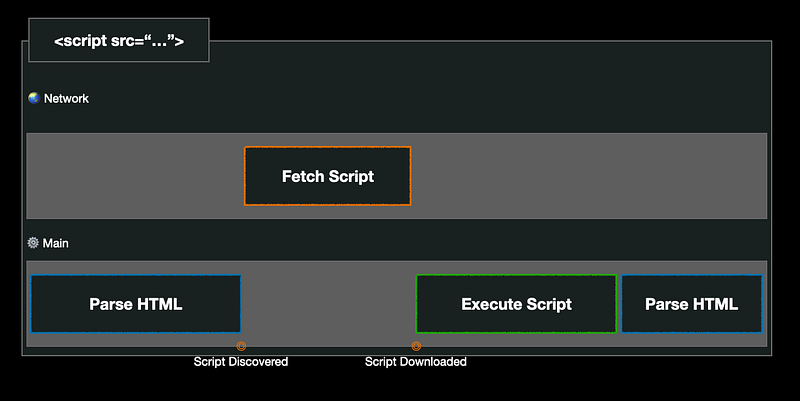
The diagram shows that are two threads which run when a page is loaded. One is the main thread and another is network thread. The main thread starts with the parsing of the HTML. As soon as it encounters a script tag, it then switches to network thread and downloads the script from the internet. It then executes the downloaded script and then continues parsing the rest of the HTML. So, these kind of scripts are basically known as render-blocking scripts. If you have multiple such scripts, the parsing of the HTML would be blocked multiple times. This is not great if you care to show something to the users really fast.
These kind of pauses can be avoided if we have async attribute on the script tags. Let’s see what happens when we encounter a script with an async attribute. Have a look at the diagram below:
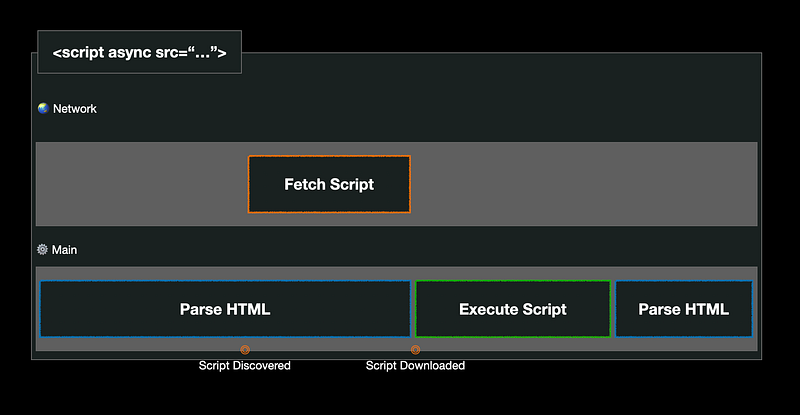
The diagram shows that when it encounters a script with an async attribute, the main thread does not stop parsing the HTML. It downloads the script in parallel and continues parsing the HTML. Once the download is complete, the main thread pauses the parsing of HTML and executes the script which is downloaded. Once the execution is completed, it resumes the parsing of HTML. Scripts get executed as soon as they are downloaded and are not render-blocking.
The defer scripts are also not render-blocking and we still fetch the scripts as soon as they are discovered but they are not executed until the parsing of the HTML is complete. Refer the below diagram to get more understanding of it:
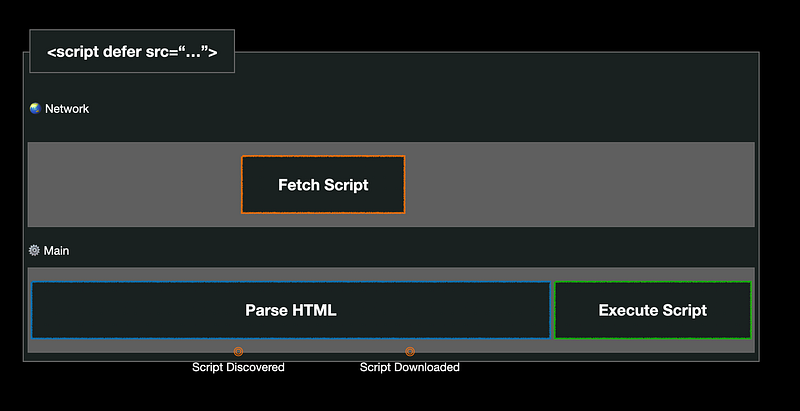
The diagram shows that as soon as the script tag with defer attribute is discovered, the download takes place but the parsing of the HTML does not stop. The execution of the downloaded script happens only when the entire HTML is parsed. The defer scripts does guarantee the order of the script execution. So if you had 2 scripts with defer attributes, the script execution would happen only in the sequence of which they were discovered. Scripts with defer attribute are a much better alternative for the scripts that rely on each other but are not render-blocking.
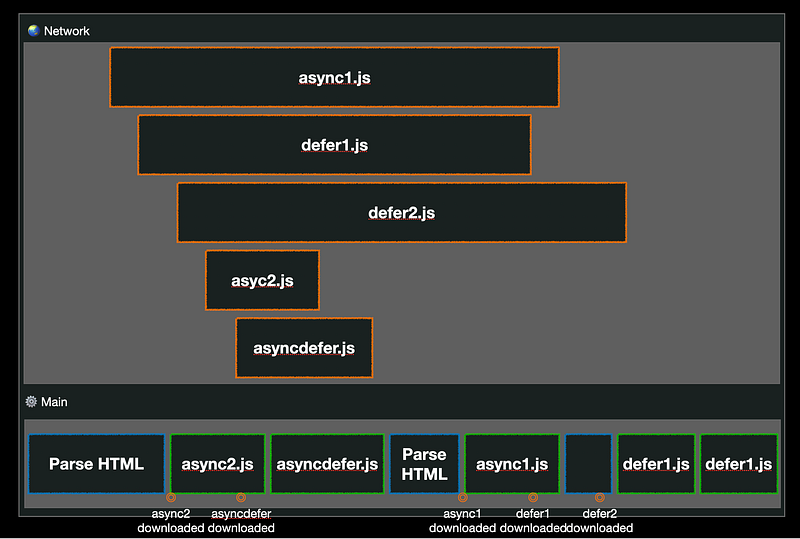
The async attribute takes precedence over defer attribute. Hence if a script tag has both async and defer, it will be treated as an async script.
I hope you enjoyed this article about async and defer scripts. Please share it with your frontend friends.
PlainEnglish.io 🚀
Thank you for being a part of the In Plain English community! Before you go:
- Be sure to clap and follow the writer️
- Learn how you can also write for In Plain English️
- Follow us: X | LinkedIn | YouTube | Discord | Newsletter
- Visit our other platforms: Stackademic | CoFeed | Venture