
Master Python: Develop a Custom LLM Agent from Scratch
A lot of people are finding the concept of the agents in large language models (LLMS) is the idea of agents. But if you are someone who really understands things by seeing or creating the code for it from scratch, so like many other folks, I decided to try building one from scratch.
So what is an agent and why are they important? let’s tackle the second question first. Currently, a lot of people who use large language models mainly interact with them through chat interfaces. But these chat systems have a few limitations
- They often hallucinate.
- They are only trained on data up to a certain date (for now, that’s 2021)
- They don’t have access to private data
- They can’t work well with other tools (without a human in the middle)
Agent attempts to surpass this by :
- Prompting models to call or use outside tools in a specific way (we’ll explain how this works below).
- Running the model in a loop, with some wrapper code that can parse the model's tool requests, execute them, and return the input to the model.
- Adding some “chain-of-thought” in the prompting to reduce hallucination
The model chooses what action to execute, and then some code parses out and executes that request on its behalf
How does this work?
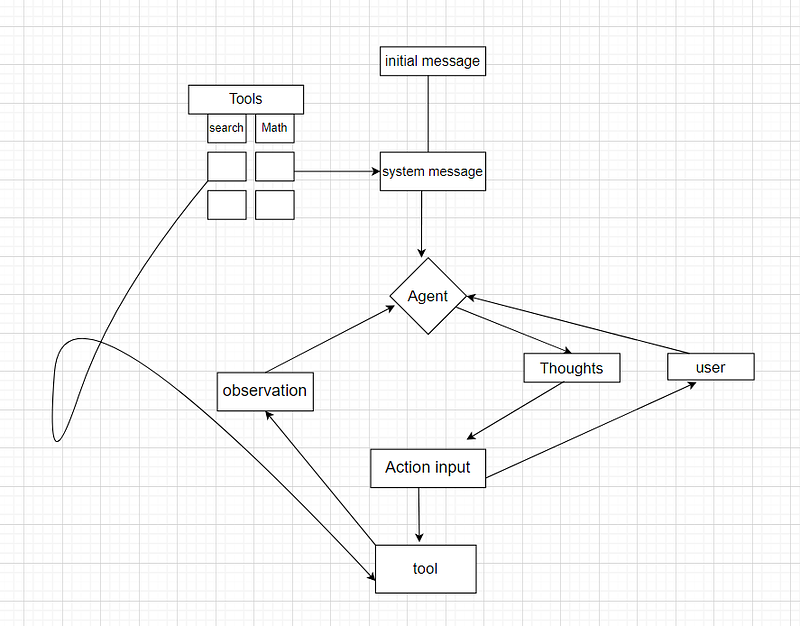
We start with the initial message and some tools that are defined as functions and we have a system message we input both the descriptions of the tools and the initial message to the system message and then we send it to an agent in this case GPT 3.5, so we get a response comes in as thoughts at first so the agent ends up having some thoughts and after that it decides on an action and an action input it decides whether to use a tool or interact with the user if it decide to use a tool then we grab on of the tools if this sends us which tool to use we use that tool and we going get an observation from that tool and we feed that back into the agent, then agent decides again if it has the final answer by giving us another action or to use another tool this cycle continues until when it has its final answer then it interacts with the user and the user responded it goes back to the agent and the cycle repeats again and again
So let’s start by building our agent.
1. Set up your environment
1. You want to start by creating a venv on your local machine.
First, open your terminal and create a virtual environment.
python -m venv venv
then activate it:
venv\Scripts\activate
You should see (Venv) in the terminal now.
Now, let’s install the required dependencies:
Pip install openai==0.27.6 , tiktoken==0.3.3 , py-expression-eval==0.3.14
termcolor==2.3.0 ,langchain==0.0.146
Finally, we’ll need to set an environment variable for the OpenAI API key:
set OPENAI_API_KEY=<YOUR_API_KEY>
set SerpApi = <YOUR_API_Serp>
Now, that we’re all set, let’s start!
Create a file named “Custom_agent.py”, where we will write the functions for answering questions.
let’s import the required dependencies:
import openai
from langchain.utilities import SerAPIWrapper
from py_expression_eval import Parser
import os
from termcolor import colored
import tiktoken
Read the file
load_dotenv()
openai_key = os.getenv("OPENAI_API_KEY")Setting up the Prompt
let’s set up the base prompt
PROMPT = """
Answer the following questions and obey the following commands as best you can.

You have access to the following tools:

Search: Search: useful for when you need to answer questions about current
events. You should ask targeted questions.
Calculator: Useful for when you need to answer questions about math.
Use python code, eg: 2 + 2
Save response to csv: Useful for when you need to save your response to a csv
file
Response To Human: When you need to respond to the human you are talking to.

You will receive a message from the human, then you should start a loop and
do one of two things

Option 1: You use a tool to answer the question.
For this, you should use the following format:
Thought: you should always think about what to do
Action: the action to take, should be one of [Search, Calculator,
Save response to csv]
Action Input: the input to the action, to be sent to the tool

After this, the human will respond with an observation, and you will continue.

Option 2: You respond to the human.
For this, you should use the following format:
Action: Response To Human
Action Input: your response to the human, summarizing what you did and what
you learned

Begin!
"""we are telling the model that it will be run in the loop and the LLM has two options, it can either “use a tool”, giving that tool an input, or it can respond to the human, then we give the model a list of the tools and s description of when/how to use each one.
- the thought-action pattern creates a “chain-of-thought”, telling the model to think about what it’s doing.
Setting up The Tools
Next, we’ll proceed to develop our tools. Each tool will be a function that accepts a string as input and produces another string as output.
search_wrapper = SerpAPIWrapper(serpapi_api_key='YOUR_SERP_API_KEY')
def search(str):
    return search_wrapper.run(str)

parser = Parser()
def calculator(str):
    return parser.parse(str).evaluate({})
def save_response_to_csv_file(response):
    with open('response.csv','a') as f:
         f.write(response + "\n")
Here, we’ve made three tools:
- Search: This performs a search engine query using SERP_API_KEY. if you wish to actually execute this, you can register and generate a free key at https://serpapi.com/. this free key allows you to make 100 searches per month.
- Calculator: I use py_expression_eval as a calculator (good balance between being able to run complex math expressions, without many of the risks of trying to pull in a full Python REPL/eval).
- Save_CSV: we save the response to a CSV file which takes a response, which is a string and then opens and saves the response
That’s all you need to do. You can make any tool using this method, it just has to accept a line of text and give back a line of text.
Setting up The Tools
def agent_loop(initial_command):
    messages = [
        { "role": "system", "content": PROMPT },
        { "role": "user", "content": initial_command },
    ]
    total_session_tokens = sum([len(encoding.encode(message["content"]))
    for message in messages])
    while True:
        tool = None
        response = openai.ChatCompletion.create(
           model="gpt-4",
           temperature=0.3,
           stream=True,
           messages=messages,
        )
        tokens_used = 0
        response = ''
        #process each chunk
        for chunk in response:
            if "role" in chunk["choices"][0]["delta"]:
                continue
            elif "content" in chunk["choices"][0]["delta"]
                tokens_used += 1
                r_text = chuck["choices"][0]["delta"]["content"]
                responses += r_text
                print(colored(r_text, 'green'), end='',flush=True)
        total_session_tokens += tokens_used
        if show_token_consumption:
           print(colored("\nTokens used this time: " + str(tokens_used),'red'))
           print(colored("Total tokens used so far: "+ str(total_session_tokens),'yellow'))
        user_input = None
        action = responses.split("Action: ")[1].split("\n")[0].strip()
        action_input = responses.split("Action Input: ")[1].split("\n")[0].strip()
        if action == "Search":
            tool = search
        elif action == "Calculator":
            tool = calculator
        elif action == "Save response to csv":
            tool = save_response_to_csv_file
        elif action == "Response To Human":
            print(f"Response: {action_input}")
            user_input = input("enter your response: ")
            total_session_tokens += len(encoding.encode(user_input))
        if tool:
           observation = tool(action_input)
           print("Observation: " , observation)
        if user_input:
           messages.extend([
                 {"role": "system" , "content":responses},
                 {"role": "user" , "content":user_input},])
        else:
          messages.extend([
             {"role": "system" , "content": responses },
             {"role": "user" , "content":f"Observation: {observation}"},])
what i am doing? it’s pretty simple
the first thing to point out is that I am using a conversational model (GPT4). GPT4 is much more powerful than 3.5 resulting in the agent performing better than the model
We set the model with a system_prompt that is the same as our PROMPT from earlier. This gives the model instructions on what we want it to do.\
Next, we set it up in a loop. In the first run of the loop, we give the model the system prompt and the first message from the user, then we allow the model to generate text. When it’s done, it’s time for our code to take over again.
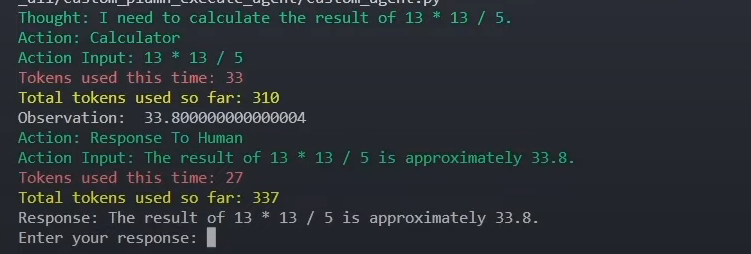
We should now have a message from the model that looks something like this:
First Query : agent(“what is 13 * 13 / 5??”)
Conclusion :
Agents are really powerful. I won’t discuss whether it is reasoning or not, but allowing an LLM to “act” as if it’s thinking helps it overcome many of its limitations it also opens up a lot of interesting use cases (it even seems like OpenAI’s ChatGPT plugins work similarly). It’s pretty certain that in a few months, there will be new products and businesses built around interesting custom agents connected to all kinds of tools.
this is pretty cool you can define your functions and you can change your Prompts, this is done entirely with Python and OpenAi So feel free to play around with it and adapt it to your use case.
Reference :
https://python.langchain.com/docs/get_started/introduction.html
📻 Stay tuned for more details on trending AI-related implementations and discussions on my personal blog and if you are not a medium member and you would like unlimited articles to the platform. Consider using my referral link right here to sign up — it’s less than the price of a fancy coffee, only $5 a month! Dive in, the knowledge is fine!
🧙♂️ We are AI application experts! If you want to collaborate on a project, drop an inquiry here, stop by our website, or shoot us direct email..
📚Feel free to check out my other articles:


