
Massive Scale Databases
Introduction
Data is the new oil, it is everywhere. Only companies who really understand, manage and control their industry data will succeed. A company is as valuable as its capacity to understand and process data in order to drive business decisions.
In this article, I will review the more recent massive scalable databases to store and process big data discussing the pros and cons; and providing some use cases; but first; let’s see how we got here…
History
The ability to pass information to future generations has driven evolution for millions of years, and in the last decades data has grown exponentially giving birth to Big Data. Businesses have realized that Information is power and gathering and storing it, must be a priority. Defining a data strategy is key.
OLTP vs OLAP
Several years ago, business use to have online applications backed by a relational database which was used to store users and other structured data(OLTP). Overnight, this data was archived using complex jobs into a data warehouse which was optimized for data analysis and business intelligence(OLAP). Historical data was copied to the data warehouse and used to generate reports which were used to make business decisions.
Data Warehouse vs Data Lake
As data grew, data warehouses became expensive and difficult to manage. Also, companies started to store and process unstructured data such images or logs. With Big Data, companies started to create data lakes to centralize of their structured and unstructured data creating a single repository with all the data.
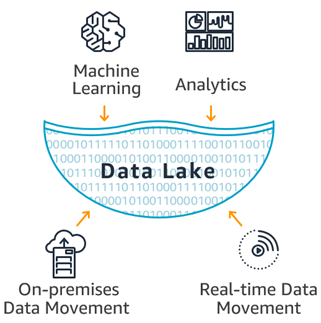
In short, a data lake it’s just a set of computer nodes that store data in a HA file system and a set of tools to process and get insights from the data. Based on Map Reduce a huge ecosystem of tools such Spark were created to process any type of data using commodity hardware which was more cost effective.
So, there was a shift from data warehouses to data lakes mainly driven by economic reasons since data lakes are more cost effective; although both data lakes and data warehouse were and still are, often combined and used together. For example, data warehouse can be used for BI and data lakes for Machine Learning. Many cloud providers like AWS provide ways to extend the data ware house to your data lake providing a single view for all your analytic needs. For more information check this article which compares data lakes and data warehouses.
For OLTP, there was a shift towards NoSQL, using databases such MongoDB which could scale beyond the limitations of SQL databases.
Nowadays, compute and specially storage is very cost effective thanks to the cloud providers. This opens new possibilities to many companies are using different storage options(SQL, NoSQL, data warehouses, data lakes…) for different use cases to overcome the limitations each one had.
Recent databases can handle large amount of data used for both ,OLTP and OLAP, and do this at a low cost for both stream and batch processing. Big organizations with many systems, applications, source and type of data will need a data warehouse and/or data lake to meet their analytical needs, but if your company doesn’t have too many information channels, a single massive database could suffice simplifying your architecture and drastically reducing costs. In this article we will discuss some of these databases, although we will focus on OLTP since data lakes and data warehouse is a topic on its own.
Considerations
Before jumping on comparing some of these databases, let’s review some considerations.
NoSQL vs SQL
This topic has been covered in many articles. What is important is that NoSQL emerged to overcome the scalability issues tat Relational Databases were facing and the shift on the type of applications. The key is that SQL is a powerful general purpose query language but it requires a defined schema. In the other hand NoSQL does not enforce a schema and it is more specific, meaning that you need to think and optimize for the queries in advance. This is very important, if you know how your data will be accessed, you expect lots of queries and strong consistency is not an issue, then NoSQL is a great option; and this is the case for many applications.
NoSQL types
NoSQL is a broad topic that consist of many types of data bases which uses different approach to store and access the data. The idea is that depending on your use case some databases will suit you better than others, furthermore, you may want to combine several databases to meet different needs. My advise is to analyze how data is used and choose the best model that works to solve your specific needs; instead of choosing the technology and then try to fir your needs into the database model.
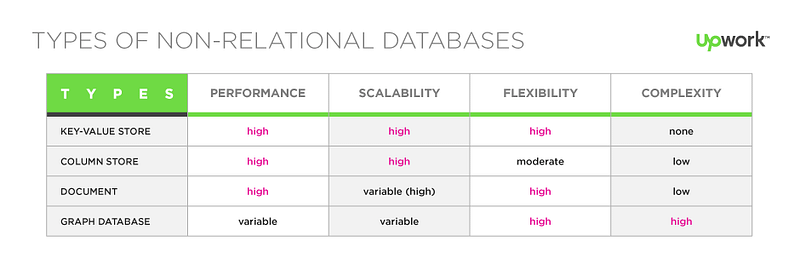
For example, if you are using SQL and find your self doing lots of joins because you care about the relations, then a graph database may be a more suitable solution.
Some of the types include document, time series, key-value, graphs… You need to select the database that better handle the types of usage for your applications. In many cases you will need to run multiple databases each one optimized for certain queries or access patterns.
Open Source vs. Cloud Provider
Virtually all cloud providers provide managed or Serverless database solutions ready to use. This is a game changer which provides you with a simple and cost effective to store different types of data. The offerings vary between cloud providers and studying in detail their different options in key. For example, Google Cloud offers massive scale databases that no other cloud provider does, so if you need this type of scale, choosing the right cloud provider is very important.
As you scale up, cloud based databases can become expensive. An alternative is using open source databases. There are many options to choose from, many of them can run very cheaply on the cloud and even on top of Kubernetes. A good approach in the cloud, is to start with a managed solution and then consider open source databases if the costs are too high.
OLAP vs OLTP
We already talked about this, think of OLTP your normal applications and microservices; you care about latency. You typically store structured data and the rows are just few kilobytes in size.
In the other hand for OLAP you care about parallelism and throughput. Queries may take a lot longer and will scan huge amount of data. The most common approach is to move the data to a data lake and/or a data warehouse which are optimized for these types of queries.
Some of the databases that we are going to talk can support both types of queries but it is recommended that you have different clusters for OLAP and OLTP, although some DBs support both on the same cluster.
Databases
Let’s see of databases and discuss the Pros and Cons. Note that this is not an exhaustive list.
I will not mention data warehouses specifically built for OLAP such Redshift or BigQuery, check this article for a detailed comparison.
Cassandra
Apache Cassandra is the most established scalable massive database. It an Open source NoSQL key-value database that provides low latency, it is fault tolerant(using replicas), scalable and decentralized; meaning it does not follow a master-slave pattern to provide high availability. It is optimized for OLTP but it can be tuned to support OLAP queries but it is quite limited for these types of usages and it usually requires a replicated cluster with different settings. It can run on Kubernetes using Stateful sets and can store lots of data.

It is widely adopted and can be used for many use cases including web applications database, cache, event store, and much more.
ScyllaDB
ScyllaDB is a Cassandra compatible database rewritten in C++ which provides better performance and ultra low latency. It is probably the fastest database on the market. It is open source but some of the features require the enterprise edition. It can run on-prem or in the cloud. The dynamic scheduler provides optimizations for both, OLAP and OLTP queries in the same cluster, making it a great database for all types of queries and tasks.

YugaByteDB
YugabyteDB is a high-performance distributed massive SQL Database. It is the only relational open source database that can scale at a global level providing ACID semantics for transactions. It provides low latency, massive scale, high available data store. It has a cloud offering and enterprise edition.
It is written in C/C++ and can store any amount of data at any scale. It can be deployed in any cloud provider, Kubernetes or on-prem. It provides a Cassandra language compatible API and a SQL compatible API.
It is the most versatile open source database.
Neo4j
Neo4J is the most popular Graph Database. It is mature, reliable and fast. It is native graph database and not built on top of another one. It free to use for development but you need a license for production; they do provide a free enterprise edition for start-ups.

It is highly available, secure, scalable and performs great.
ArangoDB is another great alternative. JanusGraph is a non native GraphDB that can run on top of other DBs like Cassandra.
MongoDB
MongoDB is the most famous NoSQL database which made famous the NoSQL databases. It stores the data in documents. Very popular for scalable web sites and mobile applications. It is optimized for OLTP. It has a free community edition and an enterprise edition. It also has a cloud offering.
DynamoDB
DynamoDB is AWS proprietary NoSQL Serverless Cloud database. You don’t need to manage absolutely anything and can autoscale to handle any traffic demand. It is optimize for OLTP and can handle many use cases including microservices, web apps, mobile apps, etc. It integrates great with the AWS Serverless ecosystem such AWS Lambda, Amplify, Kinesis and much more, making it a great option for AWS users. It is relatively cheap and very easy to get started with. The row size is limited to 400kb. It support strict or eventual consistency reads.
Redis
Redis is an open source, in-memory data structure store, used as a database, cache and message broker. It is very popular and can be used for many use cases including managing the state for stateless applications, web cache, database cache, session management and much more.
It provides a very low latency and high performance. Many cloud providers use it as a managed solution but you can run it on-prem or in Kubernetes. It provides a simple API making it very easy to use. Redis has built-in replication.
InfluxDB
InfluxDB is a popular time series database. It offers an open source, enterprise or cloud version. It is very popular to store logs and telemetry data and integrates with other tools such Prometheus and Grafana. Widely used by SREs to monitor the systems but can be used for many use cases.
It is a fast scalable NoSQL database that provides a SQL-like query language. It is great for analytics.
Elastic Search
ElasticSearch is a special kind of storage, at is core, it is a distributed inverted index used for really fast searches. It is a distributed and enhanced version of Apache Lucene, a popular search software.
It stores the data in JSON documents and provides a rich query DSL to perform fast searches using a REST interface. It is a highly available, redundant, reliable data store that can run on the cloud, Kubernetes or on-prem. It provides very fast look ups. It has an open source and enterprise edition.
ElasticSearch is very popular and over the years it has evolved into much more than a search engine covering many use cases. It got extremely popular for log aggregation as part of the ELK stack, providing a simple way for SREs to search and analyze large amount of log data in single data store. Several tools and aggregations were added over time creating a huge ecosystem that now can be used for searching, log analysis, visualizations, machine learning, and much more.
Although, it can be used as a primary data store, it is often used to optimize searches and look-ups and only the searchable data is stored. This is because ElasticSearch does not provide high consistency and struggles with mutable data which is very important in a primary data store. ElasticSearch is often combined with NoSQL databases since it provides a very rich, even richer that SQL, query language that supports joins and complex nested queries.
BigTable
I already talked about the advantages of Google Cloud versus other providers. GCP offers great databases, on of them is BigTable; a massive NoSQL database that can be used for large analytical and operational workloads. It offers very low latency, replication, high durability and much more in a managed environment. It can scale linearly to cope with any amount of data.
It is very easy to use and provide a very simple API but the query language is limited, so a good schema design is critical. Since it provides very low latency and has no schema can be used for a wide variety of use cases including data streaming, big data workloads, time series data, event store, graph data and much more. It can be used as a backend for other graph or time series databases.
Spanner
Spanner was Google’s internal massive transnational relational database and it is now part of GCP. It provides ACID transactions and strong consistency at scale. It is highly available and reliable.
It is not super fast but strong consistent at a global scale. You can schedule both OLTP and OLAP queries. It is a great option when you need a massive SQL database.
Cloud Firestore
Cloud Firestore is a flexible NoSQL, scalable database focused on mobile and web applications. It can provide real time synchronization with mobile devices including offline synchronization.
It stores the data in documents, and has a rich query language. It is great for time to market since it is very easy to use and completely Serverless. It is used for OLTP and can handle lots of data but not massive data since row size is limited just like DynamoDB.
Summary
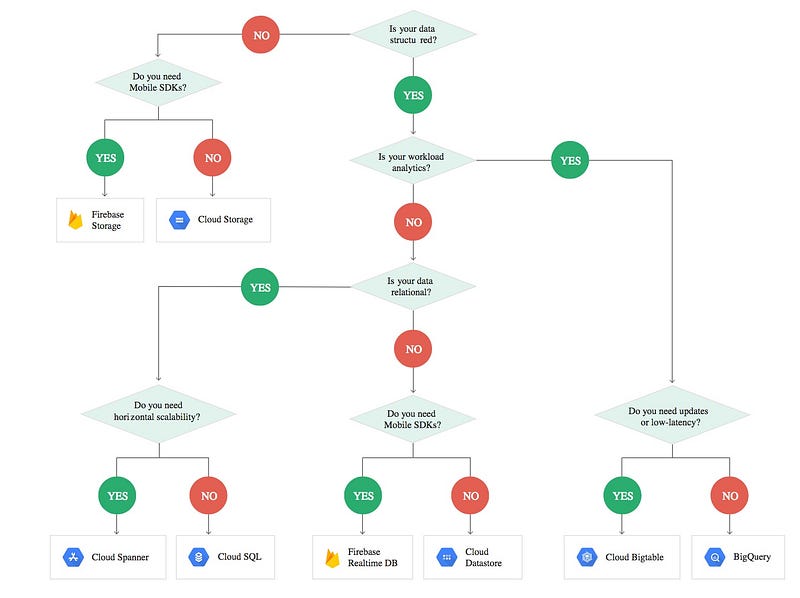
The following table summarizes all the Database Options.
Choose one or more storage options to fit your business needs. The main point is that databases such BigTable, YugaByteDB or ScyllaDB allow you to run both OLAP and OLTP queries without the need to create data lakes or data warehouses for analytics. Again, this doesn’t mean you have to use them for OLAP, if you have other sources of data and you want to centralize all the data at a lower cost, a data lake will be required.
Use Cases
In this section let’s review some use cases and suggest some options based on your requirements.
When should I use traditional relational databases
- Your data is relational in nature. It has a structure that can be normalized to avoid duplication. You can easily define your schema using tables composed of columns.
- You require consistent read and ACID transactions.
- You don’t know the access patterns or queries in advance.
- You don’t need your database to scale globally.
- You don’t require very low latency.
- You don’t need to store big data. No more than a few Terabytes.
- You don’t need to store complex graphs, hierarchies, time series data, documents, etc. Special purpose NoSQL were built for those specific use cases.
- You are not sure about the amount of data you will store or access patterns and your team is not familiar with NoSQL
In case you need to store lots of data at scale…
Massive Scale Databases Use Cases
- You need ACID transactions, global in nature and you need consistent reads: Use YugabyteDB or if you are in GCP Spanner.
- I need a fully compliant SQL database: Use YugabyteDB or if you are in GCP Spanner.
- I need an open source SQL based database with low latency that I can deploy anywhere: Use YugabyteDB.
- I need a managed cloud solution in GCP for global scale SQL queries: Use GCP Spanner
- I need a data store for a large web application, I don’t need joins and I don’t want to use any cloud provider: use MongoDB.
- I need to build a big web application on AWS, I don’t care about vendor-lock in. I want also to build mobile apps and integrate with other AWS Services, specially AWS Lambda: Use DynamoDB.
- I need a real time database for rich mobile and web applications that support offline synchronization: Use DynamoDB with Amplify in AWS or Firestore in GCP.
- I need a Serverless cloud based solution to store my data in a NoSQL database for my rich applications. Use DynamoDB or Firestore in GCP.
- I need a super fast cache for my database or web application. Use Redis, if you are in the cloud use a managed solution.
- I need to store state for my stateless microservices: Use Redis.
- My data consist mainly on relationships that are hard to define using a relational system: Use a graph database like Neo4J, if you already use BigTable or Cassandra consider JanusGraph.
- I need to store graph relationships like social media followers at scale: Use Neo4J or JanusGraph.
- I need to store time series data: Use InfluxDB or if you use BigTable already consider OpenTSB.
- I need to store a complex hierarchy that is hard to define in a relational system: Use Neo4J.
- I need to store big data at a scale with very low latency, I don’t need complex joins and eventual consistency is enough for me: Use Cassandra, ScyllaDB or BigTable. Consider also YugabyteDB is you also need consistent reads (with performance penalty).
- Same as above but without vendor lock-in: Use Cassandra or ScyllaDB. For a full open source solution use Cassandra.
- I need to easily support OLTP and OLAP queries.Use Cassandra, ScyllaDB or BigTable.
- I need to easily support OLTP and OLAP access patterns in the same cluster without performance degradation: Use ScyllaDB.
- I need a an event store for event sourcing, for example for Akka Persistence: Use Cassandra or ScyllaDB.
- I need a database for real time fast stream processing, for example using Apache Flink, Spark Streaming or Data flow: Use Cassandra, ScyllaDB or Bigtable
- I need to perform analytics using SparkSQL or other engine on top of a data store capable of handling this load: Use Cassandra, ScyllaDB or BigTable
- I need a managed solution for several use cases that require very low latency as part of stream processing such as store time series data, cache, write once-read many, etc. : Use BigTable.
- I need a global scale database which is flexible and supports Cassandra query language for low latency queries using or SQL query for ACID transactions in a single data base: Use YugabyteDB.
- I need to store unstructured text and be able to search its contents: Use ElasticSearch.
- I need to store log data for analysis: Use ElasticSearch or InfluxDB.
- I need to store documents and support complex queries with low latency: Use ElasticSearch.
- I need to speed up the searches on my website and support auto completes, I need also fuzzy logic to deal with typos and other issues related to user input: Use ElasticSearch.
- I have my data store in massive key-value database which provide very low latency look-ups such as Cassandra, ScyllaDB or BigTable but I need to perform complex queries: Use ElasticSearch, as a secondary data store for searchable content. You will issue queries to ElasticSearch which will return the IDs of the items to return, then use your primary data store to retrieve the data.
Conclusion
In this article I have review some of the massive databases available in the market, this is just some of the options available; I do encourage you to do your own research and look for alternatives.
Start small, if you don’t know the user data access patterns in advance or you don’t know your growth projections, start with MySQL or PostgreSQL if you have structure data or Firebase, DynamoDB or MongoDB for NoSQL. Firebase is a great BaaS option to start your website or mobile application. For analytics, start by creating read replicas for you databases to perform the queries in a separate environment. As you grow, you may need to move to massive databases such Cassandra, and if you analytics needs grow even further you may need to start moving data to a data warehouse or data lake. The key is that you don’t need to do it from the beginning.
Use several databases for different use cases. In the area of microservices there is no one size fits all. Do not fight trying to fit graph relationships in a relational system. It is okay to duplicate data, use CDC and other synchronization mechanism to propagate events in event driven architecture. Serverless options in Cloud providers make the development of event driven applications quite easy. Also, you can use the same technology for different use cases. For example, ElasticSearch can be used to store your logs and also for your website searches.
Answer the big questions first to narrow down your options. Decide if you are going to commit with a given cloud provider or if you prefer to avoid vendor lock-in. If you choose a cloud provider, choose wisely; if you are a data company, consider GCP over AWS since it has more storage options and more databases including a Serverless data warehouse; it is also great for AI/ML. If you want to avoid vendor lock-in and/or you use Kubernetes, consider open source options such Cassandra, MongoDB, YugaByteDB, etc. There are many options for companies that want to run their workloads on-prem or multiple cloud providers.
I hope you enjoyed this article. Feel free to leave a comment or share this post. Follow me for future post.