Registering the dataset</h1><p id="f6c4">To use a dataset with Detectron2, we need to register it so that we can use the predefined data loaders. As our dataset is not in the COCO format, we will need to write a function to return all the needed information about the data as a list and passing the result to DatasetCatalog.register.</p>
<figure id="a9f5">
<div>
<div>
<iframe class="gist-iframe" src="/gist/xictus77/9fd3261081037855f1c1b79ce63078cb.js" allowfullscreen="" frameborder="0" height="undefined" width="undefined">
</div>
</div>
</figure></iframe></div></div></figure><p id="0e88">Detectron2 keeps track of a list of available datasets in a <code>registry</code>, so we must register our custom data with Detectron2 so it can be invoked for training. We register our metadata which tells Detectron2 about which class id corresponds to which class which helps in visualization later.</p>
<figure id="fcf4">
<div>
<div>
<iframe class="gist-iframe" src="/gist/xictus77/a29fd70ba778eecf62fb1ea006dda4e5.js" allowfullscreen="" frameborder="0" height="undefined" width="undefined">
</div>
</div>
</figure></iframe></div></div></figure><h1 id="a2fa">Visualize Detectron2 training data</h1><p id="56d1">This step is optional as we have viewed our training dataset during our exploratory data analysis phase. However, we can make use of the visualizer library in Detectron2 to easily view our training data to ensure the data has imported correctly.</p>
<figure id="3853">
<div>
<div>
<iframe class="gist-iframe" src="/gist/xictus77/0e1c9f9921ddc45305645497b6eec66c.js" allowfullscreen="" frameborder="0" height="undefined" width="undefined">
</div>
</div>
</figure></iframe></div></div></figure><figure id="3161"><img src="https://cdn-images-1.readmedium.com/v2/resize:fit:800/1*jBQXRD_HgggDr1d5WtTPSw.png"><figcaption></figcaption></figure><figure id="9ed4"><img src="https://cdn-images-1.readmedium.com/v2/resize:fit:800/1*RJ_5qo-H2b7ZD0u6rYUI7w.png"><figcaption></figcaption></figure><figure id="a7b3"><img src="https://cdn-images-1.readmedium.com/v2/resize:fit:800/1*f17BzxukSeHRxmgfIEnbjg.png"><figcaption>Visualization on training dataset</figcaption></figure><h1 id="b1c8">Fine-Tuning a pre-trained model using transfer learning</h1><p id="3e87">After registering the data-set we can simply perform transfer learning on a pre-trained model using the <a href="https://github.com/facebookresearch/detectron2/blob/master/detectron2/engine/defaults.py#L181">DefaultTrainer class</a>. Detectron2 allows you many options in determining your model architecture, which you can refer to using the <a href="https://github.com/facebookresearch/detectron2/blob/master/MODEL_ZOO.md">Detectron2 model zoo</a>.</p><figure id="4c13"><img src="https://cdn-images-1.readmedium.com/v2/resize:fit:800/1*XHqLJE7D0jMS9t8osrO1EQ.png"><figcaption>Object detection models available in the <a href="https://github.com/facebookresearch/detectron2/blob/master/MODEL_ZOO.md">Detectron2 model zoo</a>.</figcaption></figure><p id="4315">In our case, we use the following script to fine tune our selected pre-trained model. This may not be the ideal configuration and we may be able to modify certain parameters such as learning rate, maximum iterations, batch size, for better results. However, for this post, we will use these values as defaults as the test results will show a decent performance from the trained model.</p>
<figure id="fe48">
<div>
<div>
<iframe class="gist-iframe" src="/gist/xictus77/0c18908f7627cbce5b8f545123203285.js" allowfullscreen="" frameborder="0" height="undefined" width="undefined">
</div>
</div>
</figure></iframe></div></div></figure><p id="8768">Now we can start training our model. The training process will run for close to an hour and we can visualize the training and loss plots using tensorboard.</p>
<figure id="92bf">
<div>
<div>
<iframe class="gist-iframe" src="/gist/xictus77/4aabbd3f44a4a6011204227c5fbc2d36.js" allowfullscreen="" frameborder="0" height="undefined" width="undefined">
</div>
</div>
</figure></iframe></div></div></figure><figure id="6f16"><img src="https://cdn-images-1.readmedium.com/v2/resize:fit:800/1*WzxzT_ofgLKt9FoTLePjkQ.png"><figcaption></figcaption></figure><p id="d6de">There are a lot of metrics of interest in there — most notably <code>total_loss</code> We can see that the total loss converges to a reasonably low value after 999 iterations. We can of course improve the model performance and fine tune the model by increasing the maximum iterations to 1500 or more.</p><h1 id="5761">Run Detectron2 inference on test images</h1><p id="2846">With the model is trained, we can use our custom Detectron2 for inference on the test set which are the images that we have created using <a href="https://readmedium.com/facial-mask-overlay-with-opencv-dlib-4d948964cc4d">mask-overlay-opencv-Dlib</a>.</p><p id="a60c">Now, we can perform inference on our test set by creating a predictor object.</p>
<figure id="c6cf">
<div>
<div>
<iframe class="gist-iframe" src="/gist/xictus77/19beb5793ef034a1261d08cde4a9fefb.js" allowfullscreen="" frameborder="0" height="undefined" width="undefined">
</div>
</div>
</figure></iframe></div></div></figure><p id="e600">The results of the test images is shown in Figures 1 and 2 below. We can observed that the custom trained detectron2 perf
Options
orms well in detecting if the drawn face mask is worn. It does not detect and classify correctly people who wore the drawn face mask incorrectly. The main reason is due to the training dataset which has very small number of images with people wearing mask incorrectly.</p><p id="1ace">We may also consider playing with the <code>SCORE_THRESH_TEST</code> to change the confidence threshold that the model requires to make a prediction.</p><figure id="ca19"><img src="https://cdn-images-1.readmedium.com/v2/resize:fit:800/1*ZbfN0mHIPxboUeJfqWDkPQ.png"><figcaption></figcaption></figure><figure id="c412"><img src="https://cdn-images-1.readmedium.com/v2/resize:fit:800/1*0tQ11-vGprRK2Jxs06xQwA.png"><figcaption></figcaption></figure><figure id="276b"><img src="https://cdn-images-1.readmedium.com/v2/resize:fit:800/1*m4sAaJe_Y78snIbablyugQ.png"><figcaption>Figure 1 —Face mask drawn on the image on the right cannot be detected</figcaption></figure><figure id="763c"><img src="https://cdn-images-1.readmedium.com/v2/resize:fit:800/1*gFbaJTRaCHan4l_O87TmDA.png"><figcaption></figcaption></figure><figure id="9080"><img src="https://cdn-images-1.readmedium.com/v2/resize:fit:800/1*tLA_G-VqGH5cjl0-ezO2PA.png"><figcaption></figcaption></figure><figure id="5763"><img src="https://cdn-images-1.readmedium.com/v2/resize:fit:800/1*qwgFru1UHLbae_6xGVn-OA.png"><figcaption>Figure 2— Face mask drawn on the image on the right incorrectly labelled</figcaption></figure><h1 id="0e7b">Save your model and config</h1><p id="cdb3">We can now save the weights in the <code>os.path.join(cfg.OUTPUT_DIR, "model_final.pth")</code> for future inference by exporting to Google Drive.</p><p id="1fe7">To use the model for inference you need both the model weights and config. To save the config use:</p>
<figure id="15a7">
<div>
<div>
<iframe class="gist-iframe" src="/gist/xictus77/b0fbf23d41978b13e08fce88865c7c63.js" allowfullscreen="" frameborder="0" height="undefined" width="undefined">
</div>
</div>
</figure></iframe></div></div></figure><h1 id="b612">Conclusion</h1><p id="9e09">In this post, we have successfully trained a Detectron2 object detection model using a custom face mask dataset and used it to test on our “masked” faces that has been generated using OpenCV and dlib library. The results showed that pre-trained model does well to detect the drawn face mask but unable to detect if the mask is worn correctly. The results should improve if we are able to train with a dataset with more balanced classes especially on the class — face mask worn incorrectly.</p><p id="01d8">The results also show that the script in my article — <a href="https://readmedium.com/facial-mask-overlay-with-opencv-dlib-4d948964cc4d">Facial mask overlay with OpenCV-dlib</a> used can provide another alternative solution to create image datasets of people with face masks that can be used to <b><i>train</i></b><i> </i>and <b><i>evaluate</i></b><i> </i>facial recognition systems.</p><p id="b187">References</p><div id="fb16" class="link-block">
<a href="https://gilberttanner.com/blog/detectron2-train-a-instance-segmentation-model">
<div>
<div>
<h2>Detectron2 Train a Instance Segmentation Model</h2>
<div><h3>In this article, you'll learn how to create your own instance segmentation data-set and how to train a Detectron2 model…</h3></div>
<div><p>gilberttanner.com</p></div>
</div>
<div>
<div style="background-image: url(https://miro.readmedium.com/v2/resize:fit:320/0*-vKo3xh5pfFo4_GA)"></div>
</div>
</div>
</a>
</div><div id="3edb" class="link-block">
<a href="https://gilberttanner.com/blog/detectron-2-object-detection-with-pytorch">
<div>
<div>
<h2>Detectron2 - Object Detection with PyTorch</h2>
<div><h3>Update Feb/2020: Facebook Research released pre-built Detectron2 versions, which make local installation a lot easier…</h3></div>
<div><p>gilberttanner.com</p></div>
</div>
<div>
<div style="background-image: url(https://miro.readmedium.com/v2/resize:fit:320/0*BPurdDbyFsukDMx7)"></div>
</div>
</div>
</a>
</div><div id="20ff" class="link-block">
<a href="https://www.kaggle.com/gozyssj4/mask-detection-starting-with-the-xml-dataset">
<div>
<div>
<h2>Mask Detection - Starting with the XML Dataset</h2>
<div><h3>Explore and run machine learning code with Kaggle Notebooks | Using data from Face Mask Detection</h3></div>
<div><p>www.kaggle.com</p></div>
</div>
<div>
<div style="background-image: url(https://miro.readmedium.com/v2/resize:fit:320/0*4Sqrt2kVYQoNQmTn)"></div>
</div>
</div>
</a>
</div><p id="0e9e">Source of images</p><div id="bd22" class="link-block">
<a href="https://www.kaggle.com/andrewmvd/face-mask-detection">
<div>
<div>
<h2>Face Mask Detection</h2>
<div><h3>853 images belonging to 3 classes.</h3></div>
<div><p>www.kaggle.com</p></div>
</div>
<div>
<div style="background-image: url(https://miro.readmedium.com/v2/resize:fit:320/0*t6mG9Z0AOgv9oOND)"></div>
</div>
</div>
</a>
</div><p id="3591">You can download my complete codes here</p><p id="e4d4"><a href="https://github.com/xictus77/Facial-mask-overlay-with-OpenCV-Dlib.git">https://github.com/xictus77/Facial-mask-overlay-with-OpenCV-Dlib.git</a></p></article></body>
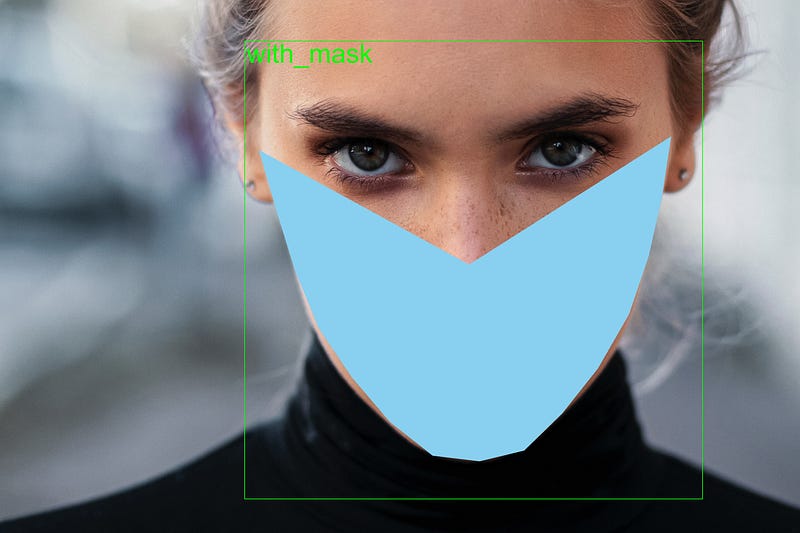
We will implement the new Detectron2 Library by facebook to be trained on our “masked faces” dataset for object detection. Thereafter, we will run our Detectron2 inference on our test images where the face masks are synthetically superimposed using openCV and dlib library.
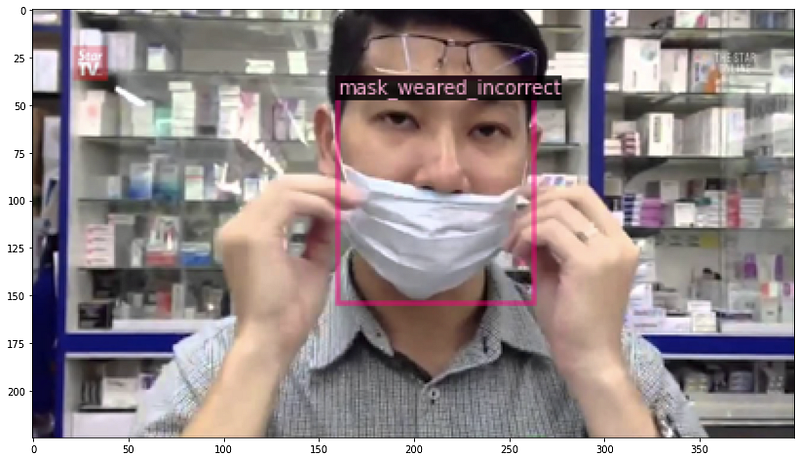
We will be running on Google Colab as we will be utilizing its free GPU resource for our training of our Object Detector. The dataset that we are using can be downloaded from Kaggle. We select this dataset as there are 3 classes in this dataset namely — with mask, mask not properly worn, not wearing mask. You can find the colab notebooks at the end of this post.
Overview of Detectron2
Detectron2 is an advanced model zoo that provides state-of-the-art detection and segmentation algorithms. First released by Facebook AI Research (FAIR)group in Feb 2020, it is the successor of Detectron and maskrcnn-benchmark. It consists of:
Training recipes for object detection, instance segmentation, panoptic segmentation, semantic segmentation and keypoint detection.
80+ pre-trained models to use for fine-tuning (or training afresh).
Dataset support for popular vision datasets such as COCO, Cityscapes, LVIS, PASCAL VOC, ADE20k.
Detectron2 registers datasets in COCO JSON format.
Overview of our dataset
We will be training our custom Detectron2 detector on face mask dataset from Kaggle. This dataset consists of 853 images with 3 classes — people with mask, mask not properly worn, not wearing mask.
As Detectron2 is not trained on detecting face mask, we will need to train the underlying networks to fit our custom task. Before that, let us perform exploratory data analysis on the dataset. [source code]
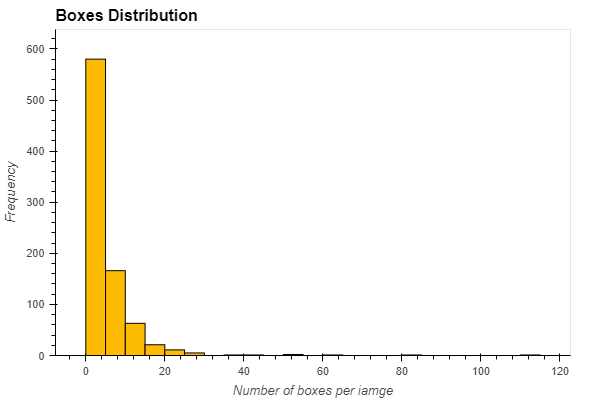
The distribution of the data can be shown in Figure 1 where clearly there is an imbalance of class types across the 3 classes. The spread is about 80% of people with mask, 17% of people without mask and 3% of people with mask_weared_incorrect. We dive deeper to check the distribution of the bounding boxes in the images. Figure 2 describes the spread using histogram and it is obvious that about 70% (close to 600 images) of the images have less than 5 bounding boxes.
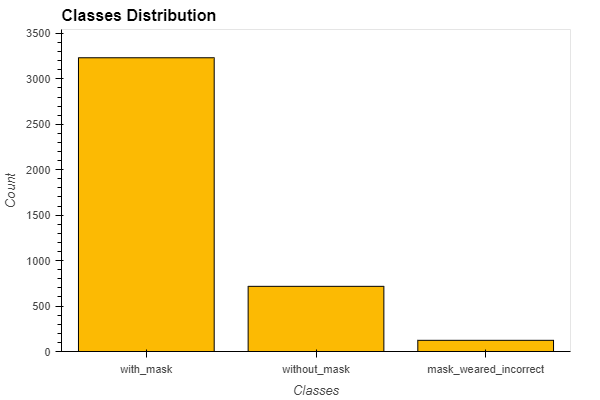
Figure 1 — Imbalance distribution across 3 classesFigure 2— Most images have less than 5 bounding boxes per image
There are several methods to deal with this type of imbalance dataset — Synthetic Minority Oversampling Technique (SMOTE), Oversampling the minority class, Undersampling the majority class, etc. However, for the purpose of this article, we will proceed to train our object detector with our dataset and keeping in mind that our dataset is biased.
Getting Started
Installing Detectron2 will be relatively straightforward when we are using Google Colab. It can be installed with the following lines:
At this point, we will need to restart the notebook runtime to continue.
Next we will proceed to import the necessary Detectron2 dependencies.
Registering the dataset
To use a dataset with Detectron2, we need to register it so that we can use the predefined data loaders. As our dataset is not in the COCO format, we will need to write a function to return all the needed information about the data as a list and passing the result to DatasetCatalog.register.
Detectron2 keeps track of a list of available datasets in a registry, so we must register our custom data with Detectron2 so it can be invoked for training. We register our metadata which tells Detectron2 about which class id corresponds to which class which helps in visualization later.
Visualize Detectron2 training data
This step is optional as we have viewed our training dataset during our exploratory data analysis phase. However, we can make use of the visualizer library in Detectron2 to easily view our training data to ensure the data has imported correctly.
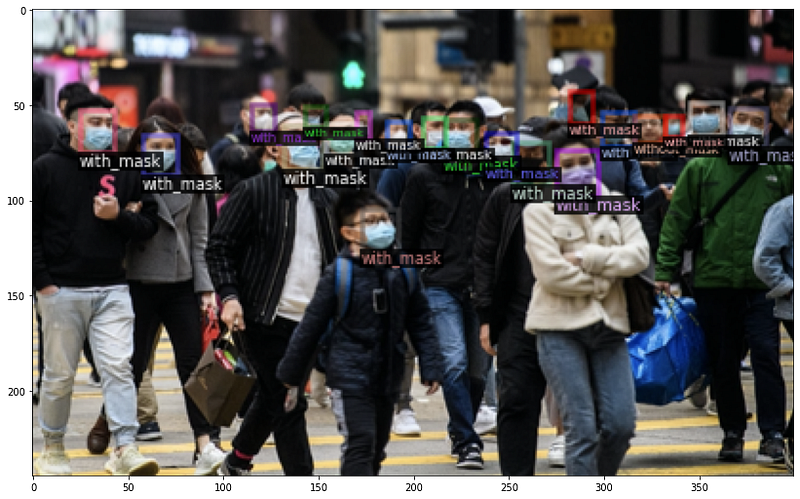
Visualization on training dataset
Fine-Tuning a pre-trained model using transfer learning
After registering the data-set we can simply perform transfer learning on a pre-trained model using the DefaultTrainer class. Detectron2 allows you many options in determining your model architecture, which you can refer to using the Detectron2 model zoo.
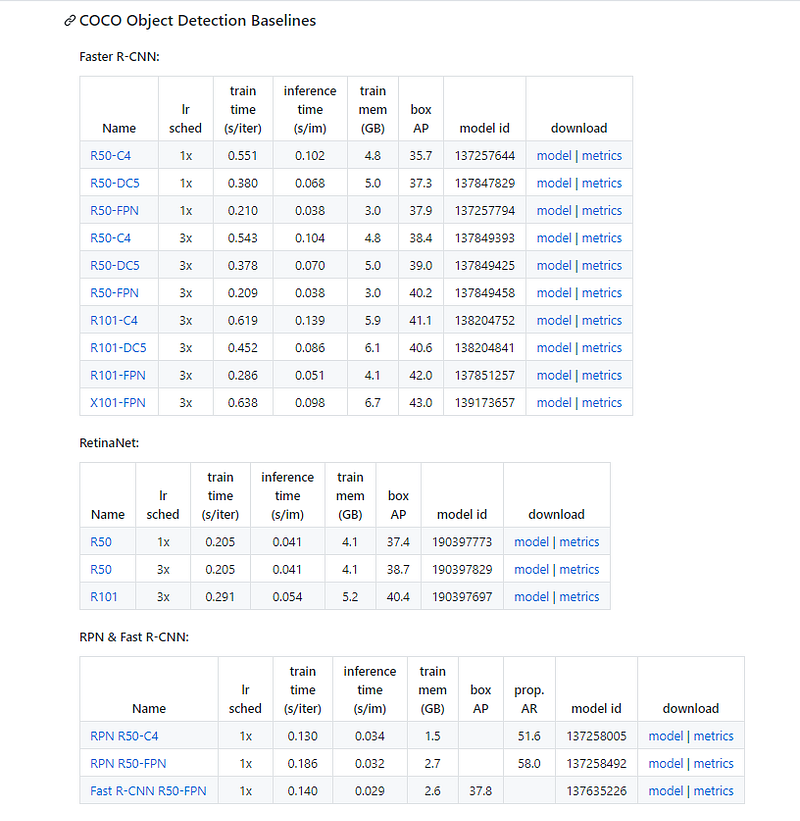
In our case, we use the following script to fine tune our selected pre-trained model. This may not be the ideal configuration and we may be able to modify certain parameters such as learning rate, maximum iterations, batch size, for better results. However, for this post, we will use these values as defaults as the test results will show a decent performance from the trained model.
Now we can start training our model. The training process will run for close to an hour and we can visualize the training and loss plots using tensorboard.
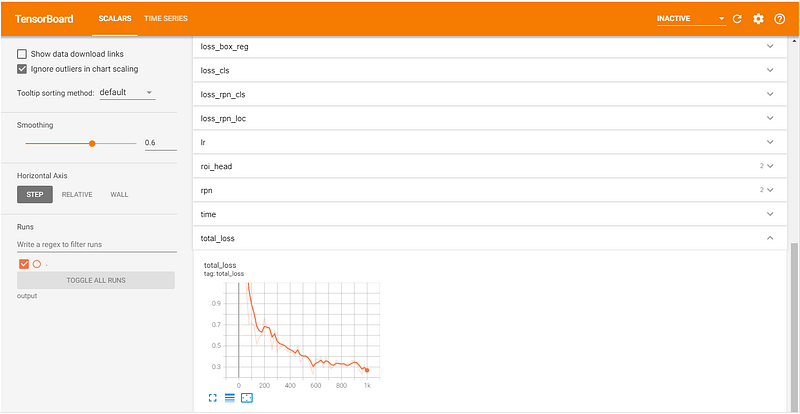
There are a lot of metrics of interest in there — most notably total_loss We can see that the total loss converges to a reasonably low value after 999 iterations. We can of course improve the model performance and fine tune the model by increasing the maximum iterations to 1500 or more.
Run Detectron2 inference on test images
With the model is trained, we can use our custom Detectron2 for inference on the test set which are the images that we have created using mask-overlay-opencv-Dlib.
Now, we can perform inference on our test set by creating a predictor object.
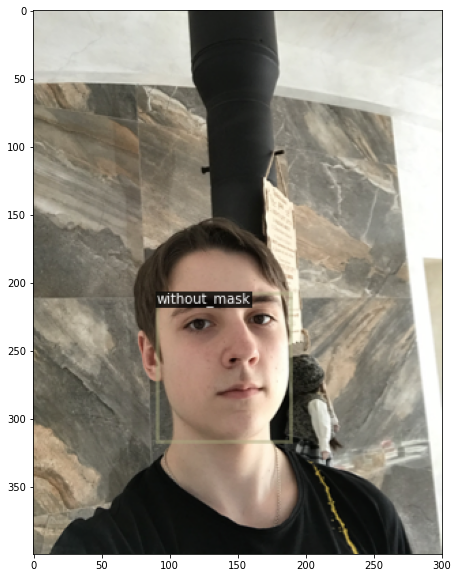
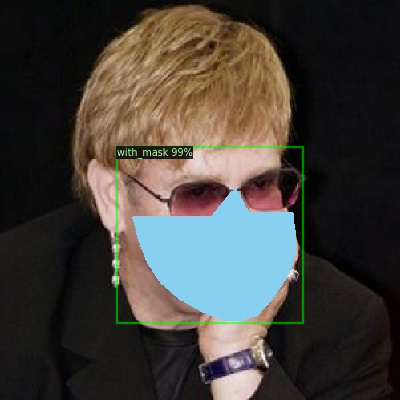
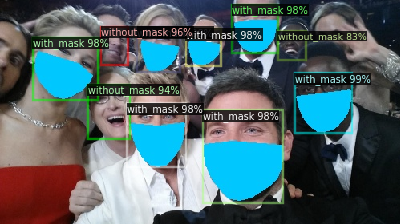
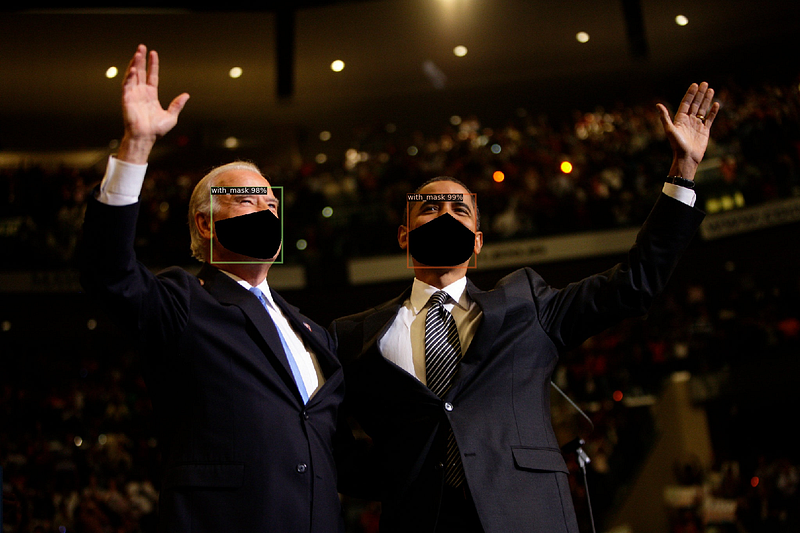
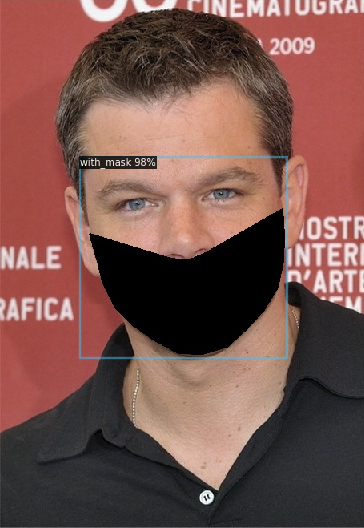
The results of the test images is shown in Figures 1 and 2 below. We can observed that the custom trained detectron2 performs well in detecting if the drawn face mask is worn. It does not detect and classify correctly people who wore the drawn face mask incorrectly. The main reason is due to the training dataset which has very small number of images with people wearing mask incorrectly.
We may also consider playing with the SCORE_THRESH_TEST to change the confidence threshold that the model requires to make a prediction.
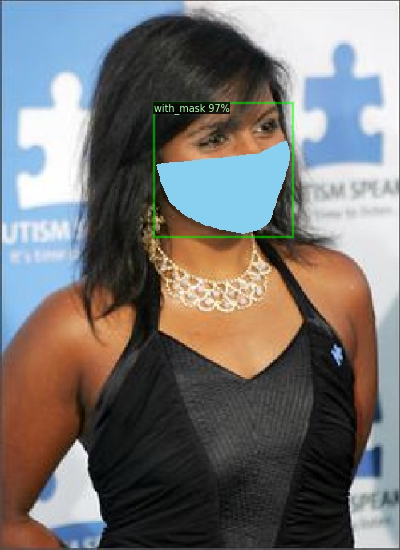
Figure 1 —Face mask drawn on the image on the right cannot be detectedFigure 2— Face mask drawn on the image on the right incorrectly labelled
Save your model and config
We can now save the weights in the os.path.join(cfg.OUTPUT_DIR, "model_final.pth") for future inference by exporting to Google Drive.
To use the model for inference you need both the model weights and config. To save the config use:
Conclusion
In this post, we have successfully trained a Detectron2 object detection model using a custom face mask dataset and used it to test on our “masked” faces that has been generated using OpenCV and dlib library. The results showed that pre-trained model does well to detect the drawn face mask but unable to detect if the mask is worn correctly. The results should improve if we are able to train with a dataset with more balanced classes especially on the class — face mask worn incorrectly.
The results also show that the script in my article — Facial mask overlay with OpenCV-dlib used can provide another alternative solution to create image datasets of people with face masks that can be used to trainand evaluatefacial recognition systems.