
Map Interface Internals —[ Java Internals Part -4]
In this Article we will Deep Dive the Map Interface Which is Implemented in the Java.util Package.

So Lets First See Some Key Concepts About How Map are taken in Java
- it maps the key to some value
- it cannot have duplicate keys
- it has Three Collection Views :
- Set of Keys
- Collection of Values
- Set of Key — Value Mappings
4. A map Cannot have itself as a Key
5. A map can have itself as value but in such a case the hascode and the equals method are not applicable
6. Unmodifiable Maps Can also be Created
So lets Start And See the Various Features the Map Interface Supports and how the Functionality are implemented Internally in Map :
Basic Function Definitions :
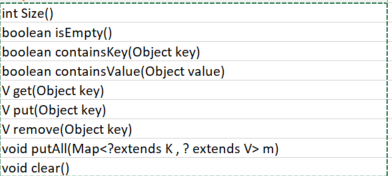
All these Functions are as per the what the name says
Besides these we have the 3 Views of the Map :

Lets Talk about these views One by One :
Set<K> keySet() :
- it returns a set of Keys contained in the Given Map
- changes in set and map are in sync
- this set supports remove , removeAll, retainAll , clear operations but don’t allow add / addAll operations
Collection<V> values () :
this similar to what we had in the Set of the Keys , here instead of that we will have a Collection That Supports all the Values Present in the Map
Set<Map.Entry<K,V>> entrySet() :
- this contains a set of Key — Value Pair Present in the Set
- the Elements of this Set are only Valid during the Iteration only
- in case our Map is Modified after the Entry is Returned by the Iterator then it is a Undefined Behaviour of the Map.
Now in our Map Interface we also have a Sub Interface Entry < K , V >
Entry<K,V> interface :
which have all the functionalities for our Key — Value Pairs and have the Functions Which We Can Perform on Key and Value Pairs , Like Compute , Merge , etc .
Some Basic Definitions in the Entry < K , V > interface are :
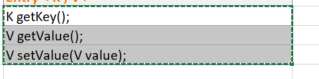
these are simple functions which can be understood by the name itself .
now lets see in detail about these following Function in Detail How they Work and What are their Logic behind .
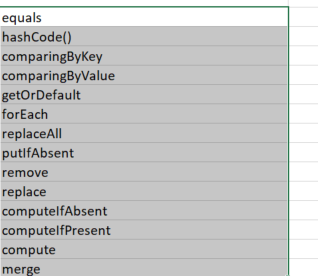
Now lets learn about each of these methods one bye one :
equals()
Compare a object with the object on which this function is applied
let o1 and o2 be the two objects we are comparing
then the logic behind equals() is
both key and value should satisfy the below criteria :
if both objects are null then they are equal otherwise we compare them by thier
respective values
so the final logic is like  :
o1.getKey() == null ? o2.getKey() == null :
o1.getKey().equals(e2.getKey())
&&
o1.getValue() == null ? o2.getValue() == null :
o1.getValue().equals(o2.getValue());
hashCode()
it returns the hash Code value of the key , value pair
the logic behind the hashCode() function is like :
if o is the object on which this function is called and o is having a key,value
pair then hashcode of the the Entry is :
o.getKey() == null ? 0 : o.getKey().hashCode()
^
o.getValue() == null ? 0 : o.getValue().hashCode()
this implementation ensures that in case our objects are equal then thier
hash code are also same.
comparingByValue() :
- it returns a Comparator which is Serializable and throws NPE on comparing with Null Values
- the Return value is type casted with (Comparator
implementation :
public static <K,V extends Comparable<? super V>>
Comparator<Map.entry<K,V>> comparingByValue(){
   return (Comparator<Map.Entry<K,V>> & Serializable)
           (c1,c2) -> c1.getValue().equals(c2.getValue())
}
comparingByKey()
Similar to what we did with Key but here we get a Comparator in the Argument which will be used as a logic to Compare our Keys
public static <K,V>
Comparator<Map.Entry<K,V>> comparingByKey( Comparator<? super K> cmp){
   Objects.requireNonNull(cmp);
   return (Comparator<Map.Entry<K,V>> & Serializable)
 ( c1 , c2 ) -> cmp.compare(c1.getKey(),c2.getKey());
}
Similar Overloaded Function for comparingByValue() is also there
getOrDefault()
it return the value of the key in case it is not null otherwise it returns a default value
implementation :
default V getOrDefault(Object key , V defaultValue){
  V v;
  (v = get(key)!=null || containsKey(key)) ? v : defaultValue;
}
forEach()
as the name suggest forEach iterates through map and performs the given operation on the Entry in the Map .
the Action which is to Performed is Passed as a BiConsumer to the ForEach Method and then we use the accept function in the BiConsumer to Apply this to the Entry in the Map .
implementation :
default void forEach(BiConsumer<? super K, ? super V> action) {
    Objects.requireNonNull(action);
    for (Map.Entry<K, V> entry : entrySet()) {
        K k;
        V v;
        try {
            k = entry.getKey();
            v = entry.getValue();
        } catch (IllegalStateException ise) {
           throw new ConcurrentModificationException(ise);
        }
        action.accept(k, v);
    }
}- BiConsumer < ? super K, ? super V> is passed as an argument
- entrySet() view is used to iterate through to the Map
- accept method of BiConsumer is used apply the given logic to the Map Entry
Example :
Map<String,String> map  = new HashMap<>();
map.put("A","B");
map.put("C","D");
map.forEach((k,v)->{
    System.out.println(k + " val - " + v);
});
in case we do some modification during the iteration to the key,value then we get the ConcurrentModificationException
Example :
Map<String,String> map  = new HashMap<>();
map.put("A","B");
map.put("C","D");
map.forEach((k,v)->{
    k = k + "X";
    v = v + "Y";
    map.put(k,v);

});
this is as per the view condition for EntrySet() we cannot do any modification in the map once the Entry is Returned by the Iterator
so any operation add/remove on the Entry of the map will give us the ConcurrentModificationException
replaceAll
Applies the Given Function on the Value of the Entry in the Map and do it for all the Entry
Three phases in replaceAll are :
- Getting the Key
- Applying the Function to get New Value
- Setting the new Value to the entry
implementation :
default void replaceAll(BiFunction<? super K, ? super V, ? extends V> function) {
    Objects.requireNonNull(function);
    for (Map.Entry<K, V> entry : entrySet()) {
        K k;
        V v;
       // Getting the Key , Value
        try {
            k = entry.getKey();
            v = entry.getValue();
        } catch (IllegalStateException ise) {
           throw new ConcurrentModificationException(ise);
        }
        // Applying the Function on the Key,Value Pair and Storing
         the Result in
        v = function.apply(k, v);

        try {
            entry.setValue(v);
        } catch (IllegalStateException ise) {
            // this usually means the entry is no longer in the map.
            throw new ConcurrentModificationException(ise);
        }
    }
}- It Accepts a BiFunction which we need to apply on the Key Value Pairs to get the new Value
- entrySet() view is used
putIfAbsent()
this function adds a value to the key in case there is no value assigned to that key
in case there is no value associated to the key it puts the given value to the key and returns null
in case the key already associated with some value then it returns the current value
implementation :
default V putIfAbsent(K key , V value){
  V v = get(key);
  if( v == null){
    put(key,value);
  }
  return v;
}
remove
This Function as the name suggest removes the key,value pair.
the only condition is that the key should be mapped to the passed value otherwise it doesn’t remove
implemenation :
default boolean remove(Object key , Object value){
 Object currVal = get(key);
 if(!currVal.equals(currVal,value) || currVal == null && !containsKey(key)){
     return false;
 }
 remove(key);
 return true;
}
replace
if the given key is mapped to the given value then only it replaces the value with the replacement .
implemenatation:
default boolean replace(K key , V oldVal, V newVal){
  Object currval = get(key);
  if(!Objects.equals(currval,oldval) || currval == null && !containsKey(key)){
   return false;
  }
  put(key,newVal);
  return true;
}
computeIfAbsent
here it first check if key is associated to some non null value , now if there is no such case then we apply the function passed ( as we want to compute only if it is absent )
now the value which the function returns in case it is null then no operation is done else we update the key with new value .
implementation :
default V computeIfAbsent(K key , Function < ? super K , ? extends V > fn){
 Objects.requireNonNull(fn);
 V v;
 if(v = get(key) == null){
    V newVal;
    if( newVal = fn.apply(key)!=null){
     put(key,newVal);
     return newVal;
    }
 }
 return v;

}
example :
Generally this is used to either initialize something in case the key is not present
for ex :
mp.computeIfAbsent(key , k -> new z(3));
where z is some function which do some calculation on the passed value and returns it .
note that this function is applied only when given key is not present in the map
for ex :
this can also be used to throw some exception in case the we want that value should be present otherwise exception should be thrown
mp.computeIfAbsent(key, k -> throw new RuntimeExceoption(“value should be present”);
computeIfPresent
this applies a function to the entry in case the key is present and value not null .
if the computed value is null then it removes the key from the map or else update the entry with new value
implementation :
default V computeIfPresent(K key,
BiFunction<? super K,? super V, ? extends V> fn){
 Objects.requireNonNull(fn);
 // Compute the Old Value
 V oldVal;
 // check if it is non null
 if( oldVal = get(key) !=null){
  // compute the new value by applying the function
  V newVal = fn.apply(key,oldVal);
  // if newVal is not null then update the Entry
  if(newVal!=null){
   put(key,newVal);
   return newVal;
  }
  else
  {
    // if the new value is NULL then remove the entry
    remove(key);
    return null;
  }
 }
 else
 {
  return null;
 }

}
compute
compute method first applies the function to the entry and checks if the returned value is null or not .
in case it is null then if our old value is not null or present in the map then it removes it as the computed value is null or else in case it is already null then it do nothing .
in case our new Value is not Null then it simply puts the value to the key
implementation :
default V compute(K key ,
 BiFunction < ? super K , ? super V , ? extends V > fn){
   Objects.requireNonNull(fn);
   V oldval = get(key); // compute the old val as per the key
   V newval = fn.apply(key,oldval); // apply the function to the entry to get
 // the new val

//if newval is non-null then update the entry
   if(newval!=null){
     put(key,newval);
     return newval;
   }
   else
   {
    // if newval is null then if the oldval is not null or key present
    // remove it as after computation it is null
       if(oldval!=null || containsKey(key)){
          remove(key);
          return null;
       }
       else
       {
          // do nothing just return null in case oldval was also null
         return null;
       }
   }
}
merge
we pass the merge function with three items :
- key
- value
- BiFunction
if the oldvalue of the key is null then our newVal is the value which we have passed in the argument ,
else in case it is not null then our new Val is the value which we get after computing the Function .
if the computed value is also null then we simply remove the key
else we put the new key — Val pair
default V merge(K key , V value ,
BiFunction<? super V, ? super V , ? extends V> fn ){
  Objects.requireNonNull(fn);
  Objects.requireNonNull(value);
  V oldval = get(key);
  V newVal = oldVal == null ? value : fn.apply(key , oldVal) ;
  if(newVal == null){
   remove(key);
  }
  else
  {
    put(key,newVal);
  }
  return newVal;

}
Unmodifiable Maps :
Unmodifiable Maps can also be created in Java using the
Map.of
Map.ofEntries
Map.copyOf
Properties :
- Keys cannot be added , removed , updated
- null keys and values are not allowed
- serializable only if All K,V pairs are serializable
## Zero Mappings :
static < K, V> Map<K,V> of(){
return ImmutableCollections.emptyMap();
}
## One Mappings :
static <K, V> Map<K, V> of(K k1, V v1) {
return new ImmutableCollections.Map1<>(k1, v1);
}
## Two Mappings :
static <K, V> Map<K, V> of(K k1, V v1, K k2, V v2) {
return new ImmutableCollections.MapN<>(k1, v1, k2, v2);
}
## Three Mappings :
static <K, V> Map<K, V> of(K k1, V v1, K k2, V v2, K k3, V v3) {
return new ImmutableCollections.MapN<>(k1, v1, k2, v2, k3, v3);
}
and so on upto 10 mappings can be created .
Since the usage of unmodifiable maps is not very common i have just done a brush up on how it is implemented and its basic properties
More about Unmodifiable maps -> https://docs.oracle.com/en/java/javase/15/core/creating-immutable-lists-sets-and-maps.html#GUID-271F524A-9F5C-45F0-8C5B-7419525605B8
Thanks for reading.Happy learning 😄
Do support our publication by following it
Also refer to the following articles.


