
Getting Started with Conda
Just the basics. What is Conda? Why should you use Conda? How do you install Conda?
What is Conda?
Conda is an open source package and environment management system that runs on Windows, Mac OS and Linux.
- Conda can quickly install, run, and update packages and associated dependencies.
- Conda can create, save, load, and switch between project specific software environments on your local computer.
- Although Conda was created for Python programs, Conda can package and distribute software for any language such as R, Ruby, Lua, Scala, Java, JavaScript, C, C++, FORTRAN.
Conda as a package manager helps you find and install packages. If you need a package that requires a different version of Python, you do not need to switch to a different environment manager, because Conda is also an environment manager. With just a few commands, you can set up a totally separate environment to run that different version of Python, while continuing to run your usual version of Python in your normal environment.
Conda vs. Miniconda vs. Anaconda
Users are often confused about the differences between Conda, Miniconda, and Anaconda. The Planemo documentation has an excellent diagram that nicely demonstrates the difference between the Conda environment and package management tool and the Miniconda and Anaconda Python distributions (N.B. the Anaconda Python distribution now has well more than 150 additional packages!).
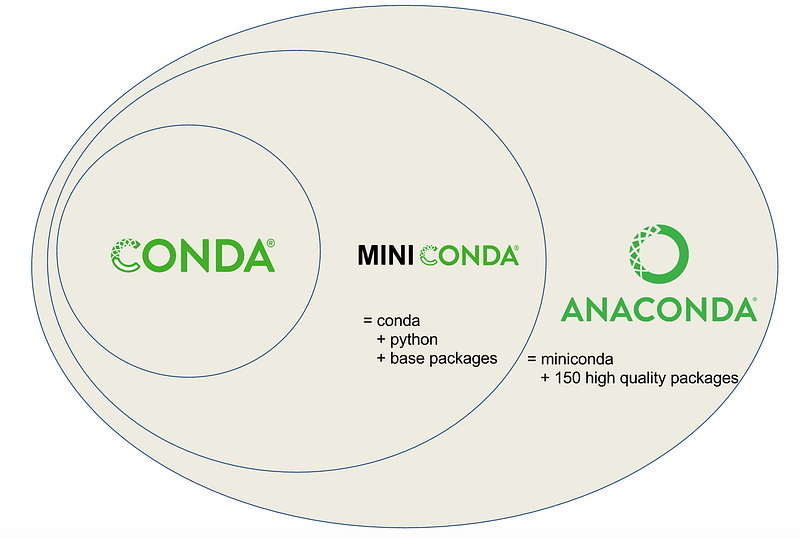
I suggest installing Miniconda which combines Conda with Python 3 (and a small number of core systems packages) instead of the full Anaconda distribution. Installing only Miniconda will encourage you to create separate environments for each project (and to install only those packages that you actually need for each project!) which will enhance portability and reproducibility of your research and workflows.
Besides, if you really want a particular version of the full Anaconda distribution you can always create an new conda environment and install it
using the following command.
conda create --name anaconda-2020-02 anaconda=2020.02Why should you use Conda?
Of the many different package and environment management systems around Conda is one of the few explicitly targeted at data scientists.
- Conda provides prebuilt packages or binaries (which generally avoids the need to deal with compiling packages from source). TensorFlow is an example of a tool widely used by data scientists which is difficult to install source (particularly with GPU support), but that can be installed using Conda in a single step.
- Conda is cross platform, with support for Windows, MacOS, GNU/Linux, and support for multiple hardware platforms, such as x86 and Power 8 and 9. In a follow up blog post I will show how to make your Conda environment reproducible across these different platforms.
- Where a library or tools is not already packaged for install using
conda, Conda allows for using other package management tools (such aspip) inside Conda environments.
Using Conda you can quickly install commonly used data science libraries and tools, such as R, NumPy, SciPy, Scikit-learn, Dask, TensorFlow, PyTorch, Fast.ai, NVIDIA RAPIDS, and more built using optimized, hardware specific libraries (such as Intel’s MKL or NVIDIA’s CUDA), which provides a speedup without having to change any of your code.
How to install Miniconda?
Download the 64-bit, Python 3 version of the appropriate Miniconda installer for your operating system from and follow the instructions. I will walk through the steps for installing on Linux systems below as installing on Linux systems is slightly more involved. Download the 64-bit Python 3 install script for Miniconda.
wget --quiet https://repo.anaconda.com/miniconda/Miniconda3-latest-Linux-x86_64.shRun the Miniconda install script.
bash Miniconda3-latest-Linux-x86_64.shThe script will present several prompts that allow you to customize the Miniconda install. I generally recommend that you accept the default settings. However, when prompted with the following…
Do you wish the installer to initialize Miniconda3
by running conda init?
…I recommend that you type yes (rather than the default no) to avoid having to manually initialize Conda for Bash later. If you accidentally accept the default, no worries. When the script finishes you just need to type the following commands.
conda init bash
source ~/.bashrc
Once the install script completes, you can remove it.
rm Miniconda3-latest-Linux-x86_64.shInitializing your shell for Conda After installing Miniconda you next need to configure your preferred shell to be "conda-aware". You may be prompted to initialize Conda for your shell when running the installation script. If so, then you can safely skip this step.
conda init bash
source ~/.bashrc
(base) $ # prompt indicates that the base environment is active!
Updating Conda
It is a good idea to keep your Conda installation updated to the most recent version. The following command will update Conda to the most recent version.
conda update --name base conda --yesUninstalling Miniconda
Whenever installing new software it is always a good idea to understand how to uninstall the software (just in case you have second thoughts!). Uninstalling Miniconda is fairly straightforward.
Uninitialize your shell to remove Conda related content from ~/.bashrc.
conda init --reverse bashRemove the entire ~/miniconda3 directory.
rm -rf ~/miniconda3Remove the entire ~/.conda directory.
rm -rf ~/.condaIf present, remove your Conda configuration file.
if [ -f ~/.condarc ] && rm ~/.condarcWhere to go next?
Now that you have installed the Conda environment and package management tool you are ready to learn “best practices” for using Conda to manage your data science project environments. In my next post I will cover a what I think are a solid, minimal set of “best practices” that you can adopt to get the most out of Conda when you start your next data science project.


