
Managing Data Science Projects with Poetry
How to install, set up, and use Poetry to manage your data science projects

Reproducibility is an important aspect of data science. When we talk about reproducibility in data science we refer to the ability to independently recreate the results of a project either by yourself at a later point in time or by a colleague.
Having processes that ensure reproducibility builds trust in outputs and ensures quality in data science work. Additionally, it makes it easier to build on top of past work. This might mean a colleague retraining a model built six months ago or another team member developing a new model based on prior analysis.
A large part of reproducibility in data science projects is guided by how well your project’s code is organised and made available so that others can run it independently. In order to organise your projects so they can be run by anyone, anywhere, at a minimum you need the following:
- A virtual environment
- A way to track the dependencies for the project
- A standard folder structure
- A way to package and publish your code
In recent years, the Python programming language has begun to see standards and best practices emerging, especially within the field of data science. Poetry is an example of a python library that has emerged to provide standards for managing python projects. At its core Poetry provides simple functionality for each of the areas listed above.
In the following article, I will walk through how to install, set up and use Poetry to manage data science projects.
Installing
Poetry provides a script for installation. This varies depending on the operating system you are using.
For Mac OSX, Linux or bash on windows run the following:
curl -sSL https://raw.githubusercontent.com/python-poetry/poetry/master/get-poetry.py | python -For Windows use this:
(Invoke-WebRequest -Uri https://raw.githubusercontent.com/python-poetry/poetry/master/get-poetry.py -UseBasicParsing).Content | python -The script will install Poetry on your system and automatically add the relevant files directory to your $PATH environment variable.
If you now open a new shell tab or window and run the following:
poetry --versionYou should see this output.

Creating a project
To create a project with Poetry type the following:
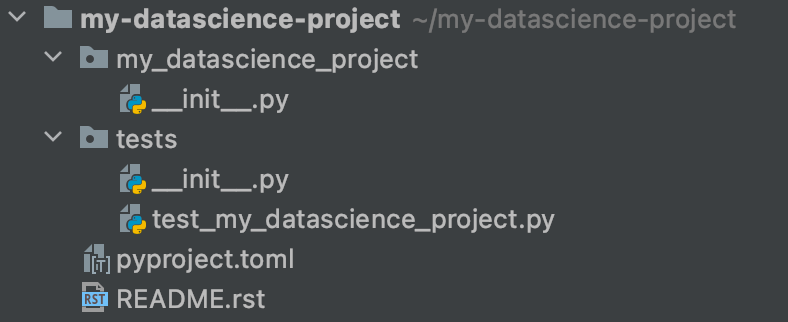
poetry new my-datascience-projectPoetry will automatically create a directory for your project with a skeleton structure similar to that shown below.
Installing packages
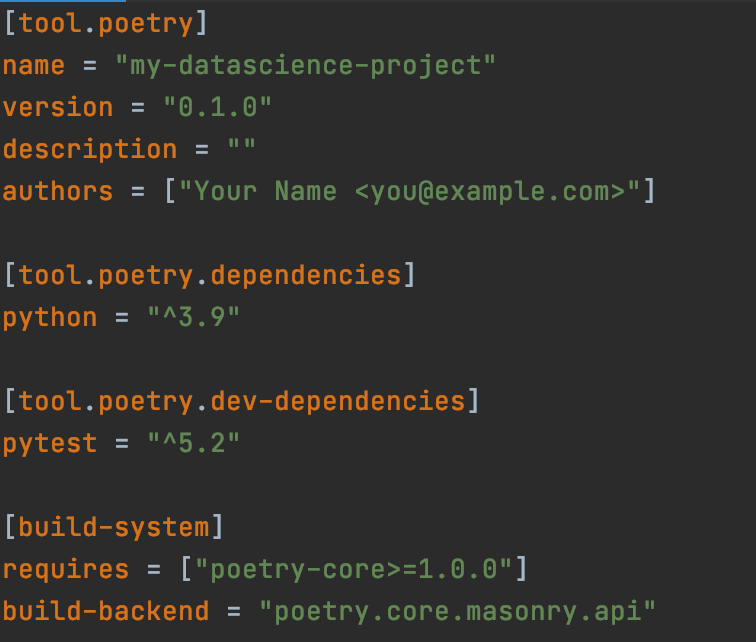
In addition to generating the default project structure, poetry will also create a virtual environment for your project and a .toml file. This file stores and maintains dependencies for the project. It will look something like this.
If you use Pycharm for development you can install a plugin that supports the toml language.
This toml file consists of 4 sections:
tool.poetry provides an area to capture information about your project such as the name, version and author(s).
tool.poetry.dependencies lists all dependencies for your project.
tool.poetry.dev-dependencies lists dependencies your project needs for development that should not be present in any version deployed to a production environment.
build-system references the fact that Poetry has been used to manage the project.
To install a new package we type the following:
poetry add pandasThis will automatically add the package to your list of dependencies and will also generate a poetry.lock file. This file keeps track of all the packages and the exact version being used in your project.
To activate the virtual environment we type poetry shell and type exit to deactivate.
Once inside the virtual environment, any python scripts can be run with the following command:
poetry run python my_script.pyBuild and publish
Sometimes we might want to package our project so that it can be published and installed by other users or within other projects. Poetry provides a very simple way to build and publish your project.
Simply run the following:
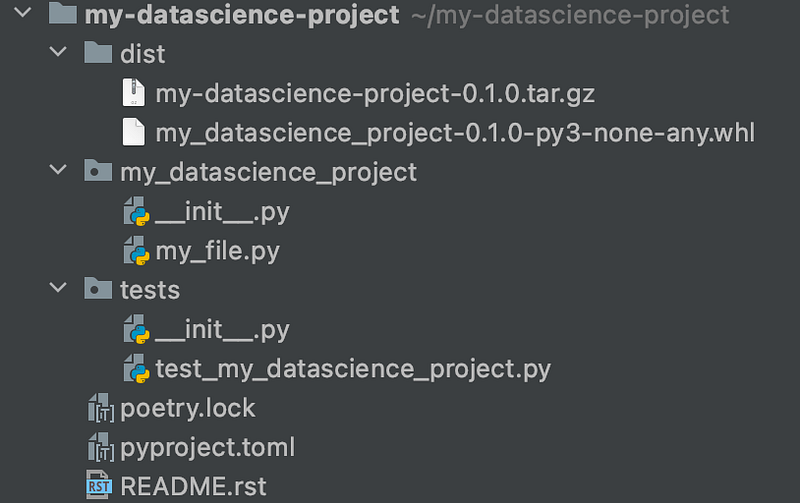
poetry buildThis will give you the following message.

Poetry has added a new folder called dist and created the necessary source distribution and wheels for the project.
Running the command poetry publish will upload the packaged project to a remote repository which can be configured with the config command.
Poetry is one of many modern python tools for dependency management and virtual environments. Other tools include pipenv, virtualenv and conda. Poetry, however, strives to encapsulate more of the required elements for code reproducibility including consistent project structure and simple tools for publishing code.
In this article, I have given a brief introduction to Poetry for managing data science projects. For more information on Python virtual environments in general and code reproducibility for data science see my earlier posts below.
Thanks for reading!


