avatarItchimonji

Free AI web copilot to create summaries, insights and extended knowledge, download it at here

3059

Abstract

v2/resize:fit:800/1*AAIhyBfcOPF-a65DP6pW8Q.png"><figcaption>K9s Tool</figcaption></figure><h1 id="6bc7">Kubescape</h1><blockquote id="6f88"><p>Kubescape is a K8s open-source tool providing a multi-cloud K8s single pane of glass, including risk analysis, security compliance, RBAC visualizer and image vulnerabilities scanning. Kubescape scans K8s clusters, YAML files, and HELM charts, detecting misconfigurations according to multiple frameworks […]</p></blockquote><h2 id="d305">Installation</h2><div id="6f45"><pre> curl -s https:<span class="hljs-regexp">//</span>raw.githubusercontent.com<span class="hljs-regexp">/armosec/</span>kubescape<span class="hljs-regexp">/master/i</span>nstall.sh | <span class="hljs-regexp">/bin/</span>bash</pre></div><h2 id="0d58">Use</h2><div id="f037"><pre><span class="hljs-comment"> kubescape scan</span> <span class="hljs-literal">--</span><span class="hljs-comment">submit</span> <span class="hljs-literal">--</span><span class="hljs-comment">enable</span><span class="hljs-literal">-</span><span class="hljs-comment">host</span><span class="hljs-literal">-</span><span class="hljs-comment">scan</span> <span class="hljs-literal">--</span><span class="hljs-comment">verbose</span></pre></div><p id="e1ee">I use kubescape to check my settings again with an automated tool. Often I forget to set CPU or Memory limits, a liveness or readiness probe, or network policies. The tool gives a lot of hints on how to improve the cluster health and security.</p><figure id="e98a"><img src="https://cdn-images-1.readmedium.com/v2/resize:fit:800/1*h1HbFFZrvQjWJ8v_Op8j8w.png"><figcaption>Terminal View</figcaption></figure><h1 id="0cde">Kubectl autocomplete</h1><p id="b09c">Autocompletion is very valuable for increasing your work speed when using the command line. Here, <b>kubectl </b>comes in handy.</p><h2 id="5cec">Installation</h2><div id="c2c1"><pre><span class="hljs-meta prompt_"> </span><span class="language-bash"><span class="hljs-built_in">source</span> &lt;(kubectl completion bash)</span> <span class="hljs-meta prompt_"> </span><span class="language-bash"><span class="hljs-built_in">echo</span> <span class="hljs-string">"source <(kubectl completion bash)"</span> >> ~/.bashrc</span></pre></div><h1 id="7e72">Kubetree</h1><blockquote id="5423"><p>A kubectl plugin to explore ownership relationships between Kubernetes objects through <code>ownersReferences</code> on the objects.</p></blockquote><blockquote id="729f"><p>The <a href="https://github.com/tohjustin/kube-lineage"><code>kubectl line</code>age</a> plugin is very similar to <code>kubectl tree</code>, but it <a href="https://github.com/tohjustin/kube-lineage#supported-relationships">understands</a> logical relationships between some API objects without needing ownerReferences.</p></blockquote><h2 id="9842">Installation</h2><p id="9137">With <i>Linuxbrew</i> there is no support for kubectl plugins. So you need to install krew per <a href="https://krew.sigs.k8s.io/docs/user-guide/setup/install/">original installtion guide</a>.</p><

Options

h2 id="7793">Use</h2><div id="9bba"><pre><span class="language-xml"> kubectl tree </span><span class="hljs-template-variable">{{<span class="hljs-name">resource-type</span>}}</span><span class="language-xml"> </span><span class="hljs-template-variable">{{<span class="hljs-name">resource-name</span>}}</span></pre></div><div id="18f2"><pre> kubectl tree deployment prometheus-<span class="hljs-keyword">operator</span> -n monitoring kubectl tree service prometheus-<span class="hljs-keyword">operator</span> -n monitoring kubectl tree deployment prometheus-<span class="hljs-keyword">operator</span> -n monitoring</pre></div><p id="679a">I use <b>kubetree</b> very often to list all dependencies and relationships of a resource type like deployments or services.</p><figure id="3bf5"><img src="https://cdn-images-1.readmedium.com/v2/resize:fit:800/1*Kd3HzN0qd0EJXTrblZIGzw.png"><figcaption>Tree Overview</figcaption></figure><h1 id="90ff">Do you need more tools?</h1><p id="bfc9">There are so many Kubernetes tools out there that are very helpful. Here is another list with a huge selection of other <a href="https://collabnix.github.io/kubetools/">tools</a>:</p><div id="228a" class="link-block"> <a href="https://collabnix.github.io/kubetools/"> <div> <div> <h2>Kubetools</h2> <div><h3>There are more than 200+ Kubernetes Certified Service Providers and tons of Kubernetes Certified distributions…</h3></div> <div><p>collabnix.github.io</p></div> </div> <div> <div style="background-image: url(https://miro.readmedium.com/v2/resize:fit:320/0*J7VQJfnv04sxEd1v)"></div> </div> </div> </a> </div><h1 id="6862">Conclusion</h1><p id="8dd8">This is a small list of tools I use every day to manage <b>Kubernetes</b> clusters of my customers. I hope you found a tool you did not know about and that can help you to work more effectively in future. Thanks for reading.</p><p id="a043">Follow me on <a href="https://itchimonji.medium.com/">Medium</a>, or <a href="https://twitter.com/Itchimonji">Twitter</a>, or <a href="https://itchimonji.medium.com/subscribe">subscribe here on Medium</a> to read more about DevOps, Agile & Development Principles, Angular and other useful stuff. Happy Coding! :)</p><h1 id="b087">Learn More</h1><div id="dd8b" class="link-block"> <a href="https://readmedium.com/how-i-learned-and-still-learn-site-reliability-engineering-dd6ad32c4285"> <div> <div> <h2>How I learned (and still learn) Site-Reliability-Engineering</h2> <div><h3>Resources with which I learned the DevOps part</h3></div> <div><p>medium.com</p></div> </div> <div> <div style="background-image: url(https://miro.readmedium.com/v2/resize:fit:320/0*5Kc5iqsIP4oap3Kx)"></div> </div> </div> </a> </div></article></body>

Managing an Ubuntu Based Kubernetes Cluster With Different CLI Tools

How to manage a Kubernetes cluster with a small list of CLI tools

Photo by Agence Olloweb on Unsplash

Continuing the subject of my previous article in which I described Setting Up a Kubernetes 1.23 Cluster using kubeadm on 3 Ubuntu Severs, today I would like to present a small list of useful tools for managing this cluster.

K9s

K9s is a terminal based UI to interact with your Kubernetes clusters. The aim of this project is to make it easier to navigate, observe, and manage your deployed applications in the wild. K9s continually watches Kubernetes for changes and offers subsequent commands to interact with your observed resources.

K9s is my most used tool for managing, maintaining, expanding and debugging Kubernetes clusters. It is very easy to understand and to handle.

Installation

First of all, you need to install Linuxbrew:

$ /bin/bash -c "$(curl -fsSL https://raw.githubusercontent.com/Homebrew/install/HEAD/install.sh)"

Then, you need to follow the instructions of the output in your terminal. After this, we can easily install K9s via the brew command:

$ brew install derailed/k9s/k9s

Use

$ k9s

With K9s you can scan services, pods, ingress’ and so on of your Kubernetes cluster very easily. New changes are shown immediately.
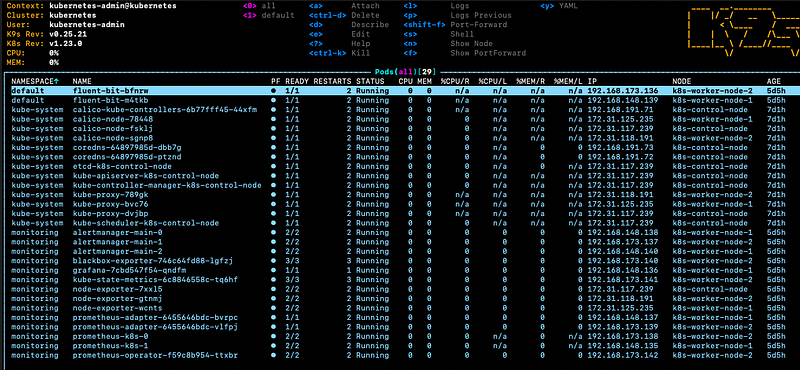
K9s Tool

Kubescape

Kubescape is a K8s open-source tool providing a multi-cloud K8s single pane of glass, including risk analysis, security compliance, RBAC visualizer and image vulnerabilities scanning. Kubescape scans K8s clusters, YAML files, and HELM charts, detecting misconfigurations according to multiple frameworks […]

Installation

$ curl -s https://raw.githubusercontent.com/armosec/kubescape/master/install.sh | /bin/bash

Use

$ kubescape scan --submit --enable-host-scan --verbose

I use kubescape to check my settings again with an automated tool. Often I forget to set CPU or Memory limits, a liveness or readiness probe, or network policies. The tool gives a lot of hints on how to improve the cluster health and security.
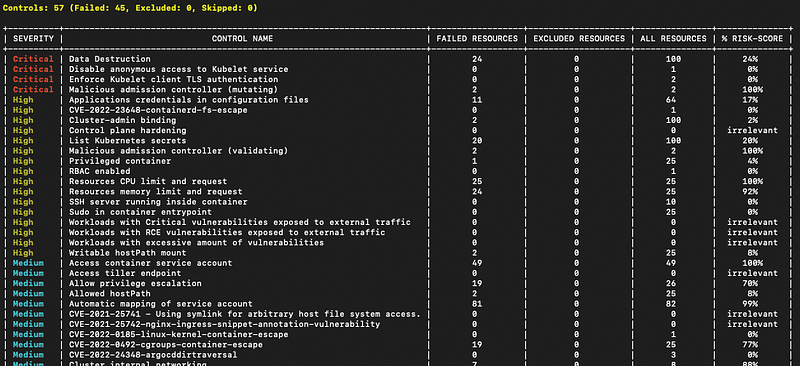
Terminal View

Kubectl autocomplete

Autocompletion is very valuable for increasing your work speed when using the command line. Here, kubectl comes in handy.

Installation

$ source <(kubectl completion bash)
$ echo "source <(kubectl completion bash)" >> ~/.bashrc

Kubetree

A kubectl plugin to explore ownership relationships between Kubernetes objects through ownersReferences on the objects.

The kubectl lineage plugin is very similar to kubectl tree, but it understands logical relationships between some API objects without needing ownerReferences.

Installation

With Linuxbrew there is no support for kubectl plugins. So you need to install krew per original installtion guide.

Use

$ kubectl tree {{resource-type}} {{resource-name}}
$ kubectl tree deployment prometheus-operator -n monitoring
$ kubectl tree service prometheus-operator -n monitoring
$ kubectl tree deployment prometheus-operator -n monitoring

I use kubetree very often to list all dependencies and relationships of a resource type like deployments or services.
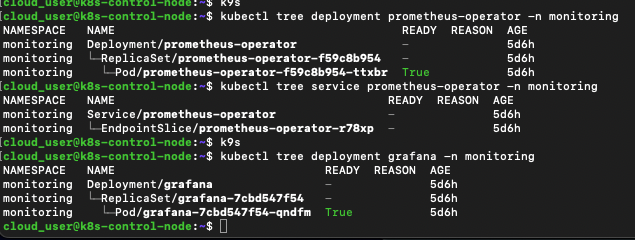
Tree Overview

Do you need more tools?

There are so many Kubernetes tools out there that are very helpful. Here is another list with a huge selection of other tools:

Conclusion

This is a small list of tools I use every day to manage Kubernetes clusters of my customers. I hope you found a tool you did not know about and that can help you to work more effectively in future. Thanks for reading.

Follow me on Medium, or Twitter, or subscribe here on Medium to read more about DevOps, Agile & Development Principles, Angular and other useful stuff. Happy Coding! :)

Learn More

Kubernetes
Cli Tool
Ubuntu
Lists
DevOps
Recommended from ReadMedium