
Managed Apache Airflow
Apache Airflow is a platform created by the community to programmatically author, schedule and monitor workflows. It has grown quite a bit since its inception in 2014, and with growth and additional features comes increased complexity. Rolling your own production Airflow environment requires a lot of knowledge on not only Airflow but also the underlying infrastructure upon which Airflow is deployed. In addition to needing to understand which Airflow executor to use and how to debug broken DAGs, you also need to understand the cloud or on-premise computing environment, related networking and security issues, and much more.
It’s common to use managed services to help maintain sufficiently complex technologies. A couple of examples include Google Kubernetes Engine for managed Kubernetes and Amazon EMR for managed Apache Spark. This article will focus on the three main managed Apache Airflow providers (in chronological order from each product’s launch date): Astronomer, Google Cloud Composer, and Amazon Managed Workflows for Apache Airflow.
Astronomer
Astronomer is a significant contributor to open source Apache Airflow, and the company is focused on delivering a product that makes it easy to adopt Airflow. Astronomer has numerous guides that help users better understand Airflow, from an introduction to Airflow to implementing Airflow with high availability.
Astronomer comes in two flavors: Cloud and Enterprise. Some features (like the Houston API and the Astronomer UI) are available in both, and the difference mostly lies in the implementation details.
Astronomer Cloud
Astronomer Cloud is a fully-managed, SaaS solution hosted in Astronomer’s cloud environment. It completely abstracts the maintenance of Airflow from you, allowing you to focus almost exclusively on authoring your workflows with DAGs. It is not entirely serverless; you still need to allocate resources for the appropriate capacity, but that process is made straightforward via the Astronomer UI.

Once you get started, you’re ready to start authoring DAGs and custom plugins to manage your business workflows.
Pricing
Pricing for Astronomer Cloud is based on the concept of the Astronomer Unit (AU). An AU maps a base amount of memory and CPU allocation to a cost. For example, at the time of publishing (Spring 2021), one AU consists of 0.1 CPU and 0.375 GB of memory and costs $10 per month. You can configure how many AUs you allocate to your workers, webserver, and schedulers to suit your needs and your associated costs will be transparent.
Astronomer Enterprise
If you want or need to run Astronomer in an environment that you control, you need Astronomer Enterprise. Enterprise enables you to run Astronomer on a Kubernetes environment that you maintain. That environment can run in the cloud on Google Kubernetes Engine (GKE), Microsoft Azure Kubernetes Service (AKS), Amazon Elastic Kubernetes Service (EKS), or in your on-premise environment. Astronomer provides quickstart guides for GKE, AKS, and EKS.
Once Astronomer is deployed to your environment, you are ready to start authoring workflows, adding and managing users, setting up CI/CD, and more.
Pricing
Pricing for Astronomer Enterprise is handled on a case-by-case basis. You can reach out to Astronomer for more information.
Google Cloud Composer
Also a significant contributor to Airflow (and the broader Apache Software Foundation), Google offers Cloud Composer, a fully managed Airflow service that runs on Google Cloud Platform. When you create a Composer environment, the Airflow database and webserver is created in a GCP “tenant” project along with a GKE cluster that runs the Airflow scheduler and workers and a Google Cloud Storage bucket in your project. You generally don’t need to worry about the GKE cluster, but the GCS bucket houses your DAGs, plugins, and logs.
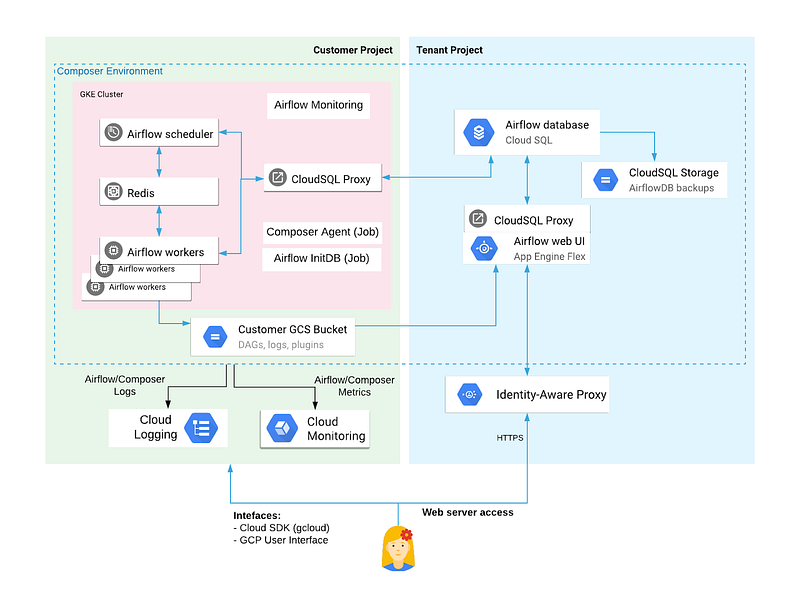
Once your project is set up, you can load your DAGs into the /dags/ folder in the GCS bucket, and they will be automatically synced with your Airflow environment. Cloud Composer will auto-generate a URI which will allow you to access the webserver in your browser. You can also use the gcloud command line tool to execute Airflow cli commands. Service calls to the tenant project are authenticated through Google’s Identity-Aware Proxy (IAP). End user access control to the Composer environment is configured via GCP’s Identity and Access Management system (IAM). More fine grained access control can also be enabled with the Airflow RBAC UI.
Pricing
Pricing for Google Cloud Compser depends heavily on how you configure and scale your environment. Pricing components breaks down at a high level as follows:
Resources in the tenant GCP project
- Airflow database on Cloud SQL
- Airflow webserver
Resources in your GCP project
- GKE cluster that includes the Airflow scheduler and Airflow workers
- GCS bucket for DAGs, plugins, and logs storage
- Google Cloud Monitoring
- Network egress
Cloud Composer prices can be estimated with the GCP Price Calculator.
Amazon Managed Workflows for Apache Airflow
Amazon Managed Workflows for Apache Airflow (MWAA) is a fully managed Airflow service on Amazon Web Services. When you create a Managed Workflow environment, the Airflow database and webserver are deployed to a service managed internal Virtual Private Cloud (VPC) that is specific to your environment, and the Airflow scheduler and workers are deployed in your VPC. The service expects you to provide an S3 bucket that will host your DAGs and plugins.

Once your environment is created, you can upload DAGs and plugins to the S3 bucket, and they will be automatically synced with your Airflow environment. Logs will be streamed to CloudWatch. You can access the Airflow UI via the AWS console. You can also access your Airflow environment programmatically or with the AWS cli tool. Authentication is handled by with AWS SSO for the UI or by using AWS Identity and Access Management (IAM) to generate a login token to access programmatically.
Pricing
Pricing for Amazon MWAA is a combination of fixed and variable cost:
- Environment size (small, medium or large), comes with aptly sized database, scheduler and one base worker—Fixed cost
- Additional worker instances (small, medium, or large for each additional instance) — On-demand variable cost based on usage
- Charges incurred for CloudWatch logs and data transfer used on the VPC by the workers
- Charges incurred for the S3 bucket you create to host your DAGs and plugins
Additional worker instances can be configured to scale automatically (i.e. by setting up MWAA autoscaling), which will automatically increase the number of worker instances during times of high capacity and automatically decrease the number of worker instances during times of low capacity.


