
Manage Serverless APIs With API Gateway in GCP
Develop, Deploy, Secure and Manage API

Introduction
In Google Cloud Next 2020, new API management service has been introduced. Google Cloud API Gateway is a fully managed service that makes it easy for developers to create, publish, maintain, monitor and secure APIs. It acts as “Front Door” for an application deployed on backend service like Cloud Functions, Cloud Run and App Engine, Compute Engine and Google Kubernetes Engine.
In this tutorial, we are going to deploy Employee APIs endpoints in Cloud Function, Cloud Run and App Engine Standard environment with front end proxy by API Gateway. These APIs will be secured with API Keys and Oauth2 Bearer Token.
I have recently written a blog for securing APIs using Cloud Endpoints ESPV2. I will use the same Architecture and same code but deploy in API Gateway.
Architecture
We are aiming to create an app with 3 different services using the following components.
- Cloud Functions: GET an Employee from Firestore using API Key.
- Cloud Run: Add an Employee into Firestore using Bearer Token.
- App Engine: DELETE an Employee from Firestore using Bearer Token.
- API Gateway: Proxy service to control the requests.
- Firestore: Store Employee data.
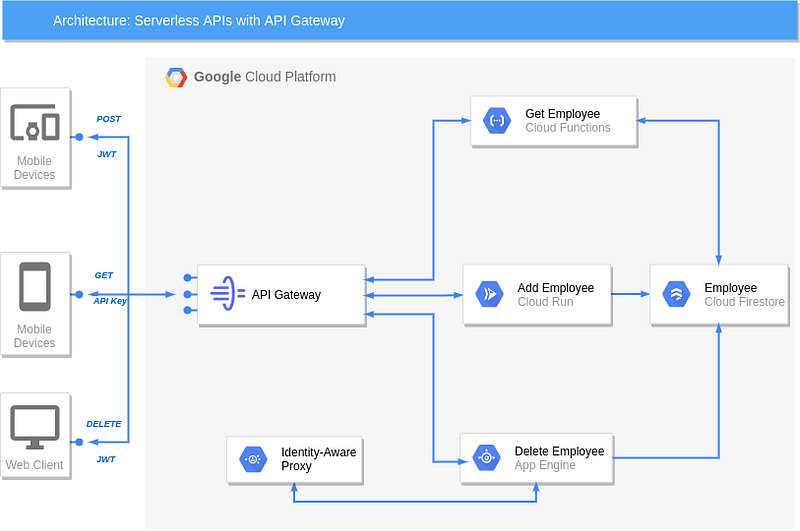
Deploy the secured backend services
Setup
In order to complete this guide, you’ll need to install the following tools
- Git: Git is used to clone the example code and trigger new deployments.
- GCP: You will need a GCP account with billing enabled.
- Python 3.7 : Python is installed to run a script.
Create GCP Project
Create a GCP project for this tutorial.
Select Firestore mode
- Go to Firestore
- Select Native Mode
- Select a Location (e.g. United States)
- Click on “Create Database”
Enable APIs
Go to APIs & Services and Enable Following APIs
- Cloud Build
- Cloud Run
- Cloud Functions
- Identity-Aware Proxy
Clone the Repository
Open Cloud Shell, Clone the following repository containing the sample code, then switch to the cloud-run directory:
$ export PROJECT_ID = <PROJECT_ID>
$ git clone https://github.com/vikramshinde12/endpoints-espv2.git
$ cd endpoints-espv2/cloud-run
Cloud Run
The code to add an employee in the Firestore.
The Dockerfile of the image
First build the image.
$ gcloud builds submit --tag gcr.io/$PROJECT_ID/employeeThen, deploy the container in private mode
$ gcloud run deploy employee --no-allow-unauthenticated \
  --image gcr.io/$PROJECT_ID/employee \
  --region us-central1 --platform managed
Cloud Functions
The code to get the employee from the Firestore.
Deploy the Cloud Function in private mode.
$ cd ..
$ gcloud functions deploy employee --trigger-http \
  --runtime python37 --source cloud-function --entry-point get_emp \
  --region us-central1 --no-allow-unauthenticated
Google App Engine (Standard)
The code to Delete the employee from the Firestore
Deploy the App Engine service in Standard environment.
$ cd app-engine
$ gcloud app deploy
Deploy an API on API Gateway
Enable required services
gcloud services enable apigateway.googleapis.com
gcloud services enable servicemanagement.googleapis.com
gcloud services enable servicecontrol.googleapis.com
Create an API
gcloud beta api-gateway apis create API_ID --project=$PROJECT_IDReplace API_ID with your api_id e.g. my_api
Create an API Config
Create an API config using OpenAPI spec.
# openapi-definition.yaml
swagger: "2.0"
info:
  title: my-api
  description: Serverless APIs with API Gateway
  version: 1.0.0
schemes:
 - https
produces:
 - application/json
paths:
  /employee/{employee_id}:
      get:
        summary: Get an Employee
        operationId: getEmployee
        x-google-backend:
          address: https://us-central1-api-gateway-289215.cloudfunctions.net/employee #Replace with Cloud Function URL
          protocol: h2
        parameters:
          - name: employee_id
            in: path
            description: Employee Id
            required: true
            type: string
        responses:
          '200':
            description: A successful response
            schema:
              type: string
      delete:
        summary: Delete Employee using Google App Engine service.
        operationId: deleteEmployee
        x-google-backend:
          address: https://api-gateway-289215.uc.r.appspot.com/  #Replace with your Google App Engine Service
          path_translation: APPEND_PATH_TO_ADDRESS
        parameters:
          - name: employee_id
            in: path
            description: Employee Id
            required: true
            type: string
        responses:
          '200':
            description: A successful response
            schema:
              type: string
  /employee:
      post:
        summary: Add Employee using Cloud Run Service
        operationId: add_update_employee
        x-google-backend:
          address: https://employee-r3t4hr3y3a-uc.a.run.app   #Replace with your Cloud Run Service.
          path_translation: APPEND_PATH_TO_ADDRESS
        parameters:
          - name: employee
            in: body
            description: Employee to be Added
            schema:
              $ref: '#/definitions/Employee'
        responses:
          '200':
            description: A successful response
            schema:
              type: string
definitions:
  Employee:
    type: object
    required:
     - id
     - firstname
     - lastname
    properties:
      id:
        type: string
      firstname:
        type: string
      lastname:
        type: string
Using following command, create an API config
gcloud beta api-gateway api-configs create CONFIG_ID \
  --api=API_ID --openapi-spec=API_DEFINITION \
  --project=$PROJECT_ID --backend-auth-service-account=SERVICE_ACCOUNT_EMAIL
You can use existing SERVICE_ACCOUNT_EMAIL or create new Service Account backend-auth-service by which API Gateway will call to backend service.
Enable API
Get API name with hash using following command
gcloud beta api-gateway apis describe my-api --project=my-projectThen enable the API name from managedService field.
gcloud services enable API_ID-HASH.apigateway.PROJECT_ID.cloud.googCreate a Gateway
Now deploy the API config on a gateway. Deploying an API config on a gateway defines an external URL that API clients can use to access your API
gcloud beta api-gateway gateways create GATEWAY_ID \
  --api=API_ID --api-config=CONFIG_ID \
  --location=GCP_REGION --project=PROJECT_ID
On successful completion, use following command to view the details
gcloud beta api-gateway gateways describe GATEWAY_ID \
  --location=GCP_REGION --project=PROJECT_ID
This will give you defaultHostname: GATEWAY_ID-hash.uc.gateway.dev
API Gateway Authorization
We have deployed three services and an API gateway. Now we need to give authorization to API gateway so that that it will be able to access resources in services. Gateway endpoint service is deployed using backend-auth-service service account.
Cloud Run
As describe previously, a private Cloud Run service can be reached by authenticated user with roles/run.invoker. So, let’s grant this role to the backend-auth-service service-account.
$ gcloud run services add-iam-policy-binding employee \
  --member "serviceAccount:$SERVICE_ACCOUNT_EMAIL" \
  --role "roles/run.invoker" \
  --platform managed \
  --region us-central1 \
  --project $PROJECT_ID
Cloud Functions
Like for Cloud Run, and as described previously, a private Cloud Functions service can be reached by authenticated user with roles/cloudfunctions.invoker.
$   gcloud functions add-iam-policy-binding employee \
   --region us-central1 \
   --member "serviceAccount:$SERVICE_ACCOUNT_EMAIL" \
   --role "roles/cloudfunctions.invoker" \
   --project $PROJECT_ID
App Engine
The App Engine is public by default, activate IAP on App Engine. We need to configure IAP.
Go to App Engine →Settings → Identity-Aware Proxy → Configure Now.
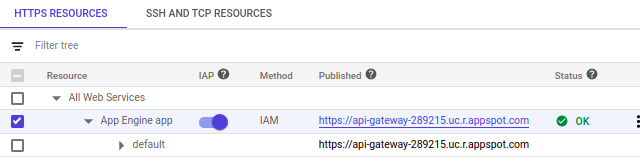
Give permission IAP-secured Web App User to the backend-auth-service service-account.
All the steps have been completed now let’s access the APIs.
Test API routes
Now you can send requests to your API
POST the employee
curl POST https://gateway_id-<hash>-uc.gateway.dev/employee --header 'Content-Type: application/json' --data-raw '{"id": 11223344, "firstname": "Vikram", "lastname": "Shinde"}'
GET the employee
curl https://gateway_id-<hash>-uc.gateway.dev/employee/11223344
DELETE the employee
curl DELETE https://gateway_id-<hash>-uc.gateway.dev/employee/11223344
Securing Access by using an API Key and Bearer Auth Token
To secure access to your API backend, modify openapi-definition.yaml to include API Key for GETand bearer auth for POST and DELETE methods
- Create service Account and download service account key.
- Update OpenAPI definition
securityDefinitions:
 api_key:
    type: "apiKey"
    name: "key"
    in: "query"
 bearer:
    authorizationUrl: ""
    flow: "implicit"
    type: "oauth2"
    x-google-issuer: "email_of_sa"
    x-google-jwks_uri: "https://www.googleapis.com/robot/v1/metadata/x509/email_of_sa"
    x-google-jwt-locations:
      - header: "Authorization"
        value_prefix: "Bearer "
Add API key security in the GET path.
security:
  - api_key: []
Update the email_of_sa with service account email.
Change security flag from api-key to bearer in the path POST and DELETE
security:
  - bearer: []
Redeploy
Since the config has been changed, create a new API config with the modified OpenAPI spec using the following command.
gcloud beta api-gateway api-configs create NEW_CONFIG_ID \
--api=API_ID --openapi-spec=NEW_API_DEFINITION \
--project=PROJECT_ID --backend-auth-service-account=SERVICE_ACCOUNT_EMAIL
Update existing gateway with new API config.
gcloud beta api-gateway gateways update GATEWAY_ID \
  --api=API_ID --api-config=NEW_CONFIG_ID \
  --location=GCP_REGION --project=PROJECT_ID
Testing the API without API key.
curl https://gateway_id-<hash>-uc.gateway.dev/employee/11223344
This should result in the following error:
UNAUTHENTICATED:Method doesn't allow unregistered callers (callers without established identity). Please use API Key or other form of API consumer identity to call this API.Creating API Key
For reaching the service, you have to use an API Key. For this you have to create one in Google Cloud console.
Go to API & Services and select Credentials. Click on Create credentials and select API Key.
Because of the low level of security of an API Key, the best practice is to restrict the key.
Edit the key (click on the pencil), under API restrictions, click on Restrict key and, in the drop down list, only check your API Name.
Testing the API with API key.
curl https://gateway_id-<hash>-uc.gateway.dev/employee/11223344?key=API_KEY
Now you should see response from the your API.
Testing the API with Bearer Token
You can use following Python code to create a bearer token.
Once bearer token is generated, make a request to the proxy with the token.
curl --request POST \
  --header "Authorization: Bearer ${token}" \
  "https://gateway_id-<hash>-uc.gateway.dev/employee" \
  --header 'Content-Type: application/json' \
  --data-raw '{
     "id": 411,
     "last": "vikram",
     "name": "Shinde"
  }'
Tracking API Activity
You can track the activity of each activity in API Gateway → APIs.

Conclusion
The API Gateway is easy to develop and manage APIs compared to Cloud Endpoints (ESPV1 and ESPV2).
API Gateway can be created using Cloud Console so less complexity involved to create/modify configurations.


