
Making Asynchronous Network Calls With Kotlin Coroutines in Android

Coroutines were introduced with Kotlin v1.1 in 2017 and since then we have experienced asynchronous simplicity at its finest. Coroutines bring in a volley of power-packed features to the game and most of us have already witnessed it by now.
While developing an Android app, you will come across multiple scenarios where coroutines could be implemented. The most common one is while making multiple network calls asynchronously.
In this article, we would not be talking about the basics or fundamentals of Coroutines but rather discuss some scenarios that we generally encounter while dealing with asynchronous network calls and how we can easily implement it with the help of Coroutines.
Pre-requisite
Some basic knowledge and fundamentals of Kotlin and Coroutines.
Objective
This article talks about dealing with some common scenarios that are encountered while implementing multiple network calls asynchronously. Some are pretty straightforward, while some require special handling.
These scenarios are:
- Fire-and-forget network calls.
- Canceling other network calls if at least one call fails.
- Continue execution of other network calls even if a single API call fails.
- Canceling other network calls only if a certain error condition is encountered.
Let's take a deep dive into these scenarios, shall we?
Fire-and-forget(FAF) network calls
These calls are subtly made in the background while ignoring the response. Consider a scenario where 10 network calls are to be made without blocking the application UI. This could be achieved with the ‘launch’ extension of ‘CoroutineScope’. It returns a ‘Job’ object that can give us information about that specific Job. Something like this:
To keep it simple, we are making the same network call ten times in a loop. joinAll() is called once all the coroutine Jobs have completed.
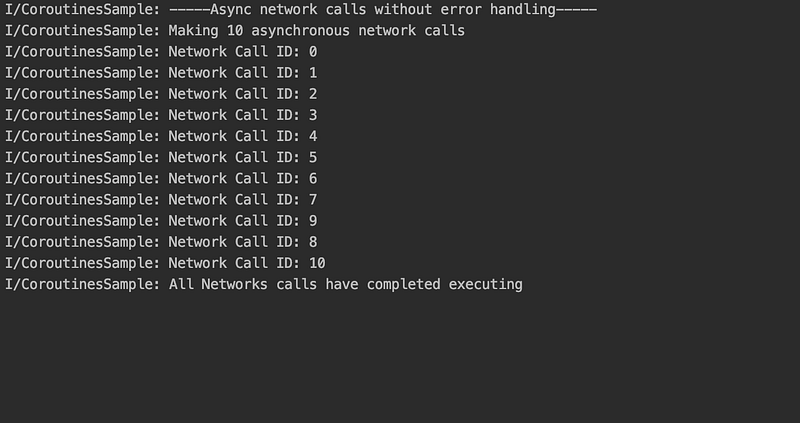
Notice that the network call ID does not appear in incremental order. This is because, essentially, coroutines are light-weight threads. Here, every ‘launch’ function is running concurrently with respect to each other.
Canceling other network calls if at least one call fails
Consider a scenario where all other network calls are to be canceled and ignored even if a single call fails. This could be because you are navigating away from the page and all the remaining network calls do not matter anymore.
In the following example, we have used an ‘async’ extension to get a deferred object in return. However, the same functionality can be achieved by ‘launch’ as well.
Notice that we have used ‘CoroutineExceptionHandler’. It is used as a generic catch block for ‘errorHandlingScope’. If any child job throws an exception, it will be caught by CoroutineExceptionHandler, a cancel signal will be sent to all other child jobs and the necessary action can be taken. To simulate an error scenario, we are calling ‘throwCustomException’ function on the 4th iteration.
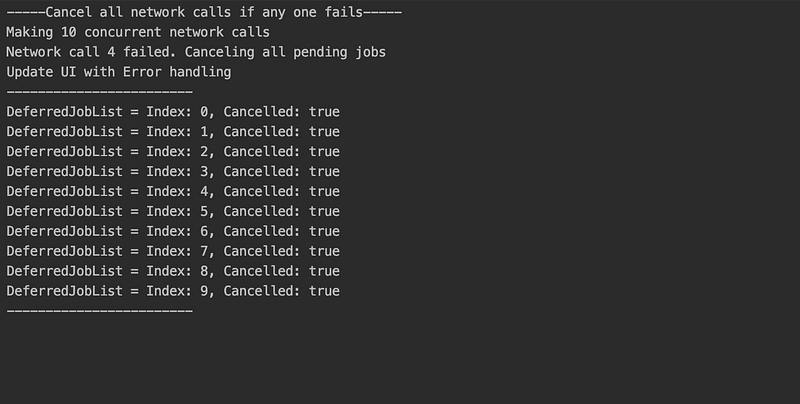
Notice that the ‘isCancelled’ property for all jobs is true. However, this can be false for some jobs that have already achieved the ‘completed’ state when the exception was thrown.
Continue execution of other network calls even if a single API call fails.
Consider a scenario where a failed network call can be ignored and the UI can be updated respectively. In other words, the parent scope should not be affected by a failing child job and other child jobs should not be affected as well.
A supervisor scope can be used to achieve this scenario in the following way
Here, ‘supervisorScope’ overrides the context’s Job() to SupervisorJob(). This is needed since the parent job should not be canceled on the cancellation of a child job.
Alternatively, we can create a scope with ‘SupervisorJob()’ instead of ‘Job()’ thus eliminating the need for a supervisorScope. Although we would need to make sure that we use CoroutineExceptionHandler in case of ‘launch’ as mentioned in the documentation.
We are calling joinAll() function instead of awaitAll() because the later would throw an exception as soon as child job throws an exception. However, joinAll() is called only when all child jobs have completed execution i.e isCompleted is true
Note: ‘getCompletionExceptionOrNull()’ is an experimental function with the current version of coroutines.
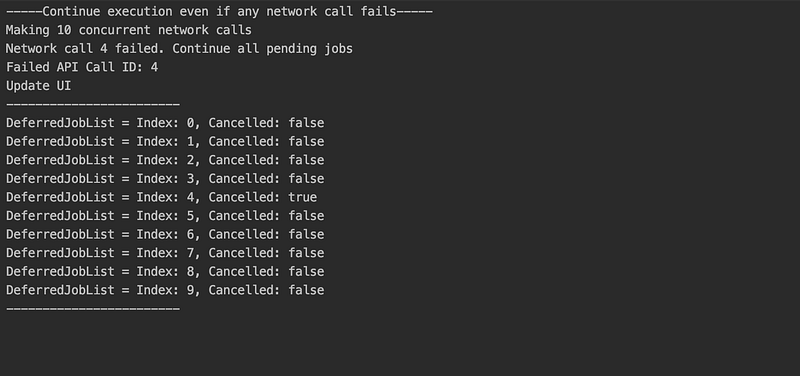
Notice that only one Job has failed without affecting any other Jobs.
Canceling other network calls only if a certain error condition is encountered.
Consider a scenario where depending upon the API response, we decide whether the execution of other network calls should continue or cancel. In other words, based on a specific condition, we decide whether we want to continue or cancel other child jobs.
Here we have two error conditions, one is a CustomException which can be ignored and other jobs can continue execution while the second is a cancel condition that cancels the parent scope.
To keep it simple, the 4th iteration throws a CustomException and the 7th iteration will cancel the parent scope. We are using awaitAll() since we want to handle the exception as soon as it is thrown.
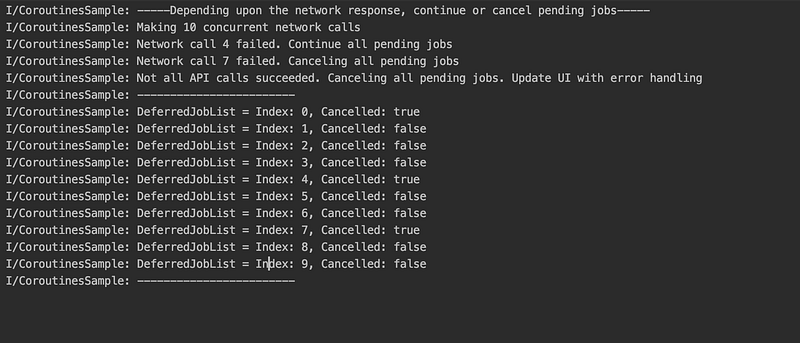
Notice that when the 4th call fails, all pending jobs are supposed to continue execution and when the 7th call fails, the parent scope is canceled, hence canceling all of its children.
However, as seen in the output, not all jobs are canceled and that is because these network calls are not executed in the same order that they have been called. At the time of canceling the parent scope, only those jobs are canceled that are yet to be executed.
While coroutines delivers a powerful solution that enables us to write concurrent code, special attention should be given to error handling to avoid app crashes.
You can find the complete repository here on Github.
Feel free to fork it/contribute to it. Happy Coding!


