
Making Artificial Intelligence Work For You With OpenAI

Imagine a world where you can ask a computer to do your work for you, or even better yet, write a paper for you. The OpenAI API can help you do just that. All you need is a little coding knowledge and you can get started with the OpenAI API today.
What is OpenAI?
OpenAI is an artificial intelligence research laboratory. The company’s goal is to “advance digital intelligence in the way that is most likely to benefit humanity as a whole”.
The OpenAI API is a set of tools that allow developers to create artificial intelligence (AI) applications. The API includes a library of pre-trained AI models that can be used to perform various tasks, such as image recognition, natural language processing, and predictive modeling.
How to use the OpenAI API?
In order to use the OpenAI API, you will need to sign up for a free account. After you have registered for an account, you will be given an API key. This key will be used to authenticate your requests to the OpenAI API.
Once you have your API key, you can start making requests to the OpenAI API playground. The OpenAI API is a RESTful API, which means that you can make requests using any HTTP client.
Use case 1: Make a summary for a 2nd grader
One of the use cases for this API is to let AI explain and summarize a complicated text for you. For example, if you input the Quantum computing Wikipedia page in the API playground and ask for a summary, you get the following result:
Quantum computers are special kinds of computers that use the laws of quantum mechanics to perform calculations. They can do some kinds of calculations much faster than regular computers. Quantum computers are still mostly in the research and development stage, and it is not yet clear what kinds of problems they will be best at solving.
Use case 2: Generate study notes
Artificial Intelligence can help you study in the following ways:
- Artificial intelligence can help you identify key concepts and ideas in a text.
- Artificial intelligence can help you find relevant information more quickly.
- Artificial intelligence can help you organize your thoughts and ideas more effectively.
For example, I am studying for a World War II history class. I can ask the AI: “What are 5 key points I should know when studying world war 2?”
1. The devastation of the Great War (as World War I was known at the time) had greatly destabilized Europe, and in many respects, World War II grew out of issues left unresolved by that earlier conflict.
2. In late August 1939, Hitler and Soviet leader Joseph Stalin signed the German-Soviet Nonaggression Pact, which incited a frenzy of worry in London and Paris. Hitler had long planned an invasion of Poland, a nation to which Great Britain and France had guaranteed military support if it were attacked by Germany.
3. Hitler’s conquest of the Balkans was a precursor for his real objective: an invasion of the Soviet Union, whose vast territory would give the German master race the “Lebensraum” it needed. The other half of Hitler’s strategy was the extermination of the Jews from throughout German-occupied Europe.
4. On June 6, 1944–celebrated as “D-Day”–the Allies began a massive invasion of Europe, landing 156,000 British, Canadian, and American soldiers on the beaches of Normandy, France. In response, Hitler poured all the remaining strength of his army into Western Europe, ensuring Germany’s defeat in the east.
5. Developed during a top-secret operation code-named The Manhattan Project, the atomic bomb was unleashed on the Japanese cities of Hiroshima and Nagasaki in early August. On August 15, the Japanese government issued a statement declaring they would accept the terms of the Potsdam Declaration, and on September 2, U.S. General Douglas MacArthur accepted Japan’s formal surrender aboard the USS Missouri in Tokyo Bay.
Use case 3: Write creative ad texts based on a product description
You can use AI to help you create better content, personalize your messages, and target your audience more effectively. You can easily generate multiple versions which will help you test your content.
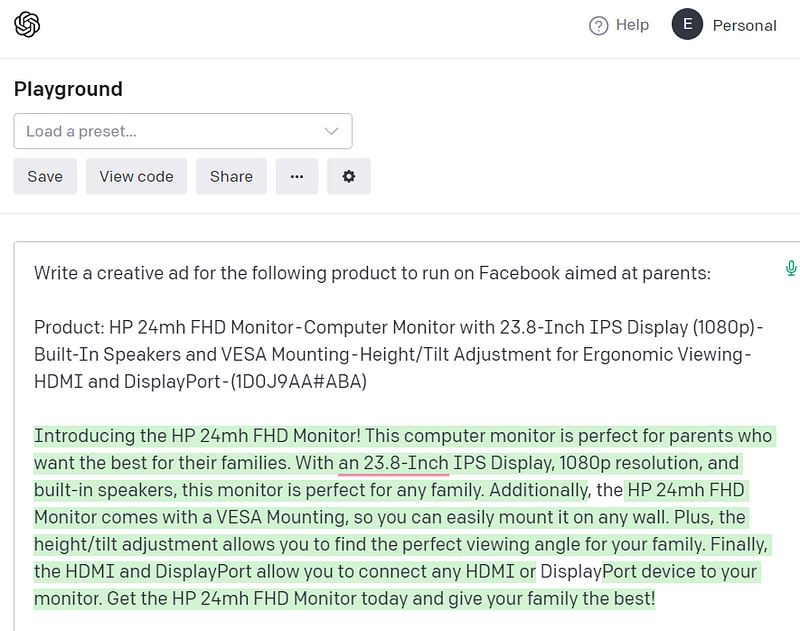
Example: This HP monitor from amazon. Imagine that you want to create an ad for this monitor aimed at parents of children.
Use case 4: Generate a title for your article
AI can use the content of this article to generate suitable titles.
It first scans the article for certain keywords. It then uses these keywords to generate a list of potential titles. Finally, it ranks these titles according to certain criteria and presents the most relevant ones to the user.
The following are some potential titles that AI has generated for this article:
1. How the OpenAI API Can Help You With Your Work
2. How to get started with the OpenAI API
3. Generating Content with the OpenAI API
4. The Many Uses of OpenAI
Use case 5: Make it your personal assistant
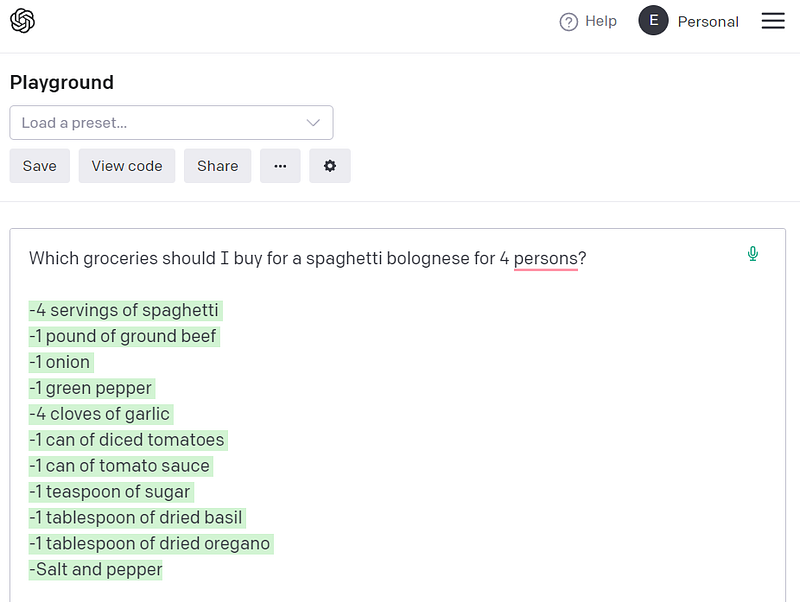
Everyone remembers the assistant J.A.R.V.I.S from the movie Iron Man. If you have ever wanted to have a similar assistant on your computer, you can do it with the help of AI. You can ask it which books to read, which movies to watch or what you should buy in order to make Spaghetti for 4 people.
One thing is certain: our lives will get easier and AI can assist us in many of our daily tasks. However, we need to be careful with how we use AI, as it has the potential to do great harm if used incorrectly or for malicious purposes.
Happy experimenting!
If you would like to learn more about AI: