
Making a Real-World Application With SwiftUI
Part two: Async data and remote images
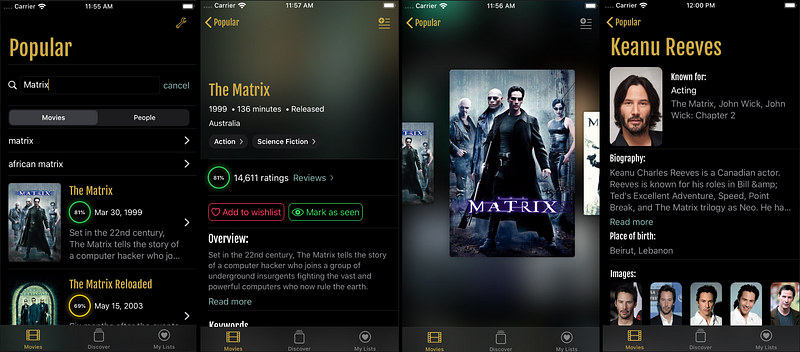
This is the second part of my collection of articles on making a real-world application only using SwiftUI. Part 1 is an introduction to data flow and Redux, and an overview of the application — this is an important read if you want to fully understand this article.
This post details how to fetch data from an API and display remote images in SwiftUI.
Since MovieSwiftUI relies on the TMDb API to display information about movies, fetching remote data is a key point. While users’ custom movies list, wishlist and seenlist, settings, etc. are handled and saved locally, other information is fetched remotely.
Async Data
There isn’t much to say about SwiftUI in this part since I’m using the Redux pattern. Fetched data are basically reduced into my app state and then the state is published, so views are updated with the new data. But how does this really work? Let’s take a look.
I made a very simple APIService class that uses URLSession to make requests. All my models conform to Codable and are almost a one-to-one representation of models from the TMDb API. That way I don’t need custom decoders or transient models for views. There are a few places in the application where I use pure view models, but for the most part, the response is serialized in the application state in a logical way (like an in-memory database if you prefer) by the reducers.
Then I have AsyncAction, which are Redux actions you can dispatch as usual, however, they’re not reduced by reducers (they could in order to provide a loading state for example), but they’re executed by middleware to trigger the request they implement in their execute() function. Once the request is finished, they chain another action to update the state from the data in contained in the response.
The actions:
The middleware is provided by my SwiftUIFlux Swift Package. Trigger the execute function from the AsyncAction as it’s dispatched.
Finally, the reducer adds the movie into the state movies property.
So what about the views? Let’s take a look at my MovieDetail view:
I retrieve my store using EnvironmentObject — accessible because it’s injected in the root view of my application. I then fetch the data I need when the .onAppear() of the views is triggered (Chris Eidhof has another approach where he triggers the resource load as SwiftUI subscribes to his ObservableObject). Because I map properties from my state into views computed properties, anything in the movie object updated by an AsyncAction will be updated in my MovieDetail view and its various components.
I hope this part provides a clear overview of how I’m doing API calls and remote data loading into my SwiftUI application. Now we’ll dig a bit more into SwiftUI, with the Image component provided by Apple, and how to make it work seamlessly with remote images.
Remote Images
The Image component from Apple is really good — it supports a good range of input formats like Data, UIImage, and SF Symbols. However, it doesn’t support an init with an URL (Yet? I’ve given feedback to Apple and hope it will be added before September release or in a future release.)
To display images fetched from a remote location, much like UIImageView, you’ll need to create your own system. This is made easy because of ObservableObject and the @ObservedObject property wrapper.
Similar to network calls, I made an ImageService. (It’s not too relevant for this post, so the code is not included below). It’s a basic manager that downloads Data from a URL asynchronously and publish it to any subscribers using the Combine framework.
The interesting part is about how it’s integrated with SwiftUI. For that purpose, I made an ImageLoader class which conform to the ObservableObject protocol, so SwiftUI can be notified of any @Published properties changes.
You instantiate it with a path, a size and it’ll call ImageService to fetch the image from the internet. It will then set it locally on the ImageLoader image (UIImage) property, which will publish its changes to whoever is subscribed to it. And what can be subscribed to it? A View!
Above I’ve also have an ImageLoaderCache, which will cache my ImageLoader instances, as they could be destroy because not referenced by anything as SwiftUI reload views body. It also avoid downloading multiple times the same image and allow reuse.
Here is the concrete implementation of a View that you can directly use in any SwiftUI application. It uses ImageLoader which uses ImageService to display an image. It even provides a placeholder and smoothly replaces it once the image is loaded with basic fade-in animation.

It trigger the ImageLoader .loadImage() call from the .onAppear() function from the SwiftUI framework.
It’s important to note that only the List component behaves like a UITableView. This means the views in the List get enqueued and dequeued/reused as you scroll. So the .onAppear() will only get called as the view actually appear on-screen (while you scroll). This is exactly the behavior we want.
For any other components (e.g., HStack, VStack, ScrollView) all views will appear on screen as soon as the parent view is displayed. Even if you have to scroll deep into the content, the body will get loaded and the .onAppear() will get called. It will begin to load all your images as soon as the parent view is on screen. Even worse than that, in the ScrollView case, the .onAppear() calls order will be called from the view the farthest in the hierarchy to the first one. In other words, the images at the bottom or trailing of your view will load first.
There isn’t a workaround as of Xcode Beta 3, but I’m hopeful Apple will make some changes to it. Maybe we’ll get the same behavior as on List in the ScrollView, or maybe we’ll get a sort of HList/VList or aGrid component that will enqueue and reuse views in its body. Or maybe they’ll call the .onAppear() in the proper order.
I hope you found this article interesting, and I’m here if you have any questions or feedback.


