
Build a RAG System Powered By Mistral 7B and Langchain To Build An ML System Design Interview Bot on Google Colab for Free!
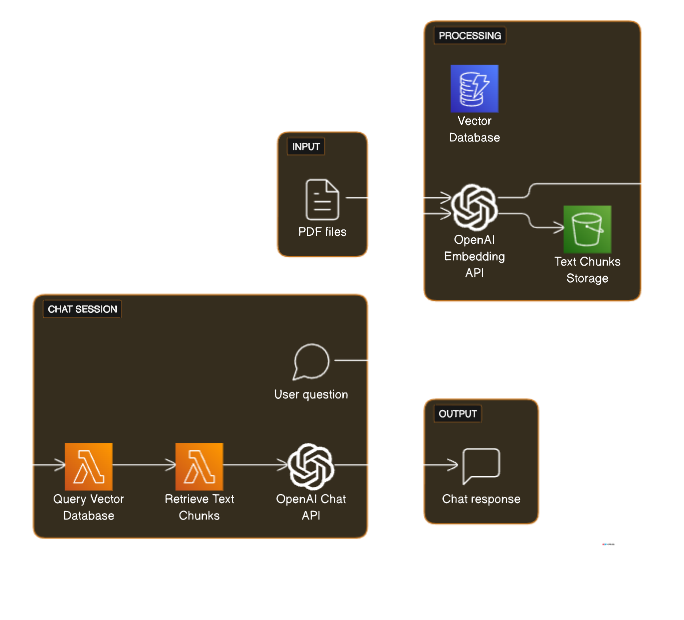
Yes I agree, another zillionth article on using Mistral. Well If youd like to delve into the code directly, feel free check out the Colab notebook attached at the end :D
Mistral-7B: A breakthrough in Large Language Modeling
Welcome to exhilarating exploration into the world of Retrieval Augmented Generation with the open-source Large Language Model (LLM), Mistral 7B. This groundbreaking LLM not only surpasses the performance of Llama 2 13B and Llama 1 34B but is also engineered with efficiency and high performance at its core. Whether you’re looking to give your business a competitive edge, power up your AI project, or stun your peers with a cutting-edge college assignment, Mistral 7B is set to revolutionize the way you approach real-world applications. So, buckle up and get ready for a deep dive into the power of Mistral 7B and how you can harness it to transform your AI journey.
💡Interesting Fact! Mistral AI now aims to be OpenAI’s open source rival after closing a $415 million funding round at a $2B valuation after releasing its new MoE (Mixture of Experts) model that beats GPT 3.5 and other SOTA 70B models like Llama 70B on most benchmarks. Mistral AI, a Paris-based OpenAI rival, closed its $415 million funding round | TechCrunch
Retrieval Augmented Generation
Retrieval Augmented Generation (RAG) is a technique for enhancing the accuracy and reliability of generative AI models with facts fetched from external sources. Generative AI models, such as large language models (LLMs), are trained on vast volumes of data and use billions of parameters to generate original output for tasks like answering questions, translating languages, and completing sentences. However, these models have some limitations, such as:
- Presenting false or out-of-date information when they do not have the answer or the knowledge in their training data.
- Presenting generic or vague information when the user expects a specific or detailed response.
- Creating a response from non-authoritative or unreliable sources.
- Creating inaccurate responses due to terminology confusion, ambiguity, or bias.
Langchain is a Python tool that aids in Retrieval Augmented Generation with various LLM providers and tools. Langchain is a framework that abstracts away the complexity of working with LLMs and other tools, and allows developers to focus on the logic and functionality of their applications. Langchain provides a standard interface for chains, which are sequences of components that perform different tasks, such as retrieving, embedding, generating, or evaluating text. Langchain also provides a comprehensive library of components that integrate with various tools and services, such as Chroma, a vector database for storing and retrieving vector embeddings; Unstructured, a document loader for fetching and parsing documents from various sources; and Hugging Face Pipeline, a wrapper for using Hugging Face Transformers models. Langchain also provides end-to-end chains for common applications, such as retrieval-augmented generation, conversational retrieval, and document summarization. It is a strong tool to have in someones utility belt. If want an introduction to Langchain, I have written another comprehensive blog on it, so head on to it if you want to acclimatize yourself with langchain and start building cool stuff with LLMs.
Langchain : A comprehensive guide to augmenting Large Language Models
Mistral AI and Langchain are two technologies that can help developers and researchers create and deploy RAG applications with ease and efficiency. Mistral AI is a French company that develops state-of-the-art LLMs and makes them available for free download and use. Langchain is an open-source framework that simplifies the creation of applications using LLMs by providing a standard interface, a library of components, and a set of pre-built chains for common use cases.
By using Mistral AI and Langchain together, developers can create and deploy RAG applications with minimal code and configuration, and leverage the best of both worlds: the high-performance and multi-lingual capabilities of Mistral AI’s LLMs, and the flexibility and productivity of Langchain’s framework and components.
Step-by-step guide on how to initialize the Large Language Model (LLM) for text embedding and response generation using Mistral AI
Before diving into the code ocean, let’s gear up with some installations. Lets pick our packages like a pro chef adding ingredients to a gourmet recipe:
!pip install -q gradio --quiet
!pip install -q xformer --quiet
!pip install -q chromadb --quiet
!pip install -q langchain --quiet
!pip install -q accelerate --quiet
!pip install -q transformers --quiet
!pip install -q bitsandbytes --quiet
!pip install -q unstructured --quiet
!pip install -q sentence-transformers --quiet
!pip install -q transformers
Lets install it all quietly (-q flag) and keep the drama and verbosity for the code.
import torch
from textwrap import fill
from IPython.display import Markdown, display
from langchain.prompts.chat import (
    ChatPromptTemplate,
    HumanMessagePromptTemplate,
    SystemMessagePromptTemplate,
)
from langchain import PromptTemplate
from langchain import HuggingFacePipeline
from langchain.vectorstores import Chroma
from langchain.schema import AIMessage, HumanMessage
from langchain.memory import ConversationBufferMemory
from langchain.embeddings import HuggingFaceEmbeddings
from langchain.text_splitter import RecursiveCharacterTextSplitter
from langchain.document_loaders import UnstructuredMarkdownLoader, UnstructuredURLLoader
from langchain.chains import LLMChain, SimpleSequentialChain, RetrievalQA, ConversationalRetrievalChain
from transformers import BitsAndBytesConfig, AutoModelForCausalLM, AutoTokenizer, GenerationConfig, pipeline
import warnings
warnings.filterwarnings('ignore')
Just some imports. Clear to understand, their functionality will be explained later as we use them.
MODEL_NAME = "mistralai/Mistral-7B-Instruct-v0.1"
quantization_config = BitsAndBytesConfig(
    load_in_4bit=True,
    bnb_4bit_compute_dtype=torch.float16,
    bnb_4bit_quant_type="nf4",
    bnb_4bit_use_double_quant=True,
)
tokenizer = AutoTokenizer.from_pretrained(MODEL_NAME, use_fast=True)
tokenizer.pad_token = tokenizer.eos_token
model = AutoModelForCausalLM.from_pretrained(
    MODEL_NAME, torch_dtype=torch.float16,
    trust_remote_code=True,
    device_map="auto",
    quantization_config=quantization_config
)
generation_config = GenerationConfig.from_pretrained(MODEL_NAME)
generation_config.max_new_tokens = 1024
generation_config.temperature = 0.0001
generation_config.top_p = 0.95
generation_config.do_sample = True
generation_config.repetition_penalty = 1.15
In this code block, we’re gearing up a language model named “mistralai/Mistral-7B-Instruct-v0.1” for some serious text generation. First, we set up a ‘diet plan’ for our model with `BitsAndBytesConfig`, which is like a tech-savvy way of helping it process data more efficiently. Then, we introduce a tokenizer, the chef of our operation, which chops up text into manageable pieces. We make sure our tokenizer knows where sentences end by equating padding tokens with end-of-sentence tokens. Next up is the main event: loading our pre-trained model, a wise guru in the art of language, ready to predict and generate text. To spice things up, we configure how creatively and extensively it generates text, from sticking closely to likely responses to venturing out into more imaginative territories, all while keeping a check on not repeating itself too much. This entire setup is like prepping a high-tech, word-savvy robot ready to compose some seriously smart text!
pipeline = pipeline(
    "text-generation",
    model=model,
    tokenizer=tokenizer,
    return_full_text=True,
    generation_config=generation_config,
)
This line of code is all about assembling our language-generating robot, making it ready to create some compelling text. We specify that this pipeline is for “text-generation”, so it knows its job is to craft sentences, not paint pictures or compose music. We then add our previously prepared model and tokenizer to this pipeline, introducing the brain and the hands of our operation. The `return_full_text=True` part is like telling the pipeline, “Hey, when you’re done, show us everything you’ve got, not just a snippet.” And finally, we feed in our `generation_config`, which sets the rules and style of text generation — it’s like giving the pipeline a guidebook on how creative or conservative it should be while generating text. All set and done, this pipeline is now a ready-to-go text-generating machine, just waiting for us to hit the ‘start’ button!
llm = HuggingFacePipeline(
    pipeline=pipeline,
    )
query = "Give me an indepth Recommendation System ML System Design"
result = llm(
    query
)
display(Markdown(f"<b>{query}</b>"))
display(Markdown(f"<p>{result}</p>"))
Then we use the HuggingfacePipeline as our LLM from Langchain. In langchain the models or llms can be one of many. It can be a standalone OpenAI model, a ChatModel of a HuggingFacePipeline. We have many options to choose.
embeddings = HuggingFaceEmbeddings(
    model_name="thenlper/gte-large",
    model_kwargs={"device": "cuda"},
    encode_kwargs={"normalize_embeddings": True},
)
For Rag Systems to work, we need to store documents in a Vector database. For semantic search we cannot just store the documents as a blob storage. If it were to be a blob storage then the sytem would be like a traditional information retrieval system in which we are matching words and indexes. Instead we will convert our documents in vectors or embeddings. We’re setting up a system to transform text into a form (embeddings) that our machine learning models can understand and work with, doing so efficiently and in a balanced manner. It’s a blend of art and science, turning words into numbers while keeping their meaning intact
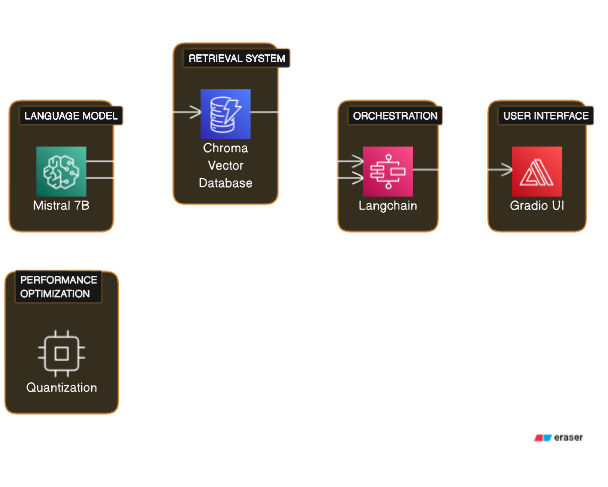
db = Chroma.from_documents(texts_chunks, embeddings, persist_directory="db")

custom_template = """You are a Machine Learning System Design Interview help  AI Assistant. Given the
following conversation and a follow up question, Give an appropriate response with the ML context given to you/ '.
Chat History:
{chat_history}
Follow Up Input: {question}
Standalone question:
"""
CUSTOM_QUESTION_PROMPT = PromptTemplate.from_template(custom_template)
memory = ConversationBufferMemory(memory_key="chat_history", return_messages=True)
qa_chain = ConversationalRetrievalChain.from_llm(
    llm=llm,
    retriever=db.as_retriever(search_kwargs={"k": 2}),
    memory=memory,
    condense_question_prompt=CUSTOM_QUESTION_PROMPT,
)
query = "Who you are?"
result_ = qa_chain({"question": query})
result = result_["answer"].strip()
display(Markdown(f"<b>{query}</b>"))
display(Markdown(f"<p>{result}</p>"))
Firstly we setup a Chroma database to store vector embeddings of text documents. This database acts as the AI’s memory, enabling it to quickly reference and retrieve relevant information.
Next, we tailored a custom prompt template to guide the AI’s responses in a format specifically designed for ML system design interviews.
To maintain context throughout conversations, we will implement a conversation memory using ConversationBufferMemory. This allows the AI to recall past interactions and build upon them for more meaningful discussions.
The heart of the system is the ConversationalRetrievalChain, which seamlessly integrates the large language model, the document retriever, and the conversation memory. It retrieves relevant documents, keeps track of the conversation flow, and applies the prompt template to generate responses.
To test the system, we can pose a query like : “Who are you?”. The AI expertly processed the question, retrieved relevant information, and crafted a fitting response, demonstrating its ability to handle conversational queries effectively.
def querying(query, history):
  memory = ConversationBufferMemory(memory_key="chat_history", return_messages=True)
  qa_chain = ConversationalRetrievalChain.from_llm(
        llm=llm,
        retriever=db.as_retriever(search_kwargs={"k": 2}),
        memory=memory,
        condense_question_prompt=CUSTOM_QUESTION_PROMPT,
    )
    result = qa_chain({"question": query})
    return result["answer"].strip()
iface = gr.ChatInterface(
fn = querying,
chatbot=gr.Chatbot(height=600),
textbox=gr.Textbox(placeholder="Tell me about Stripe System Design Articles?", container=False, scale=7),
title="MLSystemDesignBot",
theme="soft",
examples=["How to design a System for Holiday Prediction like Doordash?",
"Please summarize Expedia Group’s Customer Lifetime Value Prediction Model"],
cache_examples=True,
retry_btn="Retry",
undo_btn="Undo",
clear_btn="Clear",
submit_btn="Submit"
)
iface.launch(share=True)Here is the Output:
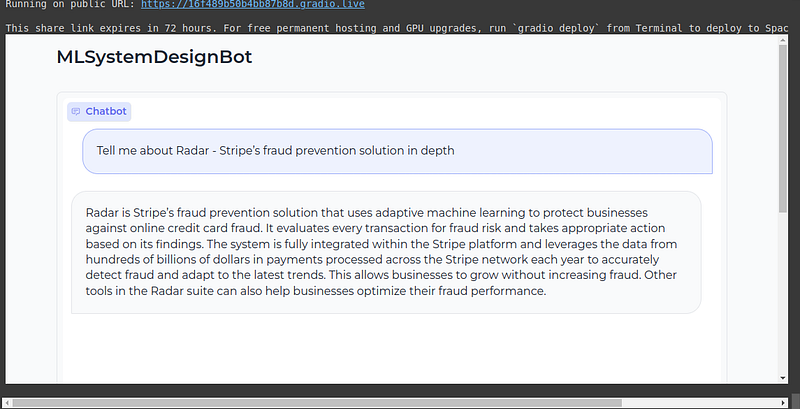
This code block creates an instance of the gradio interface with the querying function, the chatbot component, and the textbox component. The gradio interface is a class from the gradio library that allows us to create and launch user interfaces for machine learning models and applications.
Connect with me on Linkedin!
Check out Gurukul — A free to use Learning Management System that helps in improve your coding skills by the ethical and smart use of LLMs in your education. Not to cheat, but to improve critical thinking! Give it a try :D, its free of cost.
https://gurukul-v2-sn1c.vercel.app/
I hope this blog post has given you a comprehensive overview of how to use Retrieval Augmented Generation (RAG) with Mistral AI and Langchain, and how this technology can benefit various domains and applications. If you have any questions or feedback, please feel free to contact me. Thank you for reading. 😊
https://colab.research.google.com/drive/1wGGD2MJuZ5bhRw66WBOQglfq-hK0JDzH?usp=sharing
Topic Modeling with Quantized Large Language Models (LLMs): A Comprehensive Guide
References


