
VUE with TYPESCRIPT
Make the most of your Vue components with Typescript
Let the OOP spread throughout your Vue app
Assuming whether you have created a new Vue project with Typescript or you have just integrated it seamlessly, time has come to write Typescript components! 👩💻👨💻
In this article, you will find some hints to help you migrate or create your Vue components with Typescript.
Let’s get started! 🏃♀️🏃♂️
Spread Typescript into the components
To let Typescript enters into your Vue components, 2 additions are mandatory in each component file:
- Adding the
lang="ts"attribute to thescripttag so that Typescript compiler can recognized it and “scan” it. - Change the module definition with:
<script lang="ts">
import Vue from 'vue';
export default Vue.extend({
// ... You component (name, props, data, computed, ...)
})
</script>This is the first step and you are in a good way 🛤️.
Make your static values consistent
A first easy step to adopt Typescript is to transform static values/object into enum (doc).
In ES6, it’s common to have this kind of object:
However, it’s not really reusable. We can see that the properties type and cardType could accept a predefined list of values. Therefore, we can turn them into enums:
Enums
Then, these enums can be used in models and even in template.
Using enums in template
Using enums in template is very easy. In fact, we just need to add the type definition in the data attribute (L31). Them we can use them in template, like in L5-L8.
At this point, we’ve just added some data structures that can be reused over the objects we create. We can go even further by using defined models.
Add some models to your code base
Interfaces
In the paymentMethods object, clear data models are defined and so, we can create interfaces. An interface is like a contract according to which a Javascript object must comply with a set of property.
Extra properties could be added if necessary.
Some properties are common between Iban and Card. It could be interesting to merge them to make Iban and Card really focused on their own logic. Thanks to inheritance (coming from Object Oriented Programming), we can merge them into a mother-class.
Inheritance
Here, Iban and Card merge their own properties with those from PaymentMethod interface.
We can go even deeper: you may have noticed that caption is correlated with the number property and the paymentMethodType.
Let’s use some classes then!
Classes
Classes are quite similar to interface in that they are a contract, but they allow to add functions handling its properties and you can create an instance using the new keyword.
Quick notes:
public id: numberis a shorthand to declare the property and affect it in the constructor body. Following the OOP principles, a class must implement an interface. It means that every instance must have each property of the interface.
Finally, we can use these classes in our component. Classes, enums and interfaces have been extracted into a separate file.
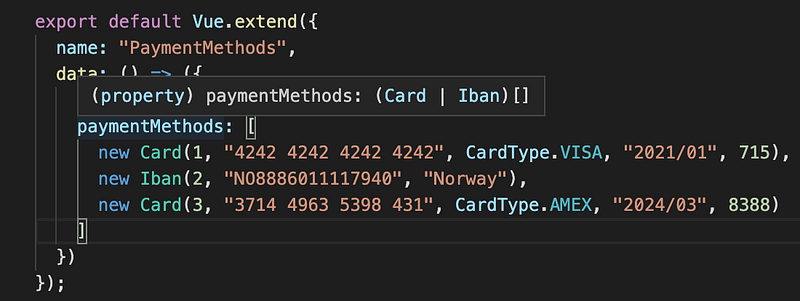
The component is neater this way and the object creation eased. As a side note, the type of the paymentMethods property is infered as suggested here:
Going further with classes
When creating those classes, we could have defined PaymentMethod as abstract. We could also have created a “caption maker” using generics. Other advanced techniques exist such as using a class as an interface.
Use typings everywhere
Type your props, data and computed
Typing your props, data and computed will make your code safer. The types will be reflected in each affectation or method calls you do in the rest of your component.
In this example, casting the type of cards on L12 is important so that we ensure cards is an array containing Card and not PaymentMethod.
Add return types to your function and types your parameters
Here, the isExpired method and its return type helps to understand that it may possibly return undefined if there is no cards in the paymentMethods props. An alternative case that could have been forgotten when using ES6.
Typescript interoperability with Vue
Managing external libs
Sometimes when adding external libraries, you could encounter this kind of error:

Indeed, it means that no Typescript typings exist for this library (no models to import and use in your components). Therefore, Typescript is grumpy and return this error.
As explained, it’s required to create a declaration module. In a @types folder, add a typings file for the problematic lib. Here, we will need to add a loadScript.d.ts file containing:
declare module 'loadScript';Then, the error will disappear. If don’t, restart your IDE so that Typescript compiler takes this modification into account.
Module augmentation
Module augmentation is a powerful tool to add variables or functions to Vue module. Thanks to it, you could use those with the Vue.yourVariable syntax.
Following the example with loadScript:
To conclude…
Using Typescript in your Vue components is a good bet since it make your code more structured and your components neater. These ones are more focused on their business logic and all the data models can be moved to a specific file.
Thanks to the OOP principles provided with Typescript, it’s even more easier to fulfill the SOLID rules.