
Make that Metadata Work for You
Here’s how you can do better with Google rankings in one easy step.

Today, we’re going to talk about the “meta description” for your articles. This metadata is important to the performance of your pieces and it is so often forgotten. We’ll cover some important info about metadata so you can improve your work and how it ranks on Google.
As a trained SEO specialist, I am usually required to write my own metadata for the work I do for clients. What I’ve learned these past few years may be of help to you and may even increase your MPP earnings here on Medium, or your traffic to your personal blog.
Today’s Takeaways
- What is metadata? How does this affect the impact of your article?
- What is the meta description and why is that important?
- How do you change the meta description for a Medium story?
- How to write a good meta description — a few tips!
Let’s get into it, shall we? Don’t worry — if SEO scares the bejeezus out of you — this tutorial will be simple and doable for any level of skill.
First, What Is a Metadata Description?
Metadata simply means a smaller selection of data representative of a larger array of data. In short, the metadata description of your article is a small statement that sums up the data, or information, of your article. It tells the reader exactly what your article is about.
When the reader approaches Google and types in their questions, phrases, and topics, they are searching for information. Your metadata description should align with their search habits and clearly describe what your article is about so that the reader knows if your article may provide the exact information they seek.
Accurate and effective metadata is honest and helpful. And the article delivers what it promises for the reader. (In fact, Google is now favoring articles that do just this — answer the initial inquiry or provide the answers it promises.)
Why Do You Need to Write a Metadata Description for Your Article?
Google and other search engines have parameters by which they sort content. This is to put most valuable content first for search engine users to find. Type any phrase into the Google search box. Ignoring the stories at the top which are paid ads, you see articles and content in descending order on that phrase. This is called “ranking.” Using SEO helps to get your work to rank better.
You may know all of this but be a little unsure what the meta description is for your work. When you do these Google searches, see the list, you’ll see below the title a description of the article. This is the metadata. If you do not set this metadata description Google does it for you and it could get cut off or just be odd snippets of your piece. Do yourself and your potential readers a favor and fill out this important part in the settings on your Medium story.
Don’t know how? Don’t worry — it’s really easy. Here’s how:
How to Write Your Metadata Description for a Medium Article (with pics)
I’ll use an example of one of my own articles that I did NOT write a meta description for, and later realized what a blunder this was. Let me explain.
The topic: Easy DIY Oil Recipe for Toothaches
Keywords: DIY oil toothaches recipe clove oil
Clearly, these are some highly Google-able keywords and I expect, over time, this article will get lots of external traffic. While this does not immediately boost MPP, I do feel it affects our standing on Medium as one who would be curated or promoted regularly. Like it or not, the more external traffic we bring in, the more valuable we are to Medium. My highest external traffic on the top three articles I have written also coincide with high earning for those articles. I do not think this is a fluke.
Therefore, the meta description for this searchable topic needs to be addressed. I took the time to screenshot the process of changing the meta description so you can see this process — step by easy step.
Note: It is optimal to do this when you publish and not at a later date as I am doing with this article.
Step One: Open your article and then using the three dots…click on “edit story”.
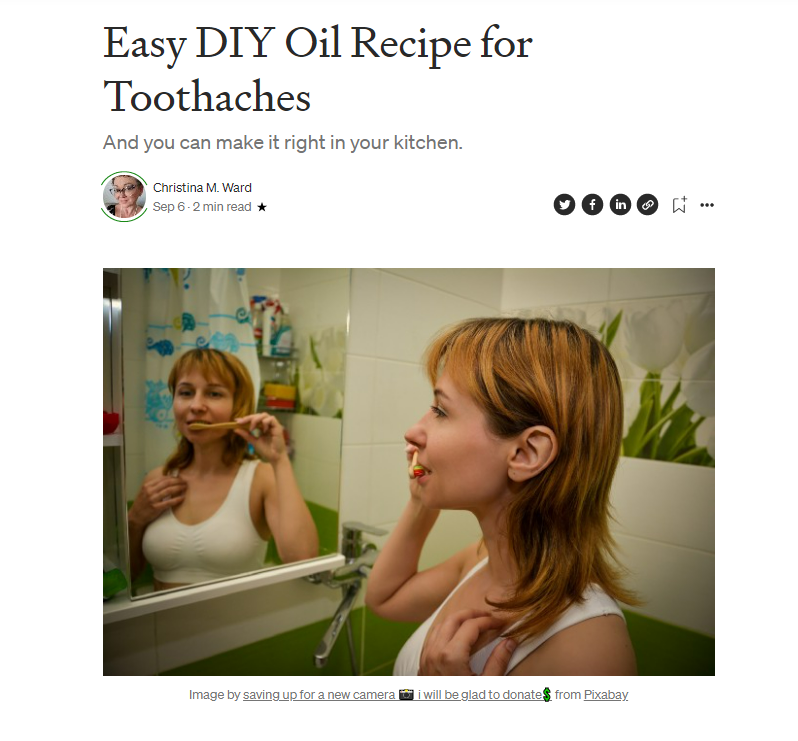
Here is my story, title in title case, and subtitle in sentence case, with feature image displayed in-line with the text. Correct attribution is also given for the photo, as you can see.
Step Two:
Using the three dots, open the menu and scroll down to “more settings.” Click that.
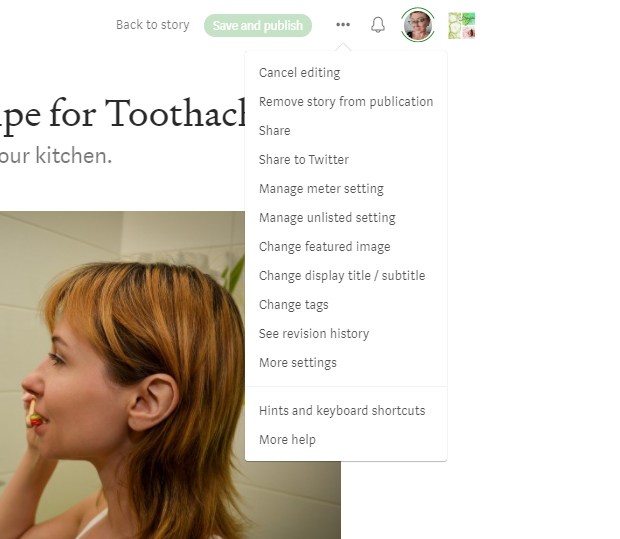
Step Three:
On the next screen, you’ll see another menu. Scroll that left-flushed menu until you get to “SEO Settings.” Click that.
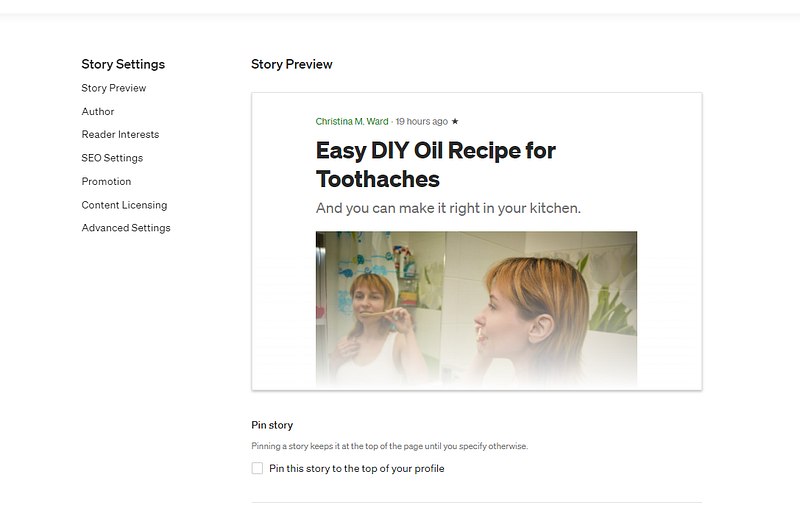
Step Four
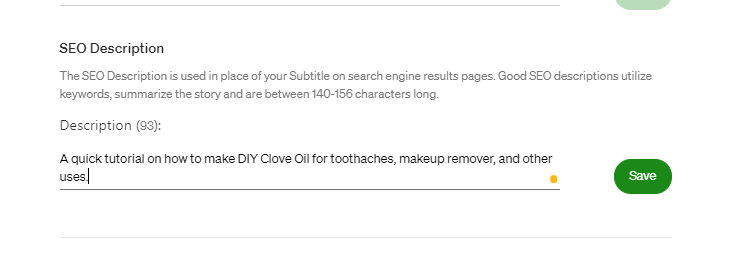
The SEO settings option opens your adjustable SEO settings for your article. The SEO description — this is your metadata description — will automatically be the first (approximately 200 characters) few lines of your story. This is what will be represented on search engines to explain to your reader what the article is about. Often your first few lines of the article do not do this well. You need to write a new one.
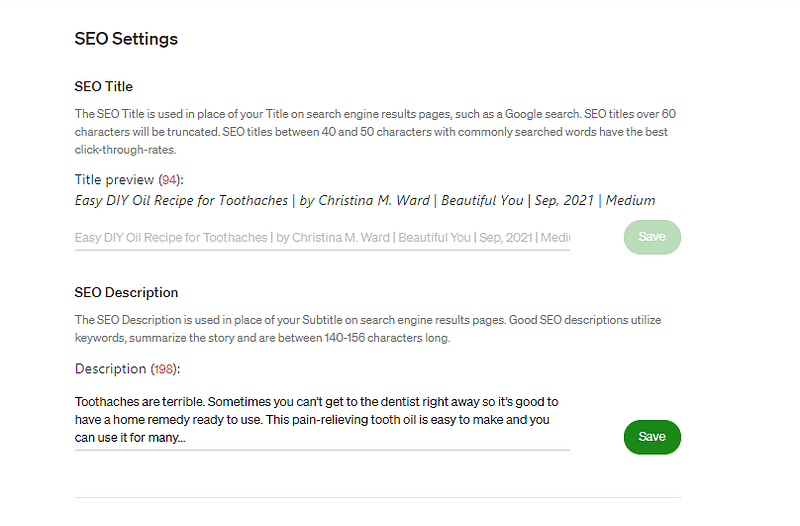
Step Five:
Write your new SEO meta description and click save.
Tips for a Great Metadata Description
Writing a meta description often takes me several tries to get it right. They aren’t super hard to write but you do need to be diligent. Pay attention to this small bit of copy because every word counts.
Subject
Make sure the meta description addresses the subject of your article, includes pertinent keywords for which you have optimized in your article, and explains to the reader in simple terms exactly what the article is about.
Length
The best length for a meta description is 155–160 symbols with spaces.
Tone
It is best for the tone of your meta description to match that of your article. This flows from the meta description to your article more fluidly and people who click will feel they’ve landed in the right place.
Your Takeaway for Today
- Don’t forget to write the metadata description for your articles.
- Make sure the metadata description accurately describes your article and includes keywords.
Other helpful SEP topics
- Long-Tail Keywords and SEO (coming up this week)
- SEO Tricks You Need to Make More Money With Your Writing
- An Easy SEO Guide for Poets
- Improve SEO in Your Articles: Stop Words
Thanks for reading. Be sure to follow the author for more great tips on writing.