Make Streamlit as Standalone App Execution
Hello, I will present how can we use streamlit as One App that could be executed on Windows or Linux without installing anything (Just with a double click). So it will be very convinient for one who don’t have the envirenment, or for no Technical peapole …
Let’s first create a sample python app.
I Will use Ubuntu 18.04 as OS, and Pycharm to edit code.
Let’s create our project called : sample_exe and use a virtualenv as the virtual environement on which we install all our necessay pakcages for the application. I use python3.9 in my example

After creating: Here is my code structure

Let’s create a simple streamlit program that show a pandas dataframe.
For That we have to install pandas and streamlit.
pip install streamlit
pip install pandas


Modify your main.py by this code:
import streamlit as st
import pandas as pd

if __name__ == '__main__':
    st.header("Hello world")
    d = {'col1': [1, 2], 'col2': [3, 4]}
    df = pd.DataFrame(data=d)
    print(df)
    st.dataframe(df)
You can display the result by executing :
streamlit run main.py
Now let’s install pyinstaller, a way allow us to make all depandency packaged in the same folder
pip install pyinstaller==4.10.0
Create a wrap script we can called it run_main.py
import streamlit.web.cli

if __name__ == '__main__':
    streamlit.web.cli._main_run_clExplicit('main.py', 'streamlit run')
in the venv folder search the cli.py script

for me it is in :
/sample_exe/venv/lib/python3.9/site-packages/streamlit/web/cli.py
add the following function to that script:
def _main_run_clExplicit(file, command_line, args=[], flag_options={}):
    import streamlit
    streamlit._is_running_with_streamlit = True
    bootstrap.run(file, command_line, args, flag_options)
Now, in the project main directory (sample_exe), let’s create two folders and two files inside each of them
- Create
./hooks/hook-streamlit.py - Create
./.streamlit/config.toml
hook-streamlit.py
from PyInstaller.utils.hooks import copy_metadata
datas = copy_metadata('streamlit')
config.toml
[global]
developmentMode = false

[server]
port = 8501
Here is our actual tree

==> Execute this command to create a run_main file as an executer. This will take a couple of minutes (Building Time). But this is not working yet, we have to work more to make streamlit files detected natiely.
pyinstaller --onefile --additional-hooks-dir=./hooks run_main.py --clean
Let’s see now our new Tree project (Refresh project if needed)

We see that we have a new created file called run_main.spec
This file is responsible for the execution file. In order to able charging files of streamlit, we have to do some modifications, like that.
We will modify some things
1- pathex=[] , datas = [], hiddenimports=[]
2- Make a recursion limit
The run_main.spec file will seem like that
# -*- mode: python ; coding: utf-8 -*-

import sys
sys.setrecursionlimit(sys.getrecursionlimit() * 5)

block_cipher = None


a = Analysis(['run_main.py'],
             pathex=['.'],
             binaries=[],
             datas=[
                 (
                     "venv/lib/python3.9/site-packages/altair/vegalite/v4/schema/",
                     "./altair/vegalite/v4/schema"
                 ),
                 (
                     "venv/lib/python3.9/site-packages/streamlit/static",
                     "./streamlit/static"
                 )
            ],
             hiddenimports=['streamlit','pandas'],
             hookspath=['./hooks'],
             hooksconfig={},
             runtime_hooks=[],
             excludes=[],
             win_no_prefer_redirects=False,
             win_private_assemblies=False,
             cipher=block_cipher,
             noarchive=False)
pyz = PYZ(a.pure, a.zipped_data,
             cipher=block_cipher)

exe = EXE(pyz,
          a.scripts,
          a.binaries,
          a.zipfiles,
          a.datas,
          [],
          name='run_main',
          debug=False,
          bootloader_ignore_signals=False,
          strip=False,
          upx=True,
          upx_exclude=[],
          runtime_tmpdir=None,
          console=True,
          disable_windowed_traceback=False,
          target_arch=None,
          codesign_identity=None,
          entitlements_file=None )
Finally, execute, to rebuild project with the new spec.
pyinstaller --onefile --additional-hooks-dir=./hooks run_main.spec --clean
Now copy the .streamlit folder and main.py into dist folder

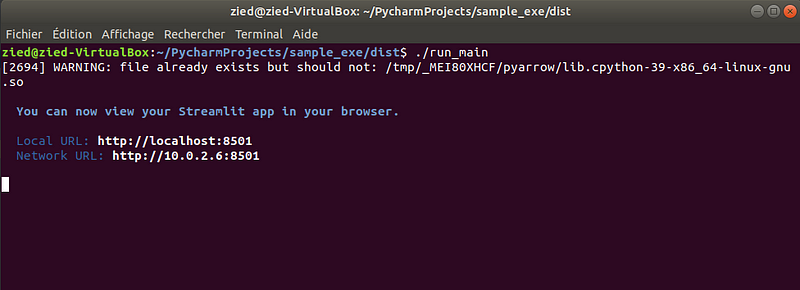
Go to the dist folder and execute :
./run_main