
How To Use Free Videos To Make Money On YouTube
YouTube Affiliate Marketing Without Making Videos!
YouTube Affiliate Marketing Sales Without Making Videos!
Medium Non-Members Can Read The Full Story HERE!

What you will learn about YouTube from this Medium story.
Choose your affiliate marketing platform for YouTube.
Free affiliate marketing product review videos on YouTube.
Converting and uploading your affiliate product video.
Bonus traffic strategy to maintain video ranking position.
YouTube video SEO basics for affiliate marketing.
Free stuff for my Medium subscribers!
Choose your affiliate marketing platform for YouTube.
When you want to make money on YouTube without making videos with affiliate marketing. Then you will need to complete a few simple steps. Choose an affiliate network, and discover your profitable niche.
Do product research, target audience research, and know where to get videos you are allowed to use. Focus on targeting your ideal buyers by means of GEO location based on interests related to your affiliate offer.
Choose Your Affiliate Network.
Choose The Right Product.
Search For Product Reviews.
Download Your Chosen Video.
Upload Your Video To YouTube.
Affiliate Link In Video Description.
Target Specific GEO Location.
Target Audience Interests.
But do not be misdirected by the phrase “simple steps”. Yes, the (eight) steps are simple. The strategy however requires time and probably failing (or rather learning) a few times.
Because that’s just how content marketing strategies work. Ever heard people say, “You fail your way to success!”? Well, they’re right, because that’s how you gather the knowledge you need to be successful!
With this specific content marketing strategy on YouTube, you will make money with affiliate marketing. You will not need to make any videos, and you will have access to all the free tools you need.
Plus a bonus video traffic strategy with YouTube that will blow you away! So be sure to read the entire article, we are pretty sure you will be glad you did. But if you’re not, just let us know in the comments.
But first, you need to decide on an affiliate network. In other words, the site where you will get affiliate products to promote. If you are a complete beginner, we suggest Clickbank.
Because most of the other affiliate networks require you to have your own blog or website. Some require proof that you have already made money online, etc. Among your top choices are.
Clickbank.
Warrior Plus.
JV Zoo.
Digistore24.
Share A Sale.
Max Bounty.
CJ Affiliate.
Pay Hip.
The options are endless, these are just some of the more popular affiliate networks to choose from. But there are countless others, along with private affiliate products which normally pay you through PayPal.
Among these private affiliate sites, you will find sites like Pretty Links Lite, FP Traffic, and Tweet Scraper. Private affiliate sites only mean that they are not part of an affiliate network, you need to sign up as a user.
Next, we will get into how you choose the right affiliate product for the right audience. Yes, it will require quite a bit of research because success requires effort.
Free affiliate marketing product review videos on YouTube.
Before you can look for the best product, you must first decide on your profitable niche. Because your affiliate marketing offer must be able to solve a problem and offer a proven solution.
For this, you must establish a common need within your profitable niche.
Once you have decided on your profitable niche and the product you wish to promote. You want to search YouTube for the following. Because that is how you make money on YouTube with affiliate marketing without making any videos.
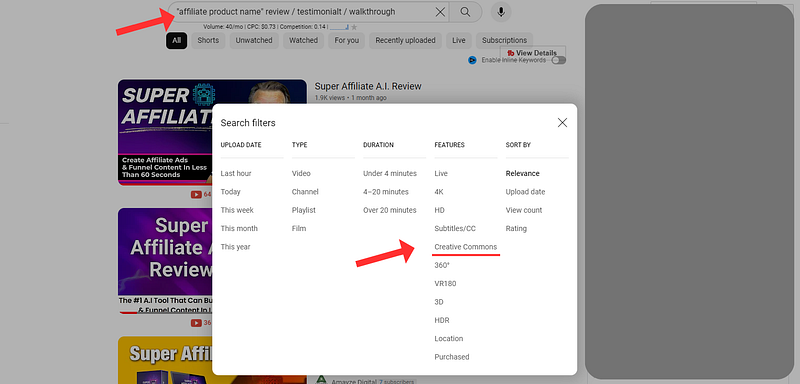
“affiliate product name” followed by review, testimonials, walkthrough, etc.
Most affiliate products will have videos you can use, but not all of them. So if you don’t find a video about the product you want to promote. Then your research starts again with product research.
As illustrated below, after you enter the search term (“affiliate product name” followed by review, testimonials, walkthrough, etc.). You want to go to “filters” inside your YouTube creator studio.
Then you want to click on “Creative Commons” because these are the videos you are allowed to use. This way you will make money on YouTube with affiliate marketing without making any videos.
And without getting any copyright strikes against your YouTube account or channel. Using videos with the “Creative Commons” license may sometimes point to a copyright claim (not a copyright strike).
Please don’t panic, this only means that the creator of the video allows you to use the video. But all video ad revenue generated by the video will still go to the video creator. It will not have any negative effect on your YouTube channel.
Do your own research about the product you want to promote and focus on affiliate products with dedicated domains. In other words, when you open the sales page, it redirects to a hosted domain.
Products with dedicated domains are much more likely to still be around next year or in the coming years. Be careful, because many affiliate products get taken down by creators just months after launch.
This will render all your hard work null and void. An affiliate product with a hosted domain, however, well, when you pay for a domain. Trust me, you don’t want to lose it because it builds up domain authority which takes time.
Converting and uploading your affiliate product video.
Before you do this, there are a few things you must know. Focus on the product and place the product name presented in the video as close to the start of the video title as possible.
Preferably as the first part of your YouTube video, you are about to upload to YouTube. Because then you know that the viewers visiting your video are most likely interested in that particular product.
But you also want to have a video description, video keywords and search phrases, along with video hashtags all related to the specific affiliate product presented in the video.
You can even use AI tools like “Chat GPT” or “Google Bard” to generate these for you. But that strategy is already covered in another Medium story. It will show you how to use AI by choosing the right search words for content.
Moving on. When you have obtained your “Creative Commons” license video. You want to click on the “Share” option below the video, with the popup window displaying as illustrated below.
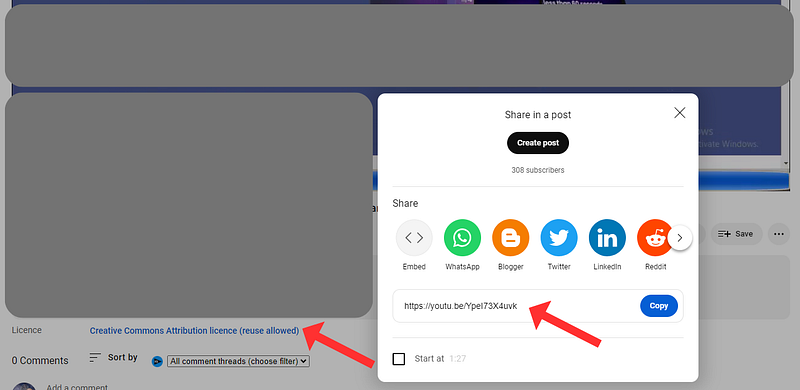
That is the URL you are going to use with the tool we will cover next. It is a really simple process to convert and download the videos to your PC or device you are using.
This is by far one of the “easiest” ways to make money with affiliate marketing on YouTube. And never create a single video, while still enjoying sales.
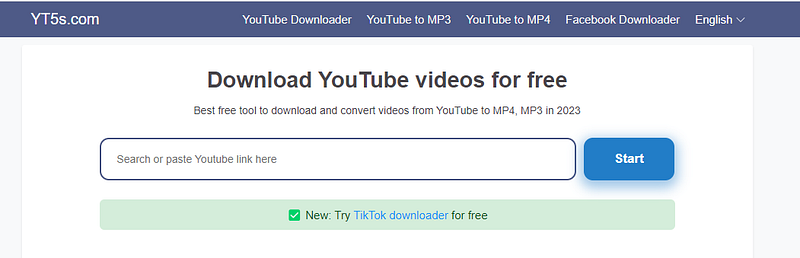
You simply copy and paste that URL into the search window of the tool called YT5s as illustrated below. Or you can even use the tool called yt1s, they both work exactly the same.
As illustrated below, this is the window where you paste the video URL for the affiliate product (Creative Commons License) you wish to promote.
You will also have the option to choose video quality in pixels, as can be seen below. We suggest you go with 1080p because high-definition (HD) videos have a better chance of ranking on YouTube.
But not all videos will provide that option, some might only go as high as 720p. But you never want to go below that. The quality of your video is very important because it forms part of the YouTube SEO ranking process.
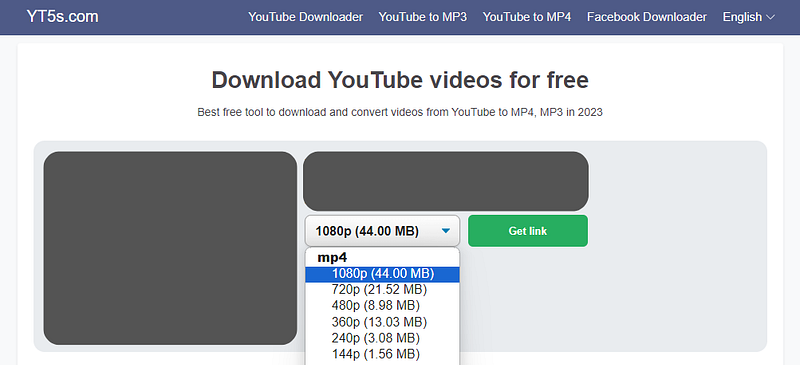
Once you have pasted the video URL, you click on “Get Link”, and then simply “Download” the video in the format you chose. But ranking a video on YouTube is the easy part.
To make money with affiliate marketing on YouTube without making videos, you also want to maintain the ranking position. Maintaining that video ranking position is an entirely different story.
Video activity determines that and is also responsible for your video to be more likely to show up in the “next suggested video” list on YouTube.
Bonus traffic strategy to maintain video ranking position.
This strategy works with paid ads through Google Ads, but not your average $1 to $3 charge per click. With this strategy, you pay around $0.012 cents per 30-second video view.
But get this, You also get a call-to-action button to use, redirecting to your affiliate offer URL. However, this is not your direct affiliate offer URL, but rather a bridge page.
You can create free bridge pages, AKA “One Page Websites” with Canva and Google Sites. These URLs are approved with Google Ads, or shall I say Google video ads for affiliate marketing. Create one website per affiliate offer.
Try sticking to videos not exceeding 3 minutes, because longer videos do not perform as well as the shorter ones. With this strategy, you only pay once the video has been watched for 30 seconds or longer.
So, be sure that your primary message that must create curiosity forms part of the first 30 seconds of the video, this makes for a higher conversion rate.
With this paid traffic strategy you will have a minimum capital outlay or expenditure. But you will have an array of benefits as listed below.
Video Views.
Video Watch Time.
Call-To-Action Redirects.
Video Description Link Visits.
Channel Subscribers.
Video Comments.
Video Likes.
Video Shares.
This, in turn, will boost your video activity, and in doing so feed the YouTube algorithm and maintain your video ranking position. You may also want to install two free browser extensions (VidIQ and Tube Buddy) for YouTube video SEO optimization and trending target keywords.
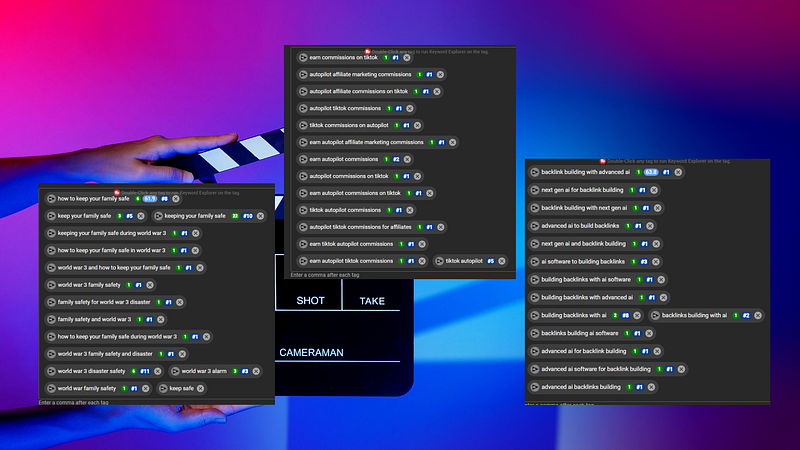
That way you can see which search phrases your video ranks for, and then build on that. Above is an example of how VidIQ and Tube Buddy will display your YouTube video ranking positions.
When you understand the basics of ranking a YouTube video, it becomes rather easy to rank a video fast. As can be seen above, some of the search phrases (or video tags) our videos are ranking for.
We are currently ranking YouTube videos for competitive search phrases (video tags) in 60 seconds or less after the video is uploaded to YouTube. But we will briefly discuss video SEO under the last subheading.
If you want to know how to set up this frightening successful YouTube video boost strategy. Then you might want to read the article below. A step-by-step (illustrated) guide on how to create a profitable Google YouTube Video Ad.
Here are just some key points to focus on, but it is all explained in the below Medium story.
Set Ad For Video Views And Website Visits.
Target A GEO Location (Preferably Top-Tier Countries).
Target Specific Related Interests.
Set Specific Days And Times.
If you follow the steps as laid out in the Medium story below. You will find this a lot less technical than it might appear to be. It really is not all that difficult. All you have to do is follow along.
YouTube video SEO basics for affiliate marketing sales.
There are 7 areas of a YouTube video upload that will play a paramount role in the video ranking capability. YouTube also gives you a bit of a head start in the beginning.
Hence the importance of maintaining the ranking position through the strategy we have just discussed above. These 7 areas of focus are listed below, And we will discuss them briefly in a bit.
Video Title.
Video Description.
Video Tags (Search Phrases)
Video Hashtags.
Video End Screens.
Video Cards.
HD Video Thumbnail.
General Settings.
Let’s take a closer look at these 7 areas of focus when ranking a YouTube video. Helping you to make money with affiliate marketing on YouTube without ever making any videos.
Video Title: In this case, you are planning on using affiliate product review videos (Creative Commons License). Therefore, try placing the affiliate product title as close to the start of your video title as possible. But do not exceed 60 characters, also counting spaces.
Avoid English Stop Words when choosing any title. Be it a YouTube video title, blog post title, or even article title. Try to avoid English Stop Words, but we have to warn you. That is a lot easier said than done.
Video Description: Be sure to include a video description related to the product. Like a review and include the search phrases or video tags you want to rank for. Try using as close to 5000 characters as you can.
Video Tags (Search Phrases): Along with your affiliate product title in mind, also think of the search phrases people would be most likely to search for. Like (does “affiliate product” really work?).
Then use Google Trends to search for related trending topics. Also, choose top-tier countries when searching with Google Trends. You can search the history as far back as 5 years.
Your video title, tags, description, and hashtags must all be directly related to one another, but also to the affiliate product you wish to promote.
Video Hashtags: Search for trending hashtags on YouTube with the use of tools like Hashtags-Org. But you can also just search your YouTube studio or check on the hashtags used by your competitors.
Video End Screens: Add video end screens, these are important. We just include the template with one video, and then subscribe to our channel option with the end screen.
Video Cards: Add video cards. With a video of around 3 minutes, you can include a maximum of 5 video cards. Just space them evenly over your video.
HD Video Thumbnail: Create a high-quality video thumbnail with Canva, where you can access multiple ready-made templates too. But focus all text to the centre of the thumbnail.
Because the thumbnail gets cropped from the sides on search result pages in search engines with mobile devices. Your video thumbnail is your chance to create curiosity.
And that forms a large part of YouTube affiliate marketing sales without creating videos.
General Settings: Be sure to select the language of the video. But also select the language for the video title and description. This simplifies the understanding of your content, therefore increasing the ranking capability. Also, set the recording (Upload) date.
Super Affiliate AI isn’t just a tool, it’s your passport to a world of unlimited potential in content creation and digital marketing! Start your new chapter in affiliate marketing now! — Source
AFFILIATE DISCLOSURE: Some of the links in this post are links to affiliate offers. If you visit them to make a purchase, I will earn a commission. The decision is yours, and whether or not you decide to buy something is entirely up to you. All offers come with a full 30–60 days, no questions asked, money-back guarantee!
Free Stuff For My Medium Subscribers.
All new subscribers on Medium will receive 4 free gifts. 2 of my top traffic eBooks, and 2 free memberships (invitation only) for buyer traffic tools I use. Subscribe to me (Deon Christie) on Medium and your free stuff will be emailed to you asap. Medium has no affiliation, nor do they endorse the free giveaway in any way. It is my personal free giveaway to all new Medium subscribers.


