
Simple, sane, and sensible Logging in Python
TLDR
If you’re not already using it, there’s a simple, powerful wrapper around Python’s Logging module called log2d that gives you access to all sorts of advanced features using a deceptively simple syntax. It’s literally all you need if you’re in the 80% of Developers who just want to adopt good logging practices quickly, using sensible default settings, without having to learn yet another peculiar syntax, and without having to store away long snippets of boiler-plate code which are too convoluted to be memorable.
Just install it in the usual way e.g.
python -m pip install log2dThen head over to the README file on Github. It’s easy enough to follow, so this article won’t repeat how to use log2d, but if you’re unsure why log2d should become your new best friend, please read on…
Why Log instead of print( )?
Learning Python’s logging module and weaning yourself off print() statements is considered by many people to be an important milestone in the journey from Python novice to “Pythonista”. It’s better than print() for several reasons, but most importantly:
- You can track (and later analyse) the timing of every message.
- You can output in a standardised format which facilitates filtering, parsing, and summarising what happened after the event.
- You can set a minimum log level and only capture messages of that level of importance and above. This in turn means…
- You don’t have to delete all your debugging messages when you move your code to production - you just change the minimum log level or disable logging entirely.
- Conversely you can turn logging back on or make it more verbose when you need to debug or retest.
- You can log the output to a file (or websocket, or http, or email…) instead of, or in addition to, just sending output to the console. This gives you a permanent record for further analysis.
Do I even need to “learn” the Logging module?
Like so many Python modules, you could invest hours (or days) working through the official documentation or derived tutorials, videos and articles if you want to master everything on offer. But if you’re in a rush to add logging to some existing project or your goal is simply to get started with simple, sane and sensible settings, I’m afraid most of your time will be wasted reading about features you don’t need, or working out from first principles how to achieve what log2d already does for you in one line.
In the case of Logging, to do anything more than very basic one-dimensional logging (choosing from the preset log levels of DEBUG, INFO, ERROR, WARNING, or CRITICAL/FATAL) you’ll need to get your head around the way Logger classes interact, including formatters, stream handlers, file handlers, and if you’re really patient, rotating file handlers. Then even after you’ve mastered all that, you’ll have to slavishly copy big chunks of boiler-plate code into every script going forwards.
That’s where a well thought through ‘wrapper’ is worth its weight in gold. log2d is just such a wrapper… a simple tool for busy people.
How easy is logging with log2d?
With log2d it’s trivially easy to create any number of named Logs which include sensible, helpful defaults and ISO8601 timestamps :
>>> from log2d import Log>>> Log("main")>>> Log.main.critical("Oopsie!")
main|CRITICAL|2022-10-26T16:00:27+0100|Oopsie!>>> Log.main.warning("Danger, Will Robinson!")
main|WARNING|2022-09-30T22:00:14+0100|Danger, Will Robinson!It’s as simple and concise as that if you want it to be.
But as you’ll see from the README, log2d comes loaded with other convenience functions, presets, and short “Cookbook” recipes. Mostly it’s just a case of specifying the relevant keyword arguments when you first create your Log, or setting attributes at a Class level if you want all your Logs to share the same settings.
For example you can quickly and easily customise your logging to:
- Send output to the console (“stdout”) or a file, or both.
- Choose from ready-made templates for message formatting and date/time formatting, or specify your own.
- Choose between logging to a single ever-growing log file, or creating a new file for each session
- Configure automatic rotating backups (I love this feature!).
- Create individual (and/or shared) logs for specific Modules, Classes, and Objects.
- Create quick log messages (using the default logging level) with log2d’s handy automatic shortcut functions:
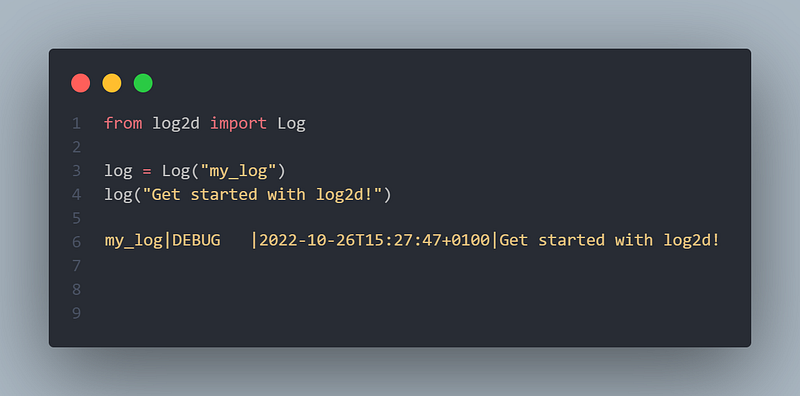
>>> log = Log("main")>>> log("Get started with log2d!")
main|DEBUG |2022-10-26T15:27:47+0100|Get started with log2d!The real power of log2d however is that you can easily create as many named Logs as you like for different purposes. For example successes, failures, retries, timings, progress, timeouts, exceptions, access, access_denied, or whatever you need to group and categorise your output in a two-dimensional way, freeing you from the constraints of the linear, one-dimensional presets (DEBUG, INFO, ERRORS, WARNING, or CRITICAL/FATAL).
Clean, concise, powerful, logging which works right out of the box. Why not install log2d today and take your code to the next level?
Happy logging!
When you’re ready for more, my next article shows you how to organise your Python Modules, Classes and Objects/Instances quickly and effectively — logging output from any of them either individually or as a group:


