Logging in Java — Log4j vs Logback vs SLF4J
Hello everyone. I am going to discuss yet another important but confusing topic i.e Logging in Java.
What is Logging?
Logging is the process of printing or recording the activities in an application which helps the developers to understand and analyze when there are any unexpected errors in the system. Before the logging frameworks were introduced, developers used to write System.out.println everywhere in the code to print to the console. The problems with were that it made the console messy and these messages were lost. Moreover, there was no control over such messages being printed on the console.
Then came the logging for Java through the java.util.logging package, and the org.apache.log4j.* package. Many logging frameworks have been developed that work on top of the Java logging package to standardize the logging and make it convenient for the developers. These frameworks in general are called loggers and they have a lot of flexibility like printing logs to separate log files and rotate the log files etc
What is Logger in Java?
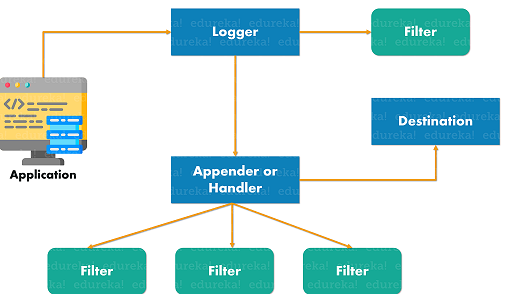
Loggers are nothing but Java objects that trigger log events. Loggers are included as objects in all the Java class files and they belong to that specific class. A class can have more than one Loggers defined for different events. When the application calls the logger to generate logs, log events are triggered and then passed to the Appender or Handler.
Appenders are used to export logs to the Destination. The destination can be a file or console or specific Syslog servers etc. These Appenders have components called Filters to filter the log messages from getting exported. Moreover, The Layout in the Appenders helps us to add custom formatting to the log messages like date, time, etc
Log Levels
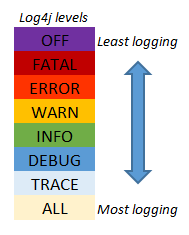
The logs can be classified based on their severity in the form of log levels. There are various log levels as seen in the diagram. There is an Integer value for each log level and the higher value indicates higher priorities.
Generally, every environment will be configured with different log levels.
Eg:The development environment might have the logging level ALL to print all the logs.The SIT environment might have DEBUG level to print the logs with level Debug and below. The UAT environment might have the logger level INFO which will print all the log messages with level INFO and above.A production environment might only print the logs with level WARN which means it will print the log messages with type WARN ERROR and FATALThus the logger frameworks help us to print relevant information for the specific environments by allowing us to configure different logging levels for different environments without changing any code.
Advantages of Using Loggers
- Centralized frameworks to handle logging
- Filtering, Custom Formatting the logs and rotating the logs when specific size or date is reached
- Displaying the class name, timestamp etc for every log messages
- Different configuration for different environments / profiles in Spring boot
- Separate log files for different components
- Different log levels
Logging Frameworks for Java
There are various Logging frameworks in Java as follows
- SLF4J — It stands for Simple Logging Facade for Java (SLF4J) and it provides an abstraction for various logging frameworks (e.g. java.util.logging, logback, log4j, log4j2) so that developers can plugin any logging frameworks and use them interchangeably without changing any implementation. The only thing needed is the dependency of the particular framework and then the specific config file.
- Log4j —Apache Log4j is an open-source Java-based logging utility framework that was very popular but it was deprecated
- Logback — Logback was developed by the same developer as Log4j and it is a successor of Log4j
- Log4j 2 — This is the latest and most efficient logging framework which is considered very fast. Apache Log4j 2 is an upgrade to Log4j that provides significant improvements over its predecessor, Log4j 1.x, and provides many of the improvements available in Logback while fixing some inherent problems in Logback’s architecture.
Logging in Spring Boot
spring-boot-starter-web is the basic package required to build a web application. This package by default comes with the logging package called spring-boot-starter-logging. Logback is the default framework included by Spring boot along with slf4j implementation. To use another framework is log4j2, logback can be excluded and the dependency of log4j2 can be added as follows
<dependency>
 <groupId>org.springframework.boot
</groupId>
 <artifactId>spring-boot-starter-web</artifactId>
 <exclusions>
  <exclusion>
   <groupId>org.springframework.boot</groupId>
   <artifactId>spring-boot-starter-logging</artifactId>
  </exclusion>
 </exclusions>
</dependency>
<dependency>
 <groupId>org.springframework.boot</groupId>
 <artifactId>spring-boot-starter-log4j2</artifactId>
</dependency>
Since logback is the default logger in Spring Boot, a file called logback-spring.xml can be created and configurations can be added to the various Spring profiles.
You can continue to read more on the recent log4Shell vulnerability here
Hope you enjoyed reading this article. Happy learning!!!
Please follow me for more content.