
Log Management Fundamentals for Cybersecurity Engineers

Log Management is a foundation field of IT admin. It’s needed for administration, troubleshooting and auditing — think of any industry standard or legislation/regulation and Logging will be a mandatory activity.
In fact, it’s so important that it has its own, dedicated NIST publication, SP800–92 — which is a bit old, from 2006 — but still... It’s a fun read and does contain relevant architectural arguments relevant to this date.
And Cloud Providers scream at the top of their lungs on how important logging is, Werner Vogels, Vice President and Chief Technology Officer at Amazon.com stated:
Back at the first re: Invent, I made a bold statement. I told you to “Log everything!” and I meant it… log everything. Logs are the source of truth for what’s going on at any given moment inside your infrastructure.
Logging is also a cornerstone of Threat hunting and not many realize its importance since nowadays we take it for granted in networks and cutting-edge (or at least, the latest iterations of) cybersecurity solutions such as XDR and SIEM/SOAR.
./fundamentals
Logging is keeping track of events in systems. Ideally, every single action, event, happening in a system is recorded and categorized. Missing some events can cause trouble down the line if those records are ever needed in the future for some reasons that I mentioned already.
In an Enterprise environment, handling log from different products and devices requires a Log Management Infrastructure/Architecture.
Sematext defines Log management as:
Log management is the process of handling log events generated by all software applications and infrastructure on which they run. It involves log collection, aggregation, parsing, storage, analysis, search, archiving, and disposal, with the ultimate goal of using the data for troubleshooting and gaining business insights, while also ensuring the compliance and security of applications and infrastructure.
Logs are typically recorded in one or more log files. Log management allows you to gather the data in one place and look at it as part of a whole instead of separate entities. As such, you can analyze the collected log data, identify issues and patterns so that you can paint a clear and visual picture of how all your systems perform at any given moment.
There are challenges with log management, such as:
- Balancing how much log data to keep out of the continuous and ever-growing supply of log.
- Log storage (be that in in the cloud or on-prem)
- Inconsistent Log content
- Log usage (both querying and confidentiality to it)
There are a number of recommendations in the NIST publication on how to better manage your Log, I will refrain from touching on them here.
Some of these challenges exist because — by definition — when auditing and securing an environment, you need to have full visibility of what happened, thus logs, from everything in the network / devices.
There are logs that focus on Performance and other that focus on Security-related information. At this stage, depending on your need, you’ll probably end up with two logging solutions:
- For Performance/Auditing/Troubleshooting Log data, you’ll need a: Log Management System (LMS).
- For Security/Threat Hunting, you’ll need a: Security Information and Event Management (SIEM).
For the rest of the document, I’ll prioritize security-related information where applicable.
Different types of devices can Log data in different ways. Especially when utilizing logs for threat hunting, it might be important to keep certain log data from devices that are not directly affected by a malware or a malicious event. Common types of devices being logged are:
- Network: This is common for network infrastructure devices and nowadays, for cloud infrastructure.
- Workloads: be that: servers or microservices in kubernetes clusters.
- Security solutions: Such as endpoint protection platforms (EPP), endpoint detection and response (EDR) agents, XDR solutions, IPS, Web gateway, Firewalls and more.
- Operating Systems: Which can encompass System Events and Audit Records.
- Software: Commercial software might want to keep performance records and some, fewer, security related, such as login/access information.
- Cloud services: A modern-day concern, keeping track of activity of SaaS services, IaaS and PaaS is a need.
./loggingArchitecture
Generally speaking, a logging infrastructure (LMS/SIEM) will encompass the following components:
- Log Generation methods, such as devices/software/cloud services
- Log Storage/Analysis, where log data is sent to.
- Log Monitoring, an interface through where the cybersecurity engineer will interact with all the log data, the FuN part!
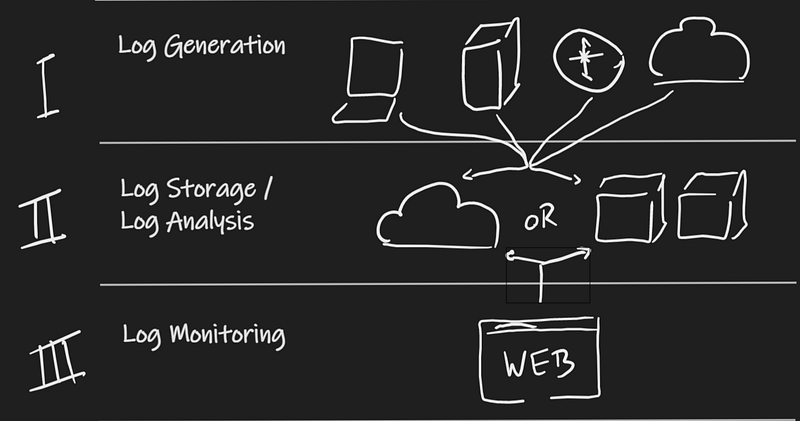
Of course, Cloud-native SIEM solutions rely on Cloud for storage and analysis and monitoring. Traditional solutions would be on-premises with some software dependency to run the web interface, oh the supply chain issues back then (who didn't have nightmares because of Java-based Clients).
./logTypes
I could write books discussing each of the log types below in depth. Here is a quick glimpse at some features of each of them, though.
Syslog: System Log
The t-rex of this list, Syslog was created what seems to be eons ago, by internet hall of fame Eric Allman. Its use is so widespread that is became synonymous of logging format and many modern-day systems support it.
Here’s an overview on the tech by dnsstuff.com:
Syslog has a standard format all applications and devices can use. A syslog message contains the following elements:
Header
Structured data
Message
The header includes information about the version, time stamp, host name, priority, application, process ID, and message ID. The structured data comprises data blocks in a specific format, which is followed by the log message.
Log messages should be encoded using the 8-bit Unicode Transformation Format (UTF-8), but apart from that, the messages can be configured based on individual needs. The flexibility of the message content is part of what makes syslog so popular and effective.
CEF: Common Event Format
This is an Open Standard developed by Arcsight for Log Management— it defined a schema for anyone to develop their own device schema for interoperability. It is used industry-wide for normalizing security events.
In a configuration Guide from Imperva, the following description is given about CEF:
The ArcSight Common Event Format (CEF) defines a syslog-based event format to be used by other vendors. The CEF standard addresses the need to define core fields for event correlation for all vendors integrating with ArcSight.
And this is how it works as described by Arcsight’s documentation:
CEF is an extensible, text-based format designed to support multiple device types by offering the most relevant information. Message syntaxes are reduced to work with ESM normalization. Specifically, CEF defines a syntax for log records comprised of a standard header and a variable extension, formatted as key-value pairs.
Supported by a wide range of devices and OS, including Windows/Linux.
BTW, here’s a handy video on how to send Unix OS logs to Sentinel.
API: Application Programming Interface
APIs are the more modern way to send Log data to your repositories.
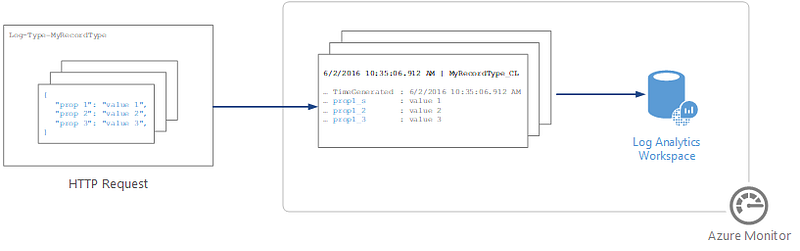
Azure Log Analytics supports HTTP endpoints sending Log data via API as described by Microsoft’s documentation:
You can use the HTTP Data Collector API to send log data to a Log Analytics workspace in Azure Monitor from any client that can call a REST API. The client might be a runbook in Azure Automation that collects management data from Azure or another cloud, or it might be an alternative management system that uses Azure Monitor to consolidate and analyze log data.
All data in the Log Analytics workspace is stored as a record with a particular record type. You format your data to send to the HTTP Data Collector API as multiple records in JavaScript Object Notation (JSON). When you submit the data, an individual record is created in the repository for each record in the request payload.
./moreResources
./eof
Think about your Log Pipeline and how to optimize it — the right kind of logs for the correct purpose.
Hopefully this helped you understand some of these concepts a little better. You’ll surely need them in conversations/blue teaming activities.
Follow me on linkedin.
Learn more about my Cloud and Security Projects Andre Camillo | Linktree
Thank you for reading and leave your thoughts/comments!
./references
Scattered throughout the document.