avatarAurélien Roblin

Free AI web copilot to create summaries, insights and extended knowledge, download it at here

3629

Abstract

<figure id="abcf"> <div> <div>
            <iframe class="gist-iframe" src="/gist/Orer0/3e2cb4820a4f2d6dda2fa6a63dee6cf0.js" allowfullscreen="" frameborder="0" height="undefined" width="undefined">
          </div>
        </div>
    </figure></iframe></div></div></figure><p id="747f">The function for Tweets Table :</p>
    <figure id="afae">
        <div>
          <div>
            
            <iframe class="gist-iframe" src="/gist/Orer0/75d74758c54f8a07b3189c59527f6e28.js" allowfullscreen="" frameborder="0" height="undefined" width="undefined">
          </div>
        </div>
    </figure></iframe></div></div></figure><p id="745e"><i>These two tables will be part of my datalake, I will show you in another tutorial how I load this Google sheet data into Big Query with tools like Fivetran and how I model my data with dbt to build my data warehouse.</i></p><p id="5d49">A write function, for load data into Google Sheet :</p><p id="52d8">For this you need to do some steps :</p><ul><li>Create twitter_users and twitter_tweets google sheet</li><li>Enable Google Drive API in your GCP project</li><li>Generate json key</li><li>Share the sheet to your service account</li></ul><p id="2ca5">You can follow a detailed tutorial here : <a href="https://erikrood.com/Posts/py_gsheets.html#:~:text=Search%20for%20'Google%20Drive%20API'%2C%20enable%20it.&amp;text=Select%20Compute%20Engine%20service%20default,it%20in%20through%20Python%20later">erikrood.com</a></p>
    <figure id="8cbe">
        <div>
          <div>
            
            <iframe class="gist-iframe" src="/gist/Orer0/922407144dbfd8404c39eebd9416f391.js" allowfullscreen="" frameborder="0" height="undefined" width="undefined">
          </div>
        </div>
    </figure></iframe></div></div></figure><p id="e38a">The entry point function (main) :</p>
    <figure id="22f3">
        <div>
          <div>
            
            <iframe class="gist-iframe" src="/gist/Orer0/df7a5776c23d8e05d89a007ed78d27cc.js" allowfullscreen="" frameborder="0" height="undefined" width="undefined">
          </div>
        </div>
    </figure></iframe></div></div></figure><p id="0711"><b>Find here all the code</b> : <a href="https://github.com/Orer0/twitter_pipeline_public/blob/main/main.py">github.com/Orer0/twitter_pipeline_public</a></p><h2 id="5239">Step 2 : Create a Pub/Sub Topic</h2><p id="1a62">We want to trigger our cloud function and to do this we will use Pub/Sub (more info on this tool : <a href="https://cloud.google.com/pubsub/docs">cloud.google.com/pubsub</a>)</p><p id="e831">Run the following command in a cloud shell for create the pub/sub topic</p><div id="771e"><pre><span class="hljs-attribute">gcloud pubsub topics create twitter_ds</span></pre></div><h2 id="f557">Step 3 : Deploy this script in a Cloud function</h2><p id="f17a">Add all necessary files in a folder on the cloud shell (you can use git for doing this, or copy and paste in vi editor).</p><p id="f189">Don’t forget to include the <b>drive_creds.json</b> and the requirements (in a file) at the roots of the folder.</p><div id="bc49"><pre><span class="hljs-comment"># add requirements.txt in the folder with :</span>

<span class="hljs-attribute">requests</span>==<span class="hljs-number">2</span>.<span class="hljs-number">23</span>.<span class="hljs-number">0</span> <span class="hljs-attribute">pandas</span>==<span class="hljs-number">1</span>.<span class="hljs-number">3</span>.<span class="hljs-number">5</spa

Options

n> <span class="hljs-attribute">pygsheets</span>==<span class="hljs-number">2</span>.<span class="hljs-number">0</span>.<span class="hljs-number">5</span></pre></div><p id="71ad">You can deploy the Cloud shell with the following command :</p><div id="c351"><pre>gcloud functions <span class="hljs-keyword">deploy</span> twitter_data_source <span class="hljs-params">--entry-point</span> get_twitter_data_source <span class="hljs-params">--runtime</span> python37 <span class="hljs-params">--trigger-topic</span> twitter_ds</pre></div><p id="bbb1">We now have a cloud function that is triggered by pub/sub.</p><p id="a88c">For each message sent to the twitter_ds topic, the cloud_function will run</p><h2 id="c72f">Step 3 : Setup cloud scheduler for run this script every week</h2><p id="6d82">The last step is to run this script on a schedule, given this script has no dependencies, we can just set up a cron with the cloud scheduler and not use Composer</p><p id="28a7">You can easily do this with cloud console on this page <a href="https://console.cloud.google.com/cloudscheduler">console.cloud.google.com/cloudscheduler</a> :</p><figure id="44be"><img src="https://cdn-images-1.readmedium.com/v2/resize:fit:800/1*8SeODaHSim-Oo47EA7HhtQ.png"><figcaption></figcaption></figure><p id="b346">This website can help you for define your cron <a href="https://crontab.guru/">crontab.guru</a> . In my case I choose an execution once a week. Thus, each week, the script retrieves tweets from the last seven days.</p><figure id="c826"><img src="https://cdn-images-1.readmedium.com/v2/resize:fit:800/1*kHzFCzPnrg3n8nANBZNEYw.png"><figcaption></figcaption></figure><p id="d341">Click on Create for validate the job.</p><h2 id="3cfc">To summarize :</h2><ol><li>We have see how to use the twitter API for retrieve data.</li></ol><p id="eca5">2. How to load data in Google Sheet.</p><p id="d2d8">3. Deploy this in a cloud function.</p><p id="db0c">4. Automate script triggering with Pub/Sub and Cloud Scheduler.</p><p id="5f19">It’s a good training and a good start to build a data engineering pipeline !</p><figure id="e255"><img src="https://cdn-images-1.readmedium.com/v2/resize:fit:800/0*Vvj1Uf0N7rY679kJ.jpg"><figcaption></figcaption></figure><p id="285e">The next tutorials to come will be :</p><ul><li>Building my datalake into BigQuery using modern loader like Fivetran or Airbyte</li><li>Using dbt for make transformation and build my data warehouse</li><li>Using a BI tools for give value on my data and obtain my first insight</li></ul><p id="6f6b">Hope this tutorial will be helpful for you.</p><p id="dce3"><i>More on my youtube channel : <a href="https://www.youtube.com/channel/UCmf7J4v1H2rzKAdHYcPmzHQ">AurélienRoblin</a></i></p><p id="70f2"><i>Please feel free to comment if you have any questions. Or contact me directly on my different networks : <a href="https://arolab.xyz/"></a></i><a href="https://arolab.xyz/">arolab.xyz</a></p><blockquote id="4b2d"><p>Follow me for more content like this !</p></blockquote><div id="6a73" class="link-block"> <a href="https://readmedium.com/mlearning-ai-submission-suggestions-b51e2b130bfb"> <div> <div> <h2>Mlearning.ai Submission Suggestions</h2> <div><h3>How to become a writer on Mlearning.ai</h3></div> <div><p>medium.com</p></div> </div> <div> <div style="background-image: url(https://miro.readmedium.com/v2/resize:fit:320/1*ib0DX0UzRoFcNuZILb7rNA.jpeg)"></div> </div> </div> </a> </div></article></body>

Load Twitter data into Google Sheet and automate it — Start a simple data pipeline

How to ingest data from Twitter into a sheet automatically and scheduled.
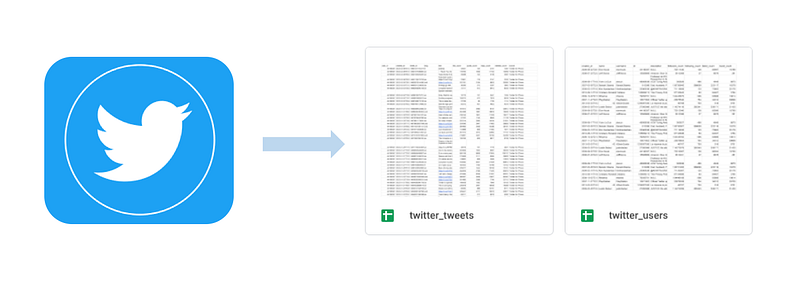
Data sources are basis of machine learning, data analysis, data visualization. At the beginning of the data cycle, there are a multitude of data sources in raw format. Every day, we participate in the enrichment of all these data sources. As a data engineer, part of our job is to load and transform that data into insights.

In this tutorial I will show you how to build a first part of a simple data pipeline, we will see :

  • Retrieve data from a source, here Twitter
  • Enrich a database, here Google Sheet (we can load our data directly into Big Query, but in another tutorial I want to use Fivetran to load my data, so google sheet will be my operational database)
  • Automate and schedule all of this

One can imagine that this goal could be real for a marketing company that analyzes tweets.

The goal will be to build two tables :

  • Users Table : Which return data about target people
  • Tweets Table : All tweets from a list of user (target people)

Some examples UC :

  • Dashboard with alls metrics, KPIs and user filter
  • Which topics a user tweet about ?

Tools :

  • Python
  • Google Drive
  • Cloud Function
  • Pub/sub
  • Cloud Scheduler

Step One : Build the script

This script takes a list of ten Twitter users and retrieves those users’ data and their latest tweets from the last 7 days.

Requirements :

Import :

Global Variable :

Add this function to pass credentials in query :

We need a function for query the API :

The function for build Users Table :

The function for Tweets Table :

These two tables will be part of my datalake, I will show you in another tutorial how I load this Google sheet data into Big Query with tools like Fivetran and how I model my data with dbt to build my data warehouse.

A write function, for load data into Google Sheet :

For this you need to do some steps :

  • Create twitter_users and twitter_tweets google sheet
  • Enable Google Drive API in your GCP project
  • Generate json key
  • Share the sheet to your service account

You can follow a detailed tutorial here : erikrood.com

The entry point function (main) :

Find here all the code : github.com/Orer0/twitter_pipeline_public

Step 2 : Create a Pub/Sub Topic

We want to trigger our cloud function and to do this we will use Pub/Sub (more info on this tool : cloud.google.com/pubsub)

Run the following command in a cloud shell for create the pub/sub topic

gcloud pubsub topics create twitter_ds

Step 3 : Deploy this script in a Cloud function

Add all necessary files in a folder on the cloud shell (you can use git for doing this, or copy and paste in vi editor).

Don’t forget to include the drive_creds.json and the requirements (in a file) at the roots of the folder.

# add requirements.txt in the folder with :
requests==2.23.0 
pandas==1.3.5 
pygsheets==2.0.5

You can deploy the Cloud shell with the following command :

gcloud functions deploy twitter_data_source --entry-point get_twitter_data_source --runtime python37 --trigger-topic twitter_ds

We now have a cloud function that is triggered by pub/sub.

For each message sent to the twitter_ds topic, the cloud_function will run

Step 3 : Setup cloud scheduler for run this script every week

The last step is to run this script on a schedule, given this script has no dependencies, we can just set up a cron with the cloud scheduler and not use Composer

You can easily do this with cloud console on this page console.cloud.google.com/cloudscheduler :
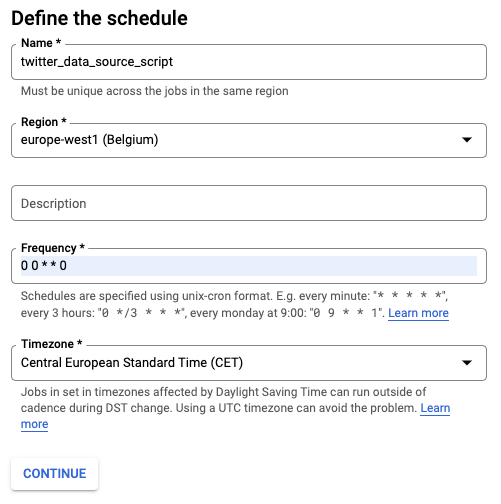
This website can help you for define your cron crontab.guru . In my case I choose an execution once a week. Thus, each week, the script retrieves tweets from the last seven days.
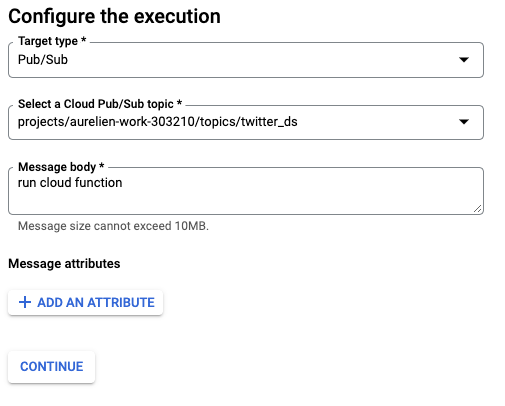
Click on Create for validate the job.

To summarize :

  1. We have see how to use the twitter API for retrieve data.

2. How to load data in Google Sheet.

3. Deploy this in a cloud function.

4. Automate script triggering with Pub/Sub and Cloud Scheduler.

It’s a good training and a good start to build a data engineering pipeline !

The next tutorials to come will be :

  • Building my datalake into BigQuery using modern loader like Fivetran or Airbyte
  • Using dbt for make transformation and build my data warehouse
  • Using a BI tools for give value on my data and obtain my first insight

Hope this tutorial will be helpful for you.

More on my youtube channel : AurélienRoblin

Please feel free to comment if you have any questions. Or contact me directly on my different networks : arolab.xyz

Follow me for more content like this !

Data Science
Data Engineering
Python
Google Cloud Platform
Ml So Good
Recommended from ReadMedium