avatarDataGeeks

Free AI web copilot to create summaries, insights and extended knowledge, download it at here

2061

Abstract

n> <span class="hljs-keyword">CREATE</span> <span class="hljs-keyword">OR REPLACE</span> <span class="hljs-keyword">TABLE</span> RAW.SAMPLE_DATA (<span class="hljs-type">NAME</span> <span class="hljs-type">VARCHAR</span>, AGE <span class="hljs-type">INTEGER</span> )</pre></div><p id="67d0">By running <code><b>SHOW STAGES</b></code><b> </b>the<b> </b>command you can verify whether the stage has been created successfully or not.</p><figure id="63d6"><img src="https://cdn-images-1.readmedium.com/v2/resize:fit:800/1*BBspkS_gbg3b8aOqexWCQA.png"><figcaption>Output of <code>SHOW STAGES command</code></figcaption></figure><p id="f32f">In this stage, I have used the most common options like SKIP_HEADER, etc but snowflake provides tons of options that can be used while creating the INTERNAL and EXTERNAL stages (Have a look at this link <a href="https://docs.snowflake.com/en/sql-reference/sql/create-stage.html">https://docs.snowflake.com/en/sql-reference/sql/create-stage.html#copy-options-copyoptions</a> ).</p><p id="f5f9">For uploading the CSV into the Snowflake open any ide ( e.g Dbeaver), SnowSQL CLI, etc, and run the <code>PUT</code> command.</p><p id="f4ff">The syntax for the PUT command:</p><div id="a315"><pre>PUT file://<span class="hljs-variable"><path_to_file></span>/<span class="hljs-variable"><filename></span> internalStage [ PARALLEL = <span class="hljs-variable"><integer></span> ] [ AUTO_COMPRESS = TRUE |<span class="hljs-string"> FALSE ] [ SOURCE_COMPRESSION = AUTO_DETECT </span>|<span class="hljs-string"> GZIP </span>|<span class="hljs-string"> BZ2 </span>|<span class="hljs-string"> BROTLI </span>|<span class="hljs-string"> ZSTD </span>|<span class="hljs-string"> DEFLATE </span>|<span class="hljs-string"> RAW_DEFLATE </span>|<span class="hljs-string"> NONE ] [ OVERWRITE = TRUE </span>|<span class="hljs-string"> FALSE ]</span></pre></div><p id="cdfd">Run the below PUT command to load the CSV into Snowflake Stage.</p><div id="4b3b"><pre><span class="hljs-keyword">PUT</span> <span class="hlj

Options

s-string">'file:///Users/datageeks/Documents/sample.csv'</span> --<span class="hljs-keyword">file</span> location</pre></div><div id="7836"><pre>@RAW.SAMPLE_LOAD_CSV <span class="hljs-comment">--STAGE NAME</span></pre></div><div id="44dc"><pre><span class="hljs-attr">OVERWRITE</span> = <span class="hljs-literal">TRUE</span></pre></div><div id="800a"><pre>PARALLEL = <span class="hljs-number">1</span> <span class="hljs-comment">--If file is huge then you can increase this number</span></pre></div><p id="b1b9">Verify if files are staged into the <code><b>STAGE</b></code><b> </b>or not.</p><div id="56bc"><pre>LIST @RAW.SAMPLE_LOAD_CSV <span class="hljs-comment">--Stage name</span></pre></div><figure id="61ec"><img src="https://cdn-images-1.readmedium.com/v2/resize:fit:800/1*K_Fi6Qwx-qxF6kFOW8E1rg.png"><figcaption>The output of the LIST command.</figcaption></figure><p id="210e">Use <code><b>COPY INTO</b></code> command to load the staged data into the Snowflake Table.</p><div id="9715"><pre><span class="hljs-keyword">COPY</span> <span class="hljs-keyword">INTO</span> "DEV_DWH"."RAW"."SAMPLE_DATA" <span class="hljs-keyword">FROM</span> <span class="hljs-variable">@RAW</span>.SAMPLE_LOAD_CSV</pre></div><figure id="08d9"><img src="https://cdn-images-1.readmedium.com/v2/resize:fit:800/1*kYP72zKHZ3wrizV14sxIDg.png"><figcaption>The output of the COPY Command.</figcaption></figure><p id="bd03"><b>Summary </b>In this article, We have seen how to load the data from a local machine into the Snowflake Database, If you think that this article is informative and helped you with what you are looking then give a clap and follow my medium account( <a href="https://datageeks.medium.com/">datageeks.medium.com</a> ) and feel free to write in comments if you have any doubts about this topic.</p><p id="6233">What Next? Check out unloading the data from Snowflake to S3 <a href="https://datageeks.medium.com/export-data-from-snowflake-to-s3-3ce408659734">https://datageeks.medium.com/export-data-from-snowflake-to-s3-3ce408659734</a></p></article></body>

Load CSV from Local to Snowflake

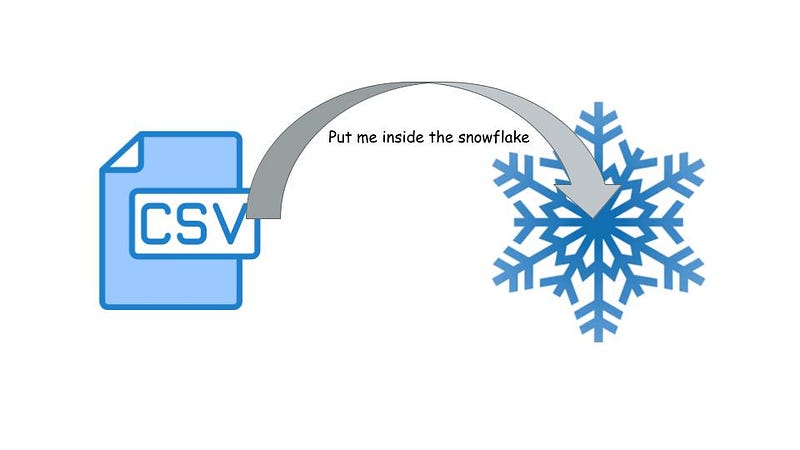
Snowflake is the most famous database and CSV is the most common file format to store data. In this article, we will figure out how easy it is to load the data from a CSV file stored at your local machine into the Snowflake.
Snowflake refers to the file location as a STAGE. If we are referring to the location of the files stored in the cloud in this case a STAGE is called EXTERNAL STAGE

If files are locally available in the system in that case stage is called an INTERNAL STAGE .

let's create a CSV file with two columns NAME and AGE and store the CSV file in the Document folder.
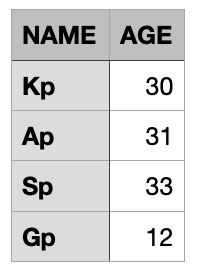
Sample.csv file

Now we need to create a STAGE for accessing the CSV file stored in the Document folder and a table in snowflake for loading the CSV data into it.

-- Stage creation DDL 
CREATE STAGE RAW.SAMPLE_LOAD_CSV
file_format =(TYPE = 'CSV'
              field_delimiter = ','
              skip_header = 1
             SKIP_BLANK_LINES = TRUE)
COPY_OPTIONS=(ON_ERROR = 'SKIP_FILE')
COMMENT='This satge loads the student and their age into the snowflake table';
--Table creation DDL
CREATE OR REPLACE TABLE RAW.SAMPLE_DATA
(NAME VARCHAR,
 AGE INTEGER )

By running SHOW STAGES the command you can verify whether the stage has been created successfully or not.

Output of SHOW STAGES command

In this stage, I have used the most common options like SKIP_HEADER, etc but snowflake provides tons of options that can be used while creating the INTERNAL and EXTERNAL stages (Have a look at this link https://docs.snowflake.com/en/sql-reference/sql/create-stage.html#copy-options-copyoptions ).

For uploading the CSV into the Snowflake open any ide ( e.g Dbeaver), SnowSQL CLI, etc, and run the PUT command.

The syntax for the PUT command:

PUT file://<path_to_file>/<filename> internalStage
    [ PARALLEL = <integer> ]
    [ AUTO_COMPRESS = TRUE | FALSE ]
    [ SOURCE_COMPRESSION = AUTO_DETECT | GZIP | BZ2 | BROTLI | ZSTD | DEFLATE | RAW_DEFLATE | NONE ]
    [ OVERWRITE = TRUE | FALSE ]

Run the below PUT command to load the CSV into Snowflake Stage.

PUT 'file:///Users/datageeks/Documents/sample.csv' --file location
@RAW.SAMPLE_LOAD_CSV   --STAGE NAME
OVERWRITE = TRUE
PARALLEL = 1 --If file is huge then you can increase this number

Verify if files are staged into the STAGE or not.

LIST @RAW.SAMPLE_LOAD_CSV --Stage name

The output of the LIST command.

Use COPY INTO command to load the staged data into the Snowflake Table.

COPY INTO "DEV_DWH"."RAW"."SAMPLE_DATA" FROM @RAW.SAMPLE_LOAD_CSV

The output of the COPY Command.

Summary In this article, We have seen how to load the data from a local machine into the Snowflake Database, If you think that this article is informative and helped you with what you are looking then give a clap and follow my medium account( datageeks.medium.com ) and feel free to write in comments if you have any doubts about this topic.

What Next? Check out unloading the data from Snowflake to S3 https://datageeks.medium.com/export-data-from-snowflake-to-s3-3ce408659734

Snowflake
Data
Database
Csv
Cloud Computing
Recommended from ReadMedium