avatarFarhad Malik

Free AI web copilot to create summaries, insights and extended knowledge, download it at here

4500

Abstract

/sites-enabled/*.conf"; }</pre></div><h1 id="2b8c">3. End to End Example: Let’s Scale A Python Application</h1><p id="0329">The first step is to create a Python application and launch multiple instances of the application on different ports.</p><h2 id="106b">1. Create a new python application and a virtual environment</h2><h2 id="4ef1">2. Install the following python package</h2><div id="02a7"><pre>pip install tornado<span class="hljs-operator">=</span><span class="hljs-operator">=</span><span class="hljs-number">6.2</span></pre></div><h2 id="984a">3. Create a new file: fintechexplained_runner.py</h2><p id="c306">Copy the following code snippet into the file.</p><div id="a626"><pre><span class="hljs-keyword">import</span> asyncio <span class="hljs-keyword">import</span> os <span class="hljs-keyword">import</span> sys</pre></div><div id="c039"><pre><span class="hljs-keyword">import</span> tornado.web </pre></div><div id="cb91"><pre><span class="hljs-keyword">class</span> <span class="hljs-title class_">FinTechHandler</span>(tornado.web.<span class="hljs-title class_">RequestHandler</span>): <span class="hljs-keyword">def</span> <span class="hljs-title function_">get</span>(<span class="hljs-params"><span class="hljs-variable language_">self</span></span>): <span class="hljs-variable language_">self</span>.write(f<span class="hljs-string">"Hello from Process Id = {os.getpid()}"</span>) </pre></div><div id="74f7"><pre><span class="hljs-keyword">def</span> <span class="hljs-title function_">make_app</span>(): <span class="hljs-keyword">return</span> tornado.web.Application([ (<span class="hljs-string">r"/"</span>, FinTechHandler), ]) </pre></div><div id="f257"><pre>async def <span class="hljs-selector-tag">main</span>(): app = <span class="hljs-built_in">make_app</span>() port = sys.argv[<span class="hljs-number">1</span>] <span class="hljs-built_in">print</span>(f<span class="hljs-string">'Running on {port}'</span>) app.<span class="hljs-built_in">listen</span>(<span class="hljs-built_in">int</span>(port)) shutdown_event = asyncio.<span class="hljs-built_in">Event</span>() await shutdown_event.<span class="hljs-built_in">wait</span>() </pre></div><div id="6d32"><pre><span class="hljs-variable"><span class="hljs-keyword">if</span></span> <span class="hljs-variable">name</span> == <span class="hljs-string">"main"</span>: <span class="hljs-variable">asyncio.run</span>(<span class="hljs-function"><span class="hljs-title">main</span>())</span></pre></div><p id="a1ca">This is a simple application but it can demonstrate the use case and how a load balancer can help.</p><ol><li>This code uses the tornado python package to start a web server on a port.</li><li>The port is a command line argument that we can pass in.</li><li>There is a<code>get </code>endpoint that serves the request and returns “<code>Hello from Process Id =< ProcessId></code>” back to the client.</li></ol><h2 id="6bad">4. Open Python Terminal or Command Prompt</h2><p id="ce31">Navigate to the folder where the <code>fintechexplained_runner.py </code>file is and run the following commands</p><p id="9076"><code>fintechexplained_runner.py 71</code></p><p id="a48f"><code>fintechexplained_runner.py 72</code></p><p id="ea54"><code>fintechexplained_runner.py 73</code></p><p id="2f03"><code>fintechexplained_runner.py 74</code></p><p id="6887"><code>fintechexplained_runner.py 75</code></p><p id="41e2" type="7">Now we have created 5 instances of the Python application and they are running on ports 71, 72, 73, 74, and 75.</p><p id="b875"><i>In a production environment, I would test this by creating 5 docker containers to provide isolation.</i></p><h2 id="c6af">5. Test The Application</h2><ul><li>Open your browser. Enter the URL: <a href="http://localhost:80">http://localhost:</a>71 and you will see:</li></ul><figure id="6a3e"><img src="https://cdn-images-1.readmedium.com/v2/resize:fit:800/1*kNkgEURhekQTvc9JMVLPiA.png"><figcaption></figcaption></figure><ul><li>Now enter the URL: <a href="http://localhost:81">http://localhost:72</a> and it will print:</li></ul><figure id="3f2e"><img src="https://cdn-images-1.readmedium.com/v2/resize:fit:800/1*lEdVsimuzqJ30gwrT9NJGQ.png"><figcaption></figcaption></figure><p id="76c1" type="7">Note the process ID is different, implying that there is a separate Python instance running to serve the request.</p><h2 id="8b43">6. Add NGINX As A Load Balancer in front of the applic

Options

ations</h2><ul><li>Remember the Python application is running the ports: 71–75</li><li>Create a directory: <code>C:/nginx/conf/sites-available</code></li><li>Create a configuration file named <b>fintechexplained.conf </b>within the <code>sites-available </code>directory and add the following configuration:</li></ul><div id="77d2"><pre><span class="hljs-section">upstream</span> fintechexplained { <span class="hljs-attribute">server</span> localhost:<span class="hljs-number">71</span>; <span class="hljs-attribute">server</span> localhost:<span class="hljs-number">72</span>; <span class="hljs-attribute">server</span> localhost:<span class="hljs-number">73</span>; <span class="hljs-attribute">server</span> localhost:<span class="hljs-number">74</span>; <span class="hljs-attribute">server</span> localhost:<span class="hljs-number">75</span>; }</pre></div><div id="8cf4"><pre><span class="hljs-section">server</span> { <span class="hljs-attribute">listen</span> <span class="hljs-number">70</span>; <span class="hljs-attribute">server_name</span> localhost; <span class="hljs-section">location</span> / { <span class="hljs-attribute">proxy_pass</span> http://fintechexplained; } }</pre></div><p id="a599">This code is informing Nginx to direct the traffic to ports 71–75 to serve the requests that are sent to port 70. NGINX can balance the load using various algorithms. By default, it will use the Round Robin algorithm.</p><p id="3112"><b><i>Best Practice: </i></b><i>Create a config file per service. Add the configuration files in the site-available folder. And then add shortcuts to the configuration files that are required to be load-balanced in the site-enabled folder.</i></p><h1 id="8acc">We are done</h1><p id="3d92"><i>And that’s how simple it is</i></p><figure id="a120"><img src="https://cdn-images-1.readmedium.com/v2/resize:fit:800/1*_ZPHRG4dOASFVsN8L8Y6qQ.png"><figcaption></figcaption></figure><h2 id="0a90">7. Start NGINX</h2><p id="4358">Open the command prompt terminal and enter:</p><p id="10c0"><code>nginx -s reload</code></p><p id="c929"><code>nginx</code></p><h2 id="9f17">8. Test Load Balancing</h2><p id="5560">Go to <a href="http://localhost:70">http://localhost:70</a></p><figure id="b49f"><img src="https://cdn-images-1.readmedium.com/v2/resize:fit:800/1*wu4VqoJq5rPRYUBUFlbqeg.png"><figcaption></figcaption></figure><ul><li>We can see that this request was served by the process running on port 72 (as demonstrated above)</li><li>Refresh the page but don’t change the URL. The browser will display:</li></ul><figure id="3fbc"><img src="https://cdn-images-1.readmedium.com/v2/resize:fit:800/1*qlBJvoYKjYZdkhVelRswbw.png"><figcaption></figcaption></figure><ul><li>We can see that this request was served by the process running on port 72</li><li>Refresh the page again and NGINX will forward the traffic to another python process.</li></ul><p id="893e">This is because NGINX is balancing the requests. This is how NGINX balances the load of Python applications. We can now serve 1000s of traffic and handle them in an extremely fast manner.</p><p id="5dc7">This is how we can build fast, scalable Python applications with 0 downtime.</p><p id="9040" type="7">NGINX is an extremely useful tool</p><h1 id="739d">3. Benefits Of NGINX</h1><p id="8cd7">Lastly, I wanted to highlight the key benefits of Nginx.</p><ul><li>Not NGINX can serve specific routes, it can make applications reliable, reduce downtime and serve millions of requests without overloading one server.</li><li>It also has an inbuilt cache so that the same request can automatically get the same response.</li><li>NGINX can also be used to control security and terminate SSL</li><li>NGINX can be used to monitor the activity</li><li>NGINX can also be used as a Mail Proxy Server</li></ul><h1 id="338f">4. Summary</h1><p id="0ed1">This article demonstrated how we can scale a Python application by using the NGINX tool. This can help us increase the reliability of our infrastructure. Plus it can reduce downtime as NGINX can server millions of requests in a fast manner without overloading a single instance.</p><p id="d3e7">It can also switch over to a secondary server if the primary server goes down via configuration. Plus the client code does not need to change. Everything is handled on the server side.</p><p id="1ca2">NGINX is an extremely powerful tool and I recommend highly that you explore the tool and attempt to use it within your architecture.</p></article></body>

Scale Python Applications Using Nginx

Scale Python Applications To Reduce Downtime, Redundancy, And Increase Reliability
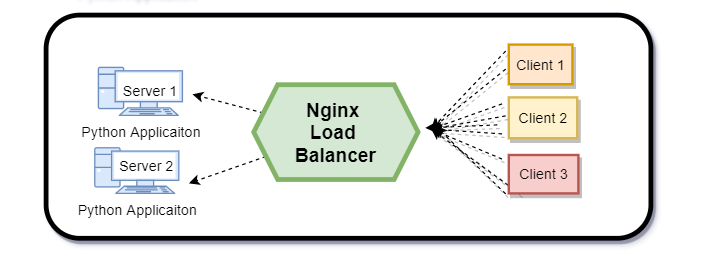
First The Usecase

  • Let’s consider we have a Python web service application running on a local machine on port 70.
  • Also, consider that multiple client applications send a large number of requests, at times millions of concurrent requests, to the Python application.
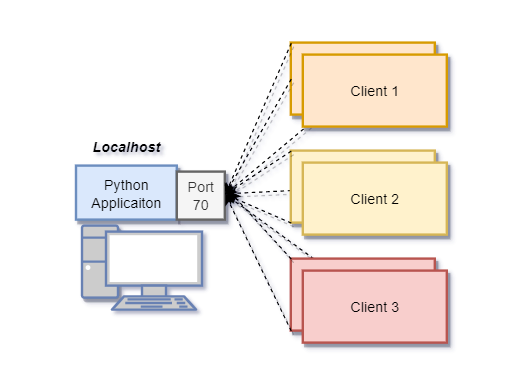
  • As a result, the application is under constant traffic load and it is slow to respond back to the client applications. The client applications start receiving timeout exceptions. And the Python application is considered not reliable.

How do we balance the load? This is where a load balancer comes in. A load balancer can route client requests across all servers whilst ensuring the workload of the applications is balanced.

1. Article Aim

This article aims to demonstrate an end-to-end example of how we can scale a Python application with the help of a load balancer.

  1. I will present a Python web service application.
  2. Then I will demonstrate how we can easily scale the Python application and use a load balancer to distribute client requests
  3. This will improve network efficiency, ensure high availability of the applications, and the applications will be able to serve the requests quickly.
  4. And the best part, the client code is not required to be amended. This means the clients can keep calling the same host and port as the load balancer will take care of the routing of the requests.

Result: A reliable, fast and trusted infrastructure with reduced downtime.

1. NGINX As A Load Balancer

I am going to use NGINX to balance the load.

  • Nginx is one of the most useful tools to add to your software architecture.
  • Essentially Nginx can work as a load balancer, which implies that it can handle the client requests and forward the requests in a smarter way so that the load is balanced.
  • The client applications do not need to know that the Nginx is serving the traffic, how many application instances are running, and which ports they are running on.
  • Additionally, NGINX can terminate connections, perform security checks, log traffic, and add caching among other features. NGINX can also handle failover scenarios.

And the best part: NGINX is extremely easy to set up

NGINX can also help architects design their applications in a smarter way.
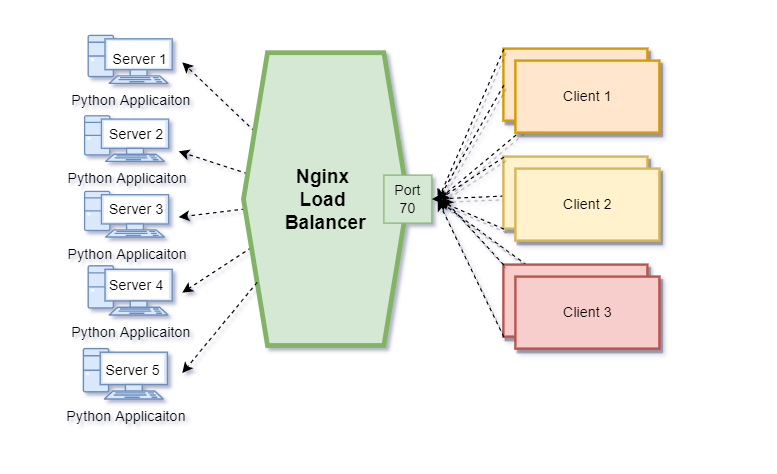
NGINX supports various balancing algorithms, from the round robin to the least connections to the random choices algorithms.

2. Install NGINX Load Balancer If It’s Not Installed Already

This is a one-off setup exercise and we only need to do it if you do not have NGINX installed already.

  1. Download NGINX from: http://nginx.org/en/docs/windows.html
  2. Unzip the file. Open the unzipped folder.
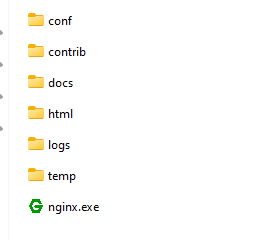
3. Start NGINX by double clicking on the nginx.exe

4. Open the conf folder and open nginx.conf file in Notepad and enter:

worker_processes  1;
events {
    worker_connections  1024;
}
http {
    include       mime.types;
    default_type  application/octet-stream;
    #to read external configuration.
    include "C:/nginx/conf/sites-enabled/*.conf";
}

3. End to End Example: Let’s Scale A Python Application

The first step is to create a Python application and launch multiple instances of the application on different ports.

1. Create a new python application and a virtual environment

2. Install the following python package

pip install tornado==6.2

3. Create a new file: fintechexplained_runner.py

Copy the following code snippet into the file.

import asyncio
import os
import sys
import tornado.web
class FinTechHandler(tornado.web.RequestHandler):
    def get(self):
        self.write(f"Hello from Process Id = {os.getpid()}")
def make_app():
    return tornado.web.Application([
        (r"/", FinTechHandler),
    ])
async def main():
    app = make_app()
    port = sys.argv[1]
    print(f'Running on {port}')
    app.listen(int(port))
    shutdown_event = asyncio.Event()
    await shutdown_event.wait()
if __name__ == "__main__":
    asyncio.run(main())

This is a simple application but it can demonstrate the use case and how a load balancer can help.

  1. This code uses the tornado python package to start a web server on a port.
  2. The port is a command line argument that we can pass in.
  3. There is aget endpoint that serves the request and returns “Hello from Process Id =< ProcessId>” back to the client.

4. Open Python Terminal or Command Prompt

Navigate to the folder where the fintechexplained_runner.py file is and run the following commands

fintechexplained_runner.py 71

fintechexplained_runner.py 72

fintechexplained_runner.py 73

fintechexplained_runner.py 74

fintechexplained_runner.py 75

Now we have created 5 instances of the Python application and they are running on ports 71, 72, 73, 74, and 75.

In a production environment, I would test this by creating 5 docker containers to provide isolation.

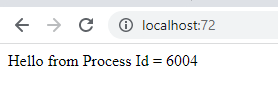
5. Test The Application

Note the process ID is different, implying that there is a separate Python instance running to serve the request.

6. Add NGINX As A Load Balancer in front of the applications

  • Remember the Python application is running the ports: 71–75
  • Create a directory: C:/nginx/conf/sites-available
  • Create a configuration file named fintechexplained.conf within the sites-available directory and add the following configuration:
upstream fintechexplained {
 server localhost:71;
 server localhost:72;
 server localhost:73;
 server localhost:74;
 server localhost:75;
}
server {
  listen       70;
  server_name  localhost;
  location / {
  proxy_pass http://fintechexplained;
 }
}

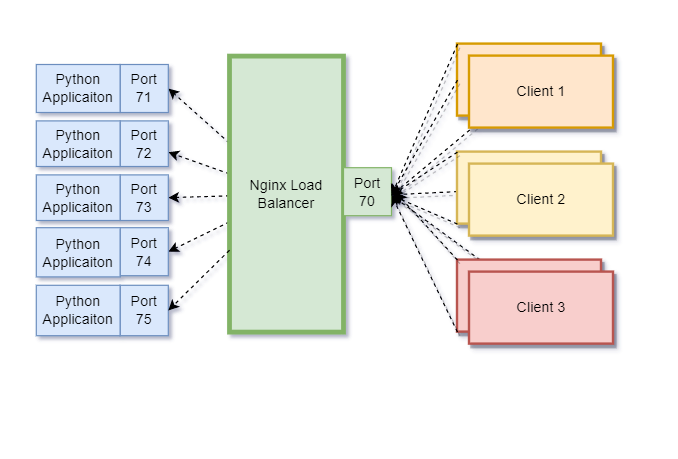
This code is informing Nginx to direct the traffic to ports 71–75 to serve the requests that are sent to port 70. NGINX can balance the load using various algorithms. By default, it will use the Round Robin algorithm.

Best Practice: Create a config file per service. Add the configuration files in the site-available folder. And then add shortcuts to the configuration files that are required to be load-balanced in the site-enabled folder.

We are done

And that’s how simple it is
7. Start NGINX

Open the command prompt terminal and enter:

nginx -s reload

nginx

8. Test Load Balancing

Go to http://localhost:70
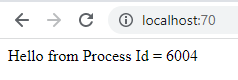
  • We can see that this request was served by the process running on port 72 (as demonstrated above)
  • Refresh the page but don’t change the URL. The browser will display:

  • We can see that this request was served by the process running on port 72
  • Refresh the page again and NGINX will forward the traffic to another python process.

This is because NGINX is balancing the requests. This is how NGINX balances the load of Python applications. We can now serve 1000s of traffic and handle them in an extremely fast manner.

This is how we can build fast, scalable Python applications with 0 downtime.

NGINX is an extremely useful tool

3. Benefits Of NGINX

Lastly, I wanted to highlight the key benefits of Nginx.

  • Not NGINX can serve specific routes, it can make applications reliable, reduce downtime and serve millions of requests without overloading one server.
  • It also has an inbuilt cache so that the same request can automatically get the same response.
  • NGINX can also be used to control security and terminate SSL
  • NGINX can be used to monitor the activity
  • NGINX can also be used as a Mail Proxy Server

4. Summary

This article demonstrated how we can scale a Python application by using the NGINX tool. This can help us increase the reliability of our infrastructure. Plus it can reduce downtime as NGINX can server millions of requests in a fast manner without overloading a single instance.

It can also switch over to a secondary server if the primary server goes down via configuration. Plus the client code does not need to change. Everything is handled on the server side.

NGINX is an extremely powerful tool and I recommend highly that you explore the tool and attempt to use it within your architecture.

Fintech
Nginx
Python
Technology
Load Balancer
Recommended from ReadMedium