
LLM Apps : Why Knowledge Graphs are super critical to know if you care about RAG : Let’s capture Wisdom of Stack Overflow in a Graph: 3
Time to explore stackoverflow in different way ! KG way !
In Part 2 of our series, we delved into the basics of graph databases and how they serve as a powerful tool for managing complex relationships between data points.
Now, in Part 3, we’re taking it a step further by exploring how we can harness the power of Neo4j, a leading graph database, to navigate and analyze Stack Overflow’s vast repository of knowledge.
We’ll be leveraging the Spring Boot framework in Java to build a robust application that interacts with Neo4j, enabling us to traverse Stack Overflow’s data in a more intuitive and insightful manner.
Project Setup
Prerequisites
- Basic understanding of Java and Spring Boot ( we will use java 17)
- A Neo4j database instance running (locally or remotely)
- A basic dataset of Stack Overflow questions, answers, and tags (you can find ways to scrape this data online or use a smaller sample dataset to start with), we will use neo4j built in stackoverflow dataset , we will see that in few
Step 1: Project Setup
- Create a Spring Boot Project: Use Spring Initializr (https://start.spring.io/) or your IDE to set up a new Spring Boot project with these dependencies:
spring-boot-starter-webspring-boot-starter-data-neo4jneo4j-ogm-bolt-driver
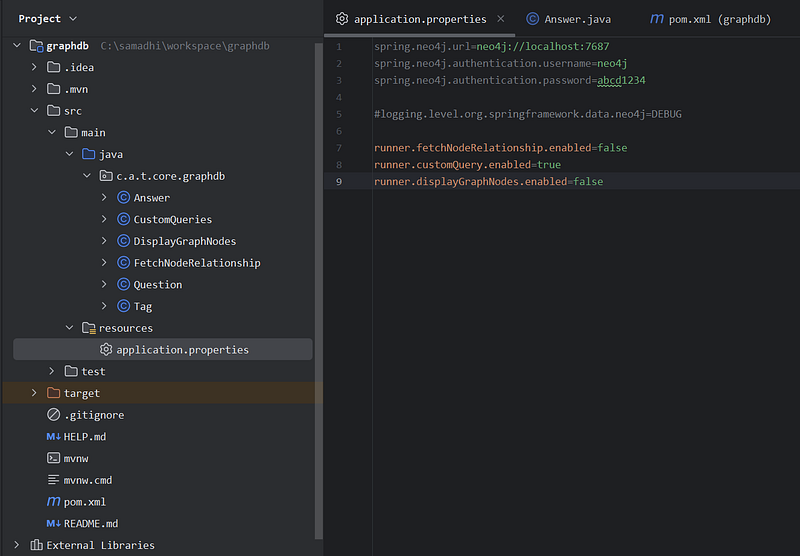
2. Configuration: In your application.properties (or .yml) file, add details to connect to your Neo4j database: all below details, will be based on what you put in, when creating neo4j DBMS
spring.neo4j.url=neo4j://localhost:7687
spring.neo4j.authentication.username=neo4j
spring.neo4j.authentication.password=abcd1234
3. Modeling the Knowledge Graph
Entity classes
- Question.java: Represents a Stack Overflow question with properties for title, answer count, and tags.
- Answer.java: Represents an answer associated with a question.
- Tag.java: Represents a Stack Overflow tag.
Key Points:
@Nodeannotations mark these as graph nodes.@Idand@GeneratedValuedenote unique identifiers.@RelationshipinQuestion.javaestablishes the "TAGGED" relationship between questions and tags.
4. Create Spring Data Neo4j Repositories
Interfaces: Define repository interfaces to simplify interactions with Neo4j:
public interface QuestionRepository extends Neo4jRepository<Question, String> {}

public interface TagRepository extends Neo4jRepository<Tag, String> {}

public interface AnswerRepository extends Neo4jRepository<Answer, Long> {}
5. Custom Queries (Optional): If needed, add custom query methods using the @Query annotation, like in CustomQueries class.
6. Designing the REST API (TODO: future work )
Controller: Create a StackOverflowController:
@RestController
@RequestMapping("/api/stackoverflow")
public class StackOverflowController {
    @Autowired QuestionRepository questionRepository;
    @Autowired TagRepository tagRepository;
    // ... other repositories if needed

    // API endpoints will go here...
}jaj
Endpoints: Implement endpoints like these:
// Find question by title
@GetMapping("/questions/{title}")
public Question findQuestionByTitle(@PathVariable String title) {
    return questionRepository.findById(title).get();
}

// Find questions with at least a specified number of answers
@GetMapping("/questions")
public List<Question> findQuestionsByAnswerCount(@RequestParam int minAnswers) {
    return questionRepository.query("<your Cypher query using minAnswers>");
}

// Get tags related to a given tag
@GetMapping("/tags/{name}/related")
 public List<Tag> findRelatedTags(@PathVariable String name) {
     // ... Cypher query using similarity algorithms
 }
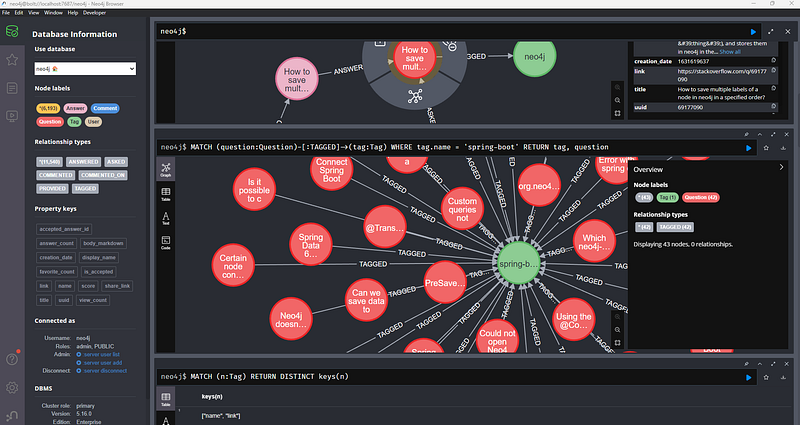
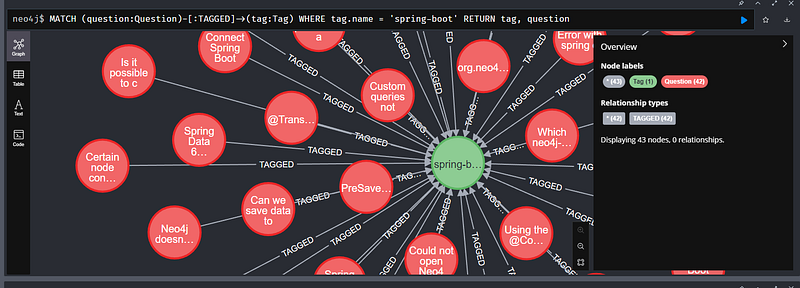
Our knowledge graph dataset
Note : Below is my interpretation of this dataset
Purpose :
This dataset provides a snapshot of Stack Overflow data specifically structured to showcase the power and flexibility of graph databases like Neo4j.
Key Elements :
Nodes
- Questions: Represents individual questions asked on Stack Overflow, likely with properties like title, body, and creation date.
- Answers: Represents answers provided to questions, potentially including text, scores, and associated user information.
- Tags: Represents the topics or categories assigned to questions.
- Users: Represents Stack Overflow users who have participated in asking or answering questions.
Relationships
- ASKED: Connects a User node to a Question they’ve asked.
- ANSWERED: Connects a User node to a Question they’ve answered.
- TAGGED_WITH: Connects Question nodes to their associated Tag nodes.
Focus :
The dataset is designed to facilitate analysis of:
- Community Dynamics: Understanding the interactions between users, their expertise (based on tags), and question-answering patterns.
- Knowledge Structure: Exploring the relationships between tags and topics to reveal hierarchies and relatedness within Stack Overflow content.
- Trends: Potentially identifying trends in question popularity or tag usage over time (if the dataset includes timestamps).
Important Note: The specific properties included, size of the dataset, and any additional relationships modeled might vary depending on the exact version of the dump file you use.
Let’s get Cooking !
Imagine the vast knowledge of Stack Overflow — countless questions, insightful answers, and a web of interconnected topics. Our mission is to harness this knowledge and structure it as a graph database, unlocking insights that would be difficult to find in a traditional list-based format.
Mapping Questions, Answers, and Tags
Let’s look at the code that makes this possible:
@Node("Question")
public class Question {

    @Id
    public final String title;

    @Property("answer_count")
    public final Integer quesWAnswerCount;

    @Relationship("TAGGED")
    public final List<Tag> tags;

    // ... Constructor and toString() ...
}
The Heart of the Graph: This Question class is not just a code snippet; it's the blueprint for a core element in our graph. Each Question object will become a node in the database.
- Properties: The Essential Details:
title: The question's unique title serves as the identifier (@Id).quesWAnswerCount: This stores the number of answers, giving us an immediate idea of a question's popularity.- Weaving Connections: The
tagslist, marked with@Relationship("TAGGED"), is crucial. This is how we represent the topics associated with each question, allowing us to navigate the knowledge by tags.
The Other Key Players
Similarly, we have representations for answers (Answer.java) to connect them with their questions, and tags (Tags.java) to categorize the knowledge :
@Node("Answer")
public class Answer {
    @Id
    @GeneratedValue
    Long id;
    // ... other properties for the answer ...
}

@Node("Tag")
public class Tag {
    @Id
    public final String name;
    // ... Constructor and toString() ...
}
Bringing it to Life with Neo4j and Spring
This code, together with the power of Neo4j (a graph database) and the convenience of Spring Boot, allows us to:
- Store Stack Overflow Data: Persist questions, answers, and tags, not just as rows in tables, but as interconnected nodes.
- Ask Compelling Questions: Use graph query language (Cypher) to uncover patterns, find similar questions, or identify experts based on tags.
- Build a Smarter Search: Go beyond keyword matches and offer results that understand the relationships within Stack Overflow’s knowledge base.
The Journey Continues
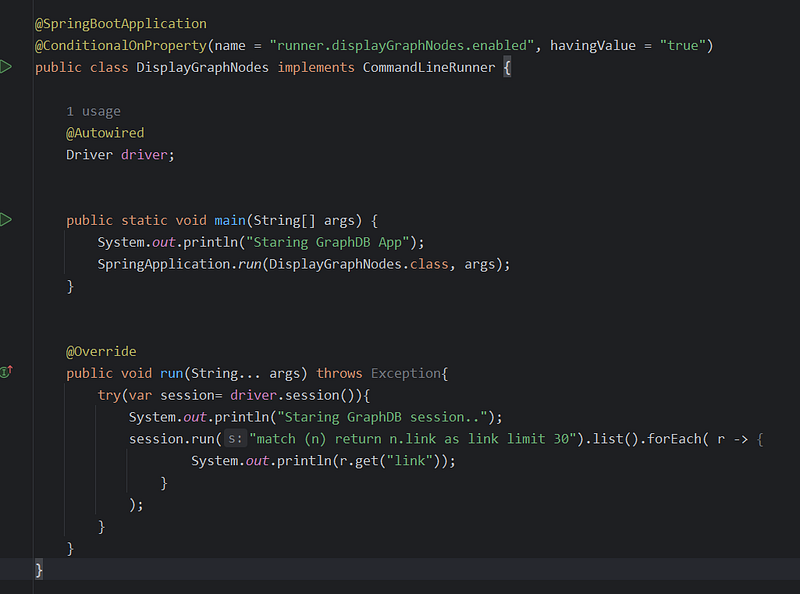
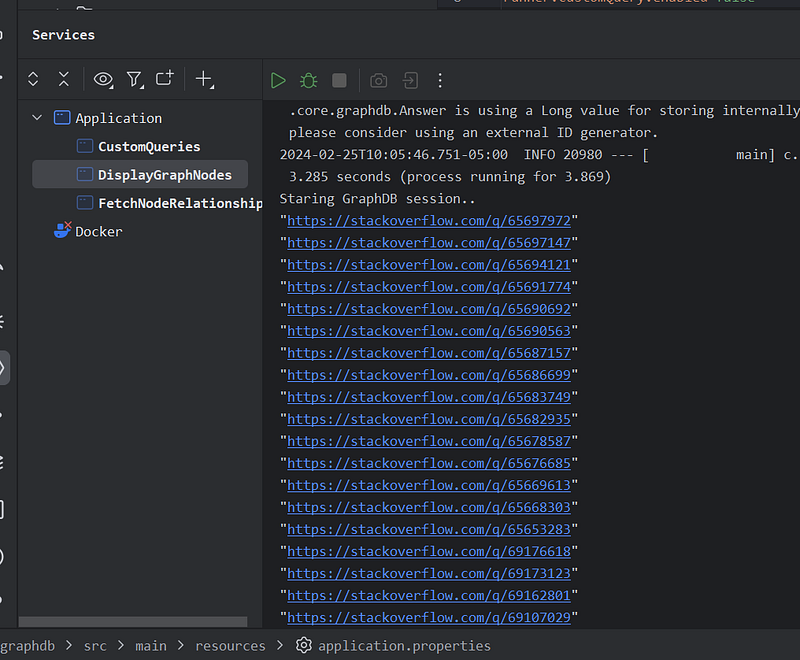
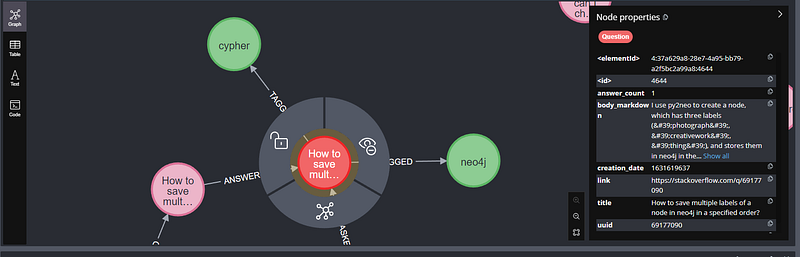
Lets fetch node, and then some property of it ( links)
Key Components
Annotations
@SpringBootApplication: This marks the class as your main Spring Boot application entry point.@ConditionalOnProperty(name = "runner.displayGraphNodes.enabled", havingValue = "true"): This crucial annotation controls whether theCommandLineRunnerlogic will execute. It checks if a property named "runner.displayGraphNodes.enabled" is set to "true"application.properties
Dependency
@Autowired Driver driver;: This injects aDriverobject (from the Neo4j Java driver) for interacting with your Neo4j database.
Main Method
public static void main(String[] args) { ... }: Typical Spring Boot application entry point. Here, it triggers the execution of your Spring application context.
CommandLineRunner Implementation
public void run(String... args) throws Exception { ... }: This is the core logic that will run if the conditional property is enabled.- It establishes a Neo4j session.
- Executes a Cypher query:
match (n) return n.link as link limit 30. This fetches up to 30 nodes (assuming they have a 'link' property) and gets their 'link' value. - Prints the retrieved ‘link’ values to the console.
Demonstrating Fetching Node Relationships
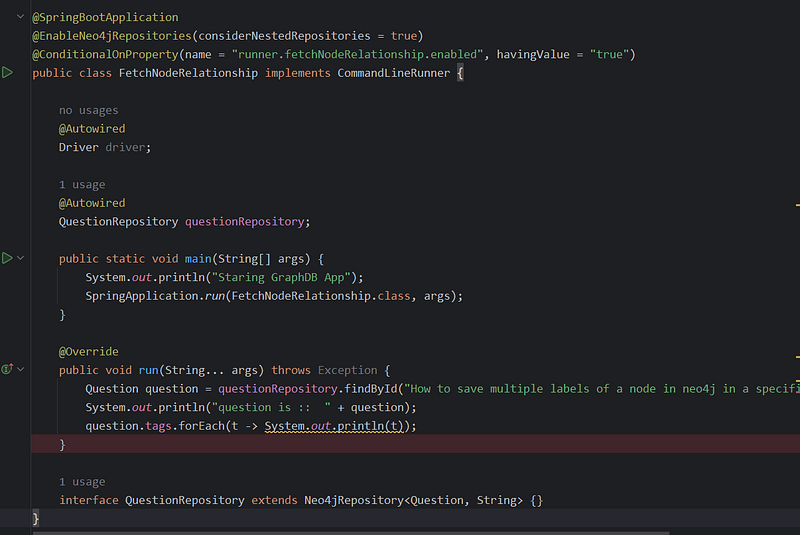
Let’s dissect this code snippet and explore its purpose within your Spring Boot and Neo4j application.
The central goal of this code is to showcase how to retrieve a node from your Neo4j graph database and then navigate its relationships to access connected data. Here’s a breakdown:
Key Components:
Annotations
@SpringBootApplication: Marks your main Spring Boot application class.@EnableNeo4jRepositories: Enables Spring Data Neo4j repositories, simplifying your database interactions.@ConditionalOnProperty: Like in the previous example, this controls the execution of yourCommandLineRunnerlogic based on a property setting.
Dependencies
@Autowired Driver driver;: Injects a Neo4jDriver(likely not used directly in this particular snippet's logic).@Autowired QuestionRepository questionRepository;: Injects yourQuestionRepository, providing the primary interaction mechanism with Neo4j.
Main Method
- Standard Spring Boot application entry point.
- CommandLineRunner Implementation
@Override public void run(String... args): This code executes if the "runner.fetchNodeRelationship.enabled" property is set to "true".- Fetch Question:
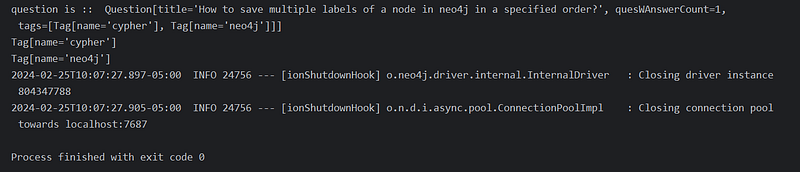
questionRepository.findById("How to save multiple labels of a node in neo4j in a specified order?").get();retrieves aQuestionnode using its title as the identifier - Print Question: Prints the retrieved
Questionobject. - Traverse Relationship:
question.tags.forEach(t -> System.out.println(t))demonstrates how to seamlessly access the associatedTagnodes connected via the "TAGGED" relationship defined in yourQuestionmodel. EachTagis printed.
In Essence
This code highlights these concepts:
- Spring Data Neo4j Repositories: Using a repository interface to streamline fetching nodes.
- Object-Graph Mapping (OGM): Spring Data Neo4j automatically maps tags (related nodes) to the
tagsproperty in theQuestionobject. - Power of Relationships: It showcases how a graph database makes it simple to fetch connected data.
Filtering Questions by Answer Count
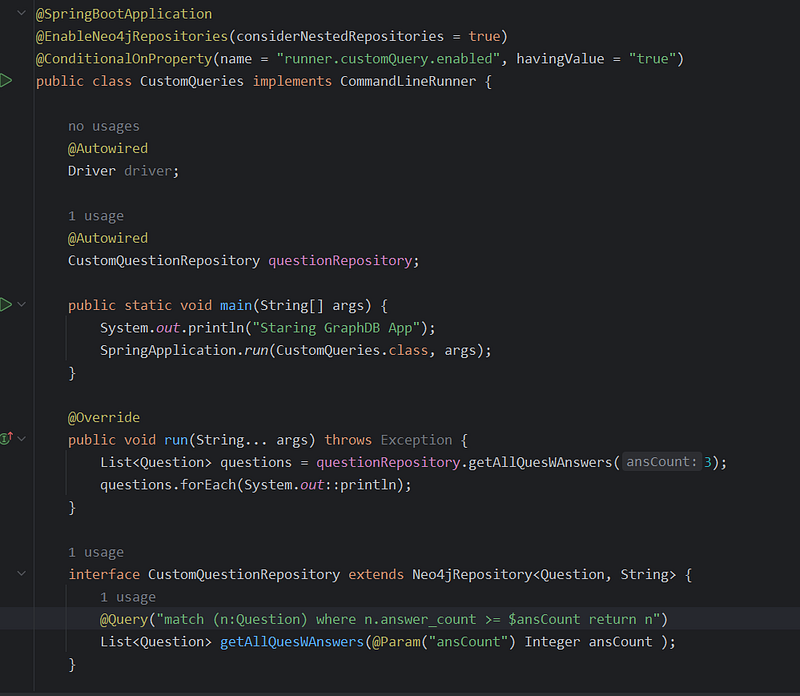
The primary function of this code is to demonstrate how to create a custom query method within a Spring Data Neo4j repository to retrieve data using specific criteria that go beyond the basic methods provided by repositories.
Key Components
Annotations
@SpringBootApplication,@EnableNeo4jRepositories: Standard setup for a Spring Boot application with Neo4j integration.@ConditionalOnProperty: Controls the execution of yourCommandLineRunnerbased on the "runner.customQuery.enabled" property.
Dependencies
@Autowired Driver driver;: Injects a Neo4jDriver.@Autowired CustomQuestionRepository questionRepository;: Injects your custom repository, providing access to your query.
Main Method
- Standard Spring Boot application entry point.
CommandLineRunner Implementation
@Override public void run(String... args): This code executes if the conditional property is enabled.- Custom Query Execution:
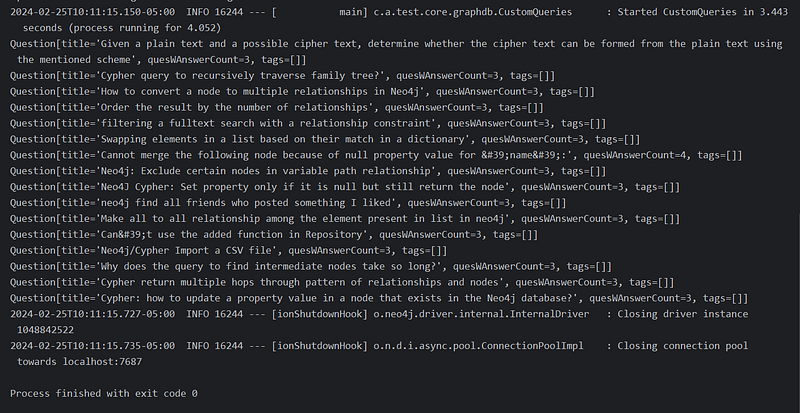
questionRepository.getAllQuesWAnswers(3);calls your custom query method, filtering questions with ananswer_countof at least 3. - Print Results: The returned list of questions is printed.
CustomQuestionRepository
- Interface Definition: Declares the
CustomQuestionRepositoryinterface extending theNeo4jRepository. - Custom Query:
@Query("match (n:Question) where n.answer_count >= $ansCount return n")The Cypher query to fetch questions with the specified answer count criterion.@Param("ansCount") Integer ansCount: Maps theansCountmethod parameter to the$ansCountparameter within the Cypher query.
In Summary
This code demonstrates:
- Custom Cypher Queries: How to embed Cypher queries directly in your Spring Data Neo4j repository interface for tailored data retrieval.
- Parameterized Queries: Making queries more flexible by passing in values (e.g., the minimum answer count) at runtime.
- Benefits of Repositories: Custom queries streamline interactions with Neo4j, enhancing the standard functionality provided by the repository.
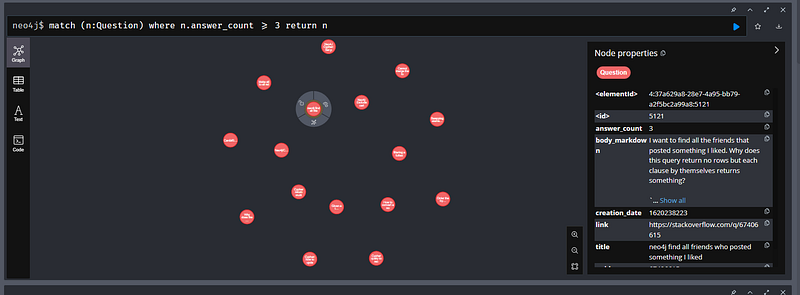
The true value of knowledge graphs lies in their ability to reveal insights that are difficult to see in traditional tabular data. I encourage you to continue experimenting and pushing the boundaries of what you can discover within your Stack Overflow or any knowledge graph!


