
Language Modeling | Autonomous Systems | Artificial Intelligence
LLM Agents — Intuitively and Exhaustively Explained
Empowering Language Models to Reason and Act

This article focuses on “Agents”, a general concept that allows language models to reason and interact with the world. First, we’ll discuss what agents are and why they’re important, then we’ll take a look at a few forms of agents to build an intuitive understanding of how they work, then we’ll explore agents in a practical context by implementing two of them, one using LangChain and one from scratch in Python.
By the end of this article you’ll understand how agents empower language models to perform complex tasks, and you’ll understand how to build an agent yourself.
Who is this useful for? Anyone interested in the tools necessary to make cutting-edge language modeling systems.
How advanced is this post? This post is conceptually simple, yet contains cutting-edge research from the last year, making this relevant to data scientists of all experience levels.
Pre-requisites: None, but a cursory understanding of language models (like OpenAI’s GPT) might be helpful. I included some relevant material at the end of this article, should you be confused about a specific concept or technology.
The Limits of a Single Prompt
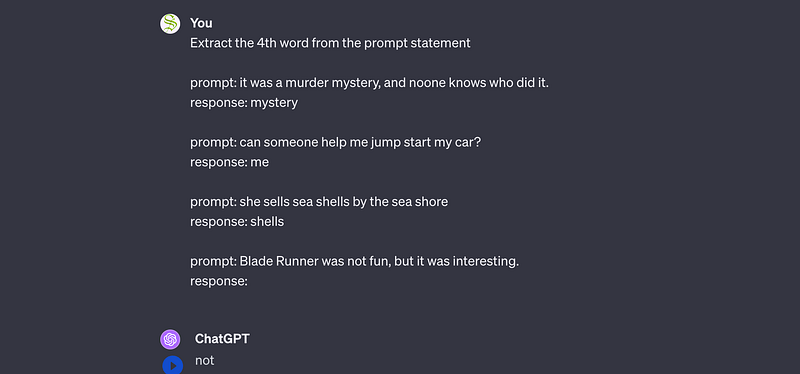
Language model usage has evolved as people have explored the limits of model performance and flexibility. “in context learning”, the property of language models to learn from examples provided by the user, is an advanced prompting strategy born from this exploration.
“Retrieval Augmented Generation” (RAG), which I cover in another article, is another advanced form of prompting. It’s an expansion of in-context learning which allows a user to inject information retrieved from a document into a prompt, thus allowing a language model to make inferences on never before seen information.
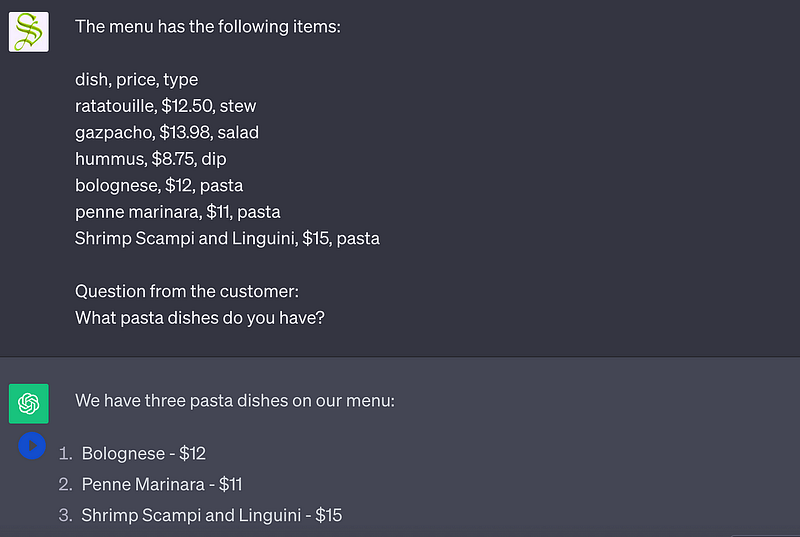
These approaches are amazing for allowing a model to reference key information or adapt to highly specific use cases, but they’re limited in one key respect: The model has to do everything in one step.
Imagine you ask a language model to calculate the cumulative age of the oldest cities in all the regions of Italy. So, the age of the oldest city in region 1, region 2, and so on, all added together. A language model would have to do a lot of stuff to answer a question like that:
- First, it would have to define what a “region” of Italy is. For instance, the first-level administrative divisions of the Italian Republic, of which there are 20.
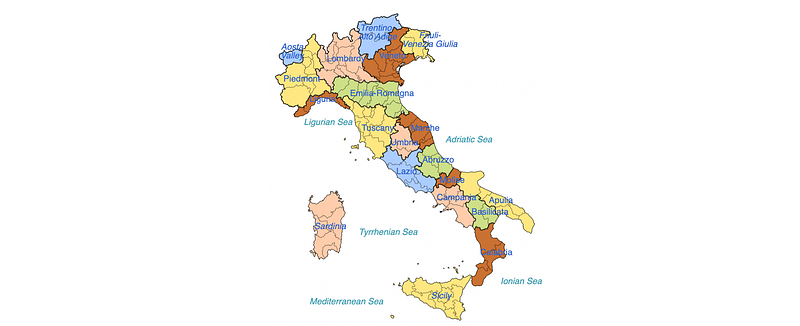
- The model would have to find the oldest city in each of those regions
- The model would then have to accurately add those numbers together to construct the final output
On questions like this even advanced prompting systems have a tendency to fail. How can we expect a RAG system, for instance, to go out and get the oldest age of a city in Piedmont before we know Piedmont is a region in Italy? That general issue, of needing to handle X before Y, is where agents come in.
Reasoning Agents
The general idea of an agent is to allow a language model to break a task up into steps, then execute those steps over time. One of the first big breakthroughs in this domain was “Chain of Thought Prompting” (proposed in this paper). Chain of thought prompting is a form of in-context learning which uses examples of logical reasoning to teach a model how to “think through” a problem.
It’s a strategy that sounds way fancier than it is. You just give a model an example of how a human might break down a problem, then you ask the model to answer a question with a similar process.
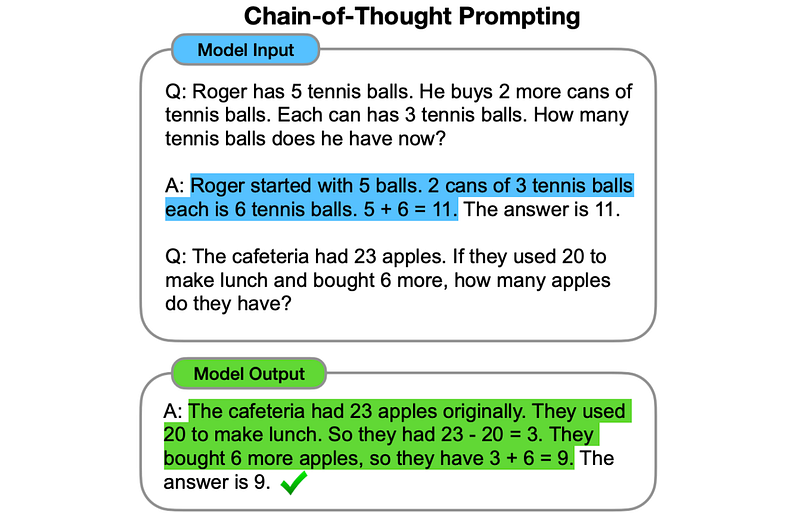
This is a subtle but powerful method of prompt engineering that uses the nature of models to drastically improve their reasoning ability. Language models use a process called “autoregressive generation” to probabilistically generate output one word at a time.
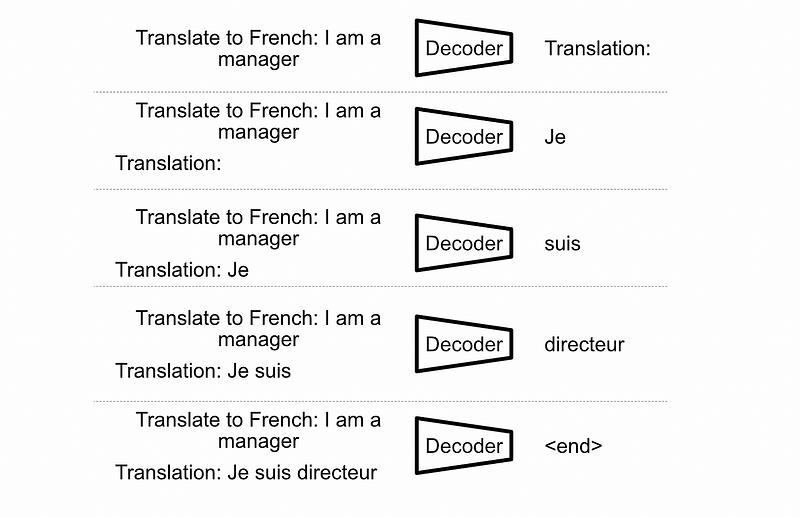
A common failure mode of language models is spitting out an incorrect answer in the beginning, then just outputting information that might justify that answer (a phenomenon called hallucination). By asking a model to formulate a response using chain of thought, you’re asking it to fundamentally change the way the language model comes to conclusions about complex questions.
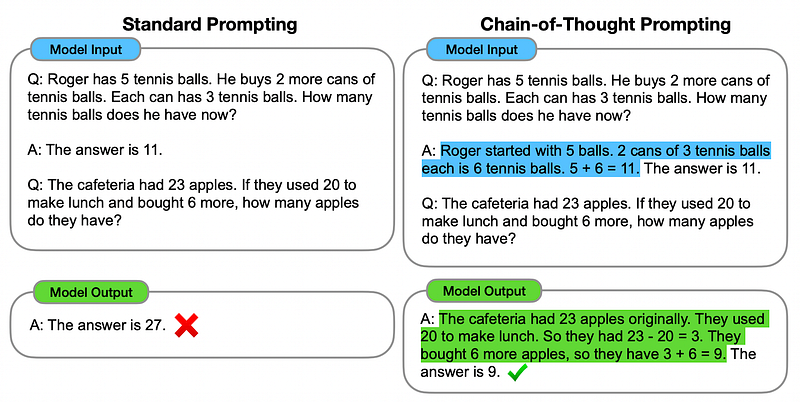
This idea is great when all information is available, but for our example of calculating the cumulative age of the oldest cities in Italy, this approach doesn’t quite fit the bill. If our language model simply doesn’t know the age of cities, no amount of careful reasoning will allow it to answer the question correctly.
Thus, sometimes reasoning isn’t enough, and action is required.
Action Agents
There are two big papers in the domain of agent action:
- Do As I Can, Not As I Say: Grounding Language in Robotic Affordances
- WebGPT: Browser-assisted question-answering with human feedback
Between both the core idea is the same; to empower language models to interface with tools that allow them to understand the world. Let’s briefly cover each approach.
SayCan
The Do As I Can, Not As I Say paper introduced what is commonly referred to as the “SayCan” architecture.
Imagine you’re trying to use a language model to control a robot, and you ask the model to help you clean up a spilled drink. Most language models would suggest completely reasonable narratives.
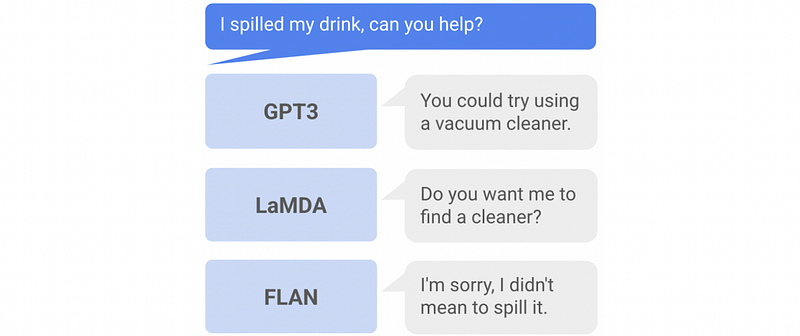
These naratives are great, but they present two big problems for controlling a robot:
- The responses have to correspond to something a robot is capable of doing. Without some sort of “call” function, a robot can’t call a cleaner.
- The response might be completely infeasible given the current environment the robot is in. A robot might have a vacuum cleaner attachment, but the robot might not be anywhere near the spill, and thus can’t use the vacuum cleaner to clean the spill.
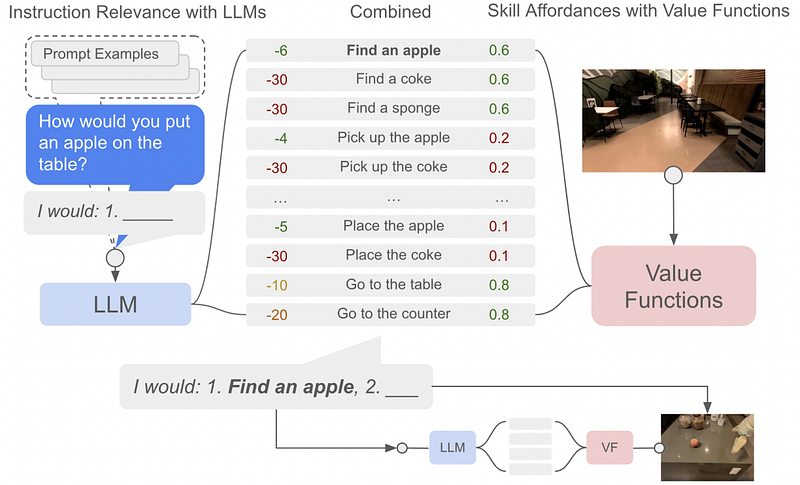
To deal with these problems, the SayCan architecture uses two systems in parallel, commonly referred to as the “Say” and “Can” systems.
In a real-world setting, robots can only do a fixed number of operations. The “Say” System uses a language model to decide which of these predefined operations is most likely to be appropriate.
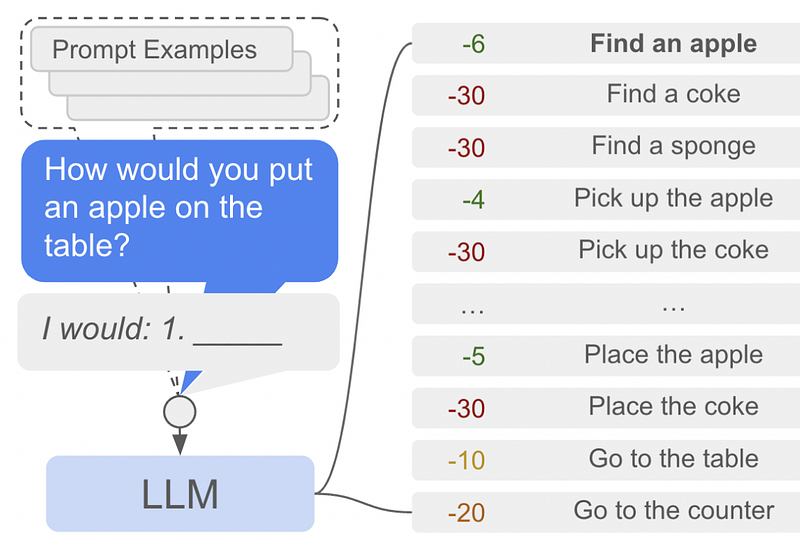
One of the less common but very useful features of a language model is to assign probabilities to a sequence of text. There’s some math and theory required to understand this idea intimately, which is out of the scope of this article. You can learn a bit more about some of the subtleties of language models that empower this ability from my article on speculative sampling:
For this article, it’s sufficient to know that, given some text, a language model can assign a probability of whether that text makes sense or not. This allows a model to “say” what it thinks is appropriate out of a list of possible actions.
A certain action might be linguistically reasonable, but might not be feasible for an agent like a robot. For instance, a language model might say to “pick up an apple”, but if there’s no apple to pick up, then “find an apple” is a more reasonable action to take. the “Can” portion of the SayCan architecture is designed to deal with this particular issue.
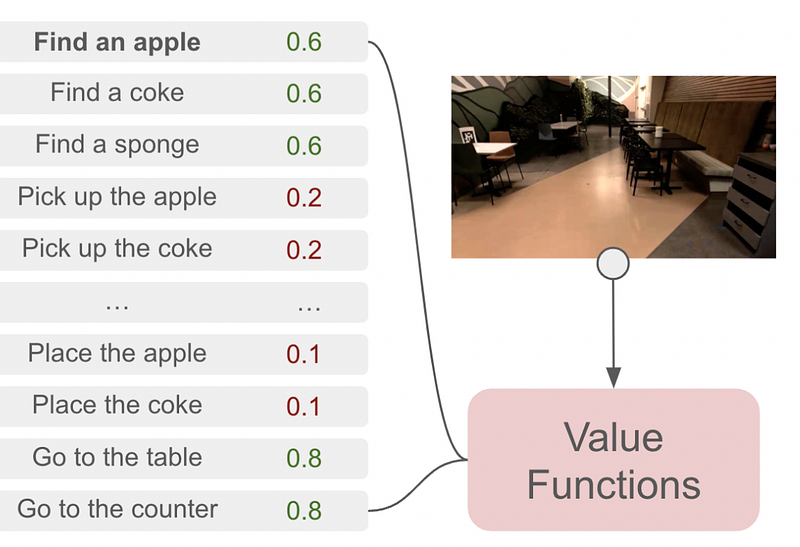
The SayCan architecture requires each possible action to be paired with a value function. The value function outputs a probability of an action being performed successfully, thus defining what a robot “Can” do. In this example, “pick up the apple” is unlikely to be successful, presumably because there is no apple in view of the robot, and thus “find an apple” is much more feasible. There are a few ways to calculate the feasibility of a given action; one common approach is “Advantage Actor Critic”, commonly abbreviated as A2C. That’s out of the scope of this article, but I’ll probably cover it in a future article.
The SayCan architecture uses what a language model says is a relevant step, paired with what a value function deems possible, to choose the next step an agent should take. It repeats this process, over and over, until the given task is complete.
WebGPT adopts some similar ideas to SayCan but empowers language models to browse the internet.
WebGPT
You might remember everyone freaking out a few years ago about AI being on the internet. WebGPT: Browser-assisted question-answering with human feedback was the reason. The idea of WebGPT was to train GPT-3 to learn to browse the internet in a way that was similar to humans. The OpenAI researchers did this through a process called “behavior cloning.”
The researchers gave humans a question, paired with a special text-only browser which used the Bing search engine, and a random prompt.
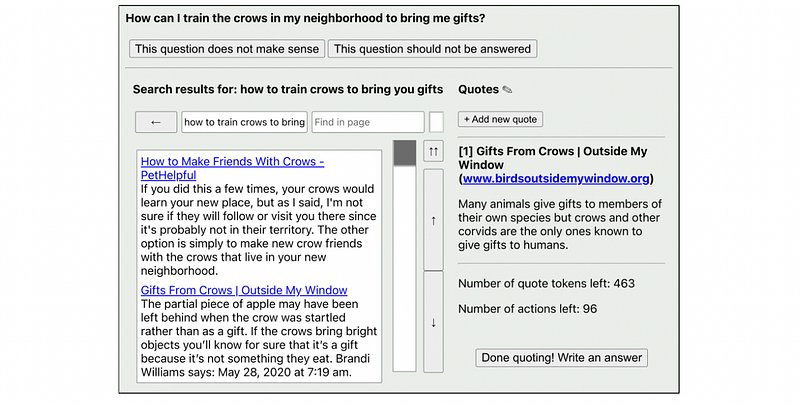
The humans were told they could browse the internet and record a set number of quotes. Then, after curating their list of quotes, they could write the answer to the question. Approximately 6,000 of these demonstrations of how to browse the internet were collected and used to fine-tune an existing pre-trained language model. From this data, GPT learned how to build its own understanding of how to get useful data from the internet.
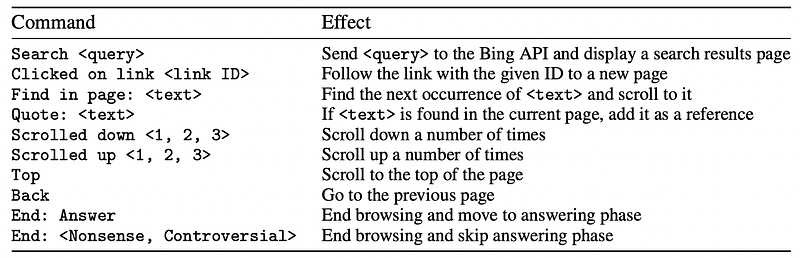
In cloning this specific form of action based on human examples, WebGPT essentially does the following:
- Receives a prompt
- Uses a text-only browser to search the internet for information about the prompt
- Scrolls around the page, follows links, and picks out quotes of individual text
- Constructs a context based on those useful quotes, which it uses to construct the final output
That’s all well and good, but building a custom web browser and fine-tuning a million-dollar model isn’t exactly feasible for everyday programmers. ReAct allows for very similar functionality, essentially, for free.
ReAct Agents, Reasoning and Acting
In previous sections we discussed reasoning prompting strategies, like chain of thought, and strategies that expose actions to a model to allow it to interface with the external world, like in SayCan and WebGPT.
The ReAct Agent framework, as proposed in ReAct: Synergizing Reasoning and Acting in Language Models, combines reasoning and acting agents in an attempt to create better agents that are capable of more complex tasks.
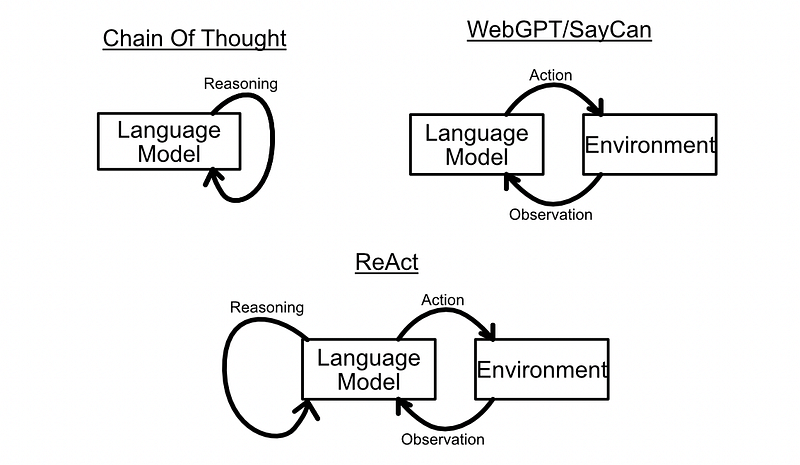
The idea is to provide a language model with a set of tools that allow that agent to take actions, then use in-context learning to encourage the model to use a chain of thought to reason about when and how those tools should be used. By creating plans step by step, and using tools as necessary, ReAct agents can do some very complex tasks.
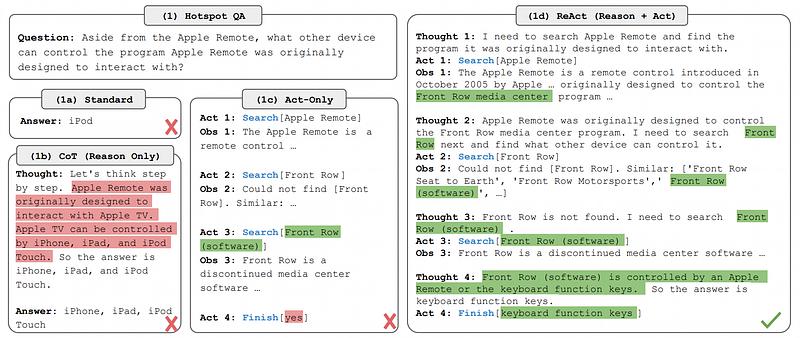
The way ReAct works is super simple. In essence, you just need three components:
- Context with examples of how ReAct prompting should be done
- Tools, which the model can decide to use as necessary
- Parsing, which monitors the output of the model and triggers actions.
Let’s get a better understanding of these subsystems, and how ReAct generally works, by building a ReAct system ourselves.
ReAct in Python with LangChain
In this example we’ll use LangChain to build an agent that can read Wikipedia articles, handle context, parsing, and tool execution.
This section will identify a few problems with LangChains agent systems. In the next section I build a ReAct agent from scratch to try to improve upon these issues. For now, though, we can get a practical understanding of ReAct by using LangChain.
Full code from this section of the article can be found here.
Dependencies
First, we need to install and import some dependencies:
!pip -q install langchain huggingface_hub openai google-search-results tiktoken wikipedia"""Importing dependencies necessary
"""
#for using OpenAI's GPT models
from langchain import OpenAI
#For allowing langchain to query Wikipedia articles
from langchain import Wikipedia
#for setting up an enviornmnet in which a ReAct agent can run autonomously
from langchain.agents import initialize_agent
#For defining tools to give to a language model
from langchain.agents import Tool
#For defining the type of agent
#there's not a lot of great documentation about agents in the LangChain docs
#I think this sets the context used to inform the model how to behave
from langchain.agents import AgentType
#again not a lot of documentation as to exactly what this does,
#but for our purposes it abstracts text documents into
#into a "search" and "lookup" function
from langchain.agents.react.base import DocstoreExplorerDocstore
The first thing we need to set up is the Docstore. To be completely honest, this is a quirky and somewhat poorly documented portion of LangChain, so getting to the bottom of exactly what a docstore is and how it works can be a bit elusive.
It seems like a Docstore is an abstraction of an arbitrary store of textual documents, be them html from a website, text from a pdf, or whatever. Docstore exposes two important functions:
- Search, which searches for a particular document within a docstore
- Lookup, which searches for a particular portion of text within a document based on a keyword
We can create a docstore based on Wikipedia with the following code,
#defining a docstore, and telling the docstore to use LangChains
#hook for wikipedia
docstore=DocstoreExplorer(Wikipedia())
then we can search for an article.
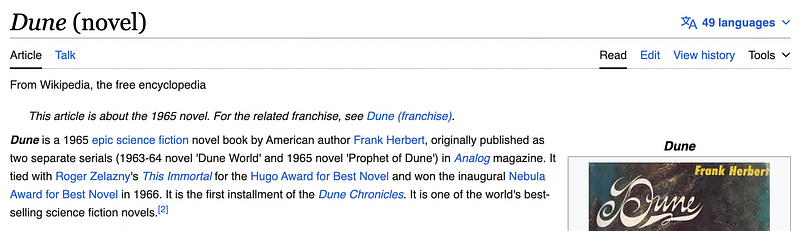
docstore.search('Dune (novel)')
The response corresponds to the article by the same name.
We can use the lookup function to search for a keyword. If we look up “Lawrence” something should pop up because the book Dune is heavily inspired by the historical figure “Lawrence of Arabia”.
#Looking up sections of the article which contain the word "Lawrence"
docstore.lookup('Lawrence')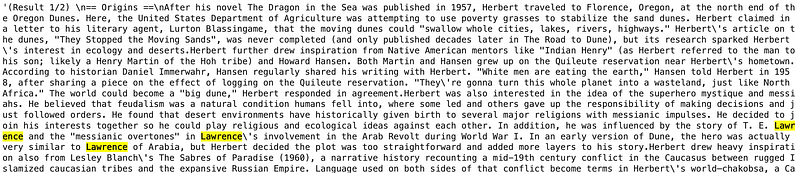
It’s worth noting before we progress, the Wikipedia driver in LangChain is based on the Wikipedia module on PyPi, which is in turn a wrapper of the MediaWiki API, which can be kind of quirky.
#searching for the article "Dune" which failes even
#though there's an article named "Dune"
docstore.search('Dune')
#Searching for "Sand Dune" results in the article "Dune"
docstore.search('Sand Dune')
If you do use an agent based on this API you’ll likely bump into the odd foible as a result of these quirks. LangChain does have a custom agent definition system which might allow you to design some robustness around these types of issues. Honestly, though, you might get better mileage just implementing ReAct from scratch, which we’ll do after we finish with LangChain.
Tools
Anyway, quirks aside, we have a docstore where we can search for documents and lookup sections within those documents based on a keyword or phrase. Now we’ll expose these as LangChain “Tools”.
A Tool, from LangChain’s perspective, is a function that an agent can use to interact with the world in some way. We can build two tools for our agent, one for search and one for lookup.
tools = [
    Tool(
        name="Search",
        func=docstore.search,
        description="useful for when you need to ask with search"
    ),
    Tool(
        name="Lookup",
        func=docstore.lookup,
        description="useful for when you need to ask with lookup"
    )
]
When the agent wants to use a given tool, it’s referenced by the name field. The func is the actual function that gets called when a tool is used, and the description is an optional but recommended description that allows the model to better understand the tool's purpose (Exactly how these descriptions get used, I have no idea. Again, poor documentation). I’m using LangChain’s recommended descriptions, but I’m sure you could play around with them to make them more explicit.
Defining a ReAct Agent
Now that we have our docstore and tools set up, we can define which LLM we’re using and set up an agent.
llm = OpenAI(temperature=0, model_name="gpt-3.5-turbo-instruct")
react_agent = initialize_agent(tools, llm, agent=AgentType.REACT_DOCSTORE, verbose=True)
It’s not exactly obvious what an AgentType is, or how it works, and the LangChain documentation provides little documentation on the subject. I think it has to do with setting context.
The language model understands our tools because, when initializing an agent, a context is automatically created which shows the model several examples of tool usage. I’m pretty sure this only works if we define our tools based on a predefined agent type which is, in this case, REACT_DOCSTORE .
If we print out react_agent.agent.llm_chain.prompt.template (which is a variable deeply nestled in the react_agent that was initialized as a REACT_DOCSTOREagent), we can see the context that gets automatically generated for our agent:
Question: What is the elevation range for the area that the eastern sector of the Colorado orogeny extends into?
Thought: I need to search Colorado orogeny, find the area that the eastern sector of the Colorado orogeny extends into, then find the elevation range of the area.
Action: Search[Colorado orogeny]
Observation: The Colorado orogeny was an episode of mountain building (an orogeny) in Colorado and surrounding areas.
Thought: It does not mention the eastern sector. So I need to look up eastern sector.
Action: Lookup[eastern sector]
Observation: (Result 1 / 1) The eastern sector extends into the High Plains and is called the Central Plains orogeny.
Thought: The eastern sector of Colorado orogeny extends into the High Plains. So I need to search High Plains and find its elevation range.
Action: Search[High Plains]
Observation: High Plains refers to one of two distinct land regions
Thought: I need to instead search High Plains (United States).
Action: Search[High Plains (United States)]
Observation: The High Plains are a subregion of the Great Plains. From east to west, the High Plains rise in elevation from around 1,800 to 7,000 ft (550 to 2,130 m).[3]
Thought: High Plains rise in elevation from around 1,800 to 7,000 ft, so the answer is 1,800 to 7,000 ft.
Action: Finish[1,800 to 7,000 ft]

...

Question: Were Pavel Urysohn and Leonid Levin known for the same type of work?
Thought: I need to search Pavel Urysohn and Leonid Levin, find their types of work, then find if they are the same.
Action: Search[Pavel Urysohn]
Observation: Pavel Samuilovich Urysohn (February 3, 1898 - August 17, 1924) was a Soviet mathematician who is best known for his contributions in dimension theory.
Thought: Pavel Urysohn is a mathematician. I need to search Leonid Levin next and find its type of work.
Action: Search[Leonid Levin]
Observation: Leonid Anatolievich Levin is a Soviet-American mathematician and computer scientist.
Thought: Leonid Levin is a mathematician and computer scientist. So Pavel Urysohn and Leonid Levin have the same type of work.
Action: Finish[yes]


Question: {input}
{agent_scratchpad}
I reduced the context size for readability, but it consists of six examples (two shown) followed by the question from the user. The context allows the language model to understand the general structure of ReAct, and will entice it to follow the “Thought”, “Action”, and “Observation” format, as well as demonstrate examples of both the “Search” and “Lookup” tools in action.
Executing our ReAct Agent
Ok, so we set up our Docstore (which is an API that accesses Wikipedia articles), defined our Tools, and initialized an agent. Now we can run it.
prompt = "What is the age of the president of the United States? The current date is Dec 26 2023."
react_agent.run(prompt)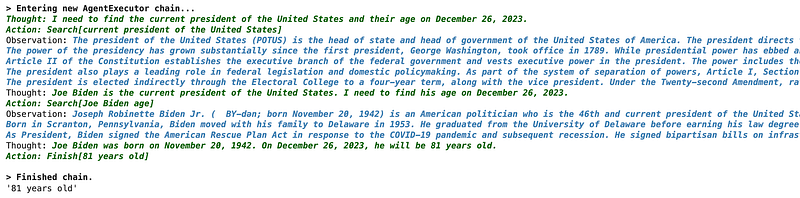
Pretty Cool! The agent broke down the question into a series of steps and used Wikipedia to search for information.
I tried our cumulative city age test but didn’t get as much luck.
from langchain.chat_models import ChatOpenAI

prompt = "Calculate the cumulative age of the oldest cities in all the regions in Italy. You have access to wikipedia given the 'search' and 'lookup' tools."
llm = ChatOpenAI(temperature=0, model_name="gpt-4-1106-preview")
react_agent = initialize_agent(tools, llm, agent=AgentType.REACT_DOCSTORE, verbose=True)
react_agent.run(prompt)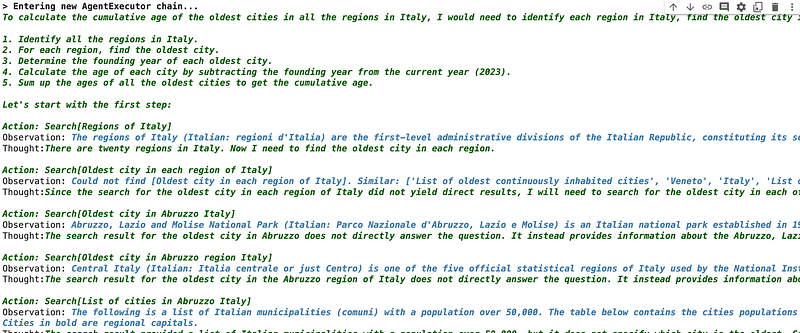
The agent got stuck on a particular search result, and then output the following:
The search result for the oldest city in Abruzzo is not providing the information needed. It seems that finding the oldest city in each region of Italy is a complex task that may not be easily accomplished with the search tools provided. It may require extensive research and cross-referencing of historical records, which is beyond the scope of a simple search query. Given the complexity of this task and the limitations of the search tools, it may not be feasible to calculate the cumulative age of the oldest cities in all the regions in Italy within this format. A more practical approach would be to consult a comprehensive historical database or a scholarly source that has already compiled this information.
This resulted in a parsing error, as this response does not fit the “Action”, “Observation”, and “Thought” structure expected by LangChain. This is a failure mode that is directly referenced in the ReAct paper; they blame it on low-quality or irrelevant information provided by a tool.
It’s around this point that the abstraction of LangChain transitions from convenience to a hurdle. Clearly, the Wikipedia API isn’t sufficient to deal with this issue, but because of the poor documentation around this topic in LangChain, exactly how to improve this is left as an exercise to the reader.
It’s looking like implementing ReAct from scratch might not only be clearer, but also easier and more performant. Let’s give it a shot!
ReAct in Python from Scratch
We’ll use a lot of the same paradigms we saw in LangChain, but try to make the components a bit less obtuse. Also, instead of using the MediaWiki API, we’ll use Bing search. LangChain does have a nice wrapper around BingSearch, so we’ll be using LangChain to help us with that, but we’ll do all the ReAct stuff ourselves.
full code for ReAct from scratch can be found here.
Installing Dependencies
We’ll be using LangChain’s Bing search wrapper and OpenAI models.
!pip install langchain
!pip install openai
"""Testing out Bing Search
"""
from langchain.utilities import BingSearchAPIWrapper

search = BingSearchAPIWrapper()
print(search.run("how many regions are there in italy?"))
Setting Up Tools
Everything we build will revolve around the tools the agent has access to, and how they behave. So, we’ll go ahead and build the tools first.
In this example we’ll build two tools: one that allows the model to search the internet via Bing, and another which allows the model to interface with a calculator. Because these are for GPT to use, which is a language model, both tools will input and output text.
"""Bing Search Tool
"""

def BSearch(input):
    """expects any arbitrary text
    """
    search = BingSearchAPIWrapper()
    return search.run(input)
"""Calculator Tool
takes in an arbitrary algebreic expression, as a string, and outputs a result as a string.
"""
import ast
import operator as op
def calculate(input):
"""Computes the result of an arbitrary algebreic expression
inspired by an answer in:
https://stackoverflow.com/questions/2371436/evaluating-a-mathematical-expression-in-a-string
"""
# supported operators
operators = {ast.Add: op.add, ast.Sub: op.sub, ast.Mult: op.mul,
ast.Div: op.truediv, ast.Pow: op.pow, ast.BitXor: op.xor,
ast.USub: op.neg}
#helper function for evaluating an algebreic expression
def eval_(node):
match node:
case ast.Constant(value) if isinstance(value, int):
return value # integer
case ast.BinOp(left, op, right):
return operators[type(op)](eval_(left), eval_(right))
case ast.UnaryOp(op, operand): # e.g., -1
return operators[type(op)](eval_(operand))
case _:
raise TypeError(node)
return 'result of "{}": {}'.format(input, str(eval_(ast.parse(input, mode='eval').body)))We’ll take some inspiration from LangChain here, and define a “name” and “description” for each tool, which we can pass to the model.
"""Defining names and descriptions for each tool
"""

tools = [
    {'name': 'BSearch',
     'description': 'Search Bing, a powerful search engine, for information about an input',
     'function': BSearch},
    {'name': 'Calculate',
     'description': 'calculate the result of an algebreic expression',
     'function': calculate}
]
Designing the Agent
ReAct is a framework from an academic perspective. It’s not a straight-up, prescriptive set of steps, but rather a method of approach to promoting a language model.
The code is more what you’d call “guidelines” than actual rules. — Barbossa from Pirates of the Caribbean
As a result, when implementing ReAct, some aspects are left up to interpretation. For instance, one of the core ideas of ReAct is that actions, and the tools those actions trigger, might output a large amount of otherwise useless information. It’s the job of “observations” to extract and distill relevant information, so as to not pollute the reasoning continuum of the agent. Exactly how that gets done, though, is loosely defined.
I opted to break the ReAct agent up into two states: the “working” state and the “act and observe” state. The working state is the normal ReAct style thought process, something like this:
Question: Musician and satirist Allie Goertz wrote a song about the "The Simpsons" character Milhouse, who Matt Groening named after who?
Thought: The question simplifies to "The Simpsons" character Milhouse is named after who. I only need to search Milhouse and find who it is named after.
Action: BSearch[Milhouse]
Observation: Milhouse Mussolini Van Houten is a recurring character in the Fox animated television series The Simpsons voiced by Pamela Hayden and created by Matt Groening.
Thought: The paragraph does not tell who Milhouse is named after, maybe I can search "who is Milhouse from The Simpsons named after".
Action: BSearch[who is Milhouse from The Simpsons named after]
Observation: Milhouse was named after U.S. president Richard Nixon, whose middle name was Milhous.
Thought: Milhouse was named after U.S. president Richard Nixon, so the answer is Richard Nixon.
Action: Finish[Richard Nixon]
However, we also need a way to take the output from the model “Action: BSearch[Milhouse]” and get the model to generate a reasonable distillation. To do that, I defined a separate state which focuses on generating those observations.
Thought: Arthur’s Magazine was started in 1844. I need to search First for Women next.
Action: BSearch[First for Women]
Action Result: 270 Sylvan Avenue, Englewood Cliffs, NJ 07632 Email address: <b>contactus</b>@<b>firstforwomen</b>.com About Us To find out more about <b>First</b> For <b>Women</b> online, visit our About Us page. Contact <b>First</b> for <b>Women</b> for subscription questions, general inquiries, tips, help and more at our email address or via phone. Free Stuff: Enter every day to win the hottest fashion, accessories, technology and more at <b>First</b> For <b>Women</b>! 10<b> DIY</b> Holiday Nail Designs That Add Festive Flair to Your Fingertips — In 3 Steps or Less! You're sure to find one that makes you shine! Cooking Hacks Chef’s Easy Trick Fixes Warped Pans So They’re Good as New + Tips for Avoiding It This *DIY on a dime* fix is cheaper than buying a new baking sheet or skillet!
Observation: First for Women offers free things, advice, cooking tips, and other articles.This state gets triggered when an “Action” is output by the model. This all works in, essentially, the following way:
- Within the “working” state, the model might decide that an “action” requiring a “tool” is performed
- When that happens, we transition to the “act and observe” state
- The tool gets triggered, resulting in the “Action Result” as seen in the example above
- The thought that triggered the action, the action itself, and the result of the action are all combined. The model is then prompted to make an observation
- This observation is then added to the working state. Thus, the working state contains distillations of tool use, without having all the baggage of the tool output
Defining Context
To get the model to do what we want it to do, ReAct uses chain-of-thought prompting. By giving the model examples of working through problems, we can encourage the model to work through the model and use our tools.
Because we have two states, the “working” state and the “act and observe” state, we need two sets of examples for how the model should behave in each of these states. These are kind of long, you can refer to the code to see the full contexts, but here’s a snippet of each:
working_context_examples = [
    {"role": "user", "content": "Question: What is the elevation range for the area that the eastern sector of the Colorado orogeny extends into?"},
    {"role": "assistant", "content": "Thought: I need to search Colorado orogeny, find the area that the eastern sector of the Colorado orogeny extends into, then find the elevation range of the area."},
    {"role": "assistant", "content": "Action: BSearch[Colorado orogeny]"},
    {"role": "assistant", "content": "Observation: The Colorado orogeny was an episode of mountain building (an orogeny) in Colorado and surrounding areas."},
    {"role": "assistant", "content": "Thought: It does not mention the eastern sector. So I need to look up eastern sector."},
    {"role": "assistant", "content": "Action: BSearch[Colorado orogeny eastern sector]"},
    {"role": "assistant", "content": "Observation: The eastern sector extends into the High Plains and is called the Central Plains orogeny."},
    {"role": "assistant", "content": "Thought: The eastern sector of Colorado orogeny extends into the High Plains. So I need to search High Plains and find its elevation range."},
    {"role": "assistant", "content": "Action: BSearch[High Plains]"},
    {"role": "assistant", "content": "Observation: High Plains refers to one of two distinct land regions"},
    {"role": "assistant", "content": "Thought: I need to instead search High Plains (United States)."},
    {"role": "assistant", "content": "Action: BSearch[High Plains (United States)]"},
    {"role": "assistant", "content": "Observation: The High Plains are a subregion of the Great Plains. From east to west, the High Plains rise in elevation from around 1,800 to 7,000 ft (550 to 2,130 m).[3]"},
    {"role": "assistant", "content": "Thought: High Plains rise in elevation from around 1,800 to 7,000 ft, so the answer is 1,800 to 7,000 ft."},
    {"role": "assistant", "content": "Action: Finish[1,800 to 7,000 ft]"},

    {"role": "user", "content": "Question: Add 3, 6, and 9. Take that sum, multipy it by two, and add seventeen"},
    {"role": "assistant", "content": "Thought: I need to find the sum of 3,6, and 9, then I need to take that sum and multiply it by 2, then I need to take the product and add 17"},
    {"role": "assistant", "content": "Action: Calculate[3+6+9]"},
    {"role": "assistant", "content": "Observation: The result is 18"},
    {"role": "assistant", "content": "Thought: I need to multiply 18 by 2"},
    {"role": "assistant", "content": "Action: Calculate[18*2]"},
    {"role": "assistant", "content": "Observation: The result is 36"},
    {"role": "assistant", "content": "Thought: I need to add 36 and 17"},
    {"role": "assistant", "content": "Action: Calculate[36+17]"},
    {"role": "assistant", "content": "Observation: The result is 53"},
    {"role": "assistant", "content": "Thought: The calculation is done, so the answer is 53"},
    {"role": "assistant", "content": "Action: Finish[53]"}
]
action_observation_examples = [
{"role": "assistant", "content": "Thought: It does not mention the eastern sector. So I need to look up eastern sector."},
{"role": "assistant", "content": "Action: BSearch[Colorado orogeny]"},
{"role": "system", "content": "Action Result: The <b>eastern</b> <b>sector</b> extends into the High Plains and is called the Central Plains <b>orogeny</b>. The boundary between the <b>Colorado orogeny</b> and the Wyoming craton is the Cheyenne belt, a 5-km-wide mylonitic shear zone that verges northward. The Cheyenne belt transects and cuts off the south edge of the older Trans-Hudson <b>orogeny</b>. [2] Introduction Acknowledgments Geologic framework <b>Colorado</b> province Structure <b>Colorado</b> <b>orogeny</b> Berthoud <b>orogeny</b> Uncompahgran disturbance of Snake River-Wichita tectonic zone Clastic metasedimentary rocks of Proterozoic age Reactivation of Proterozoic shear zones Magnetic patterns Regional significance of northeast shear zones Tectonic Action 1 Search [<b>Colorado</b> <b>orogeny</b>] Observation 1 The <b>Colorado</b> <b>orogeny</b> was an episode of mountain building (an <b>orogeny</b>) in <b>Colorado</b> and surrounding areas. Thought 2 It does not mention the <b>eastern</b> <b>sector</b>."},
{"role": "assistant", "content": "Observation: The eastern sector extends into the High Plains and is called the Central Plains orogeny."},
{"role": "assistant", "content": 'Thought: Arthur’s Magazine was started in 1844. I need to search First for Women next.'},
{"role": "assistant", "content": 'Action: BSearch[First for Women]'},
{"role": "system", "content": 'Action Result: 270 Sylvan Avenue, Englewood Cliffs, NJ 07632 Email address: <b>contactus</b>@<b>firstforwomen</b>.com About Us To find out more about <b>First</b> For <b>Women</b> online, visit our About Us page. Contact <b>First</b> for <b>Women</b> for subscription questions, general inquiries, tips, help and more at our email address or via phone. Free Stuff: Enter every day to win the hottest fashion, accessories, technology and more at <b>First</b> For <b>Women</b>! 10<b> DIY</b> Holiday Nail Designs That Add Festive Flair to Your Fingertips — In 3 Steps or Less! You're sure to find one that makes you shine! Cooking Hacks Chef’s Easy Trick Fixes Warped Pans So They’re Good as New + Tips for Avoiding It This *DIY on a dime* fix is cheaper than buying a new baking sheet or skillet!'},
{"role": "assistant", "content": 'Observation: First for Women offers free things, advice, cooking tips, and other articles.'}
]Many of the working context examples are inspired by the ones in LangChain, but modified to match my own specified tools. The action observation examples are based on actions, and their actual results, which were present in the working context. These contexts intimately inform how the agent behaves, so it’s common to need to fiddle with these examples to get the agent to behave correctly.
Defining the Agent
Now that we have tools defined, a general design for the agent, and context defined, we can give it a whirl. I defined my Agent as a class, and it has a lot of minor functionality that would be a slog to get through. We’ll touch on the high points in this article, but feel free to check out the code for more info.
Initialization
When the agent gets initialized, some important things happen. First, we set a state variable to help us keep track of if the agent “thought”, “acted”, or “observed”. We initialize the agent to “Question” at the beginning.
#state loops through "thought", "action", and "observation" as ReAct works
self.current_state = 'Question'
Next, we define our contexts. We already defined our context examples previously, but we flesh out the context a bit more by providing information about the tools, instruction to the model, and stuff like that.
#this gets built out as thoughts, actions, and observations are made
self.working_context = [
    {"role": "system", "content": "You are a helpful assistant whos job it is to answer a users question by breaking that question into logical steps, then following those steps by thought, action, and observation. Only perform one Thought or Action."},
    {"role": "system", "content": "When performing an Action you can only use one of the following tools: {}".format([t['name']+', which is used for ' +t['description'] for t in self.tools])}
]+working_context_examples + [{"role": "user", "content": 'Question:'+question}]

#This is used to tell the system how to behave when observing the result of an action
self.observe_context = [
    {"role": "system", "content": "You are a helpful assistant whos job it is to analyze information provided by the system, given a users thought, and return an observation which distills knowledge useful to the thought based on information from the system information."},
]+action_observation_examples
Working State Prompting
Before we build up our state management system, let's get a better idea of what each state does. When in the working state (which is any time the model outputs anything other than an action), we can just ask the model to continue its current chain of thought. That looks something like this:
def prompt_model_working(self):
    """Prompt a model within the normal working memory
    The distinction here is that, when prompted to act, the model
    operates outside of the working memory to make an observation. This
    function is not that; this function prompts the model to organically
    make thoughts and actions based on the working context.
    """

    #querying the model
    client = OpenAI()
    response = client.chat.completions.create(
    model=self.model,
    messages=self.working_context
    )
    #reformatting response into appropriate format
    response = {"role": "assistant", "content": response.choices[0].message.content}

    print(self.working_context)
    print('==========')
    print(response)

    #adding result to the working context
    self.working_context.append(response)
Act and Observe
When the working state prompt triggers an action (by the model outputting that it wants to perform an action), the act and observe function does a few things:
- It parses out the action. So it gets the tool name and the input to the tool.
- It executes the tool, based on the parsed-out input.
- It then constructs a context of “thought”, “action”, and “action result” which are relevant to the action, as well as examples of actions and observations from “action_observation_examples”, which we previously defined.
- Using that context, it asks an OpenAI LLM to generate a prompt.
The resulting Observation gets added to the working context.
def act_and_observe(self):
    """Triggers an action, then gets the model to generate an observation
    An action, like searching for an article, can trigger a lot of text.
    In order to save on the size of the context window, the model is asked
    to make an "observation" based on the response of the action. That
    observation is added to the working context.
    """

    #getting the most recent action request from the model
    action_request = self.text_after_colon(self.working_context[-1]['content'])

    #parsing action
    bracket_index = action_request.find('[')
    if bracket_index != -1:
        action = action_request[:bracket_index]
    else:
        raise ValueError("Improperly Formatted Action Request: {}".format(action_request))

    #parsing the action argument
    action_argument = re.findall(r"\[(.*?)\]", action_request)
    action_argument = action_argument[0] if action_argument else ""

    #The action is "finish", meaning the model is outputting the result
    if action == "finish":
        #Note: because this is a demo, I'm just running it step by step.
        pass

    #The model requested a tool to be used
    action_result=None
    for tool in self.tools:
        if tool['name'] == action:
            #found the correct toll, executing
            action_result = tool['function'](action_argument)
            break
    else:
        #the tool could not be found
        raise ValueError("Tool could not be found from action request: {}".format(action_request))

    #an observation must be generated based on the result of the tool use

    #building out the relevant context
    #using the most recent "thought" and "action" to help construct
    context = self.observe_context+self.working_context[-2:]+[
        {"role": "system", "content": "Action Result: {}".format(action_result)},
    ]

    #generating an observation based on the user thought and system info
    #the user thought being the thought which sparked the usage of the
    #tool that created the system info
    client = OpenAI()
    response = client.chat.completions.create(
    model=self.model,
    messages=context
    )
    #reformatting response into appropriate format
    response = {"role": "assistant", "content": response.choices[0].message.content}

    #adding result to the working context
    self.working_context.append(response)
Defining State Management and Execution
I skipped some of the minor functionality of the agent, but we covered all the major parts. Now we can put it all together. I chose to encapsulate the execution of the agent into “steps”. A step is defined as the following series of operations:
- Decide whether to trigger a working prompt or act and observe, based on the most recent state of the agent
- Update the state of the agent.
def execute_step(self):
  """Execute a single step of the agent
  """

  self.iter += 1

  if self.iter > self.n:
      #Stopping execution, exceeded iteration cap
      raise ValueError("Too Many Iterations")


  model_response = None
  match self.current_state:
      #the model has not executed yet, executing first model iteration
      case 'Question':
          #getting the model to generate the next output
          model_response = self.prompt_model_working()

      #handling when a thought has just occured
      case 'Thought':
          #getting the model to generate the next output
          model_response = self.prompt_model_working()

      #handling when an action request has just occured
      case 'Action':
          #triggering the relevant action, then prompting the model
          #to make an observation about that action
          model_response = self.act_and_observe()

      #handling when an observation has just occured
      case 'Observation':
          #getting the model to generate the next output
          model_response = self.prompt_model_working()

      #invalid operation type
      case _:
          raise ValueError("Unknown operation type '{}'".format(self.current_state))

  print('model response')
  print(model_response)

  #parsing out the response type from the model
  self.current_state = self.text_before_colon(model_response['content'])

  return model_response
Testing out the Agent
Nice! The agent is done. Again, I glossed over some stuff, but we covered the major details. Let's see if our agent is any better at the “cumulative age of old cities in Italy” test.
Because this is just a test, I opted to run the agent step by step using two code blocks:
question = 'What is the cumulative age of the oldest cities in all the regions in italy? Hint: search for the regions of italy first'
a = Agent(question, tools, working_context_examples, action_observation_examples, model="gpt-4-1106-preview")
#running a single step. This code block can get re-run to progress the agent
resp = a.execute_step()We can run it a few times until the model outputs a “Finished” action. Then we can print out the working context to get an idea of how well the agent did. I cleaned up the output to make it a bit more human-readable:
#only printing out the thought process, not the context used to inform the model
for i, element in enumerate(a.working_context[68:]):
    print('{} - {}'.format(i,element['content']))
This results in the following output:
0 - Question:What is the cumulative age of the oldest cities in all the regions in italy? Hint: search for the regions of italy first
1 - Thought: First I need to identify all the regions in Italy and then find the oldest city in each region. Then, I can calculate the cumulative age for all those cities. Let's begin by searching for the regions in Italy.
2 - Action: BSearch[regions of Italy]
3 - Observation: Italy is divided into 20 administrative regions, which correspond generally with historical traditional regions.
4 - Thought: Now I need to find the oldest city in each of the 20 regions of Italy. I will start by searching for the oldest city in one region and repeat this process for each region, one at a time.
5 - Action: BSearch[oldest city in each region of Italy]
6 - Observation: Matera is noted as one of the oldest continuously inhabited cities, not just in Italy but also in Europe. It is in the Basilicata region of Italy. For a comprehensive understanding, a similar search would need to be conducted for each of the 20 Italian regions to identify the oldest city in each.
7 - Thought: I have found the oldest city in one of the Italian regions, but I need to continue and find the oldest city in the remaining 19 regions. I can continue by searching for the oldest city in another region of Italy.
8 - Action: BSearch[oldest city in Abruzzo Italy]
9 - Observation: Chieti is widely believed to be one of the oldest cities in Italy and originates from ancient civilizations in the Abruzzo region.
10 - Thought: Now I have the oldest city from Abruzzo (Chieti), and before I had for Basilicata (Matera). I need to continue this research to find the oldest cities in the 18 remaining Italian regions. Let's proceed with another region.
11 - Action: BSearch[oldest city in Aosta Valley Italy]
12 - Observation: Aosta is the principal city of the Aosta Valley and is likely one of the oldest in the region, given its historical significance and central location.
13 - Thought: I have now the oldest cities in three Italian regions: Matera for Basilicata, Chieti for Abruzzo, and Aosta for Aosta Valley. To find the oldest city for the rest of the regions, I would need to repeat the procedure for each one, and then calculate the cumulative age. The next step is to find the oldest city in the fourth region of Italy. However, this process is quite lengthy; to provide a complete answer, we would need to finish gathering the data for all regions. But since the process is clear, let's proceed with the next oldest city search.
14 - Action: BSearch[oldest city in Apulia Italy]
15 - Observation: The search result specifically mentions Matera as one of the oldest continually inhabited towns in Italy and possibly the oldest in Europe. It has been inhabited for over 9,000 years. While Matera is in the Basilicata region, the search was intended to find the oldest city in Apulia (Puglia) Italy. Ostuni in Apulia is noted as one of the richest archaeological regions and was first colonized by Mycenaean Greeks. However, the search result does not clearly state that Ostuni is the oldest city in Apulia. Additional research may be needed to definitively identify the oldest city in the Apulia region of Italy.
16 - Thought: The information about Ostuni in Apulia suggests it has significant archaeological history, but it is not explicitly stated as the oldest city. This means I may need to continue searching to ensure accuracy. Alternatively, I can proceed with this assumption or move on to finding the oldest city in another Italian region. Since the original task is to establish the cumulative age of the oldest cities in all regions, and assuming Ostuni as the oldest city in Apulia may lead to an incorrect final result, it would be best to search again to confirm the oldest city in Apulia before moving on.
17 - Action: BSearch[oldest city in Puglia]
18 - Observation: Matera, which is in the region of Basilicata and not Puglia, is noted as the oldest city in Italy and Europe, with a history of continuous occupation dating back to the Palaeolithic period. For the region of Puglia (Apulia), cities like Bari and Egnazia display rich archaeological history, but there is no definitive statement in the given source that explicitly names the oldest city in Puglia. Therefore, additional research may be required to confirm the oldest city specifically in Puglia.
19 - Thought: The search for the oldest city in Puglia returned information about Matera again, which is in Basilicata, not Puglia. Since the search seems to be providing redundant results, it may require a different search strategy or deep diving into specific historical records to accurately identify the oldest city in Puglia. Since this is proving complex and the process to establish the cumulative age of the oldest cities in all Italian regions is lengthy and would require accumulating a significant amount of data, it may be best to guide the user on how to proceed with the research rather than continue the step-by-step process here.
20 - Action: Finish[Guide the user on research strategy]
When I set out to write this article I didn’t appreciate how hard this task would be. There are a lot of regions in Italy, and a lot of them have a very old and murky history. Also, there’s a lot of redundant information online. Even getting a human to answer this question accurately might be difficult.
That said, I hope you can appreciate how uncannily good the decision-making process was for this. By using GPT-4, which has a tremendous encyclopedic knowledge, ReAct can generate some very strong contextual assumptions.
Let's look at a few more examples.
Ex1) Solving a math word problem with variables
Question:
This equation shows how the amount Lucas earns from his after-school job depends on how many hours he works:e = 12h. The variable h represents how many hours he works. The variable e represents how much money he earns. How much money will Lucas earn after working for 6 hours? — Source
Agent Response:
0 - Question:This equation shows how the amount Lucas earns from his after-school job depends on how many hours he works:e = 12h. The variable h represents how many hours he works. The variable e represents how much money he earns. How much money will Lucas earn after working for 6 hours?
1 - Thought: I need to substitute h by 6 and calculate e
2 - Action: Calculate[12*6]
3 - Observation: Substituting h with 6, the calculation of 12h (12*6) yields the result of 72.
4 - Thought: The calculation is complete, so the answer is 72. Lucas will earn $72 after working for 6 hours.
5 - Action: Finish[72]
Ex2) Solving a math problem with numerous operations
Question:
Aaron’s candy container is 20 centimetres tall, 10 centimetres long and 10 centimetres wide. Bruce’s container is 25 centimetres tall, 9 centimetres long and 9 centimetres wide. Find the volume of each container. Based on volume, whose container can hold more candy? — Source
Agent Response:
0 - Question:Aaron’s candy container is 20 centimetres tall, 10 centimetres long and 10 centimetres wide. Bruce’s container is 25 centimetres tall, 9 centimetres long and 9 centimetres wide. Find the volume of each container. Based on volume, whose container can hold more candy?
1 - Thought: I need to calculate the volume of each container. The volume of a rectangular prism (which both containers seem to be, given they have measurable heights, lengths, and widths) is calculated by multiplying the height by the length by the width. After I calculate the volume of both containers, I can then compare the volumes to determine which container can hold more candy. Let's calculate the volume for Aaron's container first.

The formula for volume is V = l × w × h, where l is length, w is width, and h is height.

For Aaron's container: V = 20 cm (height) × 10 cm (length) × 10 cm (width).

Let's calculate that now.
2 - Action: Calculate[20*10*10]
3 - Observation: Aaron's container has a volume of 2000 cubic centimeters (cm³).
4 - Thought: Now I need to calculate the volume for Bruce's container using the same formula: V = l × w × h

For Bruce's container: V = 25 cm (height) × 9 cm (length) × 9 cm (width).

Let's calculate that.
5 - Action: Calculate[25*9*9]
6 - Observation: The volume of Bruce's container is 2025 cubic centimeters (cm³).
7 - Thought: Now that I have both volumes, I can compare them. Aaron's container volume is 2000 cm³ and Bruce's container volume is 2025 cm³. Bruce's container can hold slightly more candy since 2025 cm³ > 2000 cm³.
8 - Action: Finish[Bruce's container]
Ex3) Solving a difficult problem, which can be solved numerous ways
Question:
What is the distance between the most northern town in the world, and the most southern town in the world?
0 - Question:What is the distance between the most northern town in the world, and the most southern town in the world?
1 - Thought: The most northern town in the world is Longyearbyen, Svalbard, Norway; the most southern town is Puerto Toro, Chile. I need to search for the distance between Longyearbyen and Puerto Toro.
2 - Action: BSearch[distance between Longyearbyen and Puerto Toro]
3 - Observation: The distance between Longyearbyen, Svalbard, Norway, and Puerto Toro, Chile is not directly provided in the search result. However, with Longyearbyen being situated at 78°13′ N and 818 miles from the North Pole, and Puerto Toro located at 55°05′00″S on the eastern coast of Navarino Island, one would need to utilize a distance calculator tool or perform a more targeted search to determine the direct or travel distance between these two locations.
4 - Thought: I need to search for a more direct answer or use a geographic distance calculator to determine the distance between Longyearbyen and Puerto Toro. Since I don't have access to such a tool, I can only perform a search. I will adjust the search terms to hopefully yield a result that directly states the distance.
5 - Action: BSearch[distance from Longyearbyen, Norway to Puerto Toro, Chile]
6 - Observation: The distance between Longyearbyen, Norway, and Puerto Williams, Chile (close to Puerto Toro), is approximately 15784.4 kilometers (km). Note that this figure may represent a direct air travel distance and actual travel distance could vary depending on the route taken.
7 - Thought: The distance provided is for Longyearbyen to Puerto Williams, which is near Puerto Toro. The actual distance would be very slightly more than this, but for most intents and purposes, this distance would suffice as a good estimate for the distance between the most northern and the most southern towns in the world. The answer is approximately 15,784.4 kilometers.
8 - Action: Finish[Approximately 15,784.4 kilometers]
Agents in GPT4
A quick note
GPT4 is closed source, so knowing exactly what’s going on behind the scenes is difficult. However, armed with our knowledge of ReAct, we can understand some of the behavior of GPT4 a bit better.
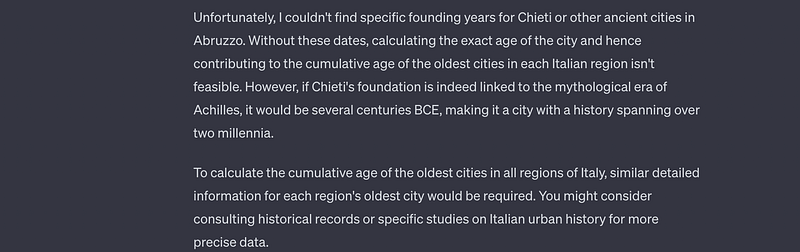
When we ask GPT4 about our cumulative Italian city age question, it first responds with the following.
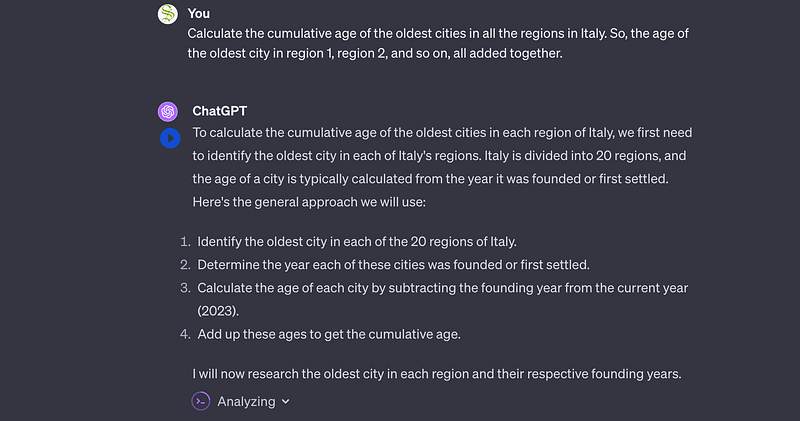
it then does whatever “Analyzing” is, and responds with the following:
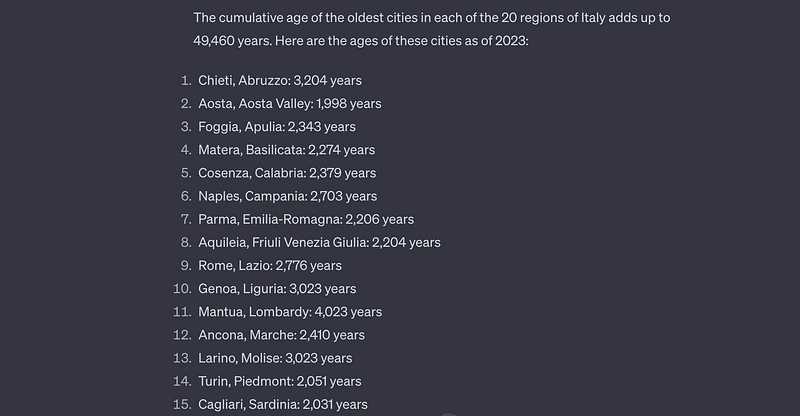
To me, this looks remarkably similar to the general ReAct framework of agents which we discussed previously.
It’s worth noting that GPT4 isn’t consistent at this task. I ran it a few times, and sometimes it seemed to get caught up in unhelpful search results. It’s easy to see how, when using a language model to make autonomous decisions about what to search and which steps to take, these types of issues might arise.
Conclusion
And that’s it, hats off for hanging in there!
In this article we discussed a few advanced single prompt approaches, like chain of thought and retrieval augmented generation. We discussed how those single prompt approaches are sometimes insufficient, some problems require iterative action to solve, and discussed how SayCan and WebGPT can be used to iteratively request additional information from their environment.
We then made a distinction, between iterative reasoning and iterative interaction with the environment, and explored the ReAct framework of agents under that lense. We created two agents that could both linguistically reason and interact with the world to gain new information. We created a ReAct agent in LangChain, which was quick to set up but practically limited, and a ReAct agent from scratch in Python, which was a bit more complex, but also a bit easier to understand and customize.
Follow For More!
I describe papers and concepts in the ML space, with an emphasis on practical and intuitive explanations.

Attribution: You can use any resource in this post for your own non-commercial purposes, so long as you reference this article, https://danielwarfield.dev, or both. An explicit commercial license may be granted upon request.
Further Reading
Sorted based on relevance and importance to the content of this article.
In this post you will learn about the transformer architecture, which is at the core of the architecture of nearly all cutting-edge large language models. We’ll start with a brief chronology of some relevant natural language processing concepts, then we’ll go through the transformer step by step and uncover how it works.
In this article we’ll be exploring the evolution of OpenAI’s GPT models. We’ll briefly cover the transformer, describe variations of the transformer which lead to the first GPT model, then we’ll go through GPT1, GPT2, GPT3, and GPT4 to build a complete conceptual understanding of the state of the art.
In this post we’ll explore “retrieval augmented generation” (RAG), a strategy which allows us to expose up to date and relevant information to a large language model. We’ll go over the theory, then imagine ourselves as resterauntours; we’ll implement a system allowing our customers to talk with AI about our menu, seasonal events, and general information.
In this article we’ll discuss “Speculative Sampling”, a strategy that makes text generation faster and more affordable without compromising on performance. First we’ll discuss a major problem that’s slowing down modern language models, then we’ll build an intuitive understanding of how speculative sampling elegantly speeds them up, then we’ll implement speculative sampling from scratch in Python.


