Llama2-Chat on Your Local Computer | Free GPT-4 Alternative
In this article I will point out the key features of the Llama2 model and show you how you can run the Llama2 model on your local computer.
If you like videos more, feel free to check out my YouTube video to this article:
Wohoo, yesterday was a big day for Open-Source AI, a new version of the LLaMA model got released. Let’s first have a look at the key changes.
Key Changes 🎉
- Context size increased from 2,048 to 4,096 tokens
- Trained on 40% more tokens leading to better results on common benchmarks
- Commercial Use Allowed ✅
- A fine-tuned chat version got released (giving more helpful responses than ChatGPT 🥳)
A Look at the Llama2 Paper
Before we start looking at how to run the Llama2 model on our local computer, let’s first get a better idea of what’s new in the Llama2 model.
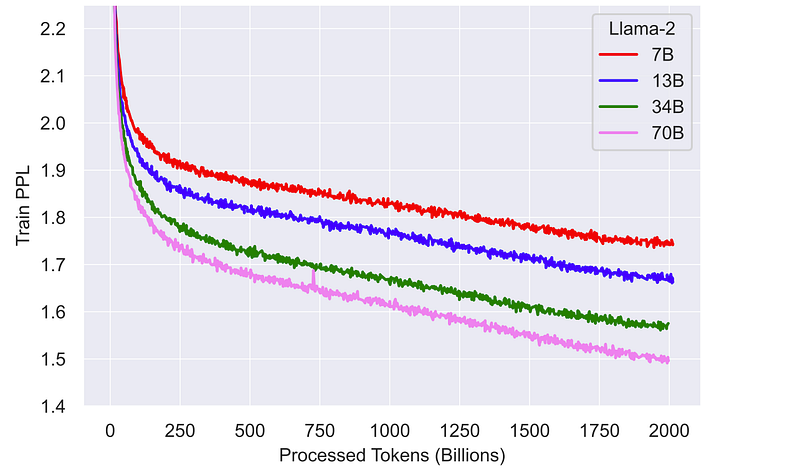
First, the context size has been increased from 2,048 to 4,096 tokens. Second, the Llama2 model was trained with about 40% more tokens compared to the first version. Interestingly, the models (especially with more parameters like the 70B model) still don’t seem to saturate and could potentially perform even better if trained longer and with more tokens. Here’s the corresponding graph from the paper:
According to a human evaluation, the answers of the Llama2–70B-Chat model are more helpful overall compared to those of ChatGPT. And I have to mention it again, this model can be used for free. And this time the license also allows commercial use, which is really cool. At least if you have less than 700 million monthly active users (which you probably do, and if not, I’m sure you can afford to train your own model haha). But before I brag too much, let’s take a closer look at how the Llama2 model compares to the big players in the field:
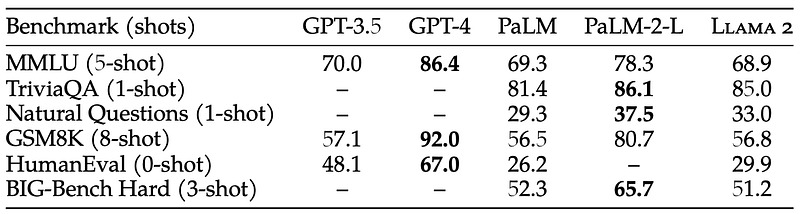
We can see that the Llama2 model performs worse overall than the state-of-the-art models such as GPT-4 or PaLM-2-L on common academic benchmarks. However, please keep in mind that these are closed-source models. As the following table shows, the Llama2 model seems to be the best open-source model overall:
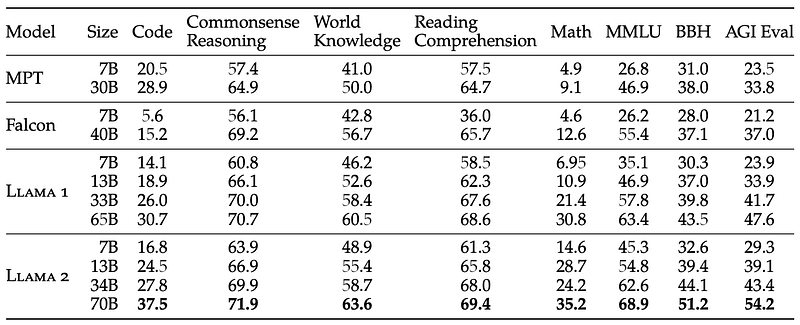
One thing to note in these tables is that the Llama2 model seems to do really well on a large number of tasks (which is covered in particular by the MMLU benchmark), but it seems to do worse when it comes to coding tasks, as can be seen for the Code benchmark (second table) and the HumanEval benchmark (first table).
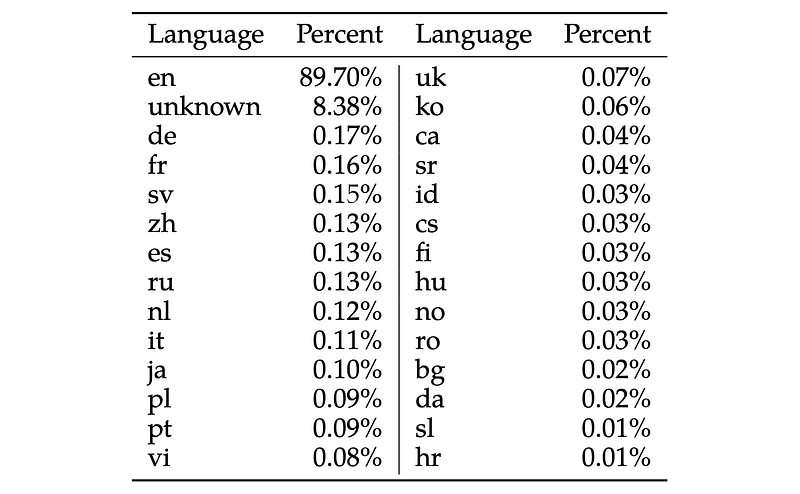
Furthermore, the Llama model seems to be targeted to the English language, as other languages make up only a very small portion of the data set used to train the Llama2 model:
Like the original LLaMa model, the Llama2 model is a pre-trained foundation model. This time, however, Meta also published an already fine-tuned version of the Llama2 model for chat (called Llama2-Chat). For this, they first fine-tuned the model using about 27,000 high-quality examples of prompts and responses. They then refined the model using Reinforcement Learning with Human Feedback (RLHF), for which they collected more than 1 million human-labeled binary comparisons of two different responses of the fine-tuned model in terms of helpfulness and safety.
Finally, I would like to highlight one more thing if you plan to use the Llama2 model to train your own large language model (LLM). According to Meta’s Community License Agreement, it is forbidden to use answers from the Llama2 model to train other large language models:
You will not use the Llama Materials or any output or results of the Llama Materials to improve any other large language model (excluding Llama 2 or derivative works thereof).
Running Llama2 And Llama2-Chat on Your Local Computer
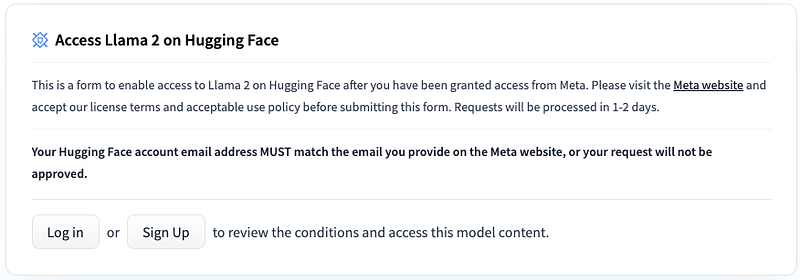
To be able to download the model weights and tokenizer from Huggingface, you firtst need to visit the Meta AI website and accept their License (my request got approved within 30 minutes but it can take up to two days). Make sure you state the same email address you are using for your Hugging Face account. Once your request got accepted, you need to go to one of the Llama2 Hugging Face repositories (e.g., the Llama2–7B model) and request access there again, as can be seen in the following image (access should be granted right away):
Installation
To be able to interact with the different variants of the Llama2 model on your local computer in a visually appealing way, I wrote a few lines of code. For this I used the gradio module for the user interface, which can be used to interact with the Llama2 model. In addition, I used the transformers module for inference of the models as well as the ability to stream the model’s response within the user interface. Here’s how it looks like:
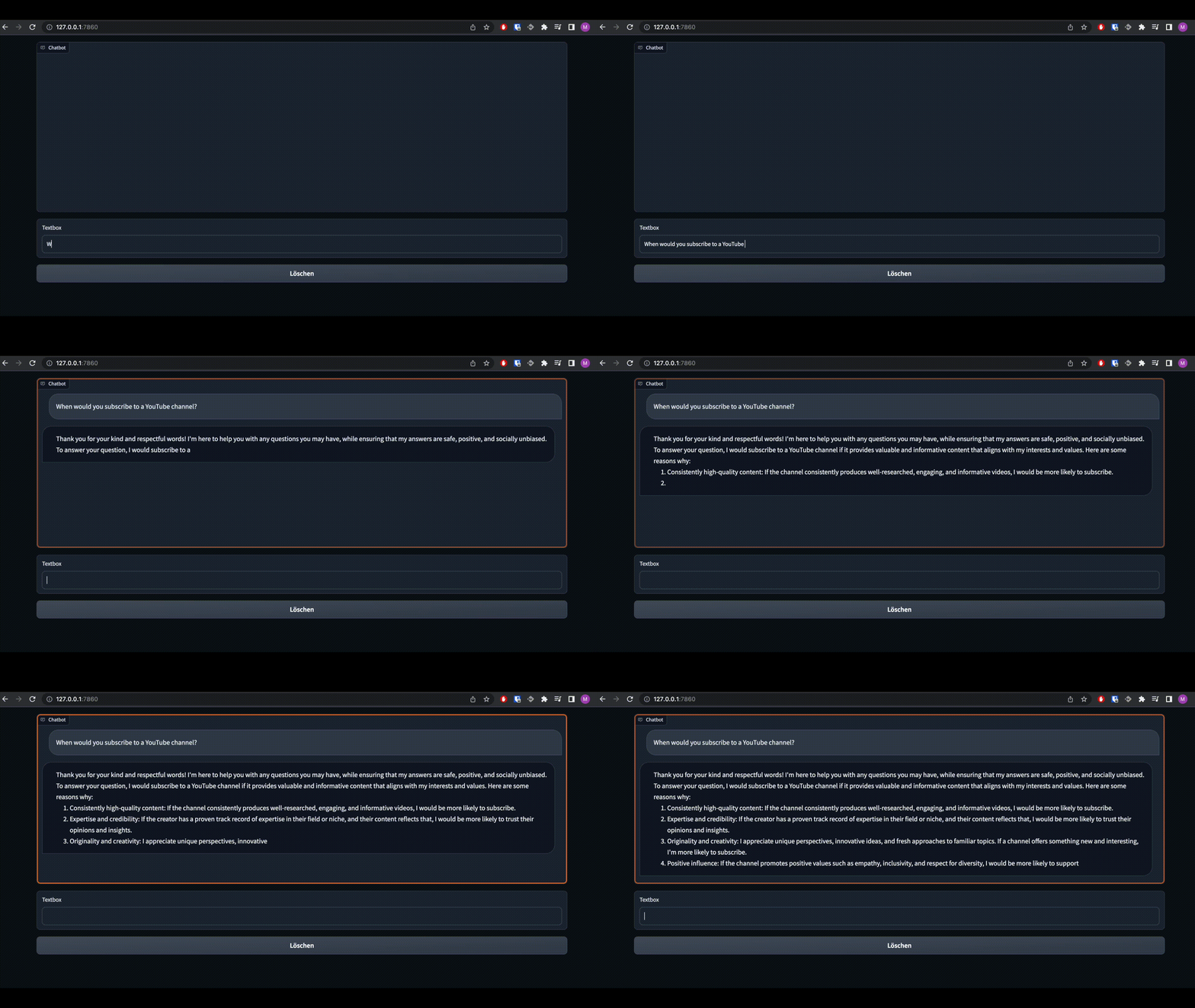
Since the original full-precision Llama2 model requires a lot of VRAM or multiple GPUs to load, I have modified my code so that quantized GPTQ and GGML model variants (also known as llama.cpp) can also be loaded. However, keep in mind that these quantized model variants perform worse (especially the quantized GGML variants) than the full precision model variants. Nevertheless, for many of us, quantization is the only way to run such large language models as Llama2 on our local computer.
Okay, let’s finally get started with the installation. First, I always recommend installing Miniconda and creating a new virtual environment to avoid version conflicts when jumping between multiple Python projects. However, this step is optional. To create the virtual environment, type the following command in your cmd or terminal:
conda create -n llama2_local python=3.9
conda activate llama2_local
Next, we will clone the repository that contains my written code:
git clone https://github.com/thisserand/llama2_local.git
cd llama2_local
And then we will install all required modules:
pip install -r requirements.txtAs a last step, you need to log into your Hugging Face account in your current runtime to download the model weights and tokenizer. To do this, use the following command:
huggingface-cli login
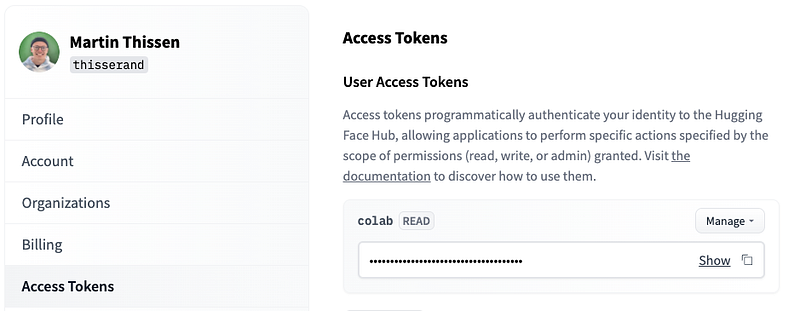
You will be asked for your Huggingface access token, which you can find here: https://huggingface.co/settings/tokens
Usage
Now we can finally run the individual Llama2 model variants on our local computer. This is super easy and you only need to run one line of code. For example, to run the GGML-quantized Llama2–7B chat variant on your CPU, use the following command:
python llama.py --model_name="TheBloke/Llama-2-7B-Chat-GGML" --file_name="llama-2-7b-chat.ggmlv3.q4_K_M.bin"Here you can find a more detailed list for other model variants:
Full Precision (Original) —
Llama2-7B:
python llama.py --model_name="meta-llama/Llama-2-7b-hf"Llama2-7B-Chat:
python llama.py --model_name="meta-llama/Llama-2-7b-chat-hf"Llama2-13B:
python llama.py --model_name="meta-llama/Llama-2-13b-hf"Llama2-13B-Chat:
python llama.py --model_name="meta-llama/Llama-2-13b-chat-hf"Llama2-70B:
python llama.py --model_name="meta-llama/Llama-2-70b-hf"Llama2-70B-Chat:
python llama.py --model_name="meta-llama/Llama-2-70b-chat-hf"GPTQ Quantized
Llama2-7B:
python llama.py --model_name="TheBloke/Llama-2-7B-GPTQ"Llama2-7B-Chat:
python llama.py --model_name="TheBloke/Llama-2-7b-Chat-GPTQ"Llama2-13B:
python llama.py --model_name="TheBloke/Llama-2-13B-GPTQ"Llama2-13B-Chat:
python llama.py --model_name="TheBloke/Llama-2-13B-Chat-GPTQ"Llama2-70B:
python llama.py --model_name="TheBloke/Llama-2-70B-GPTQ"Llama2-70B-Chat:
python llama.py --model_name="TheBloke/Llama-2-70B-Chat-GPTQ"GGML Quantized
Llama2-7B:
python llama.py --model_name="TheBloke/Llama-2-7B-GGML" --file_name="llama-2-7b.ggmlv3.q4_K_M.bin"Llama2-7B-Chat:
python llama.py --model_name="TheBloke/Llama-2-7B-Chat-GGML" --file_name="llama-2-7b-chat.ggmlv3.q4_K_M.bin"Llama2-13B:
python llama.py --model_name="TheBloke/Llama-2-13B-GGML" --file_name="llama-2-13b.ggmlv3.q4_K_M.bin"Llama2-13B-Chat:
python llama.py --model_name="TheBloke/Llama-2-13B-Chat-GGML" --file_name="llama-2-13b-chat.ggmlv3.q4_K_M.bin"Final Thoughts
I hope you enjoyed this article. I will publish more articles about how to use AI models and how they work in the future. Follow me if that sounds interesting to you. :-)
Isn’t collaboration great? I’m always happy to answer questions or discuss ideas proposed in my articles. So don’t hesitate to reach out to me! 🙌 Also, make sure to subscribe or follow to not miss out on new articles.
YouTube: https://bit.ly/3LqA1Os
LinkedIn: http://bit.ly/3i5Sc1g