
LiveData with SnackBar, Navigation and other events (the SingleLiveEvent case)
2021 Update: This guidance is deprecated in favor of the official guidelines.
A convenient way for a view (activity or fragment) to communicate with a ViewModel is to use LiveData observables. The view subscribes to changes in LiveData and reacts to them. This works well for data that is displayed in a screen continuously.
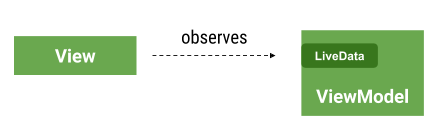
However, some data should be consumed only once, like a Snackbar message, a navigation event or a dialog trigger.
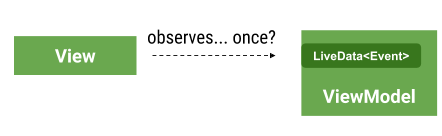
Instead of trying to solve this with libraries or extensions to the Architecture Components, it should be faced as a design problem. We recommend you treat your events as part of your state. In this article we show some common mistakes and recommended approaches.
❌ Bad: 1. Using LiveData for events
This approach holds a Snackbar message or a navigation signal directly inside a LiveData object. Although in principle it seems like a regular LiveData object can be used for this, it presents some problems.
In a list/detail app, here is the list’s ViewModel:
In the View (activity or fragment):
The problem with this approach is that the value in _navigateToDetails stays true for a long time and it’s not possible to go back to the first screen. Step by step:
- The user clicks the button so the Details Activity starts
- The user presses back, coming back to the list activity
- The observers become active again, after being inactive while activity was in the back stack
- The value is still
trueso the Details activity is incorrectly started again
A solution would be to fire the navigation from the ViewModel and immediately set the flag to false:
However, one important thing to remember is that LiveData holds values but doesn’t guarantee to emit every value that it receives. For example: a value can be set when no observers are active, so a new one will just replace it. Also, setting values from different threads could lead to race conditions that would only generate one call to the observers.
But the main problem with this approach is that it’s hard to understand and plain ugly. How do we make sure the value is reset after the navigation event has happened?
❌ Better: 2. Using LiveData for events, resetting event values in observer
With this approach you add a way to indicate from the View that you already handled the event and that it should be reset.
Usage
With a small change to our observers we might have a solution for this:
Adding the new method in the ViewModel as follows:
Issues
The problem with this approach is that there’s some boilerplate (one new method in the ViewModel per event) and it’s error prone; it’s easy to forget the call to the ViewModel from the observer.
✔️ OK: Use SingleLiveEvent
The SingleLiveEvent class was created for a sample as a solution that worked for that particular scenario. It is a LiveData that will only send an update once.
Usage
Issues
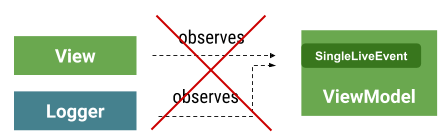
The problem with SingleLiveEvent is that it’s restricted to one observer. If you inadvertently add more than one, only one will be called and there’s no guarantee of which one.
✔️ Recommended: Use an Event wrapper
In this approach you manage explicitly whether the event has been handled or not, reducing mistakes.
Usage
The advantage of this approach is that the user needs to specify the intention by using getContentIfNotHandled() or peekContent(). This method models the events as part of the state: they’re now simply a message that has been consumed or not.
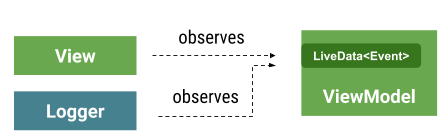
In summary: design events as part of your state. Use your own Event wrapper in LiveData observables and customize it to fit your needs.
Bonus! Use this EventObserver to remove some repetitive code if you end up having lots of events.


