
Linux Zero-Copy Using sendfile()
Why Zero-copy?
What’s happening under the hood when the OS is copying a file / transfering a file to another host? For our naked eyes the process can be simple, OS first reads content of the file, then writes it to another file, then it’s done! However, things become complicated when we look more closely and memory is taken into account.
As depicted in the dataflow below, the file read from disk must go through kernel system cache — which resides in the kernel space, then the data is copied to userspace’s memory area before being written back to a new file — which then in turn goes to kernel memory buffer before really flushed out to disk. The procedure takes quite many unnecessary operations of copying back and forth between kernel and userspace without actually doing anything, and the operations consume system resources and context switches as well. There’re room for improvement.
Zero-copy technique comes into play with the purpose of eliminating all the unnecessary copies. In the Linux world the system call for that kind of work is sendfile().
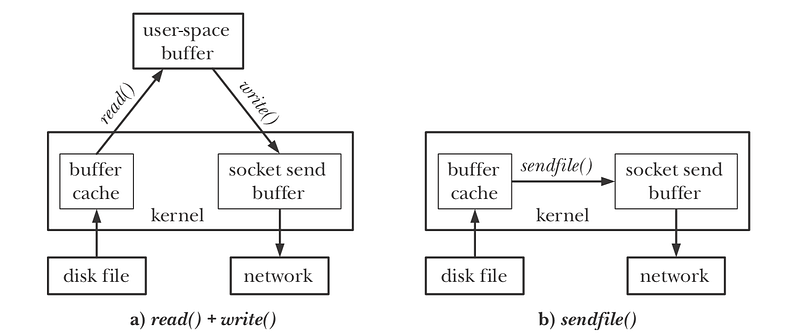
What is Zero-copy
sendfile() claims to make data transfer happening under kernel space only — i.e data transferred from kernel system cache to NIC buffer (or traversed through kernel system cache if local copy), thus doesnt require context switches as in read+write combination. sendfile() has now been widely used as a supported data transfering technique especially under nginx and kafka.
For ease of understanding we demonstrate a simple local file copy rather than file transfer over networking, and all the code’s error checking procedures are left out for clarity as well.
readwrite.c
#include <unistd.h>
#include <sys/types.h>
#include <sys/stat.h>
#include <fcntl.h>#define BUF_SIZE 4096*1000int main(int argc, char **argv) {
char buf[BUF_SIZE];
const char *fromfile = argv[1];
const char *tofile = argv[2];
struct stat stat_buf;
int fromfd = open(fromfile, O_RDONLY);
fstat(fromfd, &stat_buf);
int tofd = open(tofile, O_WRONLY | O_CREAT, stat_buf.st_mode); int n;
while ((n = read(fromfd, &buf, sizeof(buf))) > 0) {
write(tofd, &buf, n);
}
}buf[BUF_SIZE] is the user-space buffer that we’re talking about, as can be seen for every iteration, read() copies data from file (through system memory cache) to this buffer, and write() copies data from the buffer to another file (through system memory buffer)
In the process memory map, buf[BUF_SIZE] can be seen as a allocation of 4MB on stack area. Reducing the buffer size can help reduce the waste of memory, but it in turn increases number of read() and write() system calls, which is expensive as well.
00007f53e08f6000       4       4       4 rw---   [ anon ]
00007fff5a6b1000    4012    4008    4008 rw---   [ stack ]
00007fff5ab3e000      12       0       0 r----   [ anon ]
00007fff5ab41000       8       4       0 r-x--   [ anon ]
In the example, we demonstrate only one file transfer, for many transfers the memory waste might be significantly noticable using this naive technique.
sendfile.c
#include <sys/types.h>
#include <sys/stat.h>
#include <fcntl.h>
#include <sys/sendfile.h>#define BUF_SIZE 4096*1000int main(int argc, char **argv) {
const char *fromfile = argv[1];
const char *tofile = argv[2];
struct stat stat_buf;
int fromfd = open(fromfile, O_RDONLY);
fstat(fromfd, &stat_buf);
int tofd = open(tofile, O_WRONLY | O_CREAT, stat_buf.st_mode); int n = 1;
while (n > 0) {
n = sendfile(tofd, fromfd, 0, BUF_SIZE);
}
}There’s no user-space buffer for sendfile(). For that reason, sendfile can send all the data from file at once, which eliminates the need of BUF_SIZE and a while loop, however we still keep it for comparing with read/write technique.
Performance benchmark
Copy of a ~1G file. BUF_SIZE = 4K.
readwrite
syscall            calls    total       min       avg       max
                               (msec)    (msec)    (msec)    (msec)
   --------------- -------- --------- --------- --------- ---------
   read              244797 16974.624     0.002     0.069   457.333
   write             245169  2182.295     0.004     0.009   268.689
number of read / write is nearly the same, read() takes significanly more time because of major page faults.
sendfile
syscall            calls    total       min       avg       max
                               (msec)    (msec)    (msec)    (msec)
   --------------- -------- --------- --------- --------- ---------
   sendfile          245261 13559.231     0.004     0.055   185.970
number of sendfile() calls is by half of the total of read()+write(), which also helps reduce total execution time. For context switches, there’s lack of observation tool so it’s difficult to show the differences.
In conclusion, sendfile() brings to the table several benefits, including reduction of context switches, memory usage, number of system calls, and eventually faster operations. It is, however, not the silver bullet for everything, we once encountered the problem of large file download on nginx, therefore usage of sendfile() should be considered and tested carefully before production use.
References
- Chapter 61 — The Linux Programming Interface — Michael Kerrisk
- https://developer.ibm.com/articles/j-zerocopy/
- http://nginx.org/en/docs/http/ngx_http_core_module.html#sendfile
- https://kafka.apache.org/08/documentation.html


